
在CentOS上为DiscuzX3安装ImageMagick支持。
找了几篇外文的,写的很好,按照参考安装成功!
http://www.tecmint.com/install-imagemagick-in-linux/
ImageMagick is an free open source simple software suite for any kind of image manipulation that is used for creating, editing, converting, displaying image files. It can able to read and write over 200 image files such as JPEG, GIF, PNG, TIFF and Photo CD image formats and it is also used for thumbnail or captcha generation. It also includes command line options for creating transparent or animated gif image formats and many more feature like resize, sharpen, rotate or add special effects to an image.
To use ImageMagick tool with PHP or Perl programming language, you will need to installImageMagick with Imagick PHP extension for PHP and ImageMagick-perl extension for Perl.
Imagick is an simple php extension for creating and modifying images using the ImageMagick API program. There is a confusion in name, as people think that ImageMagick and Imagickboth are same, but you can use ImageMagick without Imagick extension but you need both installed on your machine to use and run it.
Installing ImageMagick
First, install following prerequisite php-pear and gcc packages to compile imagick PHP extension.
# yum install php-pear gcc
Once you’ve installed php-pear and gcc packages, you may now install ImageMagick software for PHP and Perl support using Yum command.
# yum install ImageMagick ImageMagick-devel ImageMagick-perl
Next, compile the imagick for PHP extension. To do, simple run the following ‘pecl‘ command. It will install ImageMagick and imagick PHP extension module ‘imagick.so‘ under/usr/lib/php/modules directory. If you are using 64-bit system, the module directory path would be /usr/lib64/php/modules.
# pecl install imagick

WARNING: channel "pecl.php.net" has updated its protocols, use "pecl channel-update pecl.php.net" to update

downloading imagick-3.1.0RC2.tgz ...

Starting to download imagick-3.1.0RC2.tgz (93,264 bytes)

.....................done: 93,264 bytes

15 source files, building

running: phpize

Configuring for:

PHP Api Version:         20090626

Zend Module Api No:      20090626

Zend Extension Api No:   220090626

Please provide the prefix of Imagemagick installation [autodetect] :
Note: It will ask you to provide Imagemagick installation prefix, simply hit enter to auto detect.
Now, add the ‘imagick.so‘ extension to ‘/etc/php.ini‘ file.
echo extension=imagick.so >> /etc/php.ini
Next, restart Apache web server. 这个地方现在一般都是Nginx了,所以应该换成:service nginx restart
# service httpd restart
Verify imagick PHP extension by running the following command. You will see imagick extension similar to below.
# php -m | grep imagick

imagick
Alternatively, you can create a file called ‘phpinfo.php‘ under website root directory (ex:/var/www/html/).
# vi /var/www/html/phpinfo.php
Add the following code.
<?php

     phpinfo ();

?>
Open your favorite web browser and type ‘http://localhost/phpinfo.php‘ or ‘http://ip-addresss/phpinfo.php‘ and verify the imagick extension.
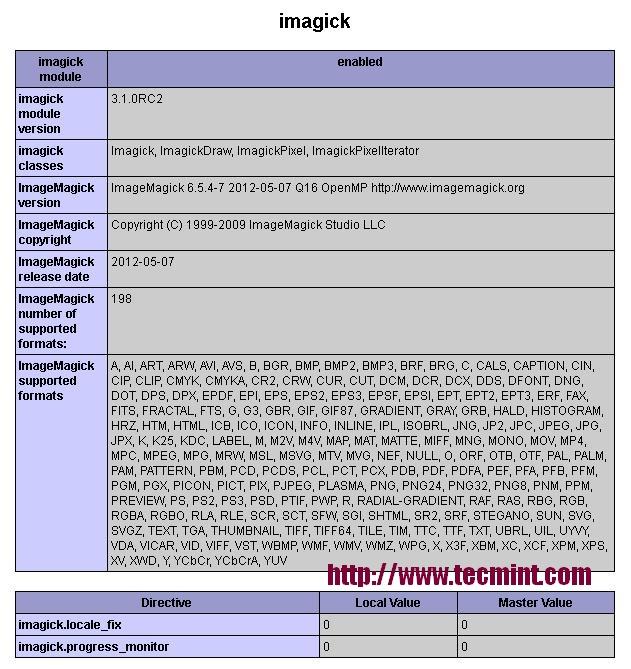
Imagick PHP Extension
Reference Link
http://www.24x7servermanagement.com/blog/?p=754
在CentOS上为DiscuzX3安装ImageMagick支持。的更多相关文章
- CentOS上使用yum安装Apache
关键词 CentOS上使用yum安装Apache 摘要 Apache在Linux系统中,其实叫“httpd”,它“无耻的”占据了官方名义!CentOS可以使用yum命令,非常简单和容易的安装Apach ...
- centos下php扩展安装imagemagick
centos下php扩展安装imagemagick 2015-10-23TONY7PHP 对于php的imagick主要是两部分的安装 ImageMagick主程序地址http://www.image ...
- CentOS随笔 - 2.CentOS7安装ftp支持(vsftpd)
前言 转帖请注明出处: http://www.cnblogs.com/Troy-Lv5/ 在前一篇文章中介绍了在虚拟机中安装CentOS7, 接下来就要进行配置了, 第一个就是安装ftp支持. 要不然 ...
- 在Linux CentOS上编译并安装Clang 3.5.0
编译CoreCLR需要Clang 3.5,而CentOS上安装的是Clang 3.4.2(yum repos中最新版也是这个),只能自己手工编译LLVM的源代码进行安装. (注:CentOS的版本是6 ...
- CentOS上升级gcc编译器使支持C++11
首先向博主致敬,好的东西拿来共享了,用一下不错. https://blog.csdn.net/clirus/article/details/62424517 0. 目标 最近在学习c++11,我本机 ...
- CentOS上yum方式安装配置LNMP
实验环境 一台最小化安装的CentOS 7.3虚拟机 安装软件包 yum install -y epel-* yum install -y nginx mariadb-server php php-m ...
- CentOS系统php5.6安装ImageMagick处理webp格式图片
1.先安装webp yum install libwebp 2.编译安装ImageMagick 之前有过yum安装的先卸载 yum remove ImageMagick 我使用的是老版本ImageMa ...
- centos上tensorflow一键安装脚本
鉴于tensorflow在centos上安装相当麻烦,特地制作了一个脚本方便以后移植到其它机器上,脚本含有其它python常用包: #! /bin/bash sudo yum install -y ...
- centos上shellcheck的安装
关于shellcheck的作用和功能,自行查阅. centos7 上安装shellcheck的过程中查了很多资料,大部分都是在ubunt下安装的,centos的比较少,然后好不容易看到一个https: ...
随机推荐
- bzoj1901:Zju2112 Dynamic Rankings
思路:树套树,我写了两种,一种是线段树套splay,线段树维护区间信息,splay维护第k大,一种是树状数组套权值线段树(并不是什么可持久化线段树,只不过是动态开点罢了,为什么网上一大堆题解都是可持久 ...
- 操作系统之进程篇(4)--经典进程间通信(IPC)问题
1. 哲学家进餐问题: 问题描述: 五个哲学家在一个圆桌上进餐,每人的面前放了一盘意大利面,两个盘子之间有一个叉子,但是由于盘子里面的面条十分光滑,需要两个叉子才能进行就餐行为.餐桌的布局如下图所示: ...
- 【CODECHEF】【phollard rho + miller_rabin】The First Cube
All submissions for this problem are available. Read problems statements in Mandarin Chinese and Rus ...
- 学习JS
原型是Js中非常重要的概念,每个函数(在Js里面函数也是对象)都有一个叫prototype即原型)的属性,不过在一般情况下它的值都是null,但它他有一项非常重要的功能就是所以实例都会共享它里面的属性 ...
- demo——06弹性和制作骰子
<!DOCTYPE html> <html> <head> <meta charset="UTF-8"> <title> ...
- js在本地预览图片
移动web <body> <form enctype="multipart/form-data" name="form1"> 上传文件: ...
- Flume用来收集日志,zeppelin用来展示
Flume:Flume是一个分布式,可依赖的,用于高效率的收集.聚类.移动大量数据的服务.Flume使用基于流数据的简单而且可扩展的架构.由于拥有可调的依赖机制和许多故障恢复机制,Flume是健壮而且 ...
- UIApplication 常用方法
下面是这个类的一些功能:1.设置icon上的数字图标 //设置主界面icon上的数字图标,在2.0中引进, 缺省为0 [UIApplicationsharedApplication].applicat ...
- 【XCode7+iOS9】http网路连接请求、MKPinAnnotationView自定义图片和BitCode相关错误--备用
更新了iOS9和XCode7,之后,Swift变成了2.0,有了新的语法习惯,iOS也加强了安全方面的限制.我们原本的项目就会出现不少问题.先来看我之前的项目中出现的3个错误吧和相关的解决办法吧. 1 ...
- JS实现精确加减乘除
说明:项目中要使用 JS 实现自动计算的功能,进行一些浮点数运算时,计算结果却是一长串的值,这里提供一个解决方法,问题基本上可以解决. 具体代码如下: //加法函数 function accAdd(a ...