
JAVA实现word doc docx pdf excel的在线浏览 - 仿百度文库 源码
我们具体实现思路是这样的 首先下载并安装openoffice和swftools
openoffice下载地址:http://www.openoffice.org/download/index.html
swftools下载地址:http://www.swftools.org/download.html
本源码下载地址:
去除FlexPaper水印的下载地址:http://pan.baidu.com/s/1pJDNunL
FlexPaper原版源码下载地址:http://pan.baidu.com/s/1c00C42O
本源码采用 j2ee eclipse luna+Apache tomcat7下开发 如果环境不一致,请移植一下。
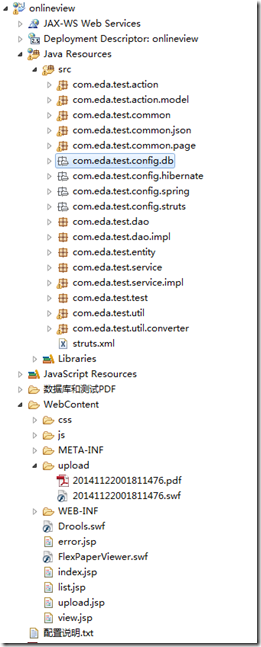 这是代码的整体架构
代码首先需要修改 com.eda.test.config.db 包下jdbc.properties 我用的是mysql数据库 数据库和数据库脚本都已经打包到了源码
下数据库和测试pdf中,大家自行导入即可,如果用的是其他数据库大家自己修改下建表脚本就好。
其次修改类:ConStant.java类 把OFFICE_HOME和SWFTOOLS_HOME配置为你本机或服务器安装路径。
package com.eda.test.common;

/**

 * 常量类

 *

 * @author luwenbin006@163.com

 * @createTime 2014-11-22 下午01:49:58

 */

public class ConStant

{

    /** OpenOffice安装根目录 */

    public static final String OFFICE_HOME = "C:/Program Files/OpenOffice.org 3";

    /** SWFTools安装根目录 */

    public static final String SWFTOOLS_HOME = "D:/swftools/";

    /** PDF-SWF */

    public static final String SWFTOOLS_PDF2SWF_PATH = SWFTOOLS_HOME

            + "pdf2swf.exe";

    /** GIF-SWF */

    public static final String SWFTOOLS_GIF2SWF_PATH = SWFTOOLS_HOME

            + "gif2swf.exe";

    /** PNG-SWF */

    public static final String SWFTOOLS_PNG2SWF_PATH = SWFTOOLS_HOME

            + "png2swf.exe";

    /** JPEG-SWF */

    public static final String SWFTOOLS_JPEG2SWF_PATH = SWFTOOLS_HOME

            + "jpeg2swf.exe";

    /** WAV-SWF */

    public static final String SWFTOOLS_WAV2SWF_PATH = SWFTOOLS_HOME

            + "wav2swf.exe";

    /** PDF合并 */

    public static final String SWFTOOLS_PDFCOMBINE_PATH = SWFTOOLS_HOME

            + "swfcombine.exe";

    /** 文件上传保存根目录 */

    public static final String UPLOAD_BASE_DIR = "upload";

    /** SWF文件后缀 */

    public static final String SWF_STUFFIX = "swf";

}
下面贴点核心类的代码 FileType枚举类,主要是反映出是什么类型的文件,文件描述。:
package com.eda.test.common;

/**

 * 文件类型枚举

 * @author       luwenbin006@163.com

 * @createTime   2014-11-22 下午05:06:11

 */

public enum FileType

{

    WORD2003 {

        public String getValue()

        {

            return "Word-2003文档";

        }

        public String getStuffix()

        {

            return "doc";

        }

    },

    EXCEL2003 {

        public String getValue()

        {

            return "Excel-2003文档";

        }

        public String getStuffix()

        {

            return "xls";

        }

    },

    PPT2003 {

        public String getValue()

        {

            return "PPT-2003文档";

        }

        public String getStuffix()

        {

            return "ppt";

        }

    },

    WORD2007 {

        public String getValue()

        {

            return "Word-2007文档";

        }

        public String getStuffix()

        {

            return "docx";

        }

    },

    EXCEL2007 {

        public String getValue()

        {

            return "Excel-2007文档";

        }

        public String getStuffix()

        {

            return "xlsx";

        }

    },

    PPT2007 {

        public String getValue()

        {

            return "PPT-2007文档";

        }

        public String getStuffix()

        {

            return "pptx";

        }

    },

    TXT {

        public String getValue()

        {

            return "记事本文档";

        }

        public String getStuffix()

        {

            return "txt";

        }

    },

    PDF {

        public String getValue()

        {

            return "PDF文档";

        }

        public String getStuffix()

        {

            return "pdf";

        }

    };

    public abstract String getValue();

    public abstract String getStuffix();

}
bean核心类 File文件类:
package com.eda.test.entity;

import java.io.Serializable;

import java.util.Date;

/**

 * 文件类

 * @author       luwenbin006@163.com

 * @createTime   2014-11-22 下午04:56:54

 */

public class File implements Serializable

{

    private static final long serialVersionUID = -110840196972249172L;

    /**主键ID*/

    private Long id;

    /**文件名*/

    private String fileName;

    /**对应SWF文件web虚拟路径*/

    private String webBasePath;

    /**文件服务器路径*/

    private String distPath;

    /**文件大小(KB)*/

    private Long fileSize;

    /**文件类型*/

    private String fileType;

    /**文件描述*/

    private String description;

    /**上传时间*/

    private Date uploadDate;

    public Long getId()

    {

        return id;

    }

    public void setId(Long id)

    {

        this.id = id;

    }

    public String getFileName()

    {

        return fileName;

    }

    public void setFileName(String fileName)

    {

        this.fileName = fileName;

    }

    public String getWebBasePath()

    {

        return webBasePath;

    }

    public void setWebBasePath(String webBasePath)

    {

        this.webBasePath = webBasePath;

    }

    public String getDistPath()

    {

        return distPath;

    }

    public void setDistPath(String distPath)

    {

        this.distPath = distPath;

    }

    public Long getFileSize()

    {

        return fileSize;

    }

    public void setFileSize(Long fileSize)

    {

        this.fileSize = fileSize;

    }

    public String getFileType()

    {

        return fileType;

    }

    public void setFileType(String fileType)

    {

        this.fileType = fileType;

    }

    public String getDescription()

    {

        return description;

    }

    public void setDescription(String description)

    {

        this.description = description;

    }

    public Date getUploadDate()

    {

        return uploadDate;

    }

    public void setUploadDate(Date uploadDate)

    {

        this.uploadDate = uploadDate;

    }

    public static long getSerialversionuid()

    {

        return serialVersionUID;

    }

    public File() {}

    @Override

    public int hashCode()

    {

        final int prime = 31;

        int result = 1;

        result = prime * result + ((id == null) ? 0 : id.hashCode());

        return result;

    }

    @Override

    public boolean equals(Object obj)

    {

        if (this == obj)

            return true;

        if (obj == null)

            return false;

        if (!(obj instanceof File))

            return false;

        File other = (File) obj;

        if (id == null)

        {

            if (other.id != null)

                return false;

        }

        else if (!id.equals(other.id))

            return false;

        return true;

    }

}
FileAction操作类,上传,转换,浏览文件 入口action类 - 最重要的一个类:
package com.eda.test.action;

import java.text.DateFormat;

import java.text.SimpleDateFormat;

import java.util.Date;

import java.util.regex.Matcher;

import java.util.regex.Pattern;

import com.eda.test.action.model.FileModel;

import com.eda.test.common.ConStant;

import com.eda.test.common.FileType;

import com.eda.test.common.GerneralSessionAction;

import com.eda.test.entity.File;

import com.eda.test.util.FileUtil;

import com.eda.test.util.FileUtils;

/**

 * 文件处理Action

 *

 * @author luwenbin006@163.com

 * @createTime 2014-11-22 下午05:04:29

 */

public class FileAction extends GerneralSessionAction<FileModel>

{

    /**

     * 跳至首页 方法摘要:这里一句话描述方法的用途

     *

     * @param

     * @return String

     */

    public String toUpload()

    {

        return "index";

    }

    /**

     * 上传文件 方法摘要:这里一句话描述方法的用途

     *

     * @param

     * @return String

     */

    public String uploadFile()

    {

        if(isEmptyFile())

        {

            this.getModel().setMessage("不允许上传空文件!");

            return "toUpload";

        }

        if(checkMaxFileSize())

        {

            this.getModel().setMessage("上传文件大小限制在20M以内!");

            return "toUpload";

        }

        if (checkFileType())

        {

            File file = createFile();

            boolean isSuccess = getFileService().saveFile(file, this.getModel().getDoc());

            this.getModel().setFiles(file);

            return "toList";

        }

        else

        {

            this.getModel().setMessage("该文件类型不允许上传!");

            return "toUpload";

        }

    }

    /**

     * 文件预览 方法摘要:这里一句话描述方法的用途

     *

     * @param

     * @return String

     */

    public String view()

    {

        return "view";

    }

    /**

     * 查询所有文件 方法摘要:这里一句话描述方法的用途

     *

     * @param

     * @return String

     */

    public String list()

    {

        this.getModel().setFileList(getFileService().findAll());

        return "list";

    }

    /**

     * 创建File对象 方法摘要:这里一句话描述方法的用途

     *

     * @param

     * @return File

     */

    private File createFile()

    {

        /** 文件上传至服务器存放路径 */

        String UPLOAD_DIR = getProjectRealPath() + ConStant.UPLOAD_BASE_DIR + "\\";

        String BASE_PATH = getBasePath() + ConStant.UPLOAD_BASE_DIR + "/";

        File file = new File();

        String fileName = this.getModel().getDocFileName();

        file.setFileName(fileName);

        String temp = getUploadFileName(fileName, null);

        String swfBasePath = BASE_PATH + temp;

        file.setDistPath(UPLOAD_DIR + temp);

        temp = FileUtils.getFileNameNoStuffix(temp) + "." + ConStant.SWF_STUFFIX;

        swfBasePath = BASE_PATH + temp;

        file.setWebBasePath(swfBasePath);

        file.setDescription(this.getModel().getDescription());

        file.setFileSize(this.getModel().getDoc().length());

        file.setUploadDate(new Date());

        String stuffix = FileUtil.getFileSufix(fileName);

        file.setFileType(getFileTypeName(stuffix));

        return file;

    }

    /**

     * 生成上传后文件名称 方法摘要:这里一句话描述方法的用途

     *

     * @param

     * @return String

     */

    public String getUploadFileName(String orignalFileName, String extension)

    {

        String stuffix = extension;

        if (null == extension || "".equals(extension))

        {

            stuffix = FileUtil.getFileSufix(orignalFileName);

        }

        Date currentDate = new Date();

        DateFormat dateFormat = new SimpleDateFormat("yyyyMMddHHmmssSSS");

        return dateFormat.format(currentDate) + "." + stuffix;

    }

    /**

     * 获取文件类型名称 方法摘要:这里一句话描述方法的用途

     *

     * @param

     * @return String

     */

    private String getFileTypeName(String fileStuffix)

    {

        String fileTypeName = "";

        if (fileStuffix.equals(FileType.WORD2003.getStuffix()))

        {

            fileTypeName = FileType.WORD2003.getValue();

        }

        else if (fileStuffix.equals(FileType.WORD2007.getStuffix()))

        {

            fileTypeName = FileType.WORD2007.getValue();

        }

        else if (fileStuffix.equals(FileType.EXCEL2003.getStuffix()))

        {

            fileTypeName = FileType.EXCEL2003.getValue();

        }

        else if (fileStuffix.equals(FileType.EXCEL2007.getStuffix()))

        {

            fileTypeName = FileType.EXCEL2007.getValue();

        }

        else if (fileStuffix.equals(FileType.PPT2003.getStuffix()))

        {

            fileTypeName = FileType.PPT2003.getValue();

        }

        else if (fileStuffix.equals(FileType.PPT2007.getStuffix()))

        {

            fileTypeName = FileType.PPT2007.getValue();

        }

        else if (fileStuffix.equals(FileType.TXT.getStuffix()))

        {

            fileTypeName = FileType.TXT.getValue();

        }

        else if (fileStuffix.equals(FileType.PDF.getStuffix()))

        {

            fileTypeName = FileType.PDF.getValue();

        }

        else

        {

            fileTypeName = "未知类型";

        }

        return fileTypeName;

    }

    /**

     * 检查文件类型是否允许上传 方法摘要:这里一句话描述方法的用途

     *

     * @param

     * @return boolean

     */

    private boolean checkFileType()

    {

        String fileType = this.getModel().getDocContentType();

        if (null == fileType || fileType.equals(""))

        {

            return false;

        }

        String[] allowTypes = this.getModel().getAllowTypes().split(",");

        for (int i = 0; i < allowTypes.length; i++)

        {

            if (allowTypes[i].equals(fileType))

            {

                return true;

            }

        }

        return false;

    }

    /**

     * 检查文件大小

     *方法摘要:这里一句话描述方法的用途

     *@param

     *@return boolean

     */

    private boolean checkMaxFileSize()

    {

        if(this.getModel().getMaxUploadSize() < this.getModel().getDoc().length())

        {

            return true;

        }

        return false;

    }

    /**

     * 检查是否空文件

     *方法摘要:这里一句话描述方法的用途

     *@param

     *@return boolean

     */

    private boolean isEmptyFile()

    {

        return this.getModel().getDoc().length() == 0;

    }

}
其他的就大家自己去看源码吧,经过上面的步骤,把源码部署到tomcat就能看到源码运行的效果了,破解版本的FlexPaper似乎设置那些参数有些问题,
就是设置了放大比例什么的没效果,这个如果有影响且不在意logo的,那就用原版本吧或者买一个个人版本或者商业版本。
感谢大家的关注,本文可以转载,转载请注明出处:http://www.cnblogs.com/luwenbin/p/4114576.html
JAVA实现word doc docx pdf excel的在线浏览 - 仿百度文库 源码的更多相关文章
- Java生鲜电商平台-小程序或者APP优惠券的设计与源码实战
Java生鲜电商平台-小程序或者APP优惠券的设计与源码实战 说明:Java生鲜电商平台-小程序或者APP优惠券的设计与源码实战,优惠券是一种常见的促销方式,在规定的周期内购买对应商品类型和额度的商品 ...
- java将word文件转为pdf
import java.io.File; import com.jacob.activeX.ActiveXComponent;import com.jacob.com.Dispatch; public ...
- Java转换Word文件到PDF文件
使用Docx4j将Word文件转换为PDF文件: public static void convertDocxToPDF(String docxFilePath, String pdfPath) th ...
- pywin32 pywin32 docx文档转html页面 word doc docx 提取文字 图片 html 结构
https://blog.csdn.net/X21214054/article/details/78873338# python docx文档转html页面 - 程序猿tx - 博客园 https:/ ...
- 【ASP.NET 进阶】仿百度文库文档在线预览(支持格式.pdf,.doc,docx,xls,xlsx,.ppt,pptx)
在[ASP.NET]PDF文件在线预览(类似百度文库)基础上进行了office文件到pdf文件的转换,然后在显示出来,效果如下: 问题说明: 1.请通过以下方式添加 Office COM 组件. 2. ...
- Java+FlexPaper+swfTools仿百度文库文档在线预览系统设计与实现
笔者最近在给客户开发文档管理系统时,客户要求上传到管理系统的文档(包括ppt,word,excel,txt)只能预览不允许下载.笔者想到了百度文库和豆丁网,百度文库和豆丁网的在线预览都是利用flash ...
- Java网络编程与NIO详解11:Tomcat中的Connector源码分析(NIO)
本文转载 https://www.javadoop.com 本系列文章将整理到我在GitHub上的<Java面试指南>仓库,更多精彩内容请到我的仓库里查看 https://github.c ...
- Java日期时间API系列8-----Jdk8中java.time包中的新的日期时间API类的LocalDate源码分析
目录 0.前言 1.TemporalAccessor源码 2.Temporal源码 3.TemporalAdjuster源码 4.ChronoLocalDate源码 5.LocalDate源码 6.总 ...
- word doc转pdf
from win32com.client import constants, gencache # TODO pip install pywin32 -i http://mirrors.aliyun. ...
随机推荐
- 利用微软类库 Visual Studio International Pack 汉字转拼音
首先,从微软官网下载安装包:http://www.microsoft.com/downloads/zh-cn/details.aspx?FamilyID=44CAC7F0-633B-477D-AED2 ...
- C++例题练习(2)
环境:Dev-C++( Version:5.6.1) 1.循环输入一个1-1000的整数,判断是否为素数(输入1时程序结束) 素数:只能被1和自身整除. 实现代码: #include <iost ...
- iOS UIView 快速修改 frame,
在iOS开发布局修改 frame 时需要繁琐的代码实现,今天偶尔看到一播客说到快速修改的 frame 的方法,自己动手写了一遍实现代码. 快速实现主要通过 添加类目的方式,对UIView 控件添加了一 ...
- Json字符与Json对象的相互转换
Json字符与Json对象的相互转换方式有很多,接下来将为大家一一介绍下,感兴趣的朋友可以参考下哈,希望可以帮助到你 1>jQuery插件支持的转换方式: 复制代码 代码如下: $.parseJ ...
- 阿里云ECS服务器被DDoS无解,请问我该何去何从?
阿里云ECS服务器被DDoS无解,请问我该何去何从?
- iOS数据库操作流程
SQLite最新的版本是3.0,使用之前应该先导入libsqlite3.0.dylib 1.导入流程 2.iOS中操作数据库的流程 打开数据库 准备SQL数据库 执行SQL数据库 语句完结 关闭数据库 ...
- 基于Jquery的banner轮播插件,简单粗暴
新手练习封装插件,觉着在前端这一块的轮播比较多,各种旋转木马一类的3D旋转,技术不够,所以封装了一个简单的banner轮播插件,功能也比较简单,就是左右向的轮播. 先挂地址https://github ...
- log4net 总结
说实话,我并不是太想写这篇文章,因为我承诺过要完成博客园的部分功能,所以一直都在积极的利用下班时间来完善这个系统, 但是我又不想让看我源代码的朋友不知道我写的代码是什么意思,所以我还是单独写一个文章, ...
- div+css实现未知宽高元素垂直水平居中
div+css实现未知宽高元素垂直水平居中.很多同学在面试的时候都会遇到这样的问题:怎么用div+css的方法实现一个未知宽高的弹出框(或者图片)垂直水平居中??如果用JS的话就好办了,但是JS的使用 ...
- sae-多个file_put_contents('saestor://public/text.txt',$data);只写第一次
多个file_put_contents('saestor://public/text.txt',$data); 只执行第一个文件的写入,永久存储也只需要一次写入 如果需要用户中间缓存文件,用tmpfs ...