
Weex 初始
1.一旦数据和模板绑定,数据的变化会立即体现在前台的变化
<template>

  <container>

    <text style="font-size: {{size}}">{{title}}</text>

  </container>

</template>

<script>

  module.exports = {

    data: {

      size: 48,

      title: 'Alibaba Weex Team'

    }

  }

</script>
<template>

  <container>

    <text style="font-size: {{title.size}}">{{title.value}}</text>

  </container>

</template>

<script>

  module.exports = {

    data: {

      title: {

        size: 48,

        value: 'Alibaba Weex Team'

      }

    }

  }

</script>
2.样式类
<template>

  <container>

    <text style="font-size: {{fontSize}};">Alibaba</text>

    <text class="large {{textClass}}">Weex Team</text>

  </container>

</template>

<style>

  .large {font-size: 32;}

  .highlight {color: #ff0000;}

</style>

<script>

  module.exports = {

    data: {

      fontSize: 32,

      textClass: 'highlight'

    }

  }

</script>
3.事件
<template>

  <container>

    <text onclick="toggle">Toggle</text>

    <image  class="thumb" src="http://alibaba.github.io/weex/img/weex_logo_blue@3x.png" if="{{shown}}"></image>

  </container>

</template>

<script>

  module.exports = {

    data: {

      shown: true

    },

    methods: {

      toggle: function () {

        this.shown = !this.shown

      }

    }

  }

</script>

<style>

  .thumb { width: 100; height: 100; }

</style>
<template>

  <scroller>

    <wxc-panel title="Toast" type="primary">

      <wxc-button type="primary" onclick="{{toast}}" value="Toast"></wxc-button>

    </wxc-panel>

    <wxc-panel title="Dialog" type="primary">

      <wxc-button type="success" onclick="{{alert}}" value="Alert" style="margin-bottom: 20px;"></wxc-button>

      <wxc-button type="primary" onclick="{{confirm}}" value="Confirm" style="margin-bottom: 20px;"></wxc-button>

      <wxc-button type="warning" onclick="{{prompt}}" value="Prompt"></wxc-button>

    </wxc-panel>

  </scroller>

</template>

<script>

  require('weex-components');

  module.exports = {

    data: {},

    methods: {

      toast: function(msg, duration) {

        if (!msg || typeof msg !== 'string') {

          msg = 'I am Toast show!';

        }

        duration = duration || 2;

        this.$call('modal', 'toast', {

          'message': msg,

          'duration': duration

        });

      },

      alert: function(msg, okTitle, cancelTitle) {

        var self = this;

        if (!msg || typeof msg !== 'string') {

          msg = "I am Alert!";

        }

        this.$call('modal', 'alert', {

          'message': msg,

          'okTitle': okTitle,

          'cancelTitle': cancelTitle

        }, function() {

          self.toast("Click Alert OK Bnt!!");

        });

      },

      confirm: function(msg, okTitle, cancelTitle) {

        var self = this

        if (!msg || typeof msg !== 'string') {

          msg = "I am Confirm!";

        }

        okTitle = okTitle || "OK";

        cancelTitle = cancelTitle || "Cancel";

        this.$call('modal', 'confirm', {

          'message': msg,

          'okTitle': okTitle,

          'cancelTitle': cancelTitle

        }, function(result) {

          self.toast("Click Confirm  " + result);

        });

      },

      prompt: function() {

        var self = this;

        this.$call('modal', 'prompt', {

          'message': 'I am Prompt!',

          'okTitle': 'ok',

          'cancelTitle': 'cancel'

        }, function(result) {

          self.toast("Click Prompt  " + result);

        });

      }

    }

  }

</script>

<style>

</style>
效果图
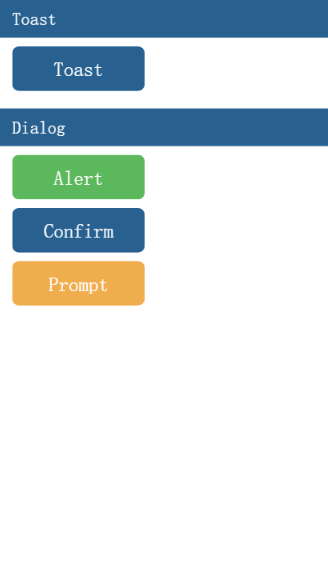
4.动画
<template>

  <div>

    <wxc-panel title="Transform" type="primary">

      <wxc-button value="Rotate" onclick="{{rotate}}" type="primary" size="middle"></wxc-button>

      <wxc-button value="Scale" onclick="{{scale}}" type="primary" size="middle" style="margin-top:12px;"></wxc-button>

      <wxc-button value="Translate" onclick="{{translate}}" type="primary" size="middle"

                 style="margin-top:12px;"></wxc-button>

      <wxc-button value="Transform" onclick="{{transform}}" type="success" size="middle"

                 style="margin-top:12px;"></wxc-button>

    </wxc-panel>

    <wxc-panel title="Others" type="primary">

      <wxc-button value="BgColor" onclick="{{color}}" type="primary" size="middle"></wxc-button>

      <wxc-button value="Opacity" onclick="{{opacity}}" type="primary" size="middle"

                 style="margin-top:12px;"></wxc-button>

      <wxc-button value="All" onclick="{{composite}}" type="success" size="middle" style="margin-top:12px;"></wxc-button>

    </wxc-panel>

    <div id="block" class="block" style="transform-origin:{{transformOrigin}}">

      <text class="block-txt">Anim</text>

    </div>

  </div>

</template>

<script>

  require('weex-components');

  module.exports = {

    data: {

      transformOrigin: 'center center',

      current_rotate: 0,

      current_scale: 1,

      current_color: '#FF0000',

      current_opacity: 1,

      current_translate: '',

      current_transform: '',

      isStop: true

    },

    methods: {

      anim: function(styles, timingFunction, duration, callback) {

        this.$call('animation', 'transition', this._ids.block.el.ref, {

          styles: styles,

          timingFunction: timingFunction,

          duration: duration

        }, callback);

      },

      rotate: function() {

        var self = this;

        self.current_rotate += 90;

        self.anim({

          transform: 'rotate(' + self.current_rotate + 'deg)'

        }, 'ease-in-out', 500, function() {

          if (self.current_rotate === 360) {

            self.current_rotate = 0;

          }

          else {

            self.rotate();

          }

        });

      },

      translate: function() {

        this.current_translate = this.current_translate ? '' : 'translate(50%, 50%)';

        this.anim({

          transform: this.current_translate

        }, 'ease-in', 500, function() {

        });

      },

      scale: function() {

        var self = this;

        self.current_scale = self.current_scale === 2 ? .5 : 2

        self.anim({

          transform: 'scale(' + self.current_scale + ')'

        }, 'linear', 500, function() {

        });

      },

      transform: function() {

        var self = this;

        this.current_transform = this.current_transform ? '' : 'rotate(45deg) scale(1.5)';

        this.anim({

          transform: this.current_transform,

          transformOrigin: 'left top'

        }, 'ease-out', 500, function() {

          if (self.current_transform !== '') {

            self.anim({

              transform: 'rotate(-90deg) scale(1.2)',

              transformOrigin: 'left top'

            }, 'ease-out', 500, function() {

            })

          }

          else {

          }

        });

      },

      composite: function() {

        var self = this;

        self.current_transform = self.current_transform ? '' : 'rotate(45deg) scale(1.5) translate(50%, 50%)';

        self.current_color = self.current_color === '#F0AD4E' ? '#D9534F' : '#F0AD4E';

        self.current_opacity = self.current_opacity === 1 ? 0.1 : 1;

        this.anim({

          transform: this.current_transform,

          transformOrigin: 'left top',

          backgroundColor: self.current_color,

          opacity: self.current_opacity

        }, 'ease-out', 1000, function() {

        });

      },

      color: function() {

        var self = this;

        self.current_color = self.current_color === '#F0AD4E' ? '#D9534F' : '#F0AD4E';

        self.anim({

          backgroundColor: self.current_color

        }, 'linear', 500, function() {

        });

      },

      opacity: function() {

        var self = this;

        self.current_opacity = self.current_opacity === 1 ? 0.1 : 1;

        self.anim({

          opacity: self.current_opacity

        }, 'linear', 500, function() {

        });

      }

    }

  };

</script>

<style>

  .block {

    position: absolute;

    width: 250px;

    height: 250px;

    top: 300px;

    left: 400px;

    background-color: #F0AD4E;

    align-items: center;

    justify-content: center;

  }

  .block-txt {

    color: #FFFFFF;

    font-size: 70px;

  }

</style>
Weex 初始的更多相关文章
- weex中UISegmentControl实现及遇到的问题
在最近主导的一个项目中,App端的实现使用了weex.通过近一个月的实践,我们发现如果对于人机交互较少的App,即使较少前端经验的人也能迅速进入开发(当然需要一定时间 才能上手weex).在开发的时候 ...
- Weex 解析(二)—— NativeBridge
(本篇幅主要讲解Weex 中iOS native与js交互实现) 大纲: weex 总框架预览 iOS NativeBridge总设计原理 一.weex 总框架预览 在写NativeBridge 总设 ...
- weex手机端安全键盘
github地址:weexSafeKeyboard 效果图: 技术依赖:框架:weex+vue 弹出层:weex-ui 图标:iconfont 说明:1.如果不想用到weex-ui,可以把inputk ...
- 2DToolkit官方文档中文版打地鼠教程(一):初始设置
这是2DToolkit官方文档中 Whack a Mole 打地鼠教程的译文,为了减少文中过多重复操作的翻译,以及一些无必要的句子,这里我假设你有Unity的基础知识(例如了解如何新建Sprite等) ...
- ReactNative&weex&DeviceOne对比
React Native出来有一段时间了,国内的weex和deviceone是近期发布的,我可以说从2011年就开始关注快速开发的跨平台平台技术了,接触过phoneGap.数字天堂.appcan等早期 ...
- CSharpGL(38)带初始数据创建Vertex Buffer Object的情形汇总
CSharpGL(38)带初始数据创建Vertex Buffer Object的情形汇总 开始 总的来说,OpenGL应用开发者会遇到为如下三种数据创建Vertex Buffer Object的情形: ...
- 阿里的weex框架到底是什么
title: 阿里的weex框架到底是什么 date: 2016-09-27 10:22:34 tags: vue, weex category: 技术总结 --- weex 工作原理 首先看下官方的 ...
- ArrayList、Vector、HashMap、HashSet的默认初始容量、加载因子、扩容增量
当底层实现涉及到扩容时,容器或重新分配一段更大的连续内存(如果是离散分配则不需要重新分配,离散分配都是插入新元素时动态分配内存),要将容器原来的数据全部复制到新的内存上,这无疑使效率大大降低. 加载因 ...
- linux系统下使用xampp 丢失mysql root密码【xampp的初始密码为空】
如果在ubuntu 下面 使用xampp这个集成开发环境,却忘记mysql密码. 注:刚安装好的xampp的Mysql初始密码是空... 找回密码的步骤如下: 1.停止mysql服务器 sudo /o ...
随机推荐
- Contest 高数题 樹的點分治 樹形DP
高数题 HJA最近在刷高数题,他遇到了这样一道高数题.这道高数题里面有一棵N个点的树,树上每个点有点权,每条边有颜色.一条路径的权值是这条路径上所有点的点权和,一条合法的路径需要满足该路径上任意相邻的 ...
- [BZOJ 1336] [Balkan2002] Alien最小圆覆盖 【随机增量法】
题目链接:BZOJ - 1336 题目分析 最小圆覆盖有一个算法叫做随机增量法,看起来复杂度像是 O(n^3) ,但是可以证明其实平均是 O(n) 的,至于为什么我不知道= = 为什么是随机呢?因为算 ...
- ibatis把表名作为一个参数报错问题的解决方案
用ibatis的时候,想把表名也作为一个参数传进去,可是报错了,在ibatis配置文件里面是#resource#的方式,报错信息如下: org.apache.cxf.interceptor.Fault ...
- Android开源项目发现--- 工具类图片缓存篇(持续更新)
1. Android-Universal-Image-Loader 图片缓存 目前使用最广泛的图片缓存,支持主流图片缓存的绝大多数特性. 项目地址:https://github.com/nostra1 ...
- Oracle导出存储过程
SQL> SELECT * FROM dba_directories ; OWN DIRECTORY_NAME DIRECTORY_PATH ------- ------------------ ...
- 浅谈Redis及其安装配置
一.Redis的介绍 二.Redis的安装配置 三.Redis的配置文件说明 四.Redis的简单操作 简介: Redis是一个开源的使用ANSI C语言编写.支持网络.可基于内存亦可持久化的日志型. ...
- IE 弹出"Unable to do xml/xsl" Processing
解决方法:
- 社区发现(Community Detection)算法 [转]
作者: peghoty 出处: http://blog.csdn.net/peghoty/article/details/9286905 社区发现(Community Detection)算法用来发现 ...
- (转载)绿色版Mysql的安装配置
本文出自于:http://johnnyhg.javaeye.com/blog/245544 一.下载MySQL http://www.mysql.org/downloads 我下载的是mysql-no ...
- [cocos2dx 3.0 + iap]中文文档(转)
一.In App Purchase概览Store Kit代表App和App Store之间进行通信.程序将从App Store接收那些你想要提供的产品的信息,并将它们显示出来供用户购买.当用户需要购买 ...