
chart.js在html中画曲线图
http://www.bootcss.com/p/chart.js/docs/
http://www.chartjs.org/docs/ 中有详细讲解
一、简介
Chart.js是一个基于HTML5的简单的面向对象的图表库,支持包括IE7和8的所有现代浏览器。图表库中有6种表,分别是:曲线图(Linecharts)、柱状图(Barcharts)、雷达图(Radarcharts)、饼状图(Piecharts)、极坐标区域图(Polararea charts)以及圆环图(Doughnutcharts)。并且带有动画效果(animated),支持retina屏。
二、开始学习
①,首先Chart.js的官网地址是:http://www.chartjs.org/,可以从官网上下载JS文件。
然后加入到html文件中。
1 <script src="Chart.js" ></script>
②,曲线图(Line charts)
曲线图适合于表示数据的趋势变化,以及数据之间的对比。
测试代码如下:

  1 <html>

  2     <head>

  3         <title>TestChart.js</title>

  4         <script src="Chart.js" ></script>

  5     </head>

  6     <body>

  7         <canvas id="myChart" width="400" height="400"></canvas>

  8         <script type="text/javascript">

  9             var ctx = document.getElementById("myChart").getContext("2d");

 10             var data = {

 11                 /// 表现在X轴上的数据,数组形式

 12                 labels : ["January","February","March","April","May","June","July"],

 13                 /// 第一条线

 14                 datasets : [

 15                 {

 16                     /// 曲线的填充颜色

 17                     fillColor : "rgba(220,220,220,0.5)",

 18                     /// 填充块的边框线的颜色

 19                     strokeColor : "rgba(220,220,220,1)",

 20                     /// 表示数据的圆圈的颜色

 21                     pointColor : "rgba(220,220,220,1)",

 22                     /// 表示数据的圆圈的边的颜色

 23                     pointStrokeColor : "#fff",

 24                     data : [65,59,90,81,56,55,40]

 25                 },

 26                 /// 第二条线

 27                 {

 28                     fillColor : "rgba(151,187,205,0.5)",

 29                     strokeColor : "rgba(151,187,205,1)",

 30                     pointColor : "rgba(151,187,205,1)",

 31                     pointStrokeColor : "#fff",

 32                     data : [28,48,40,19,96,27,100]

 33                 }

 34                 ]

 35             }

 36             /// 动画效果

 37             var options = {

 38

 39                 //Boolean - If we show the scale above the chart data

 40                 scaleOverlay : false,

 41

 42                 //Boolean - If we want to override with a hard coded scale

 43                 scaleOverride : false,

 44

 45                 //** Required if scaleOverride is true **

 46                 //Number - The number of steps in a hard coded scale

 47                 scaleSteps : null,

 48                 //Number - The value jump in the hard coded scale

 49                 scaleStepWidth : null,

 50                 //Number - The scale starting value

 51                 scaleStartValue : null,

 52

 53                 //String - Colour of the scale line

 54                 scaleLineColor : "rgba(0,0,0,.1)",

 55

 56                 //Number - Pixel width of the scale line

 57                 scaleLineWidth : 1,

 58

 59                 //Boolean - Whether to show labels on the scale

 60                 scaleShowLabels : true,

 61

 62                 //Interpolated JS string - can access value

 63                 scaleLabel : "<%=value%>",

 64

 65                 //String - Scale label font declaration for the scale label

 66                 scaleFontFamily : "'Arial'",

 67

 68                 //Number - Scale label font size in pixels

 69                 scaleFontSize : 12,

 70

 71                 //String - Scale label font weight style

 72                 scaleFontStyle : "normal",

 73

 74                 //String - Scale label font colour

 75                 scaleFontColor : "#666",

 76

 77                 ///Boolean - Whether grid lines are shown across the chart

 78                 scaleShowGridLines : true,

 79

 80                 //String - Colour of the grid lines

 81                 scaleGridLineColor : "rgba(0,0,0,.05)",

 82

 83                 //Number - Width of the grid lines

 84                 scaleGridLineWidth : 1,

 85

 86                 //Boolean - Whether the line is curved between points

 87                 bezierCurve : true,

 88

 89                 //Boolean - Whether to show a dot for each point

 90                 pointDot : true,

 91

 92                 //Number - Radius of each point dot in pixels

 93                 pointDotRadius : 3,

 94

 95                 //Number - Pixel width of point dot stroke

 96                 pointDotStrokeWidth : 1,

 97

 98                 //Boolean - Whether to show a stroke for datasets

 99                 datasetStroke : true,

100

101                 //Number - Pixel width of dataset stroke

102                 datasetStrokeWidth : 2,

103

104                 //Boolean - Whether to fill the dataset with a colour

105                 datasetFill : true,

106

107                 //Boolean - Whether to animate the chart

108                 animation : true,

109

110                 //Number - Number of animation steps

111                 animationSteps : 60,

112

113                 //String - Animation easing effect

114                 animationEasing : "easeOutQuart",

115

116                 //Function - Fires when the animation is complete

117                 onAnimationComplete : null

118

119             }

120             /// 创建对象,生成图表

121             new Chart(ctx).Line(data,options);

122         </script>

123     </body>

124 </html>
效果如下: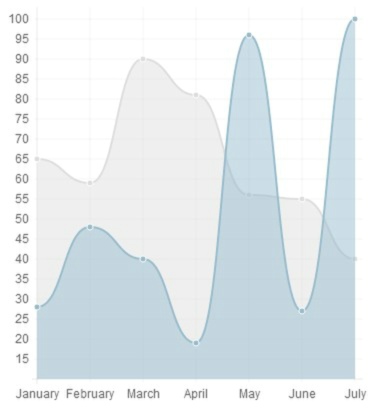
③,柱状图(Barcharts)
代码如下:
  1 <html>

  2     <head>

  3         <title>TestChart.js</title>

  4         <script src="Chart.js" ></script>

  5     </head>

  6     <body>

  7         <canvas id="myChart" width="400" height="400"></canvas>

  8         <script type="text/javascript">

  9             var ctx = document.getElementById("myChart").getContext("2d");

 10             var data = {

 11                 /// 表现在X轴上的数据,数组形式

 12                 labels : ["January","February","March","April","May","June","July"],

 13                 /// 第一条线

 14                 datasets : [

 15                 {

 16                     /// 填充颜色

 17                     fillColor : "red",

 18                     /// 填充块的边框线的颜色

 19                     strokeColor : "yellow",

 20                     data : [65,59,90,81,56,55,40]

 21                 },

 22                 /// 第二条线

 23                 {

 24                     fillColor : "blue",

 25                     strokeColor : "green",

 26                     data : [28,48,40,19,96,27,100]

 27                 }

 28                 ]

 29             }

 30             /// 动画效果

 31             var options = {

 32

 33                 //Boolean - If we show the scale above the chart data

 34                 scaleOverlay : false,

 35

 36                 //Boolean - If we want to override with a hard coded scale

 37                 scaleOverride : false,

 38

 39                 //** Required if scaleOverride is true **

 40                 //Number - The number of steps in a hard coded scale

 41                 scaleSteps : null,

 42                 //Number - The value jump in the hard coded scale

 43                 scaleStepWidth : null,

 44                 //Number - The scale starting value

 45                 scaleStartValue : null,

 46

 47                 //String - Colour of the scale line

 48                 scaleLineColor : "rgba(0,0,0,.1)",

 49

 50                 //Number - Pixel width of the scale line

 51                 scaleLineWidth : 1,

 52

 53                 //Boolean - Whether to show labels on the scale

 54                 scaleShowLabels : true,

 55

 56                 //Interpolated JS string - can access value

 57                 scaleLabel : "<%=value%>",

 58

 59                 //String - Scale label font declaration for the scale label

 60                 scaleFontFamily : "'Arial'",

 61

 62                 //Number - Scale label font size in pixels

 63                 scaleFontSize : 12,

 64

 65                 //String - Scale label font weight style

 66                 scaleFontStyle : "normal",

 67

 68                 //String - Scale label font colour

 69                 scaleFontColor : "#666",

 70

 71                 ///Boolean - Whether grid lines are shown across the chart

 72                 scaleShowGridLines : true,

 73

 74                 //String - Colour of the grid lines

 75                 scaleGridLineColor : "rgba(0,0,0,.05)",

 76

 77                 //Number - Width of the grid lines

 78                 scaleGridLineWidth : 1,

 79

 80                 //Boolean - Whether the line is curved between points

 81                 bezierCurve : true,

 82

 83                 //Boolean - Whether to show a dot for each point

 84                 pointDot : true,

 85

 86                 //Number - Radius of each point dot in pixels

 87                 pointDotRadius : 3,

 88

 89                 //Number - Pixel width of point dot stroke

 90                 pointDotStrokeWidth : 1,

 91

 92                 //Boolean - Whether to show a stroke for datasets

 93                 datasetStroke : true,

 94

 95                 //Number - Pixel width of dataset stroke

 96                 datasetStrokeWidth : 2,

 97

 98                 //Boolean - Whether to fill the dataset with a colour

 99                 datasetFill : true,

100

101                 //Boolean - Whether to animate the chart

102                 animation : true,

103

104                 //Number - Number of animation steps

105                 animationSteps : 60,

106

107                 //String - Animation easing effect

108                 animationEasing : "easeOutQuart",

109

110                 //Function - Fires when the animation is complete

111                 onAnimationComplete : null

112

113             }

114             /// 创建对象,生成图表

115             new Chart(ctx).Bar(data,options);

116         </script>

117     </body>

118 </html>

119
效果如下: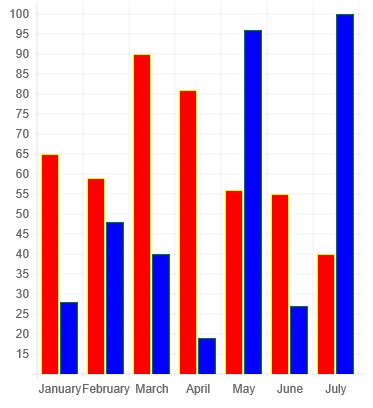
④,雷达图(Radar charts)
代码如下:
  1 <html>

  2     <head>

  3         <title>TestChart.js</title>

  4         <script src="Chart.js" ></script>

  5     </head>

  6     <body>

  7         <canvas id="myChart" width="400" height="400"></canvas>

  8         <script type="text/javascript">

  9             var ctx = document.getElementById("myChart").getContext("2d");

 10             var data = {

 11                     labels : ["Eating","Drinking","Sleeping","Designing","Coding","Partying","Running"],

 12                     datasets : [

 13                         {

 14                             fillColor : "rgba(220,220,220,0.5)",

 15                             strokeColor : "rgba(220,220,220,1)",

 16                             pointColor : "rgba(220,220,220,1)",

 17                             pointStrokeColor : "#fff",

 18                             data : [65,59,90,81,56,55,40]

 19                         },

 20                         {

 21                             fillColor : "rgba(151,187,205,0.5)",

 22                             strokeColor : "rgba(151,187,205,1)",

 23                             pointColor : "rgba(151,187,205,1)",

 24                             pointStrokeColor : "#fff",

 25                             data : [28,48,40,19,96,27,100]

 26                         }

 27                     ]

 28             }

 29             /// 动画效果

 30             var options = {

 31

 32     //Boolean - If we show the scale above the chart data

 33     scaleOverlay : false,

 34

 35     //Boolean - If we want to override with a hard coded scale

 36     scaleOverride : false,

 37

 38     //** Required if scaleOverride is true **

 39     //Number - The number of steps in a hard coded scale

 40     scaleSteps : null,

 41     //Number - The value jump in the hard coded scale

 42     scaleStepWidth : null,

 43     //Number - The centre starting value

 44     scaleStartValue : null,

 45

 46     //Boolean - Whether to show lines for each scale point

 47     scaleShowLine : true,

 48

 49     //String - Colour of the scale line

 50     scaleLineColor : "rgba(0,0,0,.1)",

 51

 52     //Number - Pixel width of the scale line

 53     scaleLineWidth : 1,

 54

 55     //Boolean - Whether to show labels on the scale

 56     scaleShowLabels : false,

 57

 58     //Interpolated JS string - can access value

 59     scaleLabel : "<%=value%>",

 60

 61     //String - Scale label font declaration for the scale label

 62     scaleFontFamily : "'Arial'",

 63

 64     //Number - Scale label font size in pixels

 65     scaleFontSize : 12,

 66

 67     //String - Scale label font weight style

 68     scaleFontStyle : "normal",

 69

 70     //String - Scale label font colour

 71     scaleFontColor : "#666",

 72

 73     //Boolean - Show a backdrop to the scale label

 74     scaleShowLabelBackdrop : true,

 75

 76     //String - The colour of the label backdrop

 77     scaleBackdropColor : "rgba(255,255,255,0.75)",

 78

 79     //Number - The backdrop padding above & below the label in pixels

 80     scaleBackdropPaddingY : 2,

 81

 82     //Number - The backdrop padding to the side of the label in pixels

 83     scaleBackdropPaddingX : 2,

 84

 85     //Boolean - Whether we show the angle lines out of the radar

 86     angleShowLineOut : true,

 87

 88     //String - Colour of the angle line

 89     angleLineColor : "rgba(0,0,0,.1)",

 90

 91     //Number - Pixel width of the angle line

 92     angleLineWidth : 1,

 93

 94     //String - Point label font declaration

 95     pointLabelFontFamily : "'Arial'",

 96

 97     //String - Point label font weight

 98     pointLabelFontStyle : "normal",

 99

100     //Number - Point label font size in pixels

101     pointLabelFontSize : 12,

102

103     //String - Point label font colour

104     pointLabelFontColor : "#666",

105

106     //Boolean - Whether to show a dot for each point

107     pointDot : true,

108

109     //Number - Radius of each point dot in pixels

110     pointDotRadius : 3,

111

112     //Number - Pixel width of point dot stroke

113     pointDotStrokeWidth : 1,

114

115     //Boolean - Whether to show a stroke for datasets

116     datasetStroke : true,

117

118     //Number - Pixel width of dataset stroke

119     datasetStrokeWidth : 2,

120

121     //Boolean - Whether to fill the dataset with a colour

122     datasetFill : true,

123

124     //Boolean - Whether to animate the chart

125     animation : true,

126

127     //Number - Number of animation steps

128     animationSteps : 60,

129

130     //String - Animation easing effect

131     animationEasing : "easeOutQuart",

132

133     //Function - Fires when the animation is complete

134     onAnimationComplete : null

135

136 }

137             /// 创建对象,生成图表

138             new Chart(ctx).Radar(data,options);

139         </script>

140     </body>

141 </html>

142
效果如下: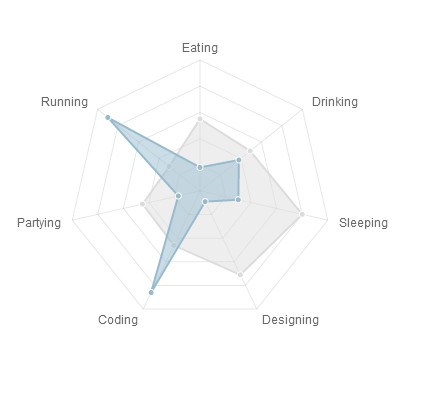
⑤,饼状图(Piecharts)
代码如下:
 1 <html>

 2     <head>

 3         <title>TestChart.js</title>

 4         <script src="Chart.js" ></script>

 5     </head>

 6     <body>

 7         <canvas id="myChart" width="400" height="400"></canvas>

 8         <script type="text/javascript">

 9             var ctx = document.getElementById("myChart").getContext("2d");

10             var data = [

11     {

12         value: 30,

13         color:"#F38630"

14     },

15     {

16         value : 50,

17         color : "#E0E4CC"

18     },

19     {

20         value : 100,

21         color : "#69D2E7"

22     }

23 ]

24             /// 动画效果

25             var options = {

26     //Boolean - Whether we should show a stroke on each segment

27     segmentShowStroke : true,

28

29     //String - The colour of each segment stroke

30     segmentStrokeColor : "#fff",

31

32     //Number - The width of each segment stroke

33     segmentStrokeWidth : 2,

34

35     //Boolean - Whether we should animate the chart

36     animation : true,

37

38     //Number - Amount of animation steps

39     animationSteps : 100,

40

41     //String - Animation easing effect

42     animationEasing : "easeOutBounce",

43

44     //Boolean - Whether we animate the rotation of the Pie

45     animateRotate : true,

46

47     //Boolean - Whether we animate scaling the Pie from the centre

48     animateScale : false,

49

50     //Function - Will fire on animation completion.

51     onAnimationComplete : null

52 }

53             /// 创建对象,生成图表

54             new Chart(ctx).Pie(data,options);

55         </script>

56     </body>

57 </html>

58
效果如下: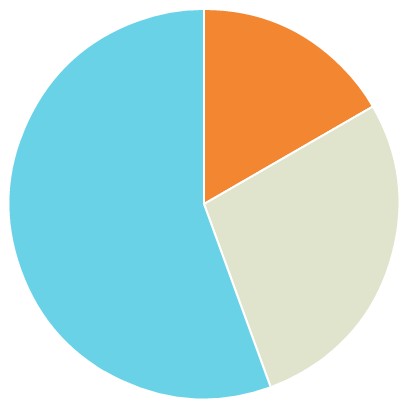
⑤,极坐标区域图(Polararea charts)
代码如下:
  1 <html>

  2     <head>

  3         <title>TestChart.js</title>

  4         <script src="Chart.js" ></script>

  5     </head>

  6     <body>

  7         <canvas id="myChart" width="400" height="400"></canvas>

  8         <script type="text/javascript">

  9             var ctx = document.getElementById("myChart").getContext("2d");

 10             var data = [

 11     {

 12         value : 30,

 13         color: "#D97041"

 14     },

 15     {

 16         value : 90,

 17         color: "#C7604C"

 18     },

 19     {

 20         value : 24,

 21         color: "#21323D"

 22     },

 23     {

 24         value : 58,

 25         color: "#9D9B7F"

 26     },

 27     {

 28         value : 82,

 29         color: "#7D4F6D"

 30     },

 31     {

 32         value : 8,

 33         color: "#584A5E"

 34     }

 35 ]

 36             /// 动画效果

 37             var options = {

 38

 39     //Boolean - Whether we show the scale above or below the chart segments

 40     scaleOverlay : true,

 41

 42     //Boolean - If we want to override with a hard coded scale

 43     scaleOverride : false,

 44

 45     //** Required if scaleOverride is true **

 46     //Number - The number of steps in a hard coded scale

 47     scaleSteps : null,

 48     //Number - The value jump in the hard coded scale

 49     scaleStepWidth : null,

 50     //Number - The centre starting value

 51     scaleStartValue : null,

 52

 53     //Boolean - Show line for each value in the scale

 54     scaleShowLine : true,

 55

 56     //String - The colour of the scale line

 57     scaleLineColor : "rgba(0,0,0,.1)",

 58

 59     //Number - The width of the line - in pixels

 60     scaleLineWidth : 1,

 61

 62     //Boolean - whether we should show text labels

 63     scaleShowLabels : true,

 64

 65     //Interpolated JS string - can access value

 66     scaleLabel : "<%=value%>",

 67

 68     //String - Scale label font declaration for the scale label

 69     scaleFontFamily : "'Arial'",

 70

 71     //Number - Scale label font size in pixels

 72     scaleFontSize : 12,

 73

 74     //String - Scale label font weight style

 75     scaleFontStyle : "normal",

 76

 77     //String - Scale label font colour

 78     scaleFontColor : "#666",

 79

 80     //Boolean - Show a backdrop to the scale label

 81     scaleShowLabelBackdrop : true,

 82

 83     //String - The colour of the label backdrop

 84     scaleBackdropColor : "rgba(255,255,255,0.75)",

 85

 86     //Number - The backdrop padding above & below the label in pixels

 87     scaleBackdropPaddingY : 2,

 88

 89     //Number - The backdrop padding to the side of the label in pixels

 90     scaleBackdropPaddingX : 2,

 91

 92     //Boolean - Stroke a line around each segment in the chart

 93     segmentShowStroke : true,

 94

 95     //String - The colour of the stroke on each segement.

 96     segmentStrokeColor : "#fff",

 97

 98     //Number - The width of the stroke value in pixels

 99     segmentStrokeWidth : 2,

100

101     //Boolean - Whether to animate the chart or not

102     animation : true,

103

104     //Number - Amount of animation steps

105     animationSteps : 100,

106

107     //String - Animation easing effect.

108     animationEasing : "easeOutBounce",

109

110     //Boolean - Whether to animate the rotation of the chart

111     animateRotate : true,

112

113     //Boolean - Whether to animate scaling the chart from the centre

114     animateScale : false,

115

116     //Function - This will fire when the animation of the chart is complete.

117     onAnimationComplete : null

118 }

119             /// 创建对象,生成图表

120             new Chart(ctx).PolarArea(data,options);

121         </script>

122     </body>

123 </html>

124
效果如下: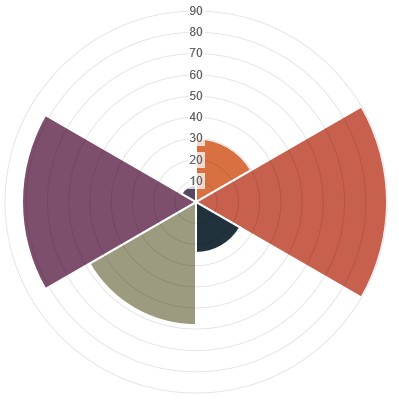
⑥,圆环图(Doughnutcharts)
代码如下:
 1 <html>

 2     <head>

 3         <title>TestChart.js</title>

 4         <script src="Chart.js" ></script>

 5     </head>

 6     <body>

 7         <canvas id="myChart" width="400" height="400"></canvas>

 8         <script type="text/javascript">

 9             var ctx = document.getElementById("myChart").getContext("2d");

10             var data = [

11     {

12         value: 30,

13         color:"#F7464A"

14     },

15     {

16         value : 50,

17         color : "#E2EAE9"

18     },

19     {

20         value : 100,

21         color : "#D4CCC5"

22     },

23     {

24         value : 40,

25         color : "#949FB1"

26     },

27     {

28         value : 120,

29         color : "#4D5360"

30     }

31

32 ]

33             /// 动画效果

34             var options = {

35     //Boolean - Whether we should show a stroke on each segment

36     segmentShowStroke : true,

37

38     //String - The colour of each segment stroke

39     segmentStrokeColor : "#fff",

40

41     //Number - The width of each segment stroke

42     segmentStrokeWidth : 2,

43

44     //The percentage of the chart that we cut out of the middle.

45     percentageInnerCutout : 50,

46

47     //Boolean - Whether we should animate the chart

48     animation : true,

49

50     //Number - Amount of animation steps

51     animationSteps : 100,

52

53     //String - Animation easing effect

54     animationEasing : "easeOutBounce",

55

56     //Boolean - Whether we animate the rotation of the Doughnut

57     animateRotate : true,

58

59     //Boolean - Whether we animate scaling the Doughnut from the centre

60     animateScale : false,

61

62     //Function - Will fire on animation completion.

63     onAnimationComplete : null

64 }

65             /// 创建对象,生成图表

66             new Chart(ctx).Doughnut(data,options);

67         </script>

68     </body>

69 </html>

70
效果如下: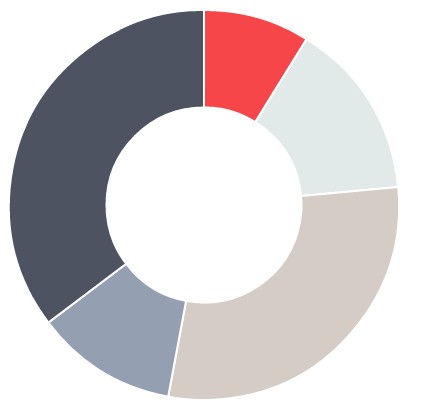
chart.js在html中画曲线图的更多相关文章
- Chart.js中文文档-雷达图
雷达图或蛛网图(Radar chart) 简介 A radar chart is a way of showing multiple data points and the variation bet ...
- Ionic中使用Chart.js进行图表展示以及在iOS/Android中的性能差异
Angular Chart 简介 在之前的文章中介绍了使用 Ionic 开发跨平台(iOS & Android)应用中遇到的一些问题的解决方案. 在更新0.1.3版本的过程中遇到了需要使用图表 ...
- 在vue中使用Echarts画曲线图(异步加载数据)
现实的工作中, 数据不可能写死的,所有的数据都应该通过发送请求进行获取. 所以本项目的需求是请求服务器获得二维数组,并生成曲线图.曲线图的横纵坐标均从获得的数据中取得. Echarts官方文档: ht ...
- chart.js应用中遇到的问题
问题一:chart.js的版本问题:打开官网https://github.com/chartjs/Chart.js/releases/tag/v2.7.3,点击Tags,选择最新版本,我这里选用的是V ...
- vue中使用chart.js
1,安装chart.js和vue-chart.js npm install chart.js --save npm install vue-chart.js --save 2,独立文件,方便修改 封装 ...
- angulajs中引用chart.js做报表,修改线条样式
目前还有个问题,在手机上看,当折线y轴值超过1000,会有点问题 1.下载chart js,可以用bower 命令下载 http://www.chartjs.org/docs/#line-chart- ...
- JS组件系列——开源免费图表组件:Chart.js
前言:最近被开源免费得有点上火了,各种组件首先想到的就是是开源否.是否免费.是否和bootstrap风格一致.想着以后做报表肯定要用到图表组件的,于是在Bootstrap中文网上面找到了Chart.j ...
- 数据可视化(1)--Chart.js
Chart.js是一个HTML5图表库,使用canvas元素来展示各式各样的客户端图表,支持折线图.柱形图.雷达图.饼图.环形图等.在每种图表中,还包含了大量的自定义选项,包括动画展示形式. Char ...
- chart.js图表库案例赏析,饼图添加文字
chart.js图表库案例赏析,饼图添加文字 Chart.js 是一个令人印象深刻的 JavaScript 图表库,建立在 HTML5 Canvas 基础上.目前,它支持6种图表类型(折线图,条形图, ...
随机推荐
- tab奇偶行颜色交替+插件
(function($){ $.fn.tableUI=function(options){ var defaults={ evenRowclass:"evenRow", oddro ...
- CI 路由设置
$route['news/show/(:num)']='news/show/$1'; 前边是匹配 网址 后边是 指定控制器 在application/config/文件夹下有routes.p ...
- isinstance使用方法
#!/usr/bin/python2.7 def displayNumType(num): print num, 'is', if isinstance(num,(int, long ...
- frameset导航框架
1.制作导航框架(注意"name='mainframe'") <html> <frameset cols="25%,75%"> < ...
- lucene3.6.1 经典案例 入门教程 (包含从文件中读取content)
转载http://liqita.iteye.com/blog/1676664 第一步:下载lucene的核心包 lucene-core-3.6.1-javadoc.jar (3.5 MB) lucen ...
- ARP/代理ARP
1.ARP首先讲到ARP,ARP是地址解析协议,它的作用是在以太网环境下,通过3层的IP地址来找寻2层的MAC地址,得到一张ARP缓存表.转发数据的时候根据ARP缓存表来进行传输.下图详细说明数据传输 ...
- Python虚拟环境安装virtualenv
解决了多个版本共存的问题 virtualenv 为每个不同项目提供一份 Python 安装.它并没有真正安装多个 Python 副本,但是它确实提供了一种巧妙的方式来让各项目环境保持独立. 安装vir ...
- crontab使用和格式
什么是crontab crontab命令常见于Unix和类Unix的操作系统之中,用于设置周期性被执行的指令.具体的用法见下图: 关于crontab的格式: crontab的格式是分为6列:f1 f2 ...
- php简单命令代码集锦
if(file_exists("file.htm"))// 检查是否存在此文件 if(file_exists("chat"))//检查是否存在此文件夹 rena ...
- js跨域总结
一.通过jsonp跨域 在js中,我们直接用XMLHttpRequest请求不同域上的数据时,是不可以的.但是,在页面上引入不同域上的js脚本文件却是可以的,jsonp正是利用这个特性来实现的. 比如 ...