
5个步骤创建你的第一个RESTFul 服务
1、啥是RESTFul 服务
在我们创建简单小程序前,先来学习下RESTFul 服务。RESTFul服务就是遵循了 Representational State Transfer(可以参考http://blog.csdn.net/zhruifei/article/details/50633495) 这个架构的一种架构。WCF允许我们使用SOAP 通过各种协议,协议包括,HTTP,TCP,MSMQ,Named Pipes等进行交换信息。现在我们通过一个最常用的协议HTTP协议来讲述WCF服务,REST服务通过HTTP来进行最常用的CRUD(Read(GET)/Create(POST)/Update(PUT)/Delete(DELETE))功能,在这里我们先实现一个简单的GET功能
2、创建restful 服务
下面是5步创建你的rest服务并且返回xml格式
- 创建WCF Service Project.
- 准备数据
- 创建Service Contract
- 继承Service
- 配置服务和行为
1)打开vs-新建项目-选择WCF服务应用程序
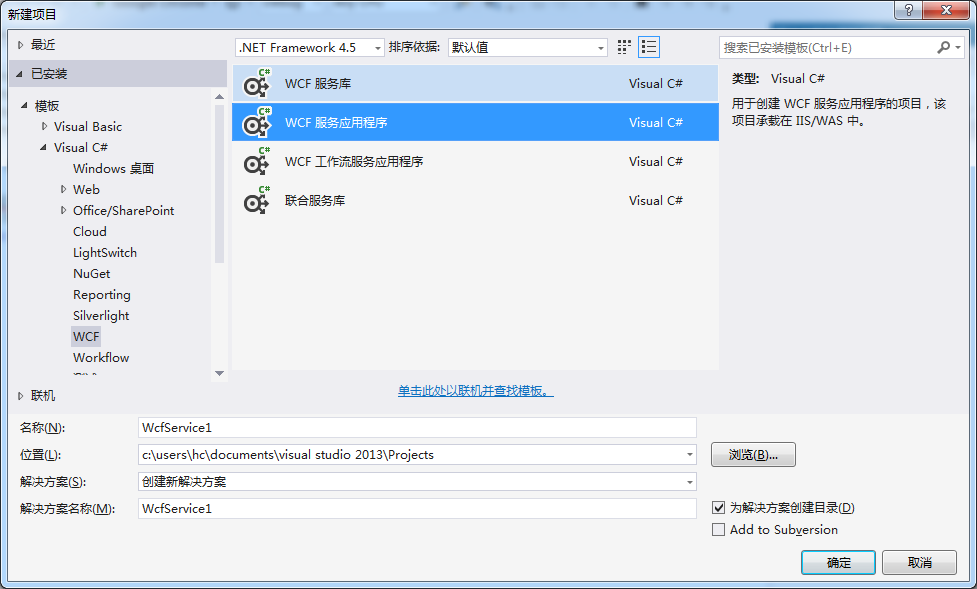
2,新建一个类 car.cs
  [DataContract]

    public class Car

    {

        [DataMember]

        public string color { get; set; }

        [DataMember]

        public double speed { get; set; }

        [DataMember]

        public double price { get; set; }

    }

    public partial class Cars

    {

        public static readonly Cars _instance = new Cars();

        private Cars() { }

        public static Cars Instance

        {

            get { return _instance; }

        }

        public List<Car> CarList

        {

            get { return carLists; }

        }

        private List<Car> carLists = new List<Car>

        {

            new Car { color = "red", speed = , price =  },

            new Car{color = "blue", speed = , price = },

            new Car{color="green",speed=,price=}

        };

    }
3)新建WCF 服务--如下图所示
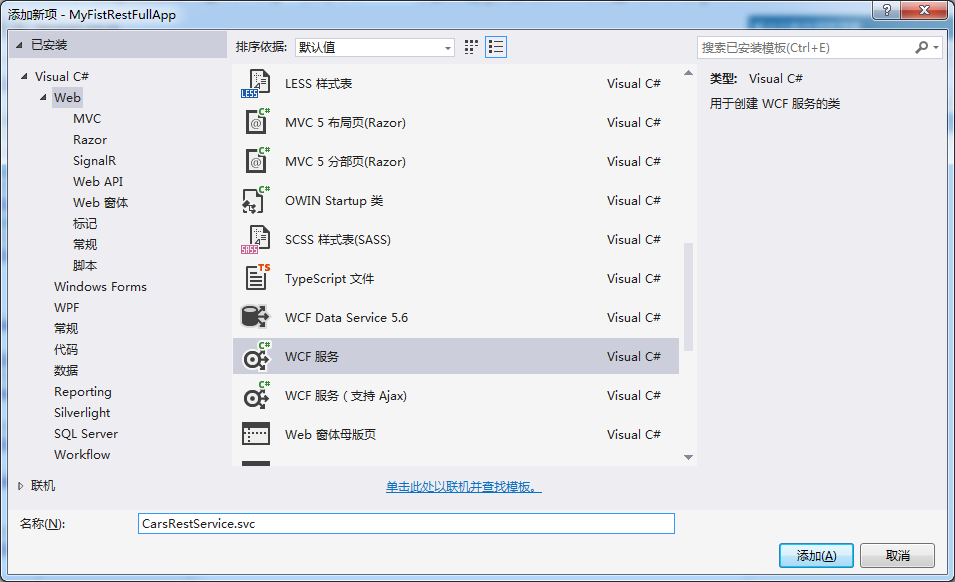
系统将新疆两个文件,包括ICarRestService.cs 接口文件如下图所示:
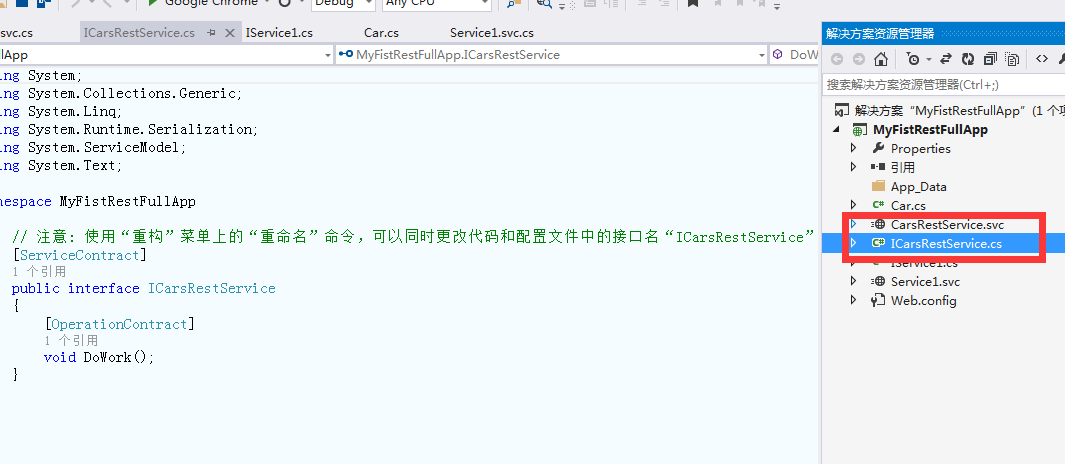
下面我们将Dowork 方法改为GetCarList 方法
如下所示:

- Method="Get" 代表这Http获取数据的方式
- RequestFormat = WebMessageFormat.Json 请求的数据是JSON格式,当然RequestFormat = WebMessageFormat.Xml 请求的是XML格式
- UriTemplate = "GetCarList/" 请求了URL
5)配置服务和行为
<?xml version="1.0"?>

<configuration>

  <appSettings>

    <add key="aspnet:UseTaskFriendlySynchronizationContext" value="true" />

  </appSettings>

  <system.web>

    <compilation debug="true" targetFramework="4.5" />

    <httpRuntime targetFramework="4.5"/>

  </system.web>

  <system.serviceModel>

    <services>

        <service name="MyRESTService.ProductRESTService" behaviorConfiguration="serviceBehavior">

            <endpoint address=""

                      binding="webHttpBinding"

                      contract="MyRESTService.IProductRESTService"

                      behaviorConfiguration="web"></endpoint>

          </service>

   </services>

    <behaviors>

      <serviceBehaviors>

        <behavior name="serviceBehavior">

                  <serviceMetadata httpGetEnabled="true"/>

                  <serviceDebug includeExceptionDetailInFaults="false"/>

        </behavior>

      </serviceBehaviors>

      <endpointBehaviors>

          <behavior name="web">

                <webHttp/>

            </behavior>

      </endpointBehaviors>

    </behaviors>

    <protocolMapping>

        <add binding="basicHttpsBinding" scheme="https" />

    </protocolMapping>

    <serviceHostingEnvironment multipleSiteBindingsEnabled="true" />

  </system.serviceModel>

  <system.webServer>

    <modules runAllManagedModulesForAllRequests="true"/>

    <!--

        To browse web app root directory during debugging, set the value below to true.

        Set to false before deployment to avoid disclosing web app folder information.

      -->

    <directoryBrowse enabled="true"/>

  </system.webServer>

</configuration>
配置自己写写就明白了 此处的webHTTPBinding 是rest 服务专用的绑定模式
6)然后在浏览器中输入:http://localhost:30547/CarsRestService.svc/GetCarList/
得到的结果如下:

哈哈这样第一个rest 服务就好了,希望可以帮助到你
5个步骤创建你的第一个RESTFul 服务的更多相关文章
- 基于SpringBoot开发一个Restful服务,实现增删改查功能
前言 在去年的时候,在各种渠道中略微的了解了SpringBoot,在开发web项目的时候是如何的方便.快捷.但是当时并没有认真的去学习下,毕竟感觉自己在Struts和SpringMVC都用得不太熟练. ...
- 一个RESTful服务,用来定位运行在AWS地区(Region)中的中间层服务
Eureka 一个RESTful服务,用来定位运行在AWS地区(Region)中的中间层服务.由两个组件组成:Eureka服务器和Eureka客户端.Eureka服务器用作服务注册服务器.Eureka ...
- 适合新手:从零开发一个IM服务端(基于Netty,有完整源码)
本文由“yuanrw”分享,博客:juejin.im/user/5cefab8451882510eb758606,收录时内容有改动和修订. 0.引言 站长提示:本文适合IM新手阅读,但最好有一定的网络 ...
- 译:3.消费一个RESTful Web Service
这节课我们根据官网教程学习如何去消费(调用)一个 RESTful Web Service . 原文链接 https://spring.io/guides/gs/consuming-rest/ 本指南将 ...
- 用Kotlin写一个基于Spring Boot的RESTful服务
Spring太复杂了,配置这个东西简直就是浪费生命.尤其在没有什么并发压力,随便搞一个RESTful服务 让整个业务跑起来先的情况下,更是么有必要纠结在一堆的XML配置上.显然这么想的人是很多的,于是 ...
- 实现一个 RESTful API 服务器
RESTful 是目前最为流行的一种互联网软件结构.因为它结构清晰.符合标准.易于理解.扩展方便,所以正得到越来越多网站的采用. 什么是 REST REST(REpresentational Stat ...
- 第一章 用three.js创建你的第一个3D场景
第一章 用three.js创建你的第一个3D场景 到官网下载three.js的源码和示例. 创建HTML框架界面 第一个示例的代码如下: 01-basic-skeleton.html 位于 Learn ...
- tomcat创建一个windows服务
具体步骤如下: 1.把JDK解压到C:\Program Files\Java下,Tomcat解压到D:\tomcat下 2.配置环境变量 JAVA_HOME:C:\Program Files\Java ...
- 【翻译】在Mac上使用VSCode创建你的第一个Asp.Net Core应用
Setting Up Your Development Environment 设置你的开发环境 To setup your development machine download and inst ...
随机推荐
- [Lua]Lua入门教程
什么是Lua Lua 是一个小巧的脚本语言.是巴西里约热内卢天主教大学(Pontifical Catholic University of Rio de Janeiro)里的一个研究小组,由Rober ...
- Html标签中Alt和Title都是提示性语言标签
在Html标签中Alt和Title都是提示性语言标签,在我们浏览一些网页时,鼠标停留在一张图片或文字链接上时,在鼠标的右下角出现一个提示信息框,对目标进行一定的注释说明,这就是它们的作用. 其中 ...
- 一次性能优化,tps从400+到4k+
项目介绍 路由网关项目watchman ,接收前端http请求转发到后端业务系统,功能安全验证,限流,转发. 使用技术:spring boot+ nreflix zuul,最开始日志使用slf4j+l ...
- 1、手把手教你Extjs5(一)搭建ExtJS5环境
Ext JS 5 的主要特性包括: 新的数据绑定方式 新增支持 MVVM 模式,并且依然支持 MVC 模式 对手持设备更友好,针对触屏设备进行优化 新的主题 Crisp / Neptune Touch ...
- javascript基础教程学习总结(1)
摘自javascript基础教程 开始: 1.将脚本放在哪里: 1.1 放在html和<html>之间 范例: <!DOCTYPE html PUBLIC "-//W3C/ ...
- JNI 中文字符串传递(转)
源:JNI 中文字符串传递 因为项目编码中通过JNI传递中文字符时出现乱码问题,特搜集了相关资料,整理如下: java内部是使用16bit的unicode编码(UTF-16)来表示字符串的,无论中文英 ...
- foreach笔记
结合泛型使用,不然就只能写成for(Object o : T). 缺点是没有下标,如下面代码 public class ForeachTest { public static void main(St ...
- RecyclerView学习笔记
主要方法: setLayoutManager:设置显示方式,有LinearLayoutManager(像ListView一样的纵向列表布局),有GridLayoutManager(网格布局),有Sta ...
- 为什么建立TCP连接需要三次握手,为什么断开TCP连接需要四次握手,TIME_WAIT状态的意义
为什么建立TCP连接需要三次握手? 原因:为了应对网络中存在的延迟的重复数组的问题 例子: 假设client发起连接的连接请求报文段在网络中没有丢失,而是在某个网络节点长时间滞留了,导致延迟到达ser ...
- 如何使用python timeit模块使用实践
其实平时使用测试应用运行时间的情况 细算一下还真的很少.很久没有做性能优化的工作,不管是cProfile还是timeit模块都已经生疏了很久没有使用,我在以前的文章里面有提到过cPfile的性能测试使 ...