
Windows平台下安装Eclipse插件,开发Hadoop应用
欢迎和大家交流技术相关问题:
邮箱: jiangxinnju@163.com
博客园地址: http://www.cnblogs.com/jiangxinnju
GitHub地址: https://github.com/jiangxincode
知乎地址: https://www.zhihu.com/people/jiangxinnju
安装插件
将hadoop安装包hadoop\contrib\eclipse-plugin\hadoop-0.20.2-eclipse-plugin.jar拷贝到eclipse的插件目录plugins下。
需要注意的是插件版本(及后面开发导入的所有jar包)与运行的hadoop一致,否则可能会出现EOFException异常。
重启eclipse,打开windows->open perspective->other->map/reduce 可以看到map/reduce开发视图。
设置连接参数
打开windows->show view->other-> map/reduce Locations视图,在点击大象后弹出的对话框(General tab)进行参数的添加:
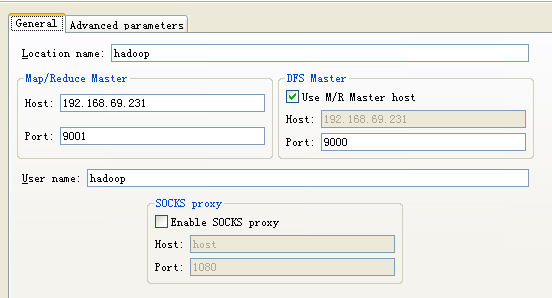
参数说明如下:
- Location name:任意
- map/reduce master:与mapred-site.xml里面mapred.job.tracker设置一致。
- DFS master:与core-site.xml里fs.default.name设置一致。
- User name: 服务器上运行hadoop服务的用户名。
然后是打开“Advanced parameters”设置面板,修改相应参数。上面的参数填写以后,也会反映到这里相应的参数,主要关注下面几个参数:
- fs.defualt.name:与core-site.xml里fs.default.name设置一致。
- mapred.job.tracker:与mapred-site.xml里面mapred.job.tracker设置一致。
- dfs.replication:与hdfs-site.xml里面的dfs.replication一致。
- hadoop.tmp.dir:与core-site.xml里hadoop.tmp.dir设置一致。
- hadoop.job.ugi:并不是设置用户名与密码。是用户与组名,所以这里填写hadoop,hadoop。
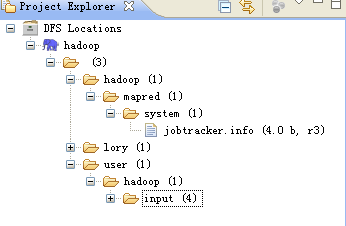
说明:第一次设置的时候可能是没有hadoop.job.ugi和dfs.replication参数的,不要紧,确认保存。打开Project Explorer中DFS Locations目录,应该可以年看到文件系统中的结构了。但是在/hadoop/mapred/system下却没有查看权限,如下图:

而且删除文件的时候也会报错:

这个原因是我使用地本用户Administrator(我是用管理员用户登陆来地windows系统的)进行远程hadoop系统操作,没有权限。
此时再打开“Advanced parameters”设置面板,应该可以看到hadoop.job.ugi了,这个参数默认是本地操作系统的用户名,如果不幸与远程hadoop用户不一致,那就要改过来了,将hadoop加在第一个,并用逗号分隔。如:

保存配置后,重新启动eclipse。/hadoop/mapred/system下就一目了然了,删除文件也OK。
运行hadoop程序
首先将hadoop安装包下面的所有jar包都导到eclipse工程里。然后建立一个类:DFSOperator.java,该类写了四个基本方法:创建文件,删除文件,把文件内容读为字符串,将字符串写入文件。同时有个main函数,可以修改测试:
package com.kingdee.hadoop;

import java.io.BufferedReader;

import java.io.IOException;

import java.io.InputStream;

import java.io.InputStreamReader;

import org.apache.hadoop.conf.Configuration;

import org.apache.hadoop.fs.FSDataOutputStream;

import org.apache.hadoop.fs.FileSystem;

import org.apache.hadoop.fs.Path;

/**

 *

 * The utilities to operate file on hadoop hdfs.

 *

 * @author luolihui 2011-07-18

 *

 */

public class DFSOperator {

	private static final String ROOT_PATH = "hdfs:///";

	private static final int BUFFER_SIZE = 4096;

	/**

	 * construct.

	 */

	public DFSOperator(){}

     /**

     * Create a file on hdfs.The root path is /.<br>

     * for example: DFSOperator.createFile("/lory/test1.txt", true);

	 * @param path  the file name to open

	 * @param overwrite if a file with this name already exists, then if true, the file will be

	 * @return true if delete is successful else IOException.

	 * @throws IOException

	 */

	public static boolean createFile(String path, boolean overwrite) throws IOException

	{

		//String uri = "hdfs://192.168.1.100:9000";

		//FileSystem fs1 = FileSystem.get(URI.create(uri), conf);

		Configuration conf = new Configuration();

		FileSystem fs = FileSystem.get(conf);

		Path f = new Path(ROOT_PATH + path);

		fs.create(f, overwrite);

		fs.close();

		return true;

	}

    /**

     * Delete a file on hdfs.The root path is /. <br>

     * for example: DFSOperator.deleteFile("/user/hadoop/output", true);

     * @param path the path to delete

     * @param recursive  if path is a directory and set to true, the directory is deleted else throws an exception. In case of a file the recursive can be set to either true or false.

     * @return true if delete is successful else IOException.

     * @throws IOException

     */

	public static boolean deleteFile(String path, boolean recursive) throws IOException

	{

		//String uri = "hdfs://192.168.1.100:9000";

		//FileSystem fs1 = FileSystem.get(URI.create(uri), conf);

		Configuration conf = new Configuration();

		FileSystem fs = FileSystem.get(conf);

		Path f = new Path(ROOT_PATH + path);

		fs.delete(f, recursive);

		fs.close();

		return true;

	}

	/**

	 * Read a file to string on hadoop hdfs. From stream to string. <br>

	 * for example: System.out.println(DFSOperator.readDFSFileToString("/user/hadoop/input/test3.txt"));

	 * @param path the path to read

	 * @return true if read is successful else IOException.

	 * @throws IOException

	 */

	public static String readDFSFileToString(String path) throws IOException

	{

		Configuration conf = new Configuration();

		FileSystem fs = FileSystem.get(conf);

		Path f = new Path(ROOT_PATH + path);

		InputStream in = null;

		String str = null;

		StringBuilder sb = new StringBuilder(BUFFER_SIZE);

		if (fs.exists(f))

		{

			in = fs.open(f);

			BufferedReader bf = new BufferedReader(new InputStreamReader(in));

			while ((str = bf.readLine()) != null)

			{

				sb.append(str);

				sb.append("\n");

			}

			in.close();

			bf.close();

			fs.close();

			return sb.toString();

		}

		else

		{

			return null;

		}

	}

	/**

	 * Write string to a hadoop hdfs file. <br>

	 * for example: DFSOperator.writeStringToDFSFile("/lory/test1.txt", "You are a bad man.\nReally!\n");

	 * @param path the file where the string to write in.

	 * @param string the context to write in a file.

	 * @return true if write is successful else IOException.

	 * @throws IOException

	 */

	public static boolean writeStringToDFSFile(String path, String string) throws IOException

	{

		Configuration conf = new Configuration();

		FileSystem fs = FileSystem.get(conf);

		FSDataOutputStream os = null;

		Path f = new Path(ROOT_PATH + path);

		os = fs.create(f,true);

		os.writeBytes(string);

		os.close();

		fs.close();

		return true;

	}

	public static void main(String[] args)

	{

		try {

			DFSOperator.createFile("/lory/test1.txt", true);

			DFSOperator.deleteFile("/dfs_operator.txt", true);

			DFSOperator.writeStringToDFSFile("/lory/test1.txt", "You are a bad man.\nReally?\n");

			System.out.println(DFSOperator.readDFSFileToString("/lory/test1.txt"));

		} catch (IOException e) {

			// TODO Auto-generated catch block

			e.printStackTrace();

		}

		System.out.println("===end===");

	}

}
然后Run As->Run on Hadoop->Choose an exitsing server from the list below->finish.
结果很简单(那个警告不管):
11/07/16 18:44:32 WARN conf.Configuration: DEPRECATED: hadoop-site.xml found in the classpath. Usage of hadoop-site.xml is deprecated. Instead use core-site.xml, mapred-site.xml and hdfs-site.xml to override properties of core-default.xml, mapred-default.xml and hdfs-default.xml respectively

You are a bad man.

Really?

===end===
也可以运行hadoop自带的WorkCount程序,找到其源代码导进来,然后设置输入输出参数,然后同样“Run on hadoop”。具体步骤不再示范。
每“Run on hadoop”都会在workspace.metadata.plugins\org.apache.hadoop.eclipse下生成临时jar包。不过第一次需要Run on hadoop,以后只需要点击那运行的绿色按钮了。
错误及处理
安全模式问题
我在eclipse上删除DFS上的文件夹时,出现下面错误:
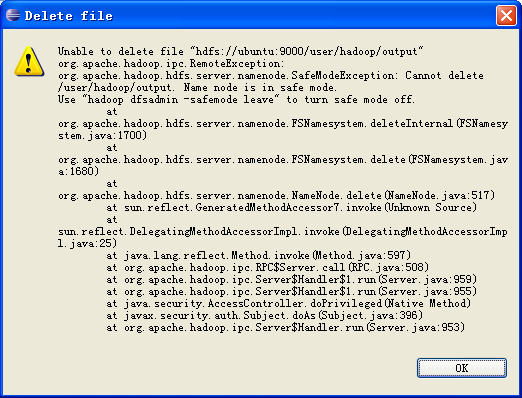
错误提示说得也比较明示,是NameNode在安全模式中,其解决方案也一并给出。类似的运行hadoop程序时,有时候会报以下错误:
org.apache.hadoop.dfs.SafeModeException: Cannot delete /user/hadoop/input. Name node is in safe mode
解除安全模式:
bin/hadoop dfsadmin -safemode leave
用户可以通过dfsadmin -safemode value 来操作安全模式,参数value的说明如下:
- enter - 进入安全模式
- leave - 强制NameNode离开安全模式
- get - 返回安全模式是否开启的信息
- wait - 等待,一直到安全模式结束。
开发时报错Permission denied
org.apache.hadoop.security.AccessControlException: org.apache.hadoop.security.AccessControlException: Permission denied: user=Administrator, access=WRITE, inode="test1.txt":hadoop:supergroup:rw-r--r--

	at sun.reflect.NativeConstructorAccessorImpl.newInstance0(Native Method)

	at sun.reflect.NativeConstructorAccessorImpl.newInstance(NativeConstructorAccessorImpl.java:39)

	at sun.reflect.DelegatingConstructorAccessorImpl.newInstance(DelegatingConstructorAccessorImpl.java:27)

	at java.lang.reflect.Constructor.newInstance(Constructor.java:513)

	at org.apache.hadoop.ipc.RemoteException.instantiateException(RemoteException.java:96)

	at org.apache.hadoop.ipc.RemoteException.unwrapRemoteException(RemoteException.java:58)

	at org.apache.hadoop.hdfs.DFSClient$DFSOutputStream.<init>(DFSClient.java:2710)

	at org.apache.hadoop.hdfs.DFSClient.create(DFSClient.java:492)

	at org.apache.hadoop.hdfs.DistributedFileSystem.create(DistributedFileSystem.java:195)

	at org.apache.hadoop.fs.FileSystem.create(FileSystem.java:484)

	at org.apache.hadoop.fs.FileSystem.create(FileSystem.java:465)

	at org.apache.hadoop.fs.FileSystem.create(FileSystem.java:372)

	at com.kingdee.hadoop.DFSOperator.createFile(DFSOperator.java:46)

	at com.kingdee.hadoop.DFSOperator.main(DFSOperator.java:134)
解决方法是,在“Advanced parameters”设置面板,设置hadoop.job.ugi参数,将hadoop用户加上去。

变为:

然后重新在运行中”Run on hadoop”。另一方法是改变要操作的文件的权限。
Permission denied: user=Administrator, access=WRITE, inode="test1.txt":hadoop:supergroup:rw-r--r--
上面的意思是:test1.txt文件的访问权限是rw-r--r--,归属组是supergroup,归属用户是hadoop,现在使用Administrator用户对test1.txt文件进行WRITE方式访问,被拒绝了。所以可以改变下test1.txt文件的访问权限:
$ hadoop fs –chmod 777 /lory/test1.txt

$ hadoop fs –chmod 777 /lory     #或者上一级文件夹
当然使用-chown命令也可以。
Windows平台下安装Eclipse插件,开发Hadoop应用的更多相关文章
- Arduino可穿戴开发入门教程Windows平台下安装Arduino IDE
Arduino可穿戴开发入门教程Windows平台下安装Arduino IDE Windows平台下安装Arduino IDE Windows操作系统下可以使用安装向导和压缩包形式安装.下面详细讲解这 ...
- 在Windows平台下安装与配置Memcached及C#使用方法
1.在Windows下安装Memcached 资料来源:http://www.jb51.net/article/30334.htm 在Windows平台下安装与配置Memcached的方法,Memca ...
- Windows 平台下安装Cygwin后,sshd服务无法启动
Windows 平台下安装Cygwin后,sshd服务无法启动 系统日志记录信息: 事件 ID ( 0 )的描述(在资源( sshd )中)无法找到.本地计算机可能没有必要的注册信息或消息 DLL 文 ...
- 获取Windows平台下 安装office 版本位数信息
最近在处理客户端安装程序过程,有一个需求:需要检测Windows平台下安装office 版本信息以及获取使用的office是32 位还是64 位: 当检测出office 位数为64位时,提示当前off ...
- [转]Windows平台下安装Hadoop
1.安装JDK1.6或更高版本 官网下载JDK,安装时注意,最好不要安装到带有空格的路径名下,例如:Programe Files,否则在配置Hadoop的配置文件时会找不到JDK(按相关说法,配置文件 ...
- 如何在Windows平台下安装配置Memcached
Memcached是一个自由开源的,高性能,分布式内存对象缓存系统. Memcached是以LiveJournal旗下Danga Interactive公司的Brad Fitzpatric为首开发的一 ...
- MongoDB学习总结(一) —— Windows平台下安装
> 基本概念 MongoDB是一个基于分布式文件存储的开源数据库系统,皆在为WEB应用提供可扩展的高性能数据存储解决方案.MongoDB将数据存储为一个文档,数据结构由键值key=>val ...
- Windows XP下安装WinCE6.0开发环境
Windows下怎样编译WinCE6.0及开发应用程序.以下介绍(安装之前必须保证C盘有足够的空间!20g左右!主要是由于在安装程序在安装过程中要解压): 在Visual Studio 2005之前, ...
- Windows平台下安装Hadoop
今天参照这个网址(http://www.cnblogs.com/kinglau/archive/2013/08/20/3270160.html)安装了下,前面七步没有问题. 到第八步出问题了,后来看了 ...
随机推荐
- atitit.ajax bp dwr 3.该票据安排使用的流量汇总 VO9o.....
atitit.ajax bp dwr 3.该票据安排使用的流量汇总 VO9o..... 1. 安装配置 1 1.1. 下载 dwr.jar 1M 1 1.2. 配置注解方式..web.xml 1 2 ...
- 利用HttpClient抓取话费详单等信息
由于项目需要,需要获取授权用户的在运营商(中国移动.中国联通.中国电信)那里的个人信息.话费详单.月汇总账单信息(需要指出的是电信用户的个人信息无法从网上营业厅获取).抓取用户信息肯定是要模仿用户登录 ...
- Strongly connected(hdu4635(强连通分量))
/* http://acm.hdu.edu.cn/showproblem.php?pid=4635 Strongly connected Time Limit: 2000/1000 MS (Java/ ...
- oracle中intersect的用法
和 UNION 指令类似, INTERSECT 也是对两个 SQL 语句所产生的结果做处理的.不同的地方是, UNION 基本上是一个 OR (如果这个值存在于第一句或是第二句,它就会被选出),而 I ...
- MVC 过滤器3
ASP.NET MVC 过滤器(三) ASP.NET MVC 过滤器(三) 前言 本篇讲解行为过滤器的执行过程,过滤器实现.使用方式有AOP的意思,可以通过学习了解过滤器在框架中的执行过程从而获得一些 ...
- Linux 下安装 SVN服务器
前段时间换了一个新项目组.过去发现居然SVN都没有.代码都是手动对比存档.当时就蛋疼了.这他妈也太苦逼了.话不多说,要来测试服务器地址.开工了.由于服务器不能连接外网. 1.先下载安装包.本次安装不结 ...
- Windows服务、批处理项目实战
一周一话题之三(Windows服务.批处理项目实战) -->目录导航 一. Windows服务 1. windows service介绍 2. 使用步骤 3. 项目实例--数据上传下载服务 ...
- JS代码平面化
重构JS代码 - 让JS代码平面化 js中的嵌套函数用的很多,很牛叉,那为何要平面化? 易懂(自己及他人) 易修改(自己及他人) 平时Ajax调用写法(基于jQuery) $.post('url' ...
- Web Components
Web Components是不是Web的未来 今天 ,Web 组件已经从本质上改变了HTML.初次接触时,它看起来像一个全新的技术.Web组件最初的目的是使开发人员拥有扩展浏览器标签的能力,可以 ...
- C#中另辟蹊径解决JSON / XML互转的问题
C#中另辟蹊径解决JSON / XML互转的问题 最近在一个POC的项目中要用到JSON和XML的相互转换, 虽然我知道很多类库如JSON.NET具备这种功能, 但是我还是另辟蹊径的使用Spider ...