
工厂模式Assembly.Load(path).CreateInstance 反射出错解决办法
项目结构:
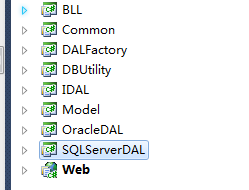
DALFactory 反射代码反射
//使用缓存

        private static object CreateObject(string AssemblyPath,string classNamespace)

        {

            object objType = DataCache.GetCache(classNamespace);

            if (objType == null)

            {

                try

                {

                    Assembly assm = Assembly.Load(AssemblyPath);//第一步:通过程序集名称加载程序集

                    objType = assm.CreateInstance(classNamespace);// 第二步:通过命名空间+类名创建类的实例。

                    DataCache.SetCache(classNamespace, objType);// 写入缓存

                }

                catch//(System.Exception ex)

                {

                    //LogOperate.WriteErrorLog("创建反射异常(不使用缓存)", ex);

                    //string str=ex.Message;// 记录错误日志

                }

            }

            return objType;

        }
当程序运行时到Assembly assm = Assembly.Load(AssemblyPath); assm值为空则会报错
错误原因一:
配置文件中的Key的Value必须跟,SQLServerDAL中的程序集名称一致。

右键SQLServerDAL,属性,可查看程序集名称

错误原因二:
站点没有引用SQLServerDAL,添加引用即可

工厂模式Assembly.Load(path).CreateInstance 反射出错解决办法的更多相关文章
- Assembly.Load(path).CreateInstance 反射出错解决办法
最近采用工厂模式反射DAL层出现一些问题,所以自己想写一下自己认为标准解决的思路和解决方法以备后用. 1.这是项目结构 2.这是DALFactory 反射代码 #region 创建对象(不使用缓存) ...
- 关于反射Assembly.Load("程序集").CreateInstance("命名空间.类")
关于反射Assembly.Load("程序集").CreateInstance("命名空间.类") 而不管在哪一层写这段代码其中的("程序集" ...
- 黄聪:C#使用Application.Restart重启程序出错解决办法
调用 Application.Restart重启程序出错 解决办法,就是给程序的.exe文件,加上下面的设置
- 转:CentOS系统yum源配置修改、yum安装软件包源码包出错解决办法!
yum安装包时报错: Could not retrieve mirrorlist http://mirrorlist.repoforge.org/el6/mirrors-rpmforge error ...
- 让360双核浏览器默认极速模式,避免采用IE模式无法正常访问html5网页的解决办法
让360双核浏览器默认极速模式,避免采用IE模式无法正常访问html5网页的解决办法 用Meta标签代码让360双核浏览器默认极速模式不是兼容模式<meta name="rendere ...
- CentOS系统yum源配置修改、yum安装软件包源码包出错解决办法apt.sw.be couldn't connect to host
yum安装包时报错: Could not retrieve mirrorlist http://mirrorlist.repoforge.org/el6/mirrors-rpmforge error ...
- npm中npm install 始终出错解决办法
npm中npm install 始终出错解决办法 错误信息: C:\Windows\System32>npm install -g gulp npm ERR! Windows_NT 6.1.76 ...
- ARM64平台编译stream、netperf出错解决办法 解决办法:指定编译平台为alpha [root@localhost netperf-2.6.0]# ./configure –build=alpha
ARM64平台编译stream.netperf出错解决办法 http://ilinuxkernel.com/?p=1738 stream编译出错信息: [root@localhost stream]# ...
- dpkg:处理 xxx (--configure)时出错解决办法,也可用于卸载软件出错的情况
dpkg:处理 xxx (--configure)时出错解决办法今早安装nfs时出现问题,找到该文,备份留用.然后在网上找到了这片文章,按步骤走就解决了,中间会提示自动卸载一下,执行那个命令就好了,我 ...
随机推荐
- 当Azure里的虚拟机网卡被禁用
当Azure里的虚拟机网卡被禁用了之后…… 这样的想法来自于一个假设,如果网卡被禁用之后,用户该如何处理,Azure又该如何处理,对于设置在虚拟机中的禁用网卡选项是否还有存在的意义?通常情况下,点选了 ...
- MVC几种传值方式
一,Model public class Course { public int Id { get; set; } public string Name { get; set; } } public ...
- ASP.NET MVC 之Model的呈现
ASP.NET MVC 之Model的呈现(仅此一文系列三) 本文目的 我们来看一个小例子,在一个ASP.NET MVC项目中创建一个控制器Home,只有一个Index: public class H ...
- .net mvc页面UI之Jquery博客日历控件
摘要:最近在做一个博客系统,其他需要用到博客日历控件,网上搜索了很多资料,其中大部分都是javascript的,经过总结使用jquery实现了博客日历效果.代码如下: 原文链接转载请注明:http:/ ...
- 自定义html标签
自定义html标签 (觉得页面全是div 的解决办法 来个个性化) 办法一(来源于 让ie支持html5标签的方法): 在ie9以前如果要自定义要使用document.createElement的方法 ...
- 什么是LeapMotion
LeapMotion预览——什么是LeapMotion LeapMotion预览 这个就是LeapMotion: 原文转自: LeapMotion预览 LeapMotion 官网:http://l ...
- 一个方便且通用的导出数据到 Excel 的类库
一个方便且通用的导出数据到 Excel 的类库 起源: 之前在做一个项目时,客户提出了许多的导出数据的需求: 导出用户信息 导出业务实体信息 各种查询都要能导出 导出的数据要和界面上看到的一致 可以分 ...
- google 浏览器使用技巧(一)
google 浏览器使用技巧(一) google 浏览器使用技巧 1. 调整地址栏的宽度 当安装多个插件的时候,默认插件会隐藏,所以使用起来很麻烦.在chrome 浏览器的配置中没有找到相应的配置.一 ...
- HTML5 智能表单
HTML5 智能表单 1.表单新增属性 ☀ autofocus 属性 <input type="text" autofocus/>设置 autofocus 属性,使文 ...
- [Angular Directive] Assign a Structual Directive a Dynamic Context in Angular 2
Just like passing in an array to *ngFor, you can pass in any value into your structural directive s ...