
快速切换天财商龙门店后台.VB6.0
名称:快速切换天财商龙门店后台
作者:landv
时间:2015年8月21日
功能:快速切换天财商龙门店后台
环境:VB6.0
注:懒的一行一行修改文件了,直接覆盖配置文件,Tcgem.ini
只能反编译喽,delphi7开发的东东。直接跳过伺服,省得IP不统一,没法使用。
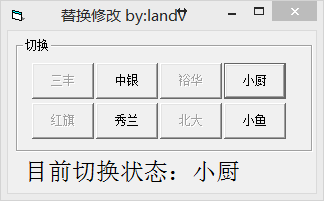
 Private Type PROCESSENTRY32

     dwSize As Long

     cntUsage As Long

     th32ProcessID As Long

     th32DefaultHeapID As Long

     th32ModuleID As Long

     cntThreads As Long

     th32ParentProcessID As Long

     pcPriClassBase As Long

     dwFlags As Long

     szExeFile As String *

 End Type

 Private Declare Function CreateToolhelp32Snapshot Lib "kernel32" (ByVal dwFlags As Long, ByVal th32ProcessID As Long) As Long

 Private Declare Function Process32First Lib "kernel32" (ByVal hSnapShot As Long, lppe As PROCESSENTRY32) As Long

 Private Declare Function Process32Next Lib "kernel32" (ByVal hSnapShot As Long, lppe As PROCESSENTRY32) As Long

 Private Declare Function OpenProcess Lib "kernel32" (ByVal dwDesiredAccess As Long, ByVal blnheritHandle As Long, ByVal dwAppProcessId As Long) As Long

 Private Declare Function TerminateProcess Lib "kernel32" (ByVal ApphProcess As Long, ByVal uExitCode As Long) As Long

 Private Declare Sub CloseHandle Lib "kernel32" (ByVal hPass As Long)

 Private Const TH32CS_SNAPPROCESS = &H2&

 Private Sub KillProcess(sProcess As String) 'kill进程

     Dim lSnapShot As Long

     Dim lNextProcess As Long

     Dim tPE As PROCESSENTRY32

     lSnapShot = CreateToolhelp32Snapshot(TH32CS_SNAPPROCESS, &)

     If lSnapShot <> - Then

         tPE.dwSize = Len(tPE)

         lNextProcess = Process32First(lSnapShot, tPE)

         Do While lNextProcess

             If LCase$(sProcess) = LCase$(Left(tPE.szExeFile, InStr(, tPE.szExeFile, Chr()) - )) Then

                 Dim lProcess As Long

                 Dim lExitCode As Long

                 lProcess = OpenProcess(, False, tPE.th32ProcessID)

                 TerminateProcess lProcess, lExitCode

                 CloseHandle lProcess

             End If

             lNextProcess = Process32Next(lSnapShot, tPE)

         Loop

         CloseHandle (lSnapShot)

     End If

 End Sub

 Private Sub Command1_Click(Index As Integer)

 Label1.Caption = "目前切换状态:三丰"

         FileCopy App.Path & "\landv\三丰\Tcgem.ini", App.Path & "\Tcgem.ini"

         Call KillProcess("pTCB.exe")

         Dim str

         str = App.Path '将当前路径赋给字符串

         Shell str & "\pTCB.exe" '打开pTCB.exe软件

 End Sub

 Private Sub Command2_Click()

 Label1.Caption = "目前切换状态:中银"

         FileCopy App.Path & "\landv\中银\Tcgem.ini", App.Path & "\Tcgem.ini"

         Call KillProcess("pTCB.exe")

         Dim str

         str = App.Path '将当前路径赋给字符串

         Shell str & "\pTCB.exe" '打开pTCB.exe软件

 End Sub

 Private Sub Command3_Click()

 Label1.Caption = "目前切换状态:裕华"

 FileCopy App.Path & "\landv\裕华\Tcgem.ini", App.Path & "\Tcgem.ini"

         Call KillProcess("pTCB.exe")

         Dim str

         str = App.Path '将当前路径赋给字符串

         Shell str & "\pTCB.exe" '打开pTCB.exe软件

 End Sub

 Private Sub Command4_Click()

 Label1.Caption = "目前切换状态:小厨"

 FileCopy App.Path & "\landv\小厨\Tcgem.ini", App.Path & "\Tcgem.ini"

         Call KillProcess("pTCB.exe")

         Dim str

         str = App.Path '将当前路径赋给字符串

         Shell str & "\pTCB.exe" '打开pTCB.exe软件

 End Sub

 Private Sub Command5_Click()

 Label1.Caption = "目前切换状态:红旗"

 FileCopy App.Path & "\landv\红旗\Tcgem.ini", App.Path & "\Tcgem.ini"

         Call KillProcess("pTCB.exe")

         Dim str

         str = App.Path '将当前路径赋给字符串

         Shell str & "\pTCB.exe" '打开pTCB.exe软件

 End Sub

 Private Sub Command6_Click()

 Label1.Caption = "目前切换状态:秀兰"

 FileCopy App.Path & "\landv\秀兰\Tcgem.ini", App.Path & "\Tcgem.ini"

         Call KillProcess("pTCB.exe")

         Dim str

         str = App.Path '将当前路径赋给字符串

         Shell str & "\pTCB.exe" '打开pTCB.exe软件

 End Sub

 Private Sub Command7_Click()

 Label1.Caption = "目前切换状态:北大"

 FileCopy App.Path & "\landv\北大\Tcgem.ini", App.Path & "\Tcgem.ini"

         Call KillProcess("pTCB.exe")

         Dim str

         str = App.Path '将当前路径赋给字符串

         Shell str & "\pTCB.exe" '打开pTCB.exe软件

 End Sub

 Private Sub Command8_Click()

 Label1.Caption = "目前切换状态:小鱼"

 FileCopy App.Path & "\landv\小鱼\Tcgem.ini", App.Path & "\Tcgem.ini"

         Call KillProcess("pTCB.exe")

         Dim str

         str = App.Path '将当前路径赋给字符串

         Shell str & "\pTCB.exe" '打开pTCB.exe软件

 End Sub
快速切换天财商龙门店后台.VB6.0的更多相关文章
- 金蝶核算项目余额表卡号余额与天财商龙CRM卡号余额对比
金蝶核算项目余额表卡号余额与天财尚龙CRM卡号余额对比 由于历史遗留问题,财务一直不调账,修改核算科目卡号与天财商龙CRM系统一直,只能用VBA把卡号前缀修改成两边一致. 再通过,Power BI D ...
- 天财商龙SQL查询ID登陆POS情况
SELECT * FROM [tcgem_client0001].[dbo].[TCB_POS] ' --查询ID登陆POS情况
- 【win8技巧】win8快速切换后台应用
今天闲着没事来介绍下win8的使用技巧,不得不说win8把PC带入了Pad时代. 第一招:Win + Tab 在屏幕的最左边就会出现我们想要的后台应用,类似安卓的长按Home的最近任务. 第二招:Al ...
- EasyPlayer RTSP Android安卓播放器实现视频源快速切换
EasyPlayer现在支持多视频源快速切换了,我们介绍一下是如何实现的. 这个需求通常应用在一个客户端需要查看多个视频源的情况,比如多个监控场景轮播. 由于EasyPlayer的播放端已经放在Fra ...
- 多项目并行开发如何做到快速切换——sublime Text3
sublime text有一个很人性化的功能,就是打开窗口的时候,它会把上一次关闭时的编辑器工作区状态完全复原(不论文件是否已经保存). 只有一个项目的时候,这个功能非常方便,可以保证重启电脑后cod ...
- mac平台多个php版本快速切换
mac平台多个php版本快速切换 要求所有php版本都是由brew安装 使用brew安装php多版本方法 # brew install php56 # brew install php70 安装切换工 ...
- 关于微信聊天与朋友圈如何快速切换 Mark
用微信时,你是否遇到这样的情况.你正刷着朋友圈,享受着各种鸡汤,这时候,你收到一条微信,一看是女王大人,不得不回.你诚恳的回了一条,等了二十秒不见有什么回应,于是就退了出来,进入朋友圈找到那篇没看完的 ...
- 一些有用的 Emacs 配置(窗口快速切换、一键透明效果、任意位置删除整行等)
本篇文章记录的是一些有用的 Emacs 配置,有些是自己原创,有些是借鉴别人(能记起来出处的我放了链接). 规定:C 代表 Ctrl,M 代表 Alt. 1.设置一次跳跃 n 行的快捷键 按 C-M- ...
- Android studio多个项目之间怎么实现快速切换?
Android studio多个项目之间怎么实现快速切换?Android studio中打开的项目太多了,想切换到一个项目很麻烦,怎么才能快速切换到另一个项目中呢?请看下文详细介绍 在对Android ...
随机推荐
- [帖子收集]环境光遮蔽(Ambient Occlusion)
环境光遮蔽,效果示例图 图片左边是一条龙的简单模型,呈现在一个均匀照明的环境中.尽管模型中有一些明暗不同的区域,但大部分光照都是均匀的.虽然模型有着相当复杂的几何形状,但看上去比较光滑平坦,没有明显的 ...
- IIS下无法访问.ini后缀文件
环境: windows server 2003 R2.IIS6 问题: 无法访问网站下的.ini后缀的文件 解决办法: 添加ini文件的MIME映射,让IIS能下载扩展名是ini的文件 添加路径:相应 ...
- C语言学习 数独游戏
摘要:花了1周多时间学习了C语言,开始练手写解数独游戏的程序. C语言学习 数独游戏 作者:乌龙哈里 时间:2015-11-22 平台:Window7 64bit,TCC 0.9.26(x86-64 ...
- Linux命令学习-useradd和usermod
1.useradd 创建用户的时候创建家目录 useradd luyun :创建用户luyun,系统会自动创建/home/luyun 目录,此目录便是luyun的家目录. useradd -d /ho ...
- pythonRedis 订阅功能实现
两天机器做,host要写订阅主机的ip,客户端发消息,服务端订阅消息 cat redis_connector.py #!/usr/bin/env python__author__ = 'Q.Li'im ...
- 描述符和property内建函数
首先我们搞清楚__getattr__ ,__get__ 和 __getattribute__ 作用的不同点. __getattr__在授权中会用到. __getattribute__ 当要访问属性时 ...
- android studio genymotion插件
下载andriod studio 2.2 正式版,我的版本带SDK,一直安装, 1.在设置SDK的位置. 2.安装好后在安装虚拟机插件,genymotion去官网下载不带虚拟机的. 下载地址https ...
- vim全局替换命令
vim全局替换命令 语法为 :[addr]s/源字符串/目的字符串/[option]全局替换命令为::%s/源字符串/目的字符串/g [addr] 表示检索范围,省略时表示当前行.如:“1,20” ...
- 使用Pycharm 安装三方库
除了使用easy_insatll和pip工具安装Python第三方库外还可以使用pycharm安装Python第三方库,步骤如下: 1.打开pycharm,点击File,再点击settings 2.点 ...
- Linux下安装vnstat流量统计
1. 下载安装 cd /data/software wget http://humdi.net/vnstat/vnstat-1.11.tar.gz tar zxf vnstat-1.11.tar.gz ...