
动态注册HttpModule
动态注册HttpModule
2014-06-05 08:58 by 汤姆大叔, 757 阅读, 4 评论, 收藏, 编辑
文章内容
通过前面的章节,我们知道HttpApplication在初始化的时候会初始化所有配置文件里注册的HttpModules,那么有一个疑问,能否初始化之前动态加载HttpModule,而不是只从Web.config里读取?
答案是肯定的, ASP.NET MVC3发布的时候提供了一个Microsoft.Web.Infrastructure.dll文件,这个文件就是提供了动态注册HttpModule的功能,那么它是如何以注册的呢?我们先去MVC3的源码看看该DLL的源代码。
注:该DLL位置在C:\Program Files\Microsoft ASP.NET\ASP.NET Web Pages\v1.0\Assemblies\下
我们发现了一个静态类DynamicModuleUtility,里面有个RegisterModule方法引起了我的注意:
// Call from PreAppStart to dynamically register an IHttpModule, just as if you had added it to the

// <modules> section in Web.config.

[SecuritySafeCritical]

public static void RegisterModule(Type moduleType) {

    if (DynamicModuleReflectionUtil.Fx45RegisterModuleDelegate != null) {

        // The Fx45 helper exists, so just call it directly.

        DynamicModuleReflectionUtil.Fx45RegisterModuleDelegate(moduleType);

    }

    else {

        // Use private reflection to perform the hookup.

        LegacyModuleRegistrar.RegisterModule(moduleType);

    }

}
通过代码和注释我们可以看到,这个方法就是让我们动态注册IHttpModule的,而且由于.Net4.5已经有helper类支持了,所以直接就可以用,其它版本使用LegacyModuleRegistrar.RegisterModule来动态注册IHttpModule 的。而这个方法里又分IIS6和IIS7集成或经典模式之分,代码大体上是一致的,我们这里就只分析IIS6版本的代码:
private static void AddModuleToClassicPipeline(Type moduleType) {

    // This works by essentially adding a new entry to the <httpModules> section defined

    // in ~/Web.config. Need to set the collection to read+write while we do this.

    // httpModulesSection = RuntimeConfig.GetAppConfig().HttpModules;

    // httpModulesSection.Modules.bReadOnly = false;

    // httpModulesSection.Modules.Add(new HttpModuleAction(...));

    // httpModulesSection.Modules.bReadOnly = true;

    HttpModulesSection httpModulesSection = null;

    try {

        object appConfig = _reflectionUtil.GetAppConfig();

        httpModulesSection = _reflectionUtil.GetHttpModulesFromAppConfig(appConfig);

        _reflectionUtil.SetConfigurationElementCollectionReadOnlyBit(httpModulesSection.Modules, false /* value */);

        DynamicModuleRegistryEntry newEntry = CreateDynamicModuleRegistryEntry(moduleType);

        httpModulesSection.Modules.Add(new HttpModuleAction(newEntry.Name, newEntry.Type));

    }

    finally {

        if (httpModulesSection != null) {

            _reflectionUtil.SetConfigurationElementCollectionReadOnlyBit(httpModulesSection.Modules, true /* value */);

        }

    }

}
上面代码的注释非常重要,通过注释我们可以看到,该方法先从RuntimeConfig.GetAppConfig().HttpModules获取HttpModules集合,然后在集合里添加需要注册的新HttpModule,那就是说HttpApplication在初始化所有HttpModule之前必须将需要注册的HttpModule添加到这个集合里,那是在哪个周期呢?HttpApplication之前是HostingEnvironment,那是不是在这里可以注册呢?我们去该类查看一下相关的代码,在Initialize方法里突然发现一个貌似很熟悉的代码BuildManager.CallPreStartInitMethods(),代码如下:
// call AppInitialize, unless the flag says not to do it (e.g. CBM scenario).

// Also, don't call it if HostingInit failed (VSWhidbey 210495)

if(!HttpRuntime.HostingInitFailed) {

    try {

        BuildManager.CallPreStartInitMethods();

        if ((hostingFlags & HostingEnvironmentFlags.DontCallAppInitialize) == 0) {

            BuildManager.CallAppInitializeMethod();

        }

    }

    catch (Exception e) {

        // could throw compilation errors in 'code' - report them with first http request

        HttpRuntime.InitializationException = e;

        if ((hostingFlags & HostingEnvironmentFlags.ThrowHostingInitErrors) != 0) {

            throw;

        }

    }

}
通过去BuildManager类去查看该方法的详情,最终发现了如下这个方法:
internal static ICollection<MethodInfo> GetPreStartInitMethodsFromAssemblyCollection(IEnumerable<Assembly> assemblies) {

    List<MethodInfo> methods = new List<MethodInfo>();

    foreach (Assembly assembly in assemblies) {

        PreApplicationStartMethodAttribute[] attributes = null;

        try {

            attributes = (PreApplicationStartMethodAttribute[])assembly.GetCustomAttributes(typeof(PreApplicationStartMethodAttribute), inherit: true);

        }

        catch {

            // GetCustomAttributes invokes the constructors of the attributes, so it is possible that they might throw unexpected exceptions.

            // (Dev10 bug 831981)

        }

        if (attributes != null && attributes.Length != 0) {

            Debug.Assert(attributes.Length == 1);

            PreApplicationStartMethodAttribute attribute = attributes[0];

            Debug.Assert(attribute != null);

            MethodInfo method = null;

            // Ensure the Type on the attribute is in the same assembly as the attribute itself

            if (attribute.Type != null && !String.IsNullOrEmpty(attribute.MethodName) && attribute.Type.Assembly == assembly) {

                method = FindPreStartInitMethod(attribute.Type, attribute.MethodName);

            }

            if (method != null) {

                methods.Add(method);

            }

            else {

                throw new HttpException(SR.GetString(SR.Invalid_PreApplicationStartMethodAttribute_value,

                    assembly.FullName,

                    (attribute.Type != null ? attribute.Type.FullName : String.Empty),

                    attribute.MethodName));

            }

        }

    }

    return methods;

}
发现了该方法会查找应用程序下所有的程序集,判断如果程序集标记为PreApplicationStartMethodAttribute特性,就会执行这个特性里指定的方法(静态方法),再检查该类的代码:
    [AttributeUsage(AttributeTargets.Assembly, AllowMultiple = false)]

    public sealed class PreApplicationStartMethodAttribute : Attribute {

         private readonly Type _type;

        private readonly string _methodName;

        public PreApplicationStartMethodAttribute(Type type, string methodName) {

            _type = type;

            _methodName = methodName;

        }

        public Type Type {   get { return _type; }   }

        public string MethodName {  get {  return _methodName; }   }

    }
这时候,心里应该有数了吧,我们可以在这里指定一个静态方法名称,然后在该方法去通过如下代码去注册一个自定义的HttpModule(注意我们只能使用一次):
DynamicModuleUtility.RegisterModule(typeof(CustomModule));
我们来做个试验试试我们分析的结果是不是正确,首先创建一个自定义HttpModule,代码如下:
public class CustomModule : IHttpModule

{

    public void Init(HttpApplication context)

    {

        context.BeginRequest += new EventHandler(context_BeginRequest);

    }

    void context_BeginRequest(object sender, EventArgs e)

    {

        HttpApplication ap = sender as HttpApplication;

        if (ap != null)

        {

            ap.Response.Write("汤姆大叔测试PreApplicationStartMethod通过!<br/>");

        }

    }

    public void Dispose()

    {

        //nothing to do here

    }

}
然后在创建一个用于注册这个HttpModule的类并且带有静态方法:
public class PreApplicationStartCode

{

    private static bool hasLoaded;

    public static void PreStart()

    {

        if (!hasLoaded)

        {

            hasLoaded = true;

            //注意这里的动态注册,此静态方法在Microsoft.Web.Infrastructure.DynamicModuleHelper

            DynamicModuleUtility.RegisterModule(typeof(CustomModule));

        }

    }

}
接着要安装要求对该程序添加一个特性,代码如下:
[assembly: PreApplicationStartMethod(typeof(WebApplication1.Test.PreApplicationStartCode), "PreStart")]
最后,编译运行,会发现所有的页面顶部都会出现我们指定的文字(汤姆大叔测试PreApplicationStartMethod通过!),截图如下:
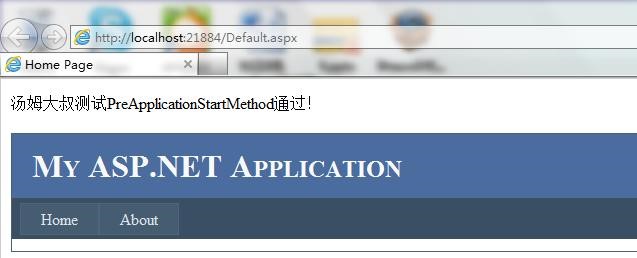
这就证实了我们的分析结果是正确的,怎么样,这个功能不错吧,不需要每次都在web.config里定义你的HttpModule咯,而且我们以后封装自己的类库就方便多了,不需要在网站程序集里指定代码去启动自己封装好的单独类库了,因为我们可以在自己的类库里直接使用这种方式实现自动注册的功能。下个章节,我们将介绍一个利用此功能开发的超强类库。
注:同一个程序集只能使用一次这个特性来调用一个静态方法。
同步与推荐
本文已同步至目录索引:MVC之前的那点事儿系列
MVC之前的那点事儿系列文章,包括了原创,翻译,转载等各类型的文章,如果对你有用,请推荐支持一把,给大叔写作的动力。
动态注册HttpModule的更多相关文章
- 你必须知道ASP.NET知识------关于动态注册httpmodule(对不起汤姆大叔)
一.关于动态注册的问题 很多人看过汤姆大叔的MVC之前的那点事儿系列(6):动态注册HttpModule ,其实汤姆大叔没有发现httpmodule动态注册的根本机制在哪里. 亦即:怎么动态注册?为什 ...
- MVC之前的那点事儿系列(6):动态注册HttpModule
文章内容 通过前面的章节,我们知道HttpApplication在初始化的时候会初始化所有配置文件里注册的HttpModules,那么有一个疑问,能否初始化之前动态加载HttpModule,而不是只从 ...
- 不使用配置文件动态注册HttpModule
在asp.net 4.0中,提供了一种不通过修改配置文件注册Module的方法.从.net3.5开始,新提供的PreApplicationStartMethodAttribute特性可以应用在程序集上 ...
- Mvc动态注册HttpModule详解
序言 注册Httpmodule可以让我们使用HttpApplication对象中的处理管道事件.目前大家所熟知的应该有2种方式来使用HttpApplication对象中的处理管道事件.第一种是通过Gl ...
- MVC源码解析 - 配置注册 / 动态注册 HttpModule
本来这一篇, 是要继续 Pipeline 的, 但是在 Pipeline之前, 我看到了InitModules()方法, 所以决定, 在中间穿插一篇进来. 这一篇来讲一下 IHttpModule 的加 ...
- 在Asp.net 4.0 中动态注册HttpModule
using System; using System.Web; using Microsoft.Web.Infrastructure; namespace MvcApplication1 { publ ...
- 动态注册HttpModule管道,实现global.asax功能
1.所用类库有 Microsoft.Web.Infrastructure.dll 和WebActivator.dll 2.类代码如下 using System; using System.Collec ...
- RPC原来就是Socket——RPC框架到dubbo的服务动态注册,服务路由,负载均衡演化
序:RPC就是使用socket告诉服务端我要调你的哪一个类的哪一个方法然后获得处理的结果.服务注册和路由就是借助第三方存储介质存储服务信息让服务消费者调用.然我们自己动手从0开始写一个rpc功能以及实 ...
- Android开发4: Notification编程基础、Broadcast的使用及其静态注册、动态注册方式
前言 啦啦啦~(博主每次开篇都要卖个萌,大家是不是都厌倦了呢~) 本篇博文希望帮助大家掌握 Broadcast 编程基础,实现动态注册 Broadcast 和静态注册 Broadcast 的方式以及学 ...
随机推荐
- 类(class)能不能自己继承自己(转)
类(class)能不能自己继承自己不行,继承关系会出现环. 假设类A继承类A.那么要新建一个类A的对象,就必须先建立一个类A父类的对象.这是一个递归的过程,而且没有终止条件.会死循环的. 从编译的角度 ...
- 波折yosemite下载过程
已经知道Yosemite正式宣布了这一消息,为了尽快有效地使用该系统尽可能.上学前把一个新的硬盘驱动器准备就绪-但不幸的是,我不知道是谁动手当天学校欠网关停电,我没有强迫受害者上课听老师讲废话(这是什 ...
- 配置静态监听解决ORA-12514错误的案例(转)
今天做Linux下DG配置的时候,遇到一个现象,tnsname.ora文件配置都正常,tnsping也正常,监听也正常,但是仍然报ORA-12514错误: SQL> set lin 130 ...
- HTML5分析实战Web存储机制(Web Storage)
Web Storage它是Key-Value在持久性数据存储的形式.Web Storage为了克服cookie把所引起的一些限制.当数据需要严格格控制client准时,没有必要不断地发回数据serve ...
- shell编程控制结构:expr、let、for、while、until、shift、if、case、break、continue、功能、select
1.expr计算整数变量值 s=`expr 2 + 3` 运算符号和參数之间要有空格分开: 2.let命令 let s=(2+3)*4 echo $s 3.for语句 for 变量 in 列表 do ...
- crawler_浅谈网络爬虫
题记: 1024,今天是个程序猿的节日 ,哈哈,转为正题,从事了一线网络爬虫开发有近1000天.简单阐述下个人对网络爬虫的理解. 提纲: 1:是什么 2:能做什么 3:怎么做 4:综述 1:是什么 w ...
- HDU 1686 Oulipo(kmp)
Problem Description The French author Georges Perec (1936–1982) once wrote a book, La disparition, w ...
- 6.跑步者--并行编程框架 ForkJoin
本文如果您已经了解一般并行编程知识.了解Java concurrent部分如ExecutorService等相关内容. 虽说是Java的ForkJoin并行框架.但不要太在意Java,当中的思想在其他 ...
- 【百度地图API】如何判断点击的是地图还是覆盖物?
原文:[百度地图API]如何判断点击的是地图还是覆盖物? 摘要:很多API爱好者问我,为什么我点击的是marker,而map也会响应该事件呢?怎样才能判断,我点击的是标注,还是地图呢?下面一起来看看. ...
- C#中实现WebBrowser控件的HTML源代码读写
原文:C#中实现WebBrowser控件的HTML源代码读写 C#中实现WebBrowser控件的HTML源代码读写http://www.blogcn.com/user8/flier_lu/index ...