致谢 https://www.jianshu.com/p/9458083214cc

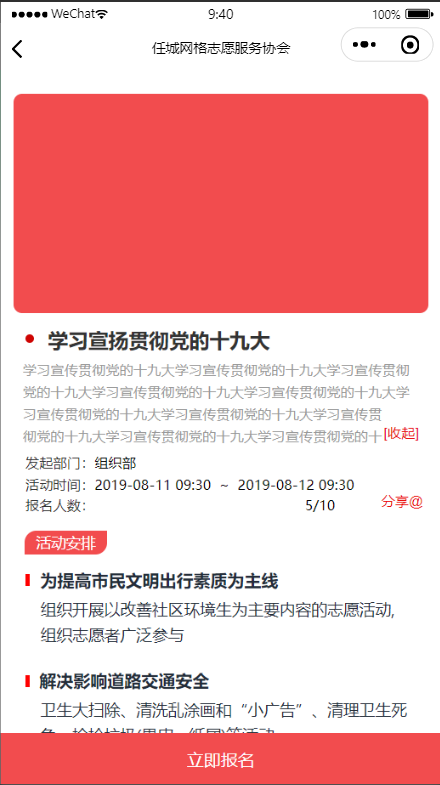
效果图


代码

js部分

// pages/volunteer/active/info/activeInfo.js
const app = getApp();
Page({
  /**
   * 页面的初始数据
   */
  data: {
    active:{},//活动详情
    val:false
  },
  /**
   * 生命周期函数--监听页面加载
   */
  onLoad: function (options) {
    let id = options.id;
    //获取活动详情
    console.info("onReady")
    this.getActiveData(id);
  },
  /**
   * 生命周期函数--监听页面初次渲染完成
   */
  onReady: function () {
  },
  /**
   * 生命周期函数--监听页面显示
   */
  onShow: function () {
    console.info("onshow")
  },
  /**
   * 生命周期函数--监听页面隐藏
   */
  onHide: function () {
    console.info("onHide")
  },
  /**
   * 生命周期函数--监听页面卸载
   */
  onUnload: function () {
    console.info("onUnload")
  },
  /**
   * 页面相关事件处理函数--监听用户下拉动作
   */
  onPullDownRefresh: function () {
    console.info("onPullDownRefresh")
  },
  /**
   * 页面上拉触底事件的处理函数
   */
  onReachBottom: function () {
    console.info("onReachBottom")
  },
  /**
   * 用户点击右上角分享
   */
  onShareAppMessage: function () {
  },
  
  //获取推荐
  getActiveData:function(id){
    console.info("***getActiveData****************************" + id);
    let _this = this;
    wx.request({
      url: app.globalData.serverIp + 'vol/active/getActiveInfo',
      method: "GET",
      data: {
        id: id,
      },
      success: function(res) {
        console.info("getActiveData**********************")
        console.info(res)
        if (res.data.code == 200) {
          _this.setData({
            active: res.data.data,
          })
        }
      },
      fail: function() {
        console.log("fail")
      }
    })
  },
  checkboxChange(e) {
      this.setData({
        val:!this.data.val
      })
  }
})

html部分

<view class="page">
  <view class="pannel">
    
    <view class="pan-box">
      <!-- 顶部图片 -->
      <view class="img-box"></view>
      <!-- 中部详情 -->
      <view class="mid-box">
        <view class="layer4">
          <view class="layer5"></view>
          <text lines="1" class="word2">学习宣扬贯彻党的十九大</text>
        </view>
        <view class="wrapper">
          <view class="text {{val?'atv':''}}">
            <label class="btn {{val?'atv_label':''}}" bindtap="checkboxChange"></label>
            学习宣传贯彻党的十九大学习宣传贯彻党的十九大学习宣传贯彻党的十九大学习宣传贯彻党的十九大学习宣传贯彻党的十九大学习宣传贯彻党的十九大学习宣传贯彻党的十九大学习宣传贯彻党的十九大学习宣传贯彻党的十九大学习宣传贯彻党的十九大
          </view>
        </view>
        <view class="layer7">
          <view class="group1">
            <text lines="1" class="info2">发起部门:</text>
            <text lines="1" class="txt1">组织部</text>
          </view>
        </view>
        <view class="layer8">
          <view class="layer9">
            <text lines="1" class="info3">活动时间:</text>
            <text lines="1" decode="true" class="word3">2019-08-11&nbsp;09:30&nbsp;&nbsp;~&nbsp;&nbsp;2019-08-12&nbsp;09:30</text>
          </view>
        </view>
        <view class="bm">
            <view class="bm-con">
              <text lines="1" class="bm-1">报名人数:</text>
              <text lines="1" class="bm-2">5/10</text>
            </view>
        </view>
        <a href="#" class="abs">分享@</a>
      </view>
      
      <!-- 底部活动安排 -->
      <view class="layer10">
        <text lines="1" class="word5">活动安排</text>
      </view>
      <view class="layer11">
        <view class="icon1"></view>
        <text lines="1" class="info4">为提高市民文明出行素质为主线</text>
      </view>
      <p  class="paragraph2">组织开展以改善社区环境生为主要内容的志愿活动,组织志愿者广泛参与</p>
      <view class="layer12">
        <view class="icon1"></view>
        <text lines="1" class="info5">解决影响道路交通安全</text>
      </view>
      <p  class="infoBox1">卫生大扫除、清洗乱涂画和“小广告”、清理卫生死角、捡拾垃圾(果皮、纸屑)等活动</p>
    </view>
    
    <!-- 尾部立即报名 -->
    <view class="bottom_button">
      <text lines="1" class="button">立即报名</text>
    </view>
  </view>
</view> 
 

css部分

.page {
  position: relative;
  width: 100vw;
  height: 100vh;
  overflow: hidden;
  display: flex;
  flex-direction: column;
  background-color: #FFFFFF;
}
.pannel{
  width: 100%;
  height: 100%;
}
.bottom_button {
  z-index: 35;
  height: 88rpx;
  border: 1px  rgba(226,226,226,1);
  background-color: #F24C4E;
  background-size: 756rpx 94rpx;
  display: flex;
  flex-direction: column;
  padding-left: 318rpx;
  width: 750rpx;
  position: fixed;
  left: 0rpx;
  bottom: 0rpx;
  justify-content: center;
}
.button {
  width: 114rpx;
  height: 28rpx;
  overflow-wrap: break-word;
  color: rgba(255,255,255,1);
  font-size: 30rpx;
  font-family: SourceHanSansCN-Regular;
  text-align: right;
  white-space: nowrap;
  line-height: 30rpx;
  display: block;
}
.pan-box{
  width: 98%;
  margin: 0 auto;
}
.img-box{
  width: 710rpx;
  height: 375rpx;
  margin: 0 auto;
  margin-top: 40rpx;
  /* background: url(https://lanhu.oss-cn-beijing.aliyuncs.com/ps503qxduaqopoznzu7hvvey4jeyzpsoyff7217094-3137-40c5-b07d-a244ed812390) -18rpx 0rpx no-repeat; */
  /* background-size: 750rpx 375rpx; */
  background-color: #F24C4E;
  display: flex;
  flex-direction: column;
  border-radius: 15rpx;
}
.layer4 {
  width: 430rpx;
  height: 35rpx;
  flex-direction: row;
  display: flex;
  justify-content: space-between;
  margin: 30rpx 0 0 35rpx;
}
.layer5 {
  background-color: rgba(206,4,2,1.000000);
  border-radius: 50%;
  width: 16rpx;
  height: 16rpx;
  margin-top: 9rpx;
  display: flex;
  flex-direction: column;
}
.word2 {
  width: 393rpx;
  height: 35rpx;
  overflow-wrap: break-word;
  color: rgba(51,51,51,1);
  font-size: 36rpx;
  font-family: SourceHanSansCN-Bold;
  text-align: left;
  white-space: nowrap;
  line-height: 36rpx;
  display: block;
  font-weight:bold;
}
.layer7 {
  width: 687rpx;
  height: 26rpx;
  flex-direction: row;
  display: flex;
  justify-content: space-between;
  margin: 13rpx 0 0 35rpx;
}
.group1 {
  width: 191rpx;
  height: 23rpx;
  overflow-wrap: break-word;
  font-size: 0rpx;
  font-family: SourceHanSansCN-Light;
  text-align: left;
  white-space: nowrap;
  line-height: 24rpx;
}
.info2 {
  width: 191rpx;
  height: 23rpx;
  overflow-wrap: break-word;
  color: rgba(51, 51, 51, 1);
  font-size: 24rpx;
  font-family: SourceHanSansCN-Light;
  text-align: left;
  white-space: nowrap;
  line-height: 24rpx;
}
.txt1 {
  width: 191rpx;
  height: 23rpx;
  overflow-wrap: break-word;
  color: black;
  font-size: 24rpx;
  font-family: SourceHanSansCN-Regular;
  text-align: left;
  white-space: nowrap;
  line-height: 24rpx;
}
.layer8 {
  width: 693rpx;
  height: 25rpx;
  flex-direction: row;
  display: flex;
  justify-content: space-between;
  margin: 12rpx 0 0 35rpx;
}
.layer9 {
  width: 531rpx;
  height: 23rpx;
  overflow-wrap: break-word;
  font-size: 0rpx;
  font-family: SourceHanSansCN-Light;
  text-align: left;
  white-space: nowrap;
  line-height: 24rpx;
  margin-top: 2rpx;
}
.info3 {
  width: 531rpx;
  height: 23rpx;
  overflow-wrap: break-word;
  color: rgba(51, 51, 51, 1);
  font-size: 24rpx;
  font-family: SourceHanSansCN-Light;
  text-align: left;
  white-space: nowrap;
  line-height: 24rpx;
}
.word3 {
  width: 531rpx;
  height: 23rpx;
  overflow-wrap: break-word;
  color: black;
  font-size: 24rpx;
  font-family: SourceHanSansCN-Regular;
  text-align: left;
  white-space: nowrap;
  line-height: 24rpx;
}
.bm {
  width: 687rpx;
  height: 26rpx;
  flex-direction: row;
  display: flex;
  justify-content: space-between;
  margin: 13rpx 0 0 35rpx;
}
.bm-con {
  width: 191rpx;
  height: 23rpx;
  overflow-wrap: break-word;
  font-size: 0rpx;
  font-family: SourceHanSansCN-Light;
  text-align: left;
  white-space: nowrap;
  line-height: 24rpx;
}
.bm-1 {
  width: 191rpx;
  height: 23rpx;
  overflow-wrap: break-word;
  color: rgba(51, 51, 51, 1);
  font-size: 24rpx;
  font-family: SourceHanSansCN-Light;
  text-align: left;
  white-space: nowrap;
  line-height: 24rpx;
  margin-right: 360rpx;
}
.bm-2 {
  width: 191rpx;
  height: 23rpx;
  overflow-wrap: break-word;
  color: black;
  font-size: 24rpx;
  font-family: SourceHanSansCN-Regular;
  text-align: left;
  white-space: nowrap;
  line-height: 24rpx;
}
.mid-box{
  position: relative;
  /* border: 1px solid black; */
}
.abs{
  text-decoration: none;
  display: block;
  width: 86rpx;
  height: 40rpx;
  color: rgb(235, 10, 10);
  font-size: 24rpx;
  position: absolute;
  bottom: 0rpx;
  right: 10rpx;
  /* border: 1px solid black; */
}
.layer10 {
  border-radius: NaNrpx;
  height: 69rpx;
  display: flex;
  flex-direction: column;
  width: 195rpx;
  margin: 20rpx 0 0 4rpx;
  padding: 10rpx 0 0 29rpx;
}
.word5 {
  width: 143rpx;
  height: 42rpx;
  overflow-wrap: break-word;
  color: rgba(255,255,255,1);
  font-size: 26rpx;
  background-color: rgba(242,76,78,1.000000);
  border-radius: 20rpx 0 20rpx 0;
  font-family: SourceHanSansCN-Bold;
  text-align: center;
  line-height: 42rpx;
  display: block;
  justify-content: center;
  text-align: center;
}
.layer11 {
  width: 444rpx;
  height: 30rpx;
  flex-direction: row;
  display: flex;
  justify-content: space-between;
  margin: 1rpx 0 0 35rpx;
}
.icon1 {
  width: 9rpx;
  height: 20rpx;
  margin-top: 6rpx;
  background-color: red;
}
.info4 {
  width: 419rpx;
  height: 30rpx;
  overflow-wrap: break-word;
  color: rgba(36,45,57,1);
  font-size: 30rpx;
  font-family: SourceHanSansCN-Bold;
  text-align: left;
  white-space: nowrap;
  line-height: 30rpx;
  display: block;
  font-weight: bold;
}
.paragraph2 {
  width: 624rpx;
  color: rgba(36,45,57,1);
  font-size: 28rpx;
  font-family: SourceHanSansCN-Normal;
  text-align: left;
  display: block;
  margin: 15rpx 0 0 60rpx;
}
.layer12 {
  width: 324rpx;
  height: 30rpx;
  flex-direction: row;
  display: flex;
  justify-content: space-between;
  margin: 42rpx 0 0 35rpx;
}
.label2 {
  width: 9rpx;
  height: 20rpx;
  margin-top: 6rpx;
}
.info5 {
  width: 300rpx;
  height: 30rpx;
  overflow-wrap: break-word;
  color: rgba(36,45,57,1);
  font-size: 30rpx;
  font-family: SourceHanSansCN-Bold;
  text-align: left;
  white-space: nowrap;
  line-height: 30rpx;
  display: block;
  font-weight: bold;
}
.infoBox1 {
  width: 642rpx;
  color: rgba(36,45,57,1);
  font-size: 28rpx;
  font-family: SourceHanSansCN-Normal;
  text-align: left;
  display: block;
  margin: 15rpx 0 0 60rpx;
}
.wrapper {
  display: flex;
  margin: 15rpx auto;
  width: 677rpx;
  overflow: hidden;
}
.text {
  margin: 0 auto;
  padding: 0;
  font-size: 24rpx;
  color: rgba(153, 153, 153, 1);
  overflow: hidden;
  text-overflow: clip;
  text-align: left;
  position: relative;
  line-height: 39rpx;
  max-height: 80rpx;
}
.text::before {
  content: '';
  height: calc(100% - 23px);
  float: right;
}
.btn {
  /* border: 1rpx solid black; */
  position: relative;
  float: right;
  clear: both;
  margin:0;
  font-size: 24rpx;
  padding: 0 ;
  /* padding-top: 1rpx; */
  line-height: 38rpx;
  height: 30rpx;
  color: rgb(233, 16, 16);
}
.btn::before {
  content: '';
  position: absolute;
  left: -5rpx;
  color: rgb(10, 1, 1);
  transform: translateX(-100%)
}
.btn::after {
  content: '[展开]'
}
.atv {
  max-height: none;
}
.atv_label::after {
  content: '[收起]'
}
.atv_label::before {
  /*在展开状态下隐藏省略号*/
  visibility: hidden;
}

微信小程序实现文本的展开与收起的更多相关文章

  1. [微信小程序] 微信小程序富文本-wxParse的使用

    最近小程序蛮火的,公司要做于是学了一点点小程序 不知道你们有没有遇到过这种问题: 从公司服务器获取的文章内容是有HTML标签格式的一段内容,但是微信是不支持这些标签的,怎么办呢? 1.一般网站后台的文 ...

  2. 微信小程序rich-text 文本首行缩进和图片居中

    微信小程序开发使用rich-text组件渲染html格式的代码,常常因为不能自定义css导致文本不能缩进,以及图片不能居中等问题,这里可以考虑使用js的replace方法,替换字符串,然后在渲染的同时 ...

  3. 微信小程序富文本渲染组件html2wxml及html2wxml代码块格式化在ios下字体过大问题

    1.组件使用: 之前微信小程序的富文本渲染组件用的wxParse,对普通富文本确实可以,但是对于代码格式pre标签则无法使用. 下面这个html2wxml很不错,可以支持代码高亮. 详细文档:http ...

  4. 微信小程序-富文本解析插件wxParse基础使用及问题解决

    一.插件准备 在github上可以直接下载该插件:https://github.com/icindy/wxParse 二.基本使用 1.将插件导入项目: 将wxParse文件夹放在项目目录下,如图: ...

  5. 微信小程序富文本中的图片大小超出屏幕

    这个问题我在小程序社区中提的,后来有个帮我回答了这个问题,我试了一下可以. 解决办法是过滤富文本内容,给图片标签添加一个样式,限制图片的最大宽度. replace(/\<img/gi,   '& ...

  6. 微信小程序 - 文字收缩与展开

    wxml <view class='containers'> <text class="content {{ellipsis?'ellipsis':'unellipsis' ...

  7. 微信小程序开发——文本框种输入手机号,点击获取验证码无反应的处理方法

    异常描述: 如下图,输入手机号码之后,点击右侧的获取验证码,在开发工具是OK的,真机测试无反应: 页面编码跟H5差不多的,H5没出现这个问题,但是小程序就不一样了. 异常分析: 页面结构层面,为了方便 ...

  8. 微信小程序 富文本插件 循环渲染方式

    感谢GitHub https://github.com/icindy/wxParse/wiki/wxParse%E5%A4%9A%E6%95%B0%E6%8D%AE%E5%BE%AA%E7%8E%AF ...

  9. 微信小程序富文本

    <div class="weui-panel__bd pad-all fs13 " > <rich-text nodes="{{detail.conte ...

随机推荐

  1. 使用 Json Schema 定义 API

    本文地址:使用 Json Schema 定义 API 前面我们介绍了 Json Schema 的基本内容,这篇文章我们结合 jsonschema2pojo 工具深入分析如何使用 Json Schema ...

  2. 小白也能看懂的Redis教学基础篇——做一个时间窗限流就是这么简单

    不知道ZSet(有序集合)的看官们,可以翻阅我的上一篇文章: 小白也能看懂的REDIS教学基础篇--朋友面试被SKIPLIST跳跃表拦住了 书接上回,话说我朋友小A童鞋,终于面世通过加入了一家公司.这 ...

  3. 什么是XSS攻击?什么是SQL注入攻击?什么是CSRF攻击?

    1. XSS(Cross Site Script,跨站脚本攻击) 是向网页中注入恶意脚本在用户浏览网页时在用户浏览器中执行恶意脚本的攻击方式. 1.1跨站脚本攻击分有两种形式: 反射型攻击(诱使用户点 ...

  4. Python中hash加密

    目录 简介 概念 特点 hash有哪些 算法碰撞 加盐防碰撞 加密 hashlib 主要方法 特有方法 使用方法 加盐 crypt 主要方法 使用说明 应用 密码加密 应用一致性校验 简介 概念 散列 ...

  5. python 裴伯拉切数列

    裴伯拉切数列:从第三个元素开始,每个元素为该元素前面的两个元素的和. 裴伯拉切数列:0,1,1,2,3,5,8,13,21,34,55...... 求出小于n的裴伯拉切数列. def fibo(n): ...

  6. CNN-卷积神经网络简单入门(2)

    在上篇中,对卷积神经网络的卷积层以及池化层模块进行了简单的介绍,接下来将对卷积神经网络的整个运作流程进行分析,以便对CNN有个总体上的认知和掌握. 如下图,卷积神经网络要完成对图片数字的识别任务.网络 ...

  7. Supervisor多进程管理 异常自动重启 可视化管理

    一.序言 Supervisor是多进程管理工具,在Docker中相关联的进程能够通过supervisor来管理. 微服务项目开发阶段,可用于微服务子项目的启动管理. 支持web可视化管理,能够极大方面 ...

  8. ApacheCN C/C++ 译文集 20211201 更新

    笨办法学C 中文版 前言 导言:C的笛卡尔之梦 练习0:准备 练习1:启用编译器 练习2:用Make来代替Python 练习3:格式化输出 练习4:Valgrind 介绍 练习5:一个C程序的结构 练 ...

  9. AT2645 [ARC076D] Exhausted?

    解法一 引理:令一个二分图两部分别为 \(X, Y(|X| \le |Y|)\),若其存在完美匹配当且仅当 \(\forall S \subseteq X, f(S) \ge |S|\)(其中 \(f ...

  10. String存放位置

    简介 字符串在不同的JDK版本中,存放的位置不同,创建方式不同,存放的位置也不同. 存放位置 JDK1.7以下,无论何种方法创建String对象,位置都位于方法区. JDK1.8及1.8以上,new ...