
div 模拟alert弹出框
--------------信息展示弹出框----------------
<style>

    .over{background-color: rgba(0, 0, 0, 0.7);display: block;height: 100%;left: 0;position: fixed;top: 0;width: 100%;z-index: 998;}

    .alert{display: block;left: 50%;position: fixed;top: 50%;transform: translateX(-50%) translateY(-50%);width: 702px;z-index: 999;}

    .title{background-color: #f54c53;border-radius: 10px 10px 0 0;color: #fff;font-size: 34px;line-height: 110px;padding-left: 30px;}

    .close{display: block;height: 36px;position: absolute;right: 30px;top: 0;width: 80px;}

    .content{background-color: #fff;border-radius: 0 0 10px 10px;color: #747474;font-size: 22px;padding: 30px;}

    .important{color: #f54c53;}

</style>

<div class="over"></div>

<div class="alert">

    <h2 class="title">

        <span>什么是英美次卡?</span>

        <a href="javascript:;" class="close">取消</a>

    </h2>

    <div class="content">

        <p><span class="important">• 英美次卡学习套餐优势:</span>每天可以随意预约多节课,没有限制,可以一次性预约未来期间内的多节课。有效期为上课次数的1.5倍,可以随意请假</p>

        <p><span class="important">• 英美次卡学习套餐适合以下用户:</span>想体验地道的英美文化,学习原汁原味的英美发音</p>

        <p><span class="important">约课须知:</span></p>

        <p>

            1、上午10点-晚上11点均可上课,需提前30分钟预约课程。 <br>

            2、提前1小时取消预约课程。<br>

            3、一天能随意预约多次课,可以一次性预约未来的多节课.

        </p>

    </div>

</div>

---------------选择弹出框------------------
<style>

    .over{background-color: rgba(0, 0, 0, 0.7);display: none;height: 100%;left: 0;position: fixed;top: 0;width: 100%;z-index: 998;}

    .g-pop-1 {position: fixed;top: 50%;left: 50%;width: 7.02rem;z-index: 999;}

    .g-pop-1 .tit {padding-left: .3rem;line-height: 1.1rem;font-size: .34rem;background-color: #f54c53;color: #fff;border-radius: 10px 10px 0 0;}

    .g-pop-1 .txt {padding: .3rem;font-size: .22rem;color: #747474;border-radius: 0 0 10px 10px;text-align: center;}

    .pop-confirm .g-btn-2 {width: 2.8rem;}

    .g-btn-2.btn-orange {background-color: #f54c53;}

    .g-btn-2 {width: 3.4rem;height: 1rem;font-size: .32rem;line-height: 1rem;display: inline-block;border-radius: 10px;color: #fff;border: none;outline: none;text-align: center;}

    .pop-confirm .btn-gray {float: right;background-color: #d5d5d5;height: 1rem;font-size: .32rem;line-height: 1rem;}

</style>

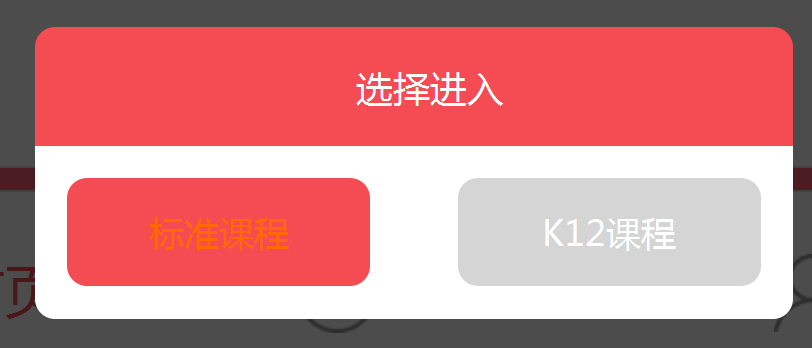
<div class="over"></div>

<div class="g-pop-1 pop-confirm alert_confirm" style="display: block;">

    <h2 class="tit">

        <span>选择进入</span>

    </h2>

    <div class="txt">

        <a href="javascript:;" class="g-btn-2 btn-orange a-confirm select_k12_jason" value="2">标准课程</a>

        <a href="javascript:;" class="g-btn-2 btn-gray a-cancel select_k12_jason" value="1"> K12课程</a>

    </div>

</div>
div 模拟alert弹出框的更多相关文章
- 系统默认的alert弹出框总会带有域名
最近在开发Hybrid APP时发现用系统默认的alert弹出框总会带有域名,用户体验就比较不好了.想了一种办法来解决就是覆盖alert的方法. (function(){ window.a ...
- Alert弹出框处理
selenium的API提供了Alert类对alert弹出框的处理的方法,涉及到的方法有text,dismiss(),accept()和send_keys(),在javascript中主要有alert ...
- 清除ios系统alert弹出框的域名
清除ios系统alert弹出框的域名 <script> window.alert = function(name) { var iframe = document.createElemen ...
- 怎么让alert弹出框的内容可以换行?
在要点击弹出的地方输入这样的代码: alert("文本框中共有字母a的个数为:"+num+"\n"+"他们在字符串的索引为:"+ind) 就 ...
- selenium处理alert弹出框
import time from selenium import webdriver driver =webdriver.Chrome(r"D:\工具包\chromedriver.exe&q ...
- 制作鼠标移动到div上面显示弹出框
<div class="show-dialog hide"> <header> <div class="note"> < ...
- 计算alert弹出框的次数
(function() { var oldAlert = window.alert, count = 0; window.alert = function(a) { count++; oldAlert ...
- updatepanel中使用alert弹出框方法
原文发布时间为:2009-05-17 -- 来源于本人的百度文章 [由搬家工具导入] ScriptManager.RegisterStartupScript(this.UpdatePa ...
- alert弹出框 弹出窗口 ----sweetAlert
推荐一款好用的alert,下面地址是demo,很直观的看到效果,wap可以使用 http://www.dglives.com/demo/sweetalert-master/example/ < ...
随机推荐
- Spring MVC 到 Spring BOOT 的简化之路
背景 Spring vs Spring MVC vs Spring Boot Spring FrameWork Spring 还能解决什么问题 Spring MVC 为什么需要Spring Boot ...
- Hibernate 这么硬核,为什么用的人少?
关于SQL和ORM的争论,永远都不会终止,我也一直在思考这个问题.最近温习了一遍SSH框架,发了动弹,和广大猿友进行了深刻的探讨,被喷的五体投地,感慨万千,于是就有了今天这篇文章. 声明:本文只是小编 ...
- Golang的一致性哈希实现
Golang的一致性哈希实现 一致性哈希的具体介绍,可以参考:http://www.cnblogs.com/haippy/archive/2011/12/10/2282943.html 1 imp ...
- Unity中的.Meta文件
.meta文件是用于辅助管理Unity资源文件的文件,删除后,Unity会自动生成,里面记录了各个资源Inspector的信息,属性等等,Unity是不会改变源资源文件的,没有意义,它是靠.meta文 ...
- Windows10上开启WSL2(Windows Subsystem for Linux 2)及Docker Desktop For Windows
什么是WSL2 WSL2(Windows Subsystem for Linux 2)是适用于Linux的Windows子系统体系结构的一个新版本,它支持适用于Linux的Windows子系统在Win ...
- MySQL不支持DELETE使用表别名?
最近做的需求经常和数据库在打交道, 因为系统页面上某些展示的字段并不是在前端写死的, 而是配置在数据库中, 这样的话便于维护和扩展. 于是遇到了一个MySQL中比较细节性的问题. 日常开发中不少程序员 ...
- Warning: bad syntax, perhaps a bogus '-'? See /usr/share/doc/procps-3.2.8/FAQ
解决办法: 去掉ps -aux 中的"-",改成ps aux 就可以了
- 阿里云ECS问题 Login Incorrect , all available gssapi merchanisms failed
1.阿里云ECS无法登录 Login Incorrect 阿里云ECS密码包含2个密码: 1.重置密码(实例密码也就是我们SSH远程连接的密码): 2.修改远程连接密码(在阿里云网页控制台上远程连接的 ...
- Java并发实战一:线程与线程安全
从零开始创建一家公司 Java并发编程是Java的基础之一,为了能在实践中学习并发编程,我们跟着创建一家公司的旅途,一起来学习Java并发编程. 进程与线程 由于我们的目标是学习并发编程,所以我不会把 ...
- 使用Hugo框架搭建博客的过程 - 前期准备
前言 这篇教程介绍了如何搭建这样效果的博客. 所需步骤 可以从这样的角度出发: 注册域名. 使用CDN加快网站访问速度. 网站内容需要部署在服务器或对象存储平台上. 重要的是放什么内容.博客需要选择框 ...