
Envoy:主动健康监测
实验文件
docker-compose
version: '3'

services:

  envoy:

    image: envoyproxy/envoy-alpine:v1.15-latest

    environment:

    - ENVOY_UID=0

    - HEALTHY=ok

    ports:

    - 80:80

    - 443:443

    - 82:9901

    volumes:

    - ./envoy.yaml:/etc/envoy/envoy.yaml

    - ./certs:/etc/envoy/certs

    networks:

      envoymesh:

        aliases:

        - envoy

    depends_on:

    - webserver1

    - webserver2

  webserver1:

    image: sealloong/envoy-end:latest

    environment:

    - COLORFUL=blue

    - HEALTHY=ok

    networks:

      envoymesh:

        aliases:

        - myservice

        - webservice

    expose:

    - 90

  webserver2:

    image: sealloong/envoy-end:latest

    environment:

    - COLORFUL=blue

    networks:

      envoymesh:

        aliases:

        - myservice

        - webservice

    expose:

    - 90

networks:

  envoymesh: {}
envoy配置文件
admin:

  access_log_path: /dev/null

  address:

    socket_address: { address: 0.0.0.0, port_value: 9901 }

static_resources:

  listeners:

  - name: listener_0

    address:

      socket_address: { address: 0.0.0.0, port_value: 80 }

    filter_chains:

    - filters:

      - name: envoy_http_connection_manager

        typed_config:

          "@type": type.googleapis.com/envoy.extensions.filters.network.http_connection_manager.v3.HttpConnectionManager

          stat_prefix: ingress_http

          codec_type: AUTO

          route_config:

            name: local_route

            virtual_hosts:

            - name: local_service

              domains: [ "*" ]

              routes:

              - match: { prefix: "/" }

                route: { cluster: local_service }

          http_filters:

          - name: envoy.filters.http.router

  clusters:

  - name: local_service

    connect_timeout: 0.25s

    type: STRICT_DNS

    lb_policy: ROUND_ROBIN

    load_assignment:

      cluster_name: local_service

      endpoints:

      - lb_endpoints:

        - endpoint:

            address:

              socket_address: { address: webservice, port_value: 90 }

    health_checks:

      timeout: 1s

      interval: 10s

      unhealthy_threshold: 5

      healthy_threshold: 5

      http_health_check:

        path: "/ping"

        expected_statuses:

          start: 200

          end: 201
路由
/ping 健康监测的路由
/ping/ok 手动将节点设置为有效节点
/ping/fail 手动将节点设置为失效
测试结论
[root@redis ~]# curl -s 127.0.0.1:82/clusters|grep health

local_service::172.22.0.2:90::health_flags::healthy

local_service::172.22.0.3:90::health_flags::healthy
当在集群启动时,所有节点默认为健康状态,在没有流量进入时,默认的间隔时间为1分钟。
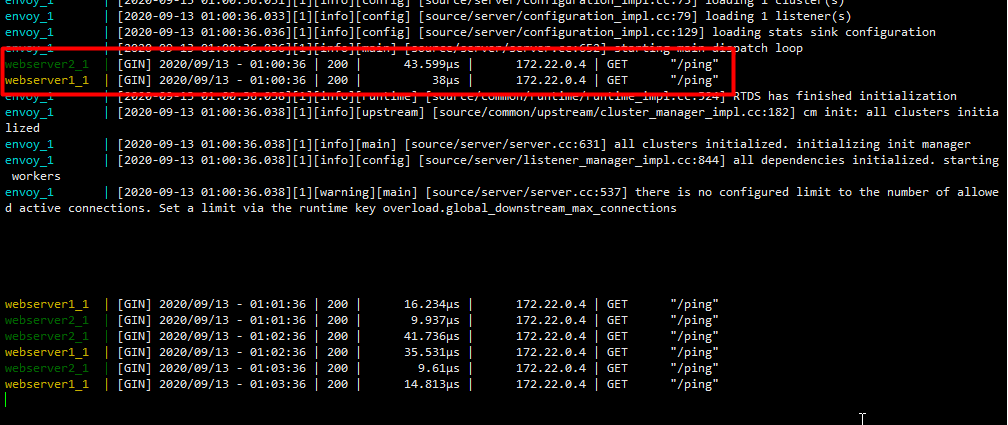
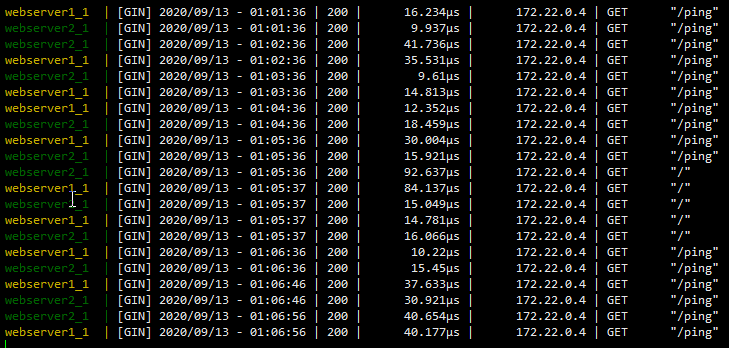
当有外部流量进入后,在结束上个默认间隔1分钟之后,会成为配置文件设置的默认10s
手动设置一个节点为不健康状态,
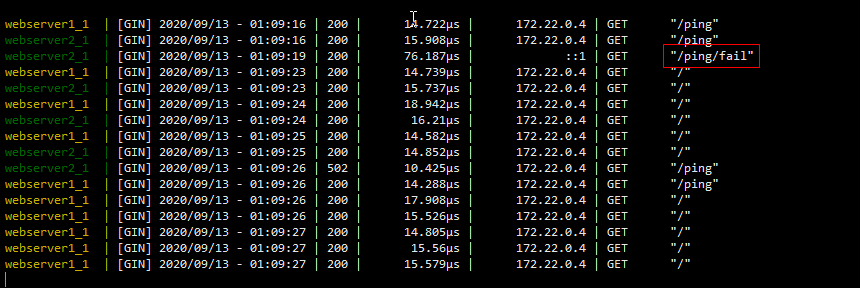
日志中可以看出,在手动设置为失效时,请求是不会到达后端失效节点,并且第一次请求时间明显长,在设置为成功时,后端节点判定为健康是在4次健康监测而非正常请求
webserver1_1  | [GIN] 2020/09/13 - 02:00:48 | 200 |     110.706µs |      172.22.0.4 | GET      "/"

webserver2_1  | [GIN] 2020/09/13 - 02:00:48 | 200 |       47.29µs |      172.22.0.4 | GET      "/"

webserver1_1  | [GIN] 2020/09/13 - 02:00:49 | 200 |      14.909µs |      172.22.0.4 | GET      "/"

webserver2_1  | [GIN] 2020/09/13 - 02:01:18 | 200 |       58.53µs |      172.22.0.4 | GET      "/"

webserver1_1  | [GIN] 2020/09/13 - 02:01:19 | 200 |      15.988µs |      172.22.0.4 | GET      "/"

webserver2_1  | [GIN] 2020/09/13 - 02:01:42 | 200 |      20.844µs |      172.22.0.4 | GET      "/ping"

webserver1_1  | [GIN] 2020/09/13 - 02:01:42 | 200 |      12.247µs |      172.22.0.4 | GET      "/ping"

webserver1_1  | [GIN] 2020/09/13 - 02:01:52 | 200 |      38.892µs |      172.22.0.4 | GET      "/ping"

webserver2_1  | [GIN] 2020/09/13 - 02:01:52 | 200 |      32.254µs |      172.22.0.4 | GET      "/ping"

webserver2_1  | [GIN] 2020/09/13 - 02:01:54 | 200 |      33.689µs |             ::1 | GET      "/ping/fail"

webserver2_1  | [GIN] 2020/09/13 - 02:01:59 | 200 |       82.86µs |             ::1 | GET      "/ping/fail"

webserver1_1  | [GIN] 2020/09/13 - 02:02:02 | 200 |     155.202µs |      172.22.0.4 | GET      "/ping"

webserver2_1  | [GIN] 2020/09/13 - 02:02:02 | 502 |       26.73µs |      172.22.0.4 | GET      "/ping"

webserver1_1  | [GIN] 2020/09/13 - 02:02:07 | 200 |      19.193µs |      172.22.0.4 | GET      "/"

webserver1_1  | [GIN] 2020/09/13 - 02:02:08 | 200 |      14.651µs |      172.22.0.4 | GET      "/"

webserver1_1  | [GIN] 2020/09/13 - 02:02:09 | 200 |      15.101µs |      172.22.0.4 | GET      "/"

webserver1_1  | [GIN] 2020/09/13 - 02:02:09 | 200 |      15.294µs |      172.22.0.4 | GET      "/"

webserver1_1  | [GIN] 2020/09/13 - 02:02:10 | 200 |       26.45µs |      172.22.0.4 | GET      "/"

webserver1_1  | [GIN] 2020/09/13 - 02:02:10 | 200 |      17.679µs |      172.22.0.4 | GET      "/"

webserver1_1  | [GIN] 2020/09/13 - 02:02:11 | 200 |      14.703µs |      172.22.0.4 | GET      "/"

webserver1_1  | [GIN] 2020/09/13 - 02:02:11 | 200 |      14.546µs |      172.22.0.4 | GET      "/"

webserver2_1  | [GIN] 2020/09/13 - 02:02:12 | 502 |        8.37µs |      172.22.0.4 | GET      "/ping"

webserver1_1  | [GIN] 2020/09/13 - 02:02:12 | 200 |      14.214µs |      172.22.0.4 | GET      "/ping"

webserver2_1  | [GIN] 2020/09/13 - 02:02:22 | 502 |       8.998µs |      172.22.0.4 | GET      "/ping"

webserver1_1  | [GIN] 2020/09/13 - 02:02:22 | 200 |      13.489µs |      172.22.0.4 | GET      "/ping"

webserver2_1  | [GIN] 2020/09/13 - 02:02:30 | 200 |     119.326µs |             ::1 | GET      "/ping/ok"

webserver1_1  | [GIN] 2020/09/13 - 02:02:32 | 200 |       8.864µs |      172.22.0.4 | GET      "/ping"

webserver2_1  | [GIN] 2020/09/13 - 02:02:32 | 200 |      14.679µs |      172.22.0.4 | GET      "/ping"

webserver1_1  | [GIN] 2020/09/13 - 02:02:38 | 200 |      14.781µs |      172.22.0.4 | GET      "/"

webserver1_1  | [GIN] 2020/09/13 - 02:02:39 | 200 |      15.452µs |      172.22.0.4 | GET      "/"

webserver1_1  | [GIN] 2020/09/13 - 02:02:39 | 200 |      14.825µs |      172.22.0.4 | GET      "/"

webserver1_1  | [GIN] 2020/09/13 - 02:02:40 | 200 |      14.784µs |      172.22.0.4 | GET      "/"

webserver1_1  | [GIN] 2020/09/13 - 02:02:40 | 200 |      14.788µs |      172.22.0.4 | GET      "/"

webserver1_1  | [GIN] 2020/09/13 - 02:02:41 | 200 |      72.985µs |      172.22.0.4 | GET      "/"

webserver2_1  | [GIN] 2020/09/13 - 02:02:42 | 200 |       8.523µs |      172.22.0.4 | GET      "/ping"

webserver1_1  | [GIN] 2020/09/13 - 02:02:42 | 200 |      14.497µs |      172.22.0.4 | GET      "/ping"

webserver1_1  | [GIN] 2020/09/13 - 02:02:42 | 200 |      15.611µs |      172.22.0.4 | GET      "/"

webserver1_1  | [GIN] 2020/09/13 - 02:02:47 | 200 |      46.065µs |      172.22.0.4 | GET      "/"

webserver1_1  | [GIN] 2020/09/13 - 02:02:47 | 200 |      19.455µs |      172.22.0.4 | GET      "/"

webserver1_1  | [GIN] 2020/09/13 - 02:02:47 | 200 |      15.079µs |      172.22.0.4 | GET      "/"

webserver1_1  | [GIN] 2020/09/13 - 02:02:48 | 200 |      22.208µs |      172.22.0.4 | GET      "/"

webserver2_1  | [GIN] 2020/09/13 - 02:02:52 | 200 |      39.693µs |      172.22.0.4 | GET      "/ping"

webserver1_1  | [GIN] 2020/09/13 - 02:02:52 | 200 |      32.376µs |      172.22.0.4 | GET      "/ping"

webserver1_1  | [GIN] 2020/09/13 - 02:03:02 | 200 |      19.476µs |      172.22.0.4 | GET      "/ping"

webserver2_1  | [GIN] 2020/09/13 - 02:03:02 | 200 |      11.041µs |      172.22.0.4 | GET      "/ping"

webserver2_1  | [GIN] 2020/09/13 - 02:03:12 | 200 |      14.292µs |      172.22.0.4 | GET      "/ping"

webserver1_1  | [GIN] 2020/09/13 - 02:03:12 | 200 |       8.215µs |      172.22.0.4 | GET      "/ping"

webserver1_1  | [GIN] 2020/09/13 - 02:03:22 | 200 |      16.145µs |      172.22.0.4 | GET      "/ping"

webserver2_1  | [GIN] 2020/09/13 - 02:03:22 | 200 |      11.455µs |      172.22.0.4 | GET      "/ping"

webserver1_1  | [GIN] 2020/09/13 - 02:03:29 | 200 |       15.02µs |      172.22.0.4 | GET      "/"

webserver2_1  | [GIN] 2020/09/13 - 02:03:30 | 200 |      34.405µs |      172.22.0.4 | GET      "/"

webserver1_1  | [GIN] 2020/09/13 - 02:03:30 | 200 |      14.647µs |      172.22.0.4 | GET      "/"

webserver2_1  | [GIN] 2020/09/13 - 02:03:30 | 200 |      15.039µs |      172.22.0.4 | GET      "/"

webserver1_1  | [GIN] 2020/09/13 - 02:03:31 | 200 |      16.706µs |      172.22.0.4 | GET      "/"

webserver2_1  | [GIN] 2020/09/13 - 02:03:31 | 200 |      15.667µs |      172.22.0.4 | GET      "/"

webserver1_1  | [GIN] 2020/09/13 - 02:03:31 | 200 |      15.025µs |      172.22.0.4 | GET      "/"

webserver1_1  | [GIN] 2020/09/13 - 02:03:32 | 200 |      15.085µs |      172.22.0.4 | GET      "/ping"

webserver2_1  | [GIN] 2020/09/13 - 02:03:32 | 200 |      13.446µs |      172.22.0.4 | GET      "/ping"

webserver2_1  | [GIN] 2020/09/13 - 02:03:42 | 200 |      14.702µs |      172.22.0.4 | GET      "/ping"

webserver1_1  | [GIN] 2020/09/13 - 02:03:42 | 200 |       9.262µs |      172.22.0.4 | GET      "/ping"
无外部流量时的请求间隔设置 官方参考
no_traffic_interval
Envoy:主动健康监测的更多相关文章
- Consul-template的简单应用:配置中心,服务发现与健康监测
简介 Consul-template是Consul的一个方扩展工具,通过监听Consul中的数据可以动态修改一些配置文件,大家比较热衷于应用在Nginx,HAProxy上动态配置健康状态下的客户端反向 ...
- 服务发现与健康监测框架Consul-DNS转发的应用
关于Consul Consul是一个提供服务注册与发现,健康监测,Key/Value存储以及多数据中心存储的分布式框架.官网地址是https://www.consul.io/,公司初步应用后我们老大觉 ...
- lvs+keepalive实现主从效果,以及RS健康监测和tcp,udp实现非web的负载均衡
前面文章讲到了tcp和udp负载均衡,但是没有健康监测,这几天我优化了一下上次的操作.当然,我也是用的跨网段的通讯,因为线上业务主要是海外业务,所以做了iptables流量转发 IP: lvs-mas ...
- Nginx被动健康检查和主动健康检查
1.被动健康检查 Nginx自带有健康检查模块:ngx_http_upstream_module,可以做到基本的健康检查,配置如下: upstream cluster{ server max_fail ...
- Consul之:服务健康监测
服务注册 - 服务进程在注册中心注册自己的位置.它通常注册自己的主机和端口号,有时还有身份验证信息,协议,版本号,以及运行环境的详细资料. 服务发现 - 客户端应用进程向注册中心发起查询,来获取服务的 ...
- 微服务中的健康监测以及其在ASP.NET Core服务中实现运行状况检查
1 .什么是健康检查? 健康检查几乎就是名称暗示的.它是一种检查您的应用程序是否健康的方法.随着越来越多的应用程序转向微服务式架构,健康检查变得尤其重要(Health Check).虽然微服务架构有很 ...
- 基于RT-Thread的人体健康监测系统
随着生活质量的提高和生活节奏的加快,人们愈加需要关注自己的健康状况,本项目意在设计一种基于云平台+APP+设备端的身体参数测试系统,利用脉搏传感器.红外传感器.微弱信号检测电路等实现人体参数的采集,数 ...
- CUDA刷新:GPU计算生态系统
CUDA刷新:GPU计算生态系统 CUDA Refresher: The GPU Computing Ecosystem 这是CUDA Refresher系列的第三篇文章,其目标是刷新CUDA中的关键 ...
- 服务网格数据平面的关键:层层剖析Envoy配置
Envoy是一种高性能C++分布式代理,专为单个服务和应用程序设计.作为Service Mesh中的重要组件,充分理解其配置就显得尤为重要.本文列出了使用Envoy而不用其他代理的原因.并给出了Env ...
随机推荐
- 关于HashMap的一些思考
一.HashMap的负载因子的作用 当 HashMap 中的元素个数(包含链表.红黑树上的元素)达到数组长度的0.75倍的时候,开始扩容. 二.HashMap的负载因子为什么是0.75 主要是为了 ...
- Java例题_30 在已经排好序的数组中插入值
1 /*30 [程序 30 插入数字] 2 题目:有一个已经排好序的数组.现输入一个数,要求按原来的规律将它插入数组中. 3 程序分析:首先判断此数是否大于最后一个数,然后再考虑插入中间的数的情况,插 ...
- Jmeter(四十) - 从入门到精通进阶篇 - Jmeter配置文件的刨根问底 - 中篇(详解教程)
1.简介 为什么宏哥要对Jmeter的配置文件进行一下讲解了,因为有的童鞋或者小伙伴在测试中遇到一些需要修改配置文件的问题不是很清楚也不是很懂,就算修改了也是模模糊糊的.更有甚者觉得那是禁地神圣不可轻 ...
- vue-i18n 国际化语言切换
vue-i18n 用于前端vue项目中,需要多语言切换的场景 安装方法(npm) npm install vue-i18n 简单使用 1.在vue项目的main.ts文件中实例化 i18n imp ...
- vue实现拖拽排序
基于vue实现列表拖拽排序的效果 在日常开发中,特别是管理端,经常会遇到要实现拖拽排序的效果:这里提供一种简单的实现方案. 此例子基于vuecli3 首先,我们先了解一下js原生拖动事件: 在拖动目标 ...
- Kubernetes 用户流量接入方案
总结Kubernetes 生产环境用户流量接入方案 方案1 client -> ddos -> waf -> slb 7层域名 -> nginx端口 -> ingress ...
- D. 【例题4】字符串环
解析 字符串的操作,可以用函数解决这个问题 s 2. f i n d ( s 1. s u b s t r ( i , j ) ) s2.find~(s1.substr~(i,~j)) s2.find ...
- 设计原则:接口隔离原则(ISP)
接口隔离原则的英文是Interface Segregation Principle,缩写就是ISP.与里氏替换原则一样其定义同样有两种 定义1: Clients should not be force ...
- 解决WebStorm无法正确识别Vue3组合式API的问题
1 问题描述 Vue3的组合式API无法在WebStorm中正确识别,表现为defineComponent等无法被识别: 2 尝试方案 猜想这种问题的原因是无法正确识别对应的Vue3库,笔者相信Web ...
- SpringMVC请求参数解析
请求参数解析 客户端请求在handlerMapping中找到对应handler后,将会继续执行DispatchServlet的doPatch()方法. 首先是找到handler对应的适配器. Hand ...