
Apache2配置文件解读
每次碰到都不知道具体的作用,所以来分析一下
配置文件结构
apache2在启动的时候自动读取/etc/apache2/apache2.conf文件的配置信息,不同的配置项按功能分布在不同的文件中,然后被Include包含到apache2.conf这个主配置文件中,方便管理。就是说事实上apache2主配置文件只有一个,即apache2.conf,其他的都是被include进来的。
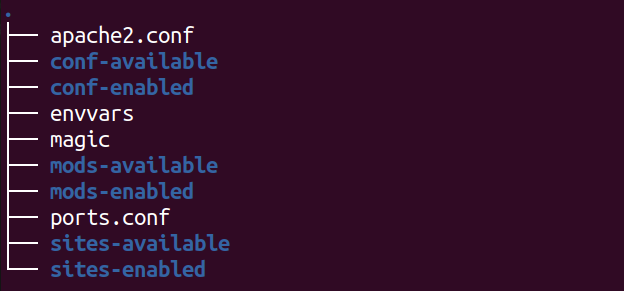
主文件配置内容
### Section 1: Global Environment

#ServerRoot:apache服务器根目录。主配置文件,日志都在该目录。

#注意路径结束时不要加斜杠,默认是/etc/apache2

#ServerRoot "/etc/apache2"

LockFile ${APACHE_LOCK_DIR}/accept.lock

#apache服务启动时在该文件记录进程ID号

# This needs to be set in /etc/apache2/envvars

PidFile ${APACHE_PID_FILE}

#连接超时,单位秒

Timeout 300

#是否允许持久连接

KeepAlive On

#持久连接时最大请求数

MaxKeepAliveRequests 100

KeepAliveTimeout 5

# prefork MPM

<IfModule mpm_prefork_module>

    StartServers          5

    MinSpareServers       5

    MaxSpareServers      10

    MaxClients          150

    MaxRequestsPerChild   0

</IfModule>

# worker MPM

<IfModule mpm_worker_module>

    StartServers        10

    ServerLimit         100

    MinSpareThreads     50

    MaxSpareThreads     200

    ThreadsPerChild     64

    MaxClients          6400

    MaxRequestsPerChild   0

</IfModule>

# event MPM

<IfModule mpm_event_module>

    StartServers          2

    MinSpareThreads      25

    MaxSpareThreads      75

    ThreadLimit          64

    ThreadsPerChild      25

    MaxClients          150

    MaxRequestsPerChild   0

</IfModule>

# These need to be set in /etc/apache2/envvars

User ${APACHE_RUN_USER}

Group ${APACHE_RUN_GROUP}

#apache服务启动后在每个目录中查找后缀是.htaccess的文件,这些文件作为附加的配置

AccessFileName .htaccess

#下面几行防止.htaccess和.htpassword文件被web客户端访问

<Files ~ "^\.ht">

    Order allow,deny

    Deny from all

    Satisfy all

</Files>

#DefaultType是浏览器访问的MIME类型,设置为None,让浏览器自行解析

DefaultType None

# HostnameLookups: Log the names of clients or just their IP addresses

# e.g., www.apache.org (on) or 204.62.129.132 (off).

HostnameLookups Off

#错误日志文件目录,默认是配置在此,可在<VirtualHost>中重载

#日志文件取名时以'/'开头会造成冲突,不以'/'开头,会默认加上服务器根目录前缀

#比如"foo.log"会被加上ServerRoor目录"/etc/apache2"变成"/etc/apache2/foo.log"

ErrorLog ${APACHE_LOG_DIR}/error.log

#Log日志记录哪些信息,取值可以是: debug, info, notice, warn, error, crit,alert, emerg.

LogLevel warn

#导入模块配置文件

Include mods-enabled/*.load

Include mods-enabled/*.conf

#导入所有用户配置文件

Include httpd.conf

#导入端口监听配置文件

Include ports.conf

# The following directives define some format nicknames for use with

# a CustomLog directive (see below).

# If you are behind a reverse proxy, you might want to change %h into %{X-Forwarded-For}i

#

LogFormat "%v:%p %h %l %u %t \"%r\" %>s %O \"%{Referer}i\" \"%{User-Agent}i\"" vhost_combined

LogFormat "%h %l %u %t \"%r\" %>s %O \"%{Referer}i\" \"%{User-Agent}i\"" combined

LogFormat "%h %l %u %t \"%r\" %>s %O" common

LogFormat "%{Referer}i -> %U" referer

LogFormat "%{User-agent}i" agent

#拦截访问

<VirtualHost *:80>

<Directory /***>

    Options None FollowSymLinks

    AllowOverride None

    Order allow,deny

    Allow from all

</Directory>

</VirtualHost>

#导入通用配置目录

Include conf.d/

#导入虚拟主机的配置

Include sites-enabled/
网站根目录配置文件
在sites-avaliabrary中
Apache2配置文件解读的更多相关文章
- 【比赛打分展示双屏管理系统-专业版】Other.ini 配置文件解读以及排行榜界面及专家评语提交展示等具体配置
第一个问题:Other.ini配置文件的解读: 在软件根目录下,找到Other.ini配置文件,打开如下: 配置文件解读: iOrderIDOrXSID:默认为0,按照软件 选项/排行榜和奖项 的设置 ...
- Nginx 小入门记录 之 Nginx 配置文件解读(二)
上一小节主要是记录一些环境准备和Nginx的安装,接下来对Nginx基本配置进行记录. 查看配置文件安装记录 可以通过以下Linux命令进行查看: rpm -ql nginx rpm 是liunx的包 ...
- 从零开始Pytorch-YOLOv3【笔记】(一)配置文件解读
前言 这是github上的一个项目YOLO_v3_tutorial_from_scratch,它还有相应的blog对其详细的解读.机器之心翻译了他的tutorial:从零开始PyTorch项目:YOL ...
- net core体系-web应用程序-4net core2.0大白话带你入门-3asp.net core项目架构和配置文件解读
asp.net core web项目目录解读 Connected Services 和传统.net web项目相比,它的功能类似于添加webservice或者wcf service的引用.暂时用不 ...
- redis 的使用 及 配置文件解读
redis-server命令 redis-server /usr/local/redis/conf/redis.conf #加配置文件绝对路径启动redis服务 redis-server /usr/l ...
- 怎样在idea添加log日志 以及log4j2配置文件解读
网上找了很多篇文章,就数这篇比较全,从下载到配置都有讲到,解决从0开始接触java日志文件添加的各位同学.参考文章:https://www.cnblogs.com/hong-fithing/p/769 ...
- java微信开发(wechat4j)——wechat4j配置文件解读
wechat4j的配置文件是wechat4j.properties.需要放置在项目src目录下.在wechat4j.jar中的META-INF下有一个wechat4j.properties.sampl ...
- Redis配置文件解读
转载自:http://www.cnblogs.com/daizhj/articles/1956681.html 对部分配置选项做了一些说明 把配置项目从上到下看了一遍,有了个大致的了解,暂时还用不到一 ...
- redis 配置文件解读
# Redis 配置文件 # 当配置中需要配置内存大小时,可以使用 1k, 5GB, 4M 等类似的格式,其转换方式如下(不区分大小写) # # 1k => 1000 bytes # 1kb = ...
随机推荐
- yum Multilib version problems
这两天在更新CentOS7系统时,出现了Multilib version problems错误,执行命令: # yum update 出现了的错误信息: .... ---> Package li ...
- Trap (陷入/中断) 源码解析
用户空间和内核空间之间的切换通常称为trap trap的三种形式 系统调用引发 异常发生 设备中断 (时间中断.IO中断.网络中断等) supervise mode的权限 用户态和内核态之间的到底有什 ...
- 阿里云ECI如何6秒扩容3000容器实例?
引言 根据最新CNCF报告,有超过90%的用户在生产环境使用容器,并且有超过80%的用户通过Kubernetes管理容器.是不是我们的生产环境上了K8s就完美解决了应用部署的问题?IT界有句俗语,没有 ...
- iNeuOS工业互联网操作系统,发布实时存储方式:实时存储、变化存储、定时存储,增加设备振动状态和电能状态监测驱动,v3.6.2
目 录 1. 概述... 1 2. 平台演示... 2 3. 存储方式... 2 4. 设备状态和用电状态监控驱动... 3 1. 概述 本次升 ...
- Linux 权限控制
权限管理概述 为什么要进行权限管理? 因为在生产服务器上,如果要让普通用户登录,就要给他分配合理的权限,在服务器上需要为用户严格定义权限等级,否则如果所有人都是roσt权限,权限过高容易导致岀现误操作 ...
- 力扣 - 剑指 Offer 59 - I. 滑动窗口的最大值
题目 剑指 Offer 59 - I. 滑动窗口的最大值 思路1(单调队列) 使用单调(递减)队列,保持队列中的元素是递减顺序,队列头保存的是当前窗口中最大的元素 首先先模拟建立第一个窗口,同时获取第 ...
- pycharm 在flask断点不停止
For me disabling Gevent compatible option in Preferences > Build, Execution, Deployment has helpe ...
- IDEA 运行maven工程报错:No goals have been specified for this build.....解决办法
出现这种错误可以在pom.xml里配置, 找到<build>标签在下面<plugins>标签上面加上<defaultGoal>compile</default ...
- Excel - java
package com.e6soft.project.ExcelUtil; import java.io.BufferedInputStream; import java.io.File; impor ...
- Maven中所用的Dependency查找方法
用了Maven,所需的JAR包就不能再像往常一样,自己找到并下载下来,用IDE导进去就完事了,Maven用了一个项目依赖(Dependency)的概念,用俗话说,就是我的项目需要用你这个jar包,就称 ...