
springcloud - alibaba - 2 - 集成Feign - 更新完成
1、依赖
- 依赖管理
<parent>

        <artifactId>spring-boot-parent</artifactId>

        <groupId>org.springframework.boot</groupId>

        <version>2.3.12.RELEASE</version>

        <relativePath/>

    </parent>
- 项目需要的依赖
<dependencies>

        <dependency>

            <groupId>org.springframework.boot</groupId>

            <artifactId>spring-boot-starter-web</artifactId>

        </dependency>

        <dependency>

            <groupId>org.projectlombok</groupId>

            <artifactId>lombok</artifactId>

        </dependency>

        <dependency>

            <groupId>org.springframework.boot</groupId>

            <artifactId>spring-boot-starter-test</artifactId>

        </dependency>

<!--        springcloud-alibaba需要的依赖-->

        <dependency>

            <groupId>com.alibaba.cloud</groupId>

            <artifactId>spring-cloud-starter-alibaba-nacos-discovery</artifactId>

        </dependency>

    </dependencies>

    <dependencyManagement>

        <dependencies>

            <dependency>

                <groupId>org.springframework.cloud</groupId>

                <artifactId>spring-cloud-dependencies</artifactId>

                <version>Hoxton.SR12</version>

                <type>pom</type>

                <scope>import</scope>

            </dependency>

            <dependency>

                <groupId>com.alibaba.cloud</groupId>

                <artifactId>spring-cloud-alibaba-dependencies</artifactId>

                <version>2.2.6.RELEASE</version>

                <type>pom</type>

                <scope>import</scope>

            </dependency>

        </dependencies>

    </dependencyManagement>

2、服务提供者
2.1)、yml配置
server:

  port: 8011

spring:

  application:

    name: ALIBABA-PUBLISHER

  cloud:

    nacos:

      discovery:

        server-addr: 162.14.66.60:8848  # 自己的服务器ip:8848

management:

  endpoints:

    web:

      exposure:

        include: "*" #健康检查

2.2)、启动类编写
package cn.zixieqing;

import org.springframework.boot.SpringApplication;

import org.springframework.boot.autoconfigure.SpringBootApplication;

import org.springframework.cloud.client.discovery.EnableDiscoveryClient;

/**

 * @ClassName PublisherApplication

 * @Author ZiXieQing

 * @Date 2021/12/7

 * Version 1.0

 **/

@SpringBootApplication

@EnableDiscoveryClient      // 开启nacos的客户端功能

public class PublisherApplication {

    public static void main(String[] args) {

        SpringApplication.run(PublisherApplication.class, args);

    }

}

2.3)、controller编写
package cn.zixieqing.controller;

import org.springframework.web.bind.annotation.GetMapping;

import org.springframework.web.bind.annotation.RequestMapping;

import org.springframework.web.bind.annotation.RestController;

@RestController

@RequestMapping("/provider")

public class ProvideService {

    @GetMapping("/service")

    public String provideService() {

        return "this is my son";

    }

}
3、Feign
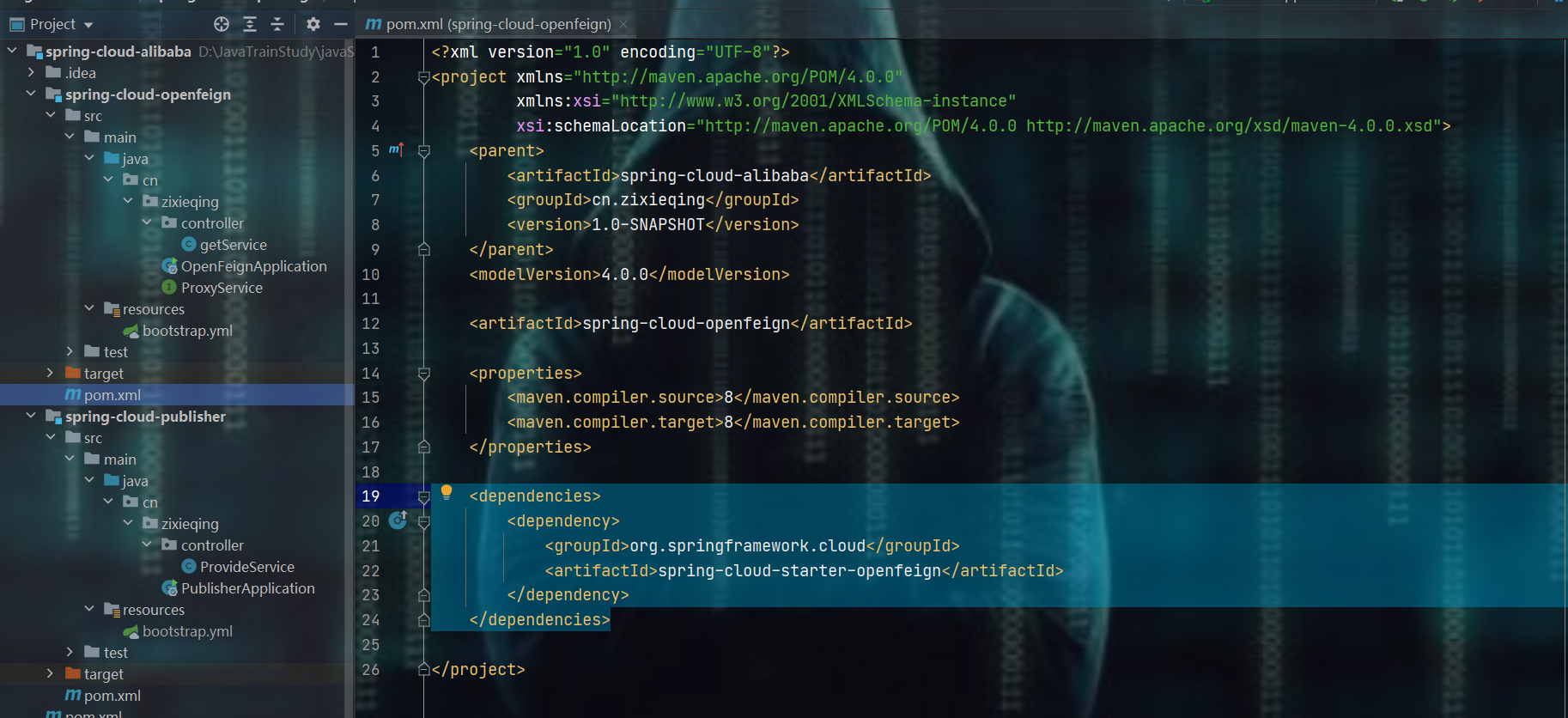
3.1)、导入依赖
    <dependencies>

        <dependency>

            <groupId>org.springframework.cloud</groupId>

            <artifactId>spring-cloud-starter-openfeign</artifactId>

        </dependency>

    </dependencies>
3.2)、编写yml
server:

  port: 8012

spring:

  cloud:

    nacos:

      discovery:

        server-addr: 162.14.66.60:8848  # 自己的服务器ip:8848

  application:

    name: ALIBABA-OPENFEIGN

3.3)、接口编写
package cn.zixieqing;

import org.springframework.cloud.openfeign.FeignClient;

import org.springframework.web.bind.annotation.RequestMapping;

import org.springframework.web.bind.annotation.RequestMethod;

@FeignClient(value = "ALIBABA-PUBLISHER")  // publisher中注册进去的服务名

public interface ProxyService {

    @RequestMapping(value = "/provider/service" , method = RequestMethod.GET)

    String provideService();

}

3.4)、启动类编写
package cn.zixieqing;

import org.springframework.boot.SpringApplication;

import org.springframework.boot.autoconfigure.SpringBootApplication;

import org.springframework.cloud.client.discovery.EnableDiscoveryClient;

import org.springframework.cloud.openfeign.EnableFeignClients;

@SpringBootApplication

@EnableDiscoveryClient

@EnableFeignClients

public class OpenFeignApplication {

    public static void main(String[] args) {

        SpringApplication.run(OpenFeignApplication.class, args);

    }

}

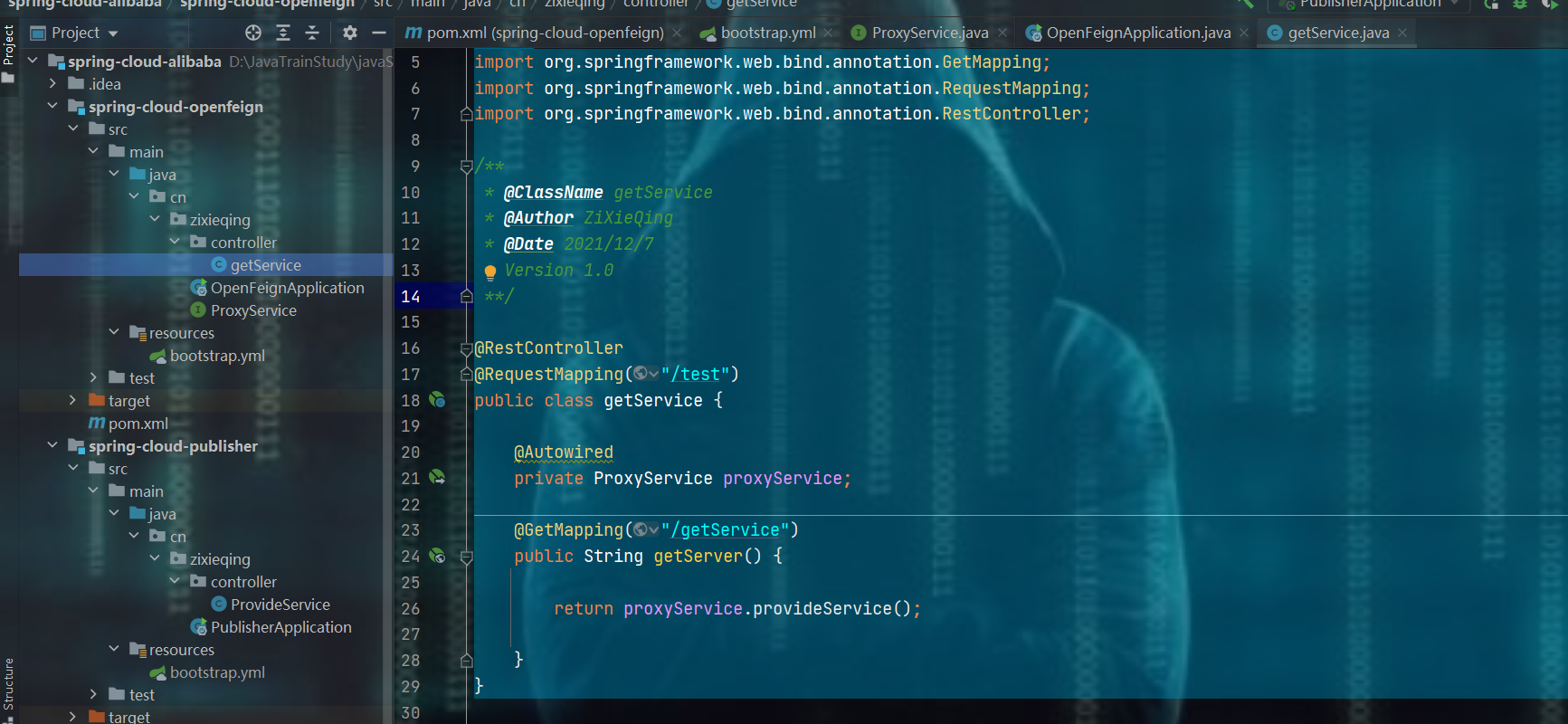
3.5)、服务消费层编写
package cn.zixieqing.controller;

import cn.zixieqing.ProxyService;

import org.springframework.beans.factory.annotation.Autowired;

import org.springframework.web.bind.annotation.GetMapping;

import org.springframework.web.bind.annotation.RequestMapping;

import org.springframework.web.bind.annotation.RestController;

/**

 * @ClassName getService

 * @Author ZiXieQing

 * @Date 2021/12/7

 * Version 1.0

 **/

@RestController

@RequestMapping("/test")

public class getService {

    @Autowired

    private ProxyService proxyService;

    @GetMapping("/getService")

    public String getServer() {

        return proxyService.provideService();

    }

}
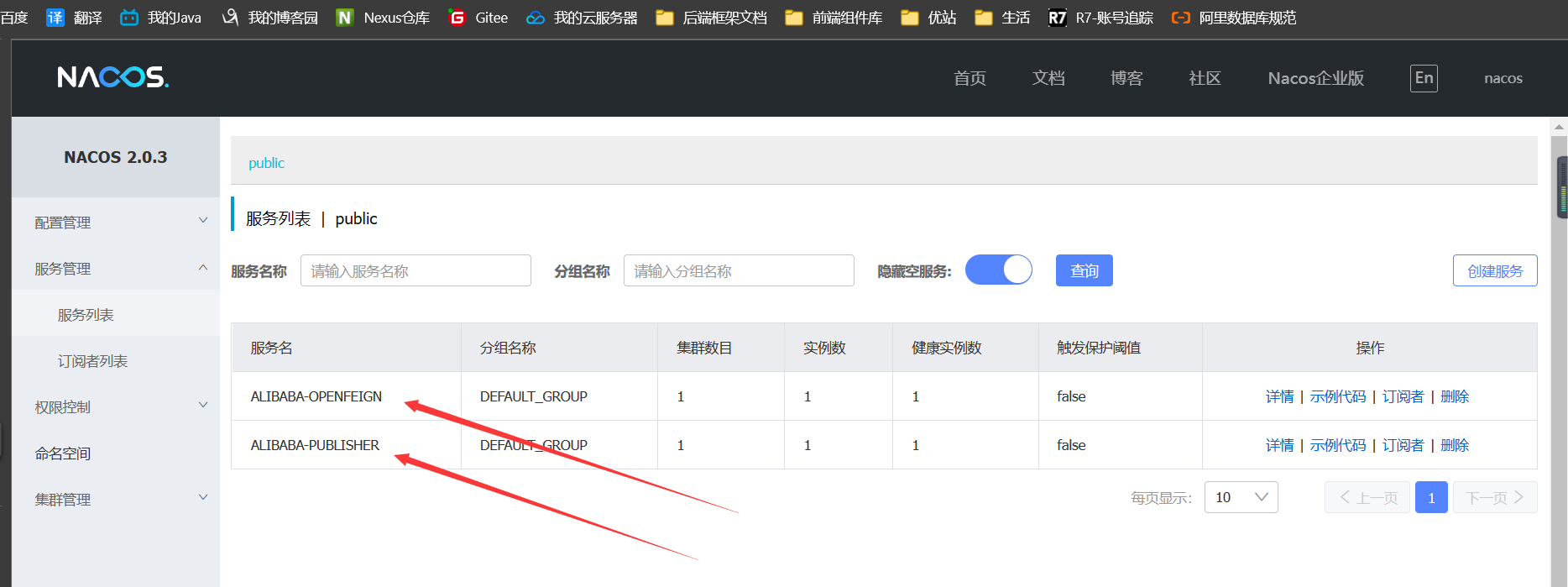
4、启动publisher 和 Feign
springcloud - alibaba - 2 - 集成Feign - 更新完成的更多相关文章
- springcloud - alibaba - 3 - 整合config - 更新完毕
0.补充 1.需求 如果我有这么一个请求:我想要gitee中的配置改了之后,我程序yml中的配置也可以跟着相应产生变化,利用原生的方式怎么做?一般做法如下: 而有了SpringCloud-alibab ...
- 十一. SpringCloud Alibaba
1. SpringCloud Alibaba简介 1.1 为什么会出现SpringCloud Alibaba Spring Cloud Netflix项目进入到维护模式 什么是维护模式?=> 将 ...
- SpringCloud Alibaba微服务实战三 - 服务调用
导读:通过前面两篇文章我们准备好了微服务的基础环境并让accout-service 和 product-service对外提供了增删改查的能力,本篇我们的内容是让order-service作为消费者远 ...
- SpringCloud系列之集成分布式事务Seata应用篇
目录 前言 项目版本 项目说明 Seata服务端部署 Seata客户端集成 cloud-web module-order module-cart module-goods module-wallet ...
- SpringCloud Alibaba实战(7:nacos注册中心管理微服务)
源码地址:https://gitee.com/fighter3/eshop-project.git 持续更新中-- 在上一节我们已经完成了Nacos Server的本地部署,这一节我们学习如何将Nac ...
- SpringCloud Alibaba实战(8:使用OpenFeign服务调用)
源码地址:https://gitee.com/fighter3/eshop-project.git 持续更新中-- 在上一个章节,我们已经成功地将服务注册到了Nacos注册中心,实现了服务注册和服务发 ...
- SpringCloud Alibaba实战(9:Hystrix容错保护)
源码地址:https://gitee.com/fighter3/eshop-project.git 持续更新中-- 在上一节我们已经使用OpenFeign完成了服务间的调用.想一下,假如我们一个服务链 ...
- 【springcloud alibaba】注册中心之nacos
1.为什么需要注册中心 1.1 没有注册中心会怎么样 1.2 注册中心提供什么功能以及解决什么问题 2.常用的微服务注册中心对比 3.案例项目父工程 4.nacos作为注册中心的使用 4.1 单机版的 ...
- SpringCloud Alibaba入门之Nacos(SCA)
SpringCloud Alibaba Spring Cloud Alibaba 致力于提供微服务开发 的一站式解决方案.此项目包含开发分布式应用微服务的必需组件,方便开发者通过 Spring Clo ...
随机推荐
- 21.10.18 test
可可大神出题,四款有趣的游戏推荐,第四个好玩/se T1 loopers \(\color{green}{100}\) 考虑钦定 \(a_1,a_i\) 的位置,固定左边一坨,那么剩下的一坨的 \(\ ...
- hdu 2154 跳舞毯(简单DP)
题意: 有一个圆圆的毯,被平均分成三个扇形.分为标记为A,B,C. 小余从A开始跳,每次可跳到相邻的扇形上.(A->B 或 A->C) 问小余跳n次,最后回到扇形A的方案数是多少. 思路: ...
- poj 2724 Purifying Machine(二分图最大匹配)
题意: 有2^N块奶酪,编号为00...0到11..1. 有一台机器,有N个开关.每个开关可以置0或置1,或者置*.但是规定N个开关中最多只能有一个开关置*. 一旦打开机器的开关,机器将根据N个开关的 ...
- poj 2226 Muddy Fields(最小点覆盖)
题意: M*N的矩阵,每个格不是*就是#. *代表水坑,#代表草地. 农民要每次可以用一块宽为1,长不限的木板去铺这个矩阵.要求这块木板不能覆盖草地.木板可以重复覆盖(即一块木板与另一块木板有 ...
- Centos7上安装docker (新手版本)
1首先要有一个安装好的Centos7 2打开终端,输入一下命令(自动安装最新版本) curl -fsSL https://get.docker.com | bash -s docker --mirro ...
- Vue 基础自查——条件渲染和列表渲染
v-if和v-show的区别是什么? v-if和v-for为什么不能一起用? v-for中的key有什么作用? 1 v-if 和 v-show 1.1 作用 都用来控制元素的显示和隐藏 1.2 控制元 ...
- MapReduce Service更换集群外部时钟源,仅需10步
摘要:MapReduce Service 集群使用NTP进行时钟同步.本文简要介绍了MapReduce Service集群NTP机制及NTP的配置方式. 本文分享自华为云社区<MapReduce ...
- Linux配置2个Tomcat同时运行
先说一下怎么遇到的这个问题,在练习linux中部署web项目时,linux系统安装了两个tomcat. 操作步骤: 1.配置profile#vi /etc/profile 输入以下内容: 这是两个to ...
- JDK源码阅读(5):HashTable类阅读笔记
HashTable public class Hashtable<K,V> extends Dictionary<K,V> implements Map<K,V>, ...
- 解决create-react-app 后 npm start or yarn start 中出现 的webpack版本问题
解决create-react-app 后 npm start or yarn start 中出现 的webpack版本问题 错误提示信息 There might be a problem with t ...