
Mybatis逆向工程生成类文件
首先,我们需要建好相关文件夹目录:
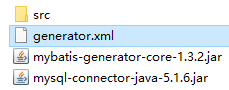
然后,编写执行脚本
generator.xml :
 1 <?xml version="1.0" encoding="UTF-8"?>

 2 <!DOCTYPE generatorConfiguration PUBLIC "-//mybatis.org//DTD MyBatis Generator Configuration 1.0//EN" "http://mybatis.org/dtd/mybatis-generator-config_1_0.dtd">

 3 <generatorConfiguration>

 4     <!-- 数据库驱动包位置:jdbc驱动放置的位置 -->

 5     <classPathEntry location="F:\Users\LHN_admin\Desktop\spring+springmvc+mybaties+maven\generator\mysql-connector-java-5.1.6.jar"/>

 6

 7     <context id="DB2Tables" targetRuntime="MyBatis3">

 8         <commentGenerator>

 9             <property name="suppressAllComments" value="true" />

10         </commentGenerator>

11         <!-- 数据库链接URL、用户名、密码:动态添加 -->

12         <jdbcConnection driverClass="com.mysql.jdbc.Driver" connectionURL="jdbc:mysql://localhost:3306/shop" userId="root" password="123456">

13

14         </jdbcConnection>

15         <javaTypeResolver>

16             <property name="forceBigDecimals" value="false" />

17         </javaTypeResolver>

18         <!-- 生成模型的包名和位置:动态添加 -->

19         <javaModelGenerator targetPackage="com.lhn.model" targetProject="F:\Users\LHN_admin\Desktop\spring+springmvc+mybaties+maven\generator\src">

20             <property name="enableSubPackages" value="true" />

21             <property name="trimStrings" value="true" />

22         </javaModelGenerator>

23         <!-- 生成的映射文件包名和位置:动态添加 -->

24         <sqlMapGenerator targetPackage="com.lhn.mapping" targetProject="F:\Users\LHN_admin\Desktop\spring+springmvc+mybaties+maven\generator\src">

25             <property name="enableSubPackages" value="true" />

26         </sqlMapGenerator>

27         <!-- 生成DAO的包名和位置:动态添加 -->

28         <javaClientGenerator type="XMLMAPPER" targetPackage="com.lhn.dao" targetProject="F:\Users\LHN_admin\Desktop\spring+springmvc+mybaties+maven\generator\src">

29             <property name="enableSubPackages" value="true" />

30         </javaClientGenerator>

31         <!-- 要生成的表(tableName:表名和domainObjectName:实体类名,其他照写(防止中文乱码)) -->

32         <table tableName="adminuser" domainObjectName="Adminuser" enableCountByExample="false" enableUpdateByExample="false" enableDeleteByExample="false" enableSelectByExample="false" selectByExampleQueryId="false" />

33         <table tableName="category" domainObjectName="Category" enableCountByExample="false" enableUpdateByExample="false" enableDeleteByExample="false" enableSelectByExample="false" selectByExampleQueryId="false" />

34         <table tableName="categorysecond" domainObjectName="Categorysecond" enableCountByExample="false" enableUpdateByExample="false" enableDeleteByExample="false" enableSelectByExample="false" selectByExampleQueryId="false" />

35         <table tableName="company" domainObjectName="Company" enableCountByExample="false" enableUpdateByExample="false" enableDeleteByExample="false" enableSelectByExample="false" selectByExampleQueryId="false" />

36         <table tableName="feed" domainObjectName="Feed" enableCountByExample="false" enableUpdateByExample="false" enableDeleteByExample="false" enableSelectByExample="false" selectByExampleQueryId="false" />

37         <table tableName="news" domainObjectName="News" enableCountByExample="false" enableUpdateByExample="false" enableDeleteByExample="false" enableSelectByExample="false" selectByExampleQueryId="false" />

38         <table tableName="notice" domainObjectName="Notice" enableCountByExample="false" enableUpdateByExample="false" enableDeleteByExample="false" enableSelectByExample="false" selectByExampleQueryId="false" />

39         <table tableName="orderitem" domainObjectName="OrderItem" enableCountByExample="false" enableUpdateByExample="false" enableDeleteByExample="false" enableSelectByExample="false" selectByExampleQueryId="false" />

40         <table tableName="orders" domainObjectName="Orders" enableCountByExample="false" enableUpdateByExample="false" enableDeleteByExample="false" enableSelectByExample="false" selectByExampleQueryId="false" />

41         <table tableName="product" domainObjectName="Product" enableCountByExample="false" enableUpdateByExample="false" enableDeleteByExample="false" enableSelectByExample="false" selectByExampleQueryId="false" />

42         <table tableName="user" domainObjectName="User" enableCountByExample="false" enableUpdateByExample="false" enableDeleteByExample="false" enableSelectByExample="false" selectByExampleQueryId="false" />

43     </context>

44 </generatorConfiguration>
最后执行该脚本:
在目录空白位置上shift+右键
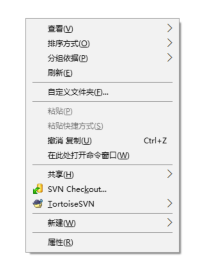
-->点击在此处打开命令窗口(M)
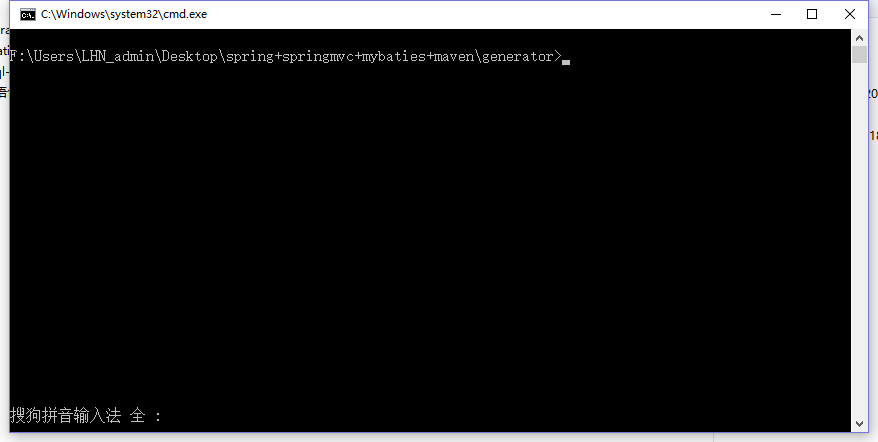
-->输入
1 java -jar mybatis-generator-core-1.3.2.jar -configfile generator.xml -overwrite
结束,,,,逆向工程生成完成!!!
还有通过java项目生成的逆向工程,我们下次再介绍。。。。。。
Mybatis逆向工程生成类文件的更多相关文章
- MyBatis逆向工程生成的Example类的方法总结
很早之前就在项目开发中多次使用MyBatis逆向工程生成的Example类,但一直没有对其下的方法做一个简单的总结,现总结如下:一.mapper接口中的方法解析mapper接口中的部分常用方法及功能如 ...
- 【坑】Mybatis 多次逆向工程生成mapper文件
在使用 mybatis 逆向工程的时候,多次逆向工程生成的文件,是不会产生覆盖的,而是追加: 假如,你第一次逆向,发生数据库的某个字段类型错了,修改以后再次逆向,那么得到的 mapper文件,将是 2 ...
- Mybatis逆向工程生成po、mapper接口、mapper.xml
Mybatis逆向工程生成po.mapper接口.mapper.xml 一.新建一个maven工程 请查看我的另一篇博客:<使用idea创建一个maven工程> 二.引入所需依赖 需要my ...
- MyBatis逆向工程生成配置 generator (生成pojo、mapper.xml、mapper.java)
MyBatis逆向工程生成 mybatis需要程序员自己编写sql语句,mybatis官方提供逆向工程,可以针对单表自动生成mybatis执行所需要的代码(mapper.java.mapper.xml ...
- Mybatis自动生成xml文件、dao接口、实体类
Mybatis可以通过逆向工程,实现自动生成xml文件.dao接口.实体类 以下使用的是Intellij Idea进行自动生成 一.首先,要在pom.xml中导入插件,在<build>中加 ...
- mybatis逆向工程生成mapper报错
Result Maps collection already contains value for xxxMapper.BaseResultMap错误解决办法一.问题描述今天在做项目时,遇到一个错误: ...
- 使用最新版Mybatis逆向工程生成属性不全的问题
这是出现问题时打印的日志 首先查看表内的字段 这张User表含8个属性,但是在逆向工程过程中生成的Pojo类不全还出现了不存在的属性 主要在逆向工程过程中的一个配置问题,修改generatorConf ...
- mybatis逆向工程生成JavaBean、dao、mapper generatorSqlmapCustom
import java.io.File; import java.util.ArrayList; import java.util.List; import org.mybatis.generator ...
- mybatis逆向工程生成代码
1 什么是逆向工程 mybaits需要程序员自己编写sql语句,mybatis官方提供逆向工程 可以针对单表自动生成mybatis执行所需要的代码(mapper.java,mapper.xml.po. ...
随机推荐
- 分布式存储ceph---ceph osd 故障硬盘更换(6)
正常状态: 故障状态: 实施更换步骤: 1.关闭ceph集群数据迁移: osd硬盘故障,状态变为down.在经过mod osd down out interval 设定的时间间隔后,ceph将其标记为 ...
- Centos双网卡配置默认路由
Centos6.5 双网卡,我们只需要一个默认路由,如果两个都有或都没有会有一系列的问题 [root@centos]# vi /etc/sysconfig/network修改以下内容NETWORKIN ...
- JDK5.0新特性 (Day_07)
JDK5.0新特性 目录 静态导入 自动装箱/拆箱 for-each循环 可变参数 枚举 JDK 5.0 新特性简介 JDK 5.0 的一个重要主题就是通过新增一些特性来简化开发,这些特性包括 ...
- Python数模笔记-PuLP库(2)线性规划进阶
1.基于字典的创建规划问题 上篇中介绍了使用 LpVariable 对逐一定义每个决策变量,设定名称.类型和上下界,类似地对约束条件也需要逐一设置模型参数.在大规模的规划问题中,这样逐个定义变量和设置 ...
- Java中单列集合List排序的真实应用场景
一.需求描述 最近产品应客户要求提出了一个新的需求,有一个列表查询需要按照其中的多列进行排序. 二.需求分析 由于数据总量不多,可以全部查询出来,因此我就考虑使用集合工具类Collections.so ...
- 我眼中的WebViewJavascriptBridge(图解)
工作中涉及到一段时间iOS开发,在开发中有个小小的框架让我非常深刻,就是WebViewJavascriptBridge,用于原生控件与前端交互通信.我觉得WebViewJavascriptBridge ...
- Go基础结构与类型02---使用iota定义常量组
package main import "fmt" /*const ( USA = 0 China = 1 Russia = 2 Britain = 3 France = 4 )* ...
- frp实现NAS外网访问
开始 入手了NAS之后就看是漫漫的折腾内网穿透的不归路.用的最多最简单的是下面三种 QC:群晖自带的,速度在100kb左右,能不能连上有时候都是运气,极其不稳定. DDNS:最推荐的方式.上下行都取决 ...
- YoyoGo v1.7.2 发布, 支持 Nacos & Apollo 配置中心
YoyoGo (Go语言框架)一个简单.轻量.快速.基于依赖注入的微服务框架( web .grpc ),支持Nacos/Consoul/Etcd/Eureka/k8s /Apollo等 . https ...
- 《吃透MQ系列》之扒开Kafka的神秘面纱
大家好,这是<吃透 MQ 系列>的第二弹,有些珊珊来迟,后台被好几个读者催更了,实属抱歉! 这篇文章拖更了好几周,起初的想法是:围绕每一个具体的消息中间件,不仅要写透,而且要控制好篇幅,写 ...