
重磅来袭!!!Elasticsearch7.14.1(ES 7.14.1)与Springboot2.5.4的整合
1. 概述
前面我们聊了 Elasticsearch(ES)集群的搭建,今天我们来聊一下,Elasticsearch(ES)集群如何与 Springboot 进行整合。
Elasticsearch(ES)集群的搭建可参见我的另一篇文章《Elasticsearch(ES)集群的搭建》。
Elasticsearch(ES)集群 我们采用的是目前最新的 7.14.1 版本。
Springboot 我们采用的是目前最新的 2.5.4 版本。
2. Springboot 与 Elasticsearch(ES)的版本对应问题
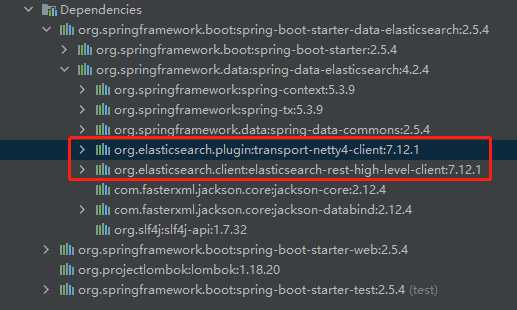
从 spring-boot-starter-data-elasticsearch 的 jar 包依赖来看,最新的 Springboot 2.5.4 版本 对应的 ElasticSearch(ES)版本应该是 7.12.1。
经本人亲测,API完全可以兼容 ElasticSearch(ES)7.14.1 版本,所以完全不用担心兼容问题。
如果担心有风险,可搭建 ElasticSearch(ES)7.12.1 版本的集群,搭建方法与 7.14.1 版本完全一致,可参见我的另一篇文章《Elasticsearch(ES)集群的搭建》。
ElasticSearch(ES)7.12.1 版本下载地址:
https://www.elastic.co/cn/downloads/past-releases#elasticsearch
https://www.elastic.co/cn/downloads/past-releases/elasticsearch-7-12-1
3. Elasticsearch(ES )与 Springboot 的整合
3.1 使用 InterlliJ IDEA 创建Springboot项目
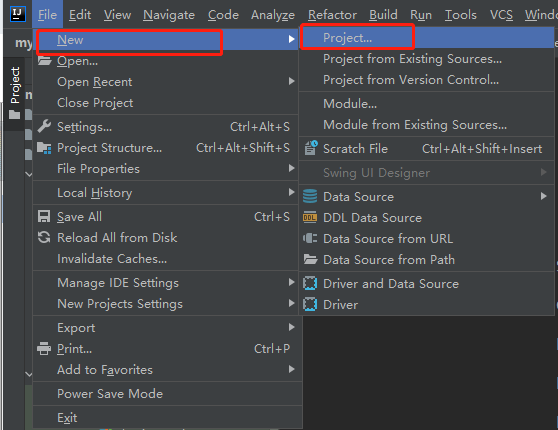
1)打开IDEA,选择 New —> Project...
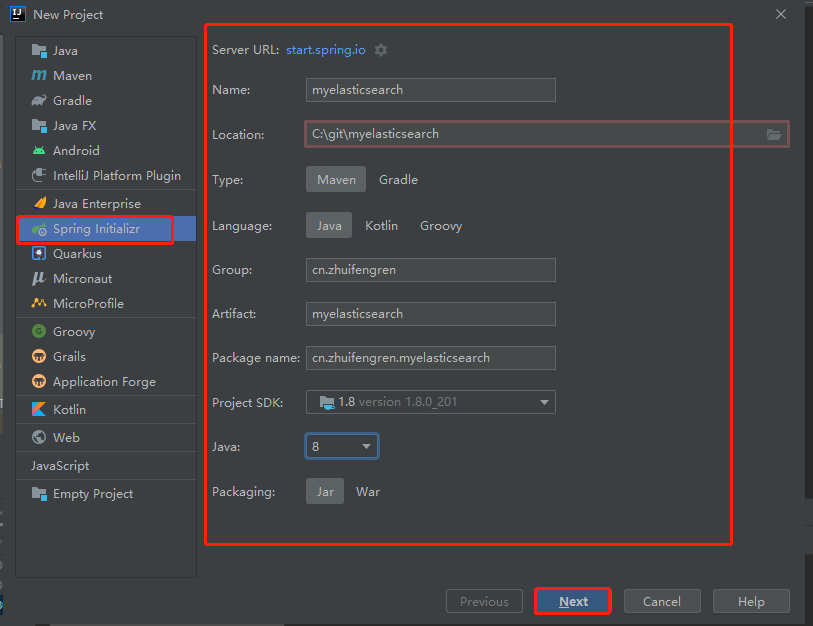
2)选择 Spring Initializr, 填写项目名称等信息,点击【Next】
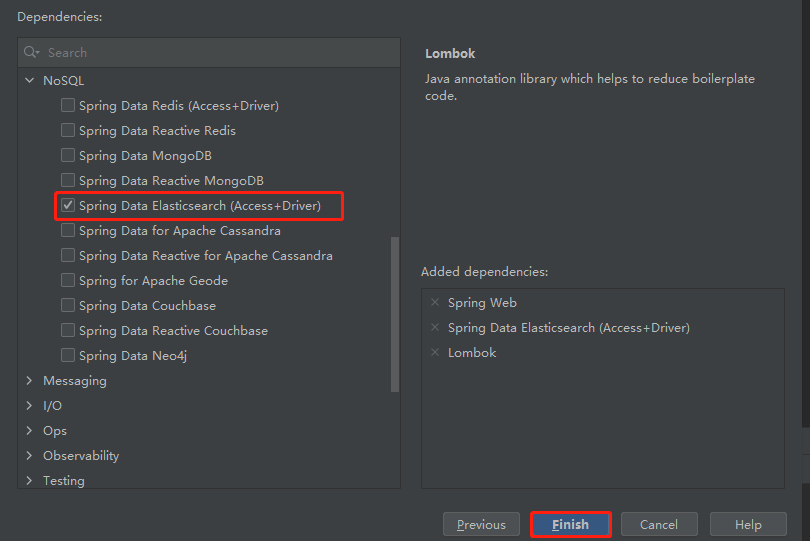
3)依赖中勾选 Spring Data Elasticsearch(Access+Driver),点击【Finish】即可
4)pom.xml 中的主要依赖
    <parent>

        <groupId>org.springframework.boot</groupId>

        <artifactId>spring-boot-starter-parent</artifactId>

        <version>2.5.4</version>

        <relativePath/> <!-- lookup parent from repository -->

    </parent>
    <dependencies>

        <dependency>

            <groupId>org.springframework.boot</groupId>

            <artifactId>spring-boot-starter-data-elasticsearch</artifactId>

        </dependency>

        <dependency>

            <groupId>org.springframework.boot</groupId>

            <artifactId>spring-boot-starter-web</artifactId>

        </dependency>

        <dependency>

            <groupId>org.projectlombok</groupId>

            <artifactId>lombok</artifactId>

            <optional>true</optional>

        </dependency>

        <dependency>

            <groupId>org.springframework.boot</groupId>

            <artifactId>spring-boot-starter-test</artifactId>

            <scope>test</scope>

        </dependency>

    </dependencies>
3.2 在 Elasticsearch(ES) 中创建索引 index_user 同时创建映射
特别说明:
不建议使用 Java代码 对索引进行管理类操作,例如:创建索引、更新映射、删除索引。
类似在mysql,我们通常不会用 Java代码 去进行建库、建表、改表、删表的操作,只用代码对表中的数据进行增删改查操作。
PUT http://192.168.1.8:9200/index_user
参数:
{

    "settings":{

        "index":{

            "number_of_shards":3,

            "number_of_replicas":1

        }

    },

    "mappings" : {

        "properties":{

            "user_id":{

                "type":"keyword"

            },

            "name":{

                "type": "text",

                "fields": {

                    "keyword": {

                        "ignore_above": 256,

                        "type": "keyword"

                    }

                },

                "analyzer":"ik_max_word"

            },

            "login_name":{

                "type":"keyword"

            },

            "age":{

                "type":"integer"

            },

            "birthday":{

                "type":"date"

            },

            "desc":{

                "type":"text",

                "analyzer":"ik_max_word"

            },

            "head_url":{

                "type":"text",

                "index":false

            }

        }

    }

}
3.3 配置 Springboot 配置文件
打开 application.yml 文件,将 Elasticsearch(ES)的集群信息配置在里面
spring:

  data:

    elasticsearch:

      client:

        reactive:

          endpoints: 192.168.1.8:9200,192.168.1.22:9200,192.168.1.144:9200

  elasticsearch:

    rest:

      uris: 192.168.1.8:9200,192.168.1.22:9200,192.168.1.144:9200
3.4 创建实体类 User
在实体类中用注解标识 实体 与 索引 的对应关系
import lombok.Builder;

import lombok.Getter;

import lombok.Setter;

import org.springframework.data.annotation.Id;

import org.springframework.data.elasticsearch.annotations.Document;

import org.springframework.data.elasticsearch.annotations.Field;

import org.springframework.data.elasticsearch.annotations.FieldType;

import org.springframework.data.elasticsearch.annotations.Setting;

import java.util.Date;

@Builder

@Setter

@Getter

@Setting(shards = 3, replicas = 1)

@Document(indexName = "index_user", createIndex = false)

public class User {

    @Id

    @Field(store = true, name = "user_id", type = FieldType.Keyword)

    private String userId;

    @Field(store = true, searchAnalyzer = "ik_max_word", analyzer = "ik_max_word")

    private String name;

    @Field(store = true, name = "login_name", type = FieldType.Keyword)

    private String loginName;

    @Field(store = true, type = FieldType.Integer)

    private Integer age;

    @Field(store = true, type = FieldType.Date)

    private Date birthday;

    @Field(store = true, searchAnalyzer = "ik_max_word", analyzer = "ik_max_word")

    private String desc;

    @Field(store = true, name = "head_url", type = FieldType.Keyword)

    private String headUrl;

}
3.5 单条文档的新增或更新
这里我们使用单元测试,演示一下,Java代码是如何操作Elasticsearch(ES)的。
文档ID不存在则新增文档,ID存在则更新文档
import cn.zhuifengren.myelasticsearch.pojo.User;

import org.junit.jupiter.api.Test;

import org.springframework.beans.factory.annotation.Autowired;

import org.springframework.boot.test.context.SpringBootTest;

import org.springframework.data.elasticsearch.core.ElasticsearchRestTemplate;

import org.springframework.data.elasticsearch.core.mapping.IndexCoordinates;

import org.springframework.data.elasticsearch.core.query.IndexQuery;

import org.springframework.data.elasticsearch.core.query.IndexQueryBuilder;

import java.text.ParseException;

import java.text.SimpleDateFormat;

@SpringBootTest(classes = MyelasticsearchApplication.class)

public class ElasticsearchTest {

    @Autowired

    private ElasticsearchRestTemplate elasticsearchRestTemplate;

    @Test

    public void save() throws ParseException {

        SimpleDateFormat sdf = new SimpleDateFormat("yyyy-MM-dd");

        User user = User.builder()

                .userId("2")

                .name("夏维尔")

                .loginName("xwe")

                .age(28)

                .birthday(sdf.parse("1992-06-06"))

                .desc("我是一名高级开发经理,每天坐地铁上班,在北京住,从不堵车")

                .headUrl("https://www.zhuifengren.cn/img/xwe.jpg")

                .build();

        elasticsearchRestTemplate.save(user);

    }

}
3.6 依据文档ID更新文档的部分字段
import cn.zhuifengren.myelasticsearch.pojo.User;

import cn.zhuifengren.myelasticsearch.utils.JsonUtils;

import org.junit.jupiter.api.Test;

import org.springframework.beans.factory.annotation.Autowired;

import org.springframework.boot.test.context.SpringBootTest;

import org.springframework.data.elasticsearch.core.ElasticsearchRestTemplate;

import org.springframework.data.elasticsearch.core.document.Document;

import org.springframework.data.elasticsearch.core.mapping.IndexCoordinates;

import org.springframework.data.elasticsearch.core.query.IndexQuery;

import org.springframework.data.elasticsearch.core.query.IndexQueryBuilder;

import org.springframework.data.elasticsearch.core.query.UpdateQuery;

import org.springframework.data.elasticsearch.core.query.UpdateResponse;

import java.text.ParseException;

import java.text.SimpleDateFormat;

import java.util.HashMap;

import java.util.Map;

@SpringBootTest(classes = MyelasticsearchApplication.class)

public class ElasticsearchTest {

    @Autowired

    private ElasticsearchRestTemplate elasticsearchRestTemplate;

    @Test

    public void update() {

        Map<String, Object> params = new HashMap<>();

        params.put("name", "夏维尔5");

        Document document = Document.from(params);

        UpdateQuery updateQuery = UpdateQuery.builder("2")  // 2 是文档的ID

                .withDocument(document)

                .build();

        UpdateResponse result = elasticsearchRestTemplate.update(updateQuery, IndexCoordinates.of("index_user"));

        System.out.println(JsonUtils.objectToJson(result));  // 结果:{"result":"UPDATED"}

    }

}
3.7 依据文档ID获得文档
import cn.zhuifengren.myelasticsearch.pojo.User;

import cn.zhuifengren.myelasticsearch.utils.JsonUtils;

import org.junit.jupiter.api.Test;

import org.springframework.beans.factory.annotation.Autowired;

import org.springframework.boot.test.context.SpringBootTest;

import org.springframework.data.elasticsearch.core.ElasticsearchRestTemplate;

import org.springframework.data.elasticsearch.core.document.Document;

import org.springframework.data.elasticsearch.core.mapping.IndexCoordinates;

import org.springframework.data.elasticsearch.core.query.IndexQuery;

import org.springframework.data.elasticsearch.core.query.IndexQueryBuilder;

import org.springframework.data.elasticsearch.core.query.UpdateQuery;

import org.springframework.data.elasticsearch.core.query.UpdateResponse;

import java.text.ParseException;

import java.text.SimpleDateFormat;

import java.util.HashMap;

import java.util.Map;

@SpringBootTest(classes = MyelasticsearchApplication.class)

public class ElasticsearchTest {

    @Autowired

    private ElasticsearchRestTemplate elasticsearchRestTemplate;

    @Test

    public void getById() {

        User user = elasticsearchRestTemplate.get("2", User.class);

        System.out.println(JsonUtils.objectToJson(user));

        // 结果:{"userId":"2","name":"夏维尔5","loginName":"xwe","age":28,"birthday":707760000000,"desc":"我是一名高级开发经理,每天坐地铁上班,在北京住,从不堵车","headUrl":"https://www.zhuifengren.cn/img/xwe.jpg"}

    }

}
3.8 依据文档ID删除文档
import cn.zhuifengren.myelasticsearch.pojo.User;

import cn.zhuifengren.myelasticsearch.utils.JsonUtils;

import org.junit.jupiter.api.Test;

import org.springframework.beans.factory.annotation.Autowired;

import org.springframework.boot.test.context.SpringBootTest;

import org.springframework.data.elasticsearch.core.ElasticsearchRestTemplate;

import org.springframework.data.elasticsearch.core.document.Document;

import org.springframework.data.elasticsearch.core.mapping.IndexCoordinates;

import org.springframework.data.elasticsearch.core.query.IndexQuery;

import org.springframework.data.elasticsearch.core.query.IndexQueryBuilder;

import org.springframework.data.elasticsearch.core.query.UpdateQuery;

import org.springframework.data.elasticsearch.core.query.UpdateResponse;

import java.text.ParseException;

import java.text.SimpleDateFormat;

import java.util.HashMap;

import java.util.Map;

@SpringBootTest(classes = MyelasticsearchApplication.class)

public class ElasticsearchTest {

    @Autowired

    private ElasticsearchRestTemplate elasticsearchRestTemplate;

    @Test

    public void delete() {

        String result = elasticsearchRestTemplate.delete("2", User.class);

        System.out.println(JsonUtils.objectToJson(result));  // 结果:"2"

    }

}
3.9 分页检索
import cn.zhuifengren.myelasticsearch.pojo.User;

import cn.zhuifengren.myelasticsearch.utils.JsonUtils;

import org.elasticsearch.index.query.QueryBuilders;

import org.junit.jupiter.api.Test;

import org.springframework.beans.factory.annotation.Autowired;

import org.springframework.boot.test.context.SpringBootTest;

import org.springframework.data.domain.PageRequest;

import org.springframework.data.domain.Pageable;

import org.springframework.data.elasticsearch.core.ElasticsearchRestTemplate;

import org.springframework.data.elasticsearch.core.SearchHits;

import org.springframework.data.elasticsearch.core.document.Document;

import org.springframework.data.elasticsearch.core.mapping.IndexCoordinates;

import org.springframework.data.elasticsearch.core.query.*;

import java.text.ParseException;

import java.text.SimpleDateFormat;

import java.util.HashMap;

import java.util.Map;

@SpringBootTest(classes = MyelasticsearchApplication.class)

public class ElasticsearchTest {

    @Autowired

    private ElasticsearchRestTemplate elasticsearchRestTemplate;

    @Test

    public void searchForPage() {

        Pageable pageable = PageRequest.of(0,10);  // page 从第 0 页开始

        Query query = new NativeSearchQueryBuilder()

                .withQuery(QueryBuilders.matchQuery("desc", "一名小学生"))

                .withQuery(QueryBuilders.termQuery("age", 10))

                .withPageable(pageable)

                .build();

        SearchHits<User> result = elasticsearchRestTemplate.search(query, User.class);

        System.out.println(JsonUtils.objectToJson(result));

    }

}
结果Json:
{

    "totalHits": 1,

    "totalHitsRelation": "EQUAL_TO",

    "maxScore": 1,

    "scrollId": null,

    "searchHits": [

        {

            "index": "index_user",

            "id": "3",

            "score": 1,

            "sortValues": [],

            "content": {

                "userId": "3",

                "name": "迪士尼在逃仙柔",

                "loginName": "dsnzxr",

                "age": 10,

                "birthday": 1308672000000,

                "desc": "我是一名五年级的小学生,每天专车接专车送,中午在学校入伙,食堂菜可好了,上学期期末考试我拿了三好学生奖",

                "headUrl": "https://www.zhuifengren.cn/img/dsnzxr.jpg"

            },

            "highlightFields": {},

            "innerHits": {},

            "nestedMetaData": null,

            "routing": null,

            "explanation": null,

            "matchedQueries": []

        }

    ],

    "aggregations": null,

    "empty": false

}
3.10 高亮的实现
import cn.zhuifengren.myelasticsearch.pojo.User;

import cn.zhuifengren.myelasticsearch.utils.JsonUtils;

import org.elasticsearch.index.query.QueryBuilders;

import org.elasticsearch.search.fetch.subphase.highlight.HighlightBuilder;

import org.junit.jupiter.api.Test;

import org.springframework.beans.factory.annotation.Autowired;

import org.springframework.boot.test.context.SpringBootTest;

import org.springframework.data.domain.PageRequest;

import org.springframework.data.domain.Pageable;

import org.springframework.data.elasticsearch.core.ElasticsearchRestTemplate;

import org.springframework.data.elasticsearch.core.SearchHits;

import org.springframework.data.elasticsearch.core.document.Document;

import org.springframework.data.elasticsearch.core.mapping.IndexCoordinates;

import org.springframework.data.elasticsearch.core.query.*;

import java.text.ParseException;

import java.text.SimpleDateFormat;

import java.util.HashMap;

import java.util.Map;

@SpringBootTest(classes = MyelasticsearchApplication.class)

public class ElasticsearchTest {

    @Autowired

    private ElasticsearchRestTemplate elasticsearchRestTemplate;

    @Test

    public void highlight() {

        Pageable pageable = PageRequest.of(0,10);  // page 从第 0 页开始

        HighlightBuilder.Field highlightField = new HighlightBuilder.Field("desc")

                                            .preTags("<span>")

                                            .postTags("</span>");

        Query query = new NativeSearchQueryBuilder()

                .withQuery(QueryBuilders.matchQuery("desc", "一名小学生"))

                .withHighlightFields(highlightField)

                .withPageable(pageable)

                .build();

        SearchHits<User> result = elasticsearchRestTemplate.search(query, User.class);

        System.out.println(JsonUtils.objectToJson(result));

    }

}
结果Json:
{

    "totalHits": 3,

    "totalHitsRelation": "EQUAL_TO",

    "maxScore": 3.0418546,

    "scrollId": null,

    "searchHits": [

        {

            "index": "index_user",

            "id": "3",

            "score": 3.0418546,

            "sortValues": [],

            "content": {

                "userId": "3",

                "name": "迪士尼在逃仙柔",

                "loginName": "dsnzxr",

                "age": 10,

                "birthday": 1308672000000,

                "desc": "我是一名五年级的小学生,每天专车接专车送,中午在学校入伙,食堂菜可好了,上学期期末考试我拿了三好学生奖",

                "headUrl": "https://www.zhuifengren.cn/img/dsnzxr.jpg"

            },

            "highlightFields": {

                "desc": [

                    "我是<span>一名</span>五年级的<span>小学生</span>,每天专车接专车送,中午在学校入伙,食堂菜可好了,上学期期末考试我拿了三好<span>学生</span>奖"

                ]

            },

            "innerHits": {},

            "nestedMetaData": null,

            "routing": null,

            "explanation": null,

            "matchedQueries": []

        },

        {

            "index": "index_user",

            "id": "1",

            "score": 0.5957724,

            "sortValues": [],

            "content": {

                "userId": "1",

                "name": "僵尸猎手",

                "loginName": "jsls",

                "age": 25,

                "birthday": 636220800000,

                "desc": "我是一名房产经纪人,现在转行了,目前是一名运输工人",

                "headUrl": "https://www.zhuifengren.cn/img/jsls.jpg"

            },

            "highlightFields": {

                "desc": [

                    "我是<span>一名</span>房产经纪人,现在转行了,目前是<span>一名</span>运输工人"

                ]

            },

            "innerHits": {},

            "nestedMetaData": null,

            "routing": null,

            "explanation": null,

            "matchedQueries": []

        },

        {

            "index": "index_user",

            "id": "2",

            "score": 0.46563908,

            "sortValues": [],

            "content": {

                "userId": "2",

                "name": "夏维尔",

                "loginName": "xwe",

                "age": 28,

                "birthday": 707760000000,

                "desc": "我是一名高级开发经理,每天坐地铁上班,在北京住,从不堵车",

                "headUrl": "https://www.zhuifengren.cn/img/xwe.jpg"

            },

            "highlightFields": {

                "desc": [

                    "我是<span>一名</span>高级开发经理,每天坐地铁上班,在北京住,从不堵车"

                ]

            },

            "innerHits": {},

            "nestedMetaData": null,

            "routing": null,

            "explanation": null,

            "matchedQueries": []

        }

    ],

    "aggregations": null,

    "empty": false

}
3.11 自定义排序的实现
import cn.zhuifengren.myelasticsearch.pojo.User;

import cn.zhuifengren.myelasticsearch.utils.JsonUtils;

import org.elasticsearch.index.query.QueryBuilders;

import org.elasticsearch.search.fetch.subphase.highlight.HighlightBuilder;

import org.elasticsearch.search.sort.FieldSortBuilder;

import org.elasticsearch.search.sort.SortBuilder;

import org.elasticsearch.search.sort.SortOrder;

import org.junit.jupiter.api.Test;

import org.springframework.beans.factory.annotation.Autowired;

import org.springframework.boot.test.context.SpringBootTest;

import org.springframework.data.domain.PageRequest;

import org.springframework.data.domain.Pageable;

import org.springframework.data.elasticsearch.core.ElasticsearchRestTemplate;

import org.springframework.data.elasticsearch.core.SearchHits;

import org.springframework.data.elasticsearch.core.document.Document;

import org.springframework.data.elasticsearch.core.mapping.IndexCoordinates;

import org.springframework.data.elasticsearch.core.query.*;

import java.text.ParseException;

import java.text.SimpleDateFormat;

import java.util.HashMap;

import java.util.Map;

@SpringBootTest(classes = MyelasticsearchApplication.class)

public class ElasticsearchTest {

    @Autowired

    private ElasticsearchRestTemplate elasticsearchRestTemplate;

    @Test

    public void sort() {

        Pageable pageable = PageRequest.of(0,10);  // page 从第 0 页开始

        HighlightBuilder.Field highlightField = new HighlightBuilder.Field("desc")

                .preTags("<span>")

                .postTags("</span>");

        SortBuilder<FieldSortBuilder> sortBuilder

                            = new FieldSortBuilder("age").order(SortOrder.DESC);

        Query query = new NativeSearchQueryBuilder()

                .withQuery(QueryBuilders.matchQuery("desc", "一名小学生"))

                .withHighlightFields(highlightField)

                .withSort(sortBuilder)  // 排序可加多个

                .withPageable(pageable)

                .build();

        SearchHits<User> result = elasticsearchRestTemplate.search(query, User.class);

        System.out.println(JsonUtils.objectToJson(result));

    }

}
4. 综述
今天聊了一下 Elasticsearch7.14.1(ES 7.14.1)与 springboot2.5.4 的整合,希望可以对大家的工作有所帮助。
欢迎帮忙点赞、评论、转发、加关注 :)
关注追风人聊Java,每天更新Java干货。
重磅来袭!!!Elasticsearch7.14.1(ES 7.14.1)与Springboot2.5.4的整合的更多相关文章
- Github上的1000多本免费电子书重磅来袭!
Github上的1000多本免费电子书重磅来袭! 以前 StackOverFlow 也给出了一个免费电子书列表,现在在Github上可以看到时刻保持更新的列表了. 瞥一眼下面的书籍分类目录,你就能 ...
- linux下安装glibc-2.14,解决“`GLIBC_2.14' not found”问题
下载安装包:http://ftp.gnu.org/gnu/glibc/ 我下载的是glibc-2.14.1.tar.gz 解压:tar xzf glibc-2.14.1.tar.gz cd glibc ...
- Ubuntu 14.04 + Linux 3.14.34 系统调用实现文件拷贝
采用 64位系统, ubuntu 14.04 + 新内核linux-3.14.34 下载地址https://www.kernel.org/pub/linux/kernel/v3.x/linux-3.1 ...
- 奥威Power-BI V11——凤凰涅槃,重磅来袭
时隔一年,奥威Power-BI重磅再推新版,在之前V10 WEB可视化前端分析工具基础上,更加注重用户体验这一块.V11站在用户的角度,以用户的视野去设计研发新版本,最终在前端框架的优化.移动设备的体 ...
- 网易蜂巢(云计算基础服务)MongoDB服务重磅来袭
此文已由作者温正湖授权网易云社区发布. 欢迎访问网易云社区,了解更多网易技术产品运营经验. MongoDB是目前最为流行的NoSQL数据库,在2017年1月新鲜出炉的数据库权威排行榜上,MongoDB ...
- 重磅来袭,使用CRL实现大数据分库分表方案
关于分库分表方案详细介绍 http://blog.csdn.net/bluishglc/article/details/7696085 这里就不作详细描述了 分库分表方案基本脱离不了这个结构,受制于实 ...
- 重磅来袭,水木PC客户端全面改版,欢迎使用!
2016-11-04 下载 最新更新 1.优化帖子中回文内容的显示,采用相比正文较小的字体,以及置灰处理,突出正文. 2.可配置是否隐藏帖子中的IP和修改 ...
- 收藏住:金融&电商类原型模板重磅来袭,免费使用!
经常有很多产品经理和设计师想要各行业的产品原型模板,可以直接下载使用.现在分享下一个资源渠道:墨刀的原型模板. 上新了金融类和电商类的主要App设计原型,可以直接免费使用,具体包括: 金融类 招商银行 ...
- 重磅来袭,开源Asp.Net MVC网上商城BrnShop正式发布,提供源码下载(转)
BrnShop网上商城是以Asp.Net mvc3为基础开发的网上商城,源代码完全开源(企业版的源代码目前还没有完全整理完成,一旦整理完成也全部开源). 啥话也不说了,直接上源码:下载源码(由于公司服 ...
随机推荐
- C# 不是异步的方法中获取异步的结果
var waiter = HP.UtilsLib.TaskAwaiterHelper.GetTaskAwaiter( async () => { return await feedBack(ve ...
- 【java虚拟机】几种内存溢出及解决方案
作者:平凡希 地址:https://www.cnblogs.com/xiaoxi/p/7406903.html 1.JVM Heap(堆)溢出:java.lang.OutOfMemoryError: ...
- Mybatis--级联(一)
级联是resultMap中的配置. 级联分为3种 鉴别器(discrimination):根据某些条件采用具体实现具体实现类级联,如体检表根据性别去区分 一对一:学生和学生证 一对多:班主任和学生. ...
- 一些Java知识点
1 import java.util.ArrayList; 2 3 public class Main { 4 5 public static void main(String[] args) { 6 ...
- Go: 复合数据类型slice
slice slice 表示用于相同类型元素的可变长度的序列. slice有三个属性:指针.长度和容量. 指针:slice存储数据的内部结构是数组,指针指向的是数组的地址 长度:保存slice中的元素 ...
- 微信公众号授权回调用户信息,获取openid
1.--------------------用户授权登录并获取code 授权登录方式有两个,一种为静默授权登录(scope=snsapi_base),一种为非静默授权登录(scope=snsapi_u ...
- dotnet OpenXML 读取 PPT 内嵌 ole 格式 Excel 表格的信息
在 Office 中,可以在 PPT 里面插入表格,插入表格有好多不同的方法,对应 OpenXML 文档存储的更多不同的方式.本文来介绍如何读取 PPT 内嵌 ole 格式的 xls+ 表格的方法 在 ...
- 基于CentOS7.x Linux操作系统,从0开始构建一套Docker虚拟化平台,使用二进制Tar包方式,部署的步骤和方法如下:
#配置centos7的yum源#建议阿里源#链接:https://yq.aliyun.com/articles/525282?type=2#从Docker官网下载软件包: ls -l docker-1 ...
- JavaWeb使用Filter进行字符编码过滤 预防web服务中文乱码
JavaWeb使用Filter进行字符编码过滤 预防web服务中文乱码 准备条件:一个创建好的 JavaWeb 项目 步骤: 1.创建一个类并实现 Filter 接口 import javax.ser ...
- volatile的基本原理
volatile这个关键字可能很多朋友都听说过,或许也都用过.在Java 5之前,它是一个备受争议的关键字,因为在程序中使用它往往会导致出人意料的结果.在Java 5之后,volatile关键字才得以 ...