
Python 线程池模块threadpool 、 concurrent.futures 的 ThreadPoolExecutor
一、threadpool 基本用法
pip install threadpool
pool = ThreadPool(poolsize)

requests = makeRequests(some_callable, list_of_args, callback)

[pool.putRequest(req) for req in requests]

pool.wait()
第一行定义了一个线程池,表示最多可以创建poolsize这么多线程;
第二行是调用makeRequests创建了要开启多线程的函数,以及函数相关参数和回调函数,其中回调函数可以不写,default是无,也就是说makeRequests只需要2个参数就可以运行;
第三行使用列表生成式代替for循环,是将所有要运行多线程的请求扔进线程池,
[pool.putRequest(req) for req in requests]等同于
for req in requests:
pool.putRequest(req)
第四行是等待所有的线程完成工作后退出。
二、代码实例
要处理的函数,只需要一个传参:
import time

import threadpool

def sayhello(str):

    print "Hello ",str

    time.sleep(2)

name_list =['xiaozi','aa','bb','cc']

start_time = time.time()

pool = threadpool.ThreadPool(10)

requests = threadpool.makeRequests(sayhello, name_list)

[pool.putRequest(req) for req in requests]

pool.wait()

print '%d second'% (time.time()-start_time)
要处理的函数,只需要N个传参:
方式一:---参数列表元素需要用元组,([args,...], None)
import time

import threadpool

def sayhello(a, b, c):

    print("Hello ",a, b, c)

    time.sleep(2)

def call_back():

    print('call_back...........')

name_list = [([1,2,3], None), ([4,5,6], None) ]

start_time = time.time()

pool = threadpool.ThreadPool(10)

requests = threadpool.makeRequests(sayhello, name_list)

[pool.putRequest(req) for req in requests]

pool.wait()

print('%d second'% (time.time()-start_time))
Hello 1 2 3
Hello 4 5 6
2 second
Process finished with exit code 0
方式二:---参数列表元素需要用元组,(None, {'key':'value', .......})
import time

import threadpool

def sayhello(a, b, c):

    print("Hello ",a, b, c)

    time.sleep(2)

def call_back():

    print('call_back...........')

# name_list = [([1,2,3], None), ([4,5,6], None) ]

name_list = [(None, {'a':1,'b':2,'c':3}), (None, {'a':4,'b':5, 'c':6}) ]

start_time = time.time()

pool = threadpool.ThreadPool(10)

requests = threadpool.makeRequests(sayhello, name_list)

[pool.putRequest(req) for req in requests]

pool.wait()

print('%d second'% (time.time()-start_time))
concurrent.futures 的ThreadPoolExecutor (线程池)
https://www.jianshu.com/p/6d6e4f745c27
从Python3.2开始,标准库为我们提供了 concurrent.futures 模块,它提供了 ThreadPoolExecutor (线程池)和ProcessPoolExecutor (进程池)两个类。
相比 threading 等模块,该模块通过 submit 返回的是一个 future 对象,它是一个未来可期的对象,通过它可以获悉线程的状态主线程(或进程)中可以获取某一个线程(进程)执行的状态或者某一个任务执行的状态及返回值:
- 主线程可以获取某一个线程(或者任务的)的状态,以及返回值。
- 当一个线程完成的时候,主线程能够立即知道。
- 让多线程和多进程的编码接口一致。
线程池的基本使用
#!/usr/bin/env python3

# -*- coding:utf-8 -*-

#  @Time: 2020/11/21 17:55

#  @Author:zhangmingda

#  @File: ThreadPoolExecutor_study.py

#  @Software: PyCharm

#  Description:

from  concurrent.futures import ThreadPoolExecutor

import time

task_args_list = [('zhangsan', 2),('lishi',3), ('wangwu', 4)]

def task(name, seconds):

    print('% sleep %s seconds start...' % (name, seconds))

    time.sleep(seconds)

    print('% sleep %s seconds done' % (name, seconds))

    return '%s task done' % name

with ThreadPoolExecutor(max_workers=5) as t:

    # [ t.submit(task, *arg) for  arg in task_args_list]

    task1 = t.submit(task, '张三', 1)

    task2 = t.submit(task, '李四', 2)

    task3 = t.submit(task, '王五', 2)

    task4 = t.submit(task, '赵柳', 3)

    print(task1.done())

    print(task2.done())

    print(task3.done())

    print(task4.done())

    time.sleep(2)

    print(task1.done())

    print(task2.done())

    print(task3.done())

    print(task4.done())

    print(task1.result())

    print(task2.result())

    print(task3.result())

    print(task4.result())
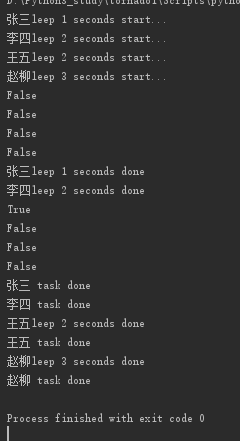
使用 with 语句 ,通过 ThreadPoolExecutor 构造实例,同时传入 max_workers 参数来设置线程池中最多能同时运行的线程数目。
使用 submit 函数来提交线程需要执行的任务到线程池中,并返回该任务的句柄(类似于文件、画图),注意 submit() 不是阻塞的,而是立即返回。
通过使用 done() 方法判断该任务是否结束。上面的例子可以看出,提交任务后立即判断任务状态,显示四个任务都未完成。在延时2.5后,task1 和 task2 执行完毕,task3 仍在执行中。
使用 result() 方法可以获取任务的返回值 【注意result 是阻塞的会阻塞主线程】
主要方法:
wait
wait(fs, timeout=None, return_when=ALL_COMPLETED)
fs: 表示需要执行的序列
timeout: 等待的最大时间,如果超过这个时间即使线程未执行完成也将返回
return_when:表示wait返回结果的条件,默认为 ALL_COMPLETED 全部执行完成再返回;可指定FIRST_COMPLETED 当第一个执行完就退出阻塞
from  concurrent.futures import ThreadPoolExecutor,wait,FIRST_COMPLETED, ALL_COMPLETED

import time

task_args_list = [('zhangsan', 1),('lishi',2), ('wangwu', 3)]

task_list = []

def task(name, seconds):

    print('% sleep %s seconds start...' % (name, seconds))

    time.sleep(seconds)

    print('% sleep %s seconds done' % (name, seconds))

    return '%s task done' % name

with ThreadPoolExecutor(max_workers=5) as t:

    [task_list.append(t.submit(task, *arg)) for  arg in task_args_list]

    wait(task_list, return_when=FIRST_COMPLETED) # 等了一秒

    print('all_task_submit_complete! and First task complete!')

    print(wait(task_list,timeout=1.5)) # 又等了1.5秒,合计等了2.5秒

as_completed
上面虽提供了判断任务是否结束的方法,但是不能在主线程中一直判断。最好的方法是当某个任务结束了,就给主线程返回结果,而不是一直判断每个任务是否结束。
task_args_list = [('zhangsan', 1),('lishi',3), ('wangwu', 2)]

task_list = []

def task(name, seconds):

    print('%s sleep %s seconds start...' % (name, seconds))

    time.sleep(seconds)

    return '%s sleep %s seconds done' % (name, seconds)

with ThreadPoolExecutor(max_workers=5) as t:

    [task_list.append(t.submit(task, *arg)) for  arg in task_args_list]

    [print(future.result()) for future in as_completed(task_list)]

    print('All Task Done!!!!!!!!!')

map
map(fn, *iterables, timeout=None)
fn: 第一个参数 fn 是需要线程执行的函数;
iterables:第二个参数接受一个可迭代对象;
timeout: 第三个参数 timeout 跟 wait() 的 timeout 一样,但由于 map 是返回线程执行的结果,如果 timeout小于线程执行时间会抛异常 TimeoutError。
用法如下:
def spider(page):

    time.sleep(page)

    return page

start = time.time()

executor = ThreadPoolExecutor(max_workers=4)

i = 1

for result in executor.map(spider, [2, 3, 1, 4]):

    print("task{}:{}".format(i, result))

    i += 1

#  运行结果

task1:2

task2:3

task3:1

task4:4
使用 map 方法,无需提前使用 submit 方法,map 方法与 python 高阶函数 map 的含义相同,都是将序列中的每个元素都执行同一个函数。
上面的代码对列表中的每个元素都执行 spider() 函数,并分配各线程池。
可以看到执行结果与上面的 as_completed() 方法的结果不同,输出顺序和列表的顺序相同,就算 1s 的任务先执行完成,也会先打印前面提交的任务返回的结果。
Python 线程池模块threadpool 、 concurrent.futures 的 ThreadPoolExecutor的更多相关文章
- python线程池(threadpool)
一.安装 pip install threadpool 二.使用介绍 (1)引入threadpool模块 (2)定义线程函数 (3)创建线程 池threadpool.ThreadPool() (4)创 ...
- python线程池(threadpool)模块使用笔记
一.安装与简介 pip install threadpool pool = ThreadPool(poolsize) requests = makeRequests(some_callable, li ...
- python线程池(threadpool)模块使用笔记 .python 线程池使用推荐
一.安装与简介 pip install threadpool pool = ThreadPool(poolsize) requests = makeRequests(some_callable, li ...
- Python 线程池(小节)
Python 线程池(小节) from concurrent.futures import ThreadPoolExecutor,ProcessPoolExecutor import os,time, ...
- Python之路(第四十六篇)多种方法实现python线程池(threadpool模块\multiprocessing.dummy模块\concurrent.futures模块)
一.线程池 很久(python2.6)之前python没有官方的线程池模块,只有第三方的threadpool模块, 之后再python2.6加入了multiprocessing.dummy 作为可以使 ...
- python3 线程池-threadpool模块与concurrent.futures模块
多种方法实现 python 线程池 一. 既然多线程可以缩短程序运行时间,那么,是不是线程数量越多越好呢? 显然,并不是,每一个线程的从生成到消亡也是需要时间和资源的,太多的线程会占用过多的系统资源( ...
- Python3【模块】concurrent.futures模块,线程池进程池
Python标准库为我们提供了threading和multiprocessing模块编写相应的多线程/多进程代码,但是当项目达到一定的规模,频繁创建/销毁进程或者线程是非常消耗资源的,这个时候我们就要 ...
- python并发模块之concurrent.futures(一)
Python3.2开始,标准库为我们提供了concurrent.futures模块,它提供了ThreadPoolExecutor和ProcessPoolExecutor两个类,实现了对threadin ...
- Python之网络编程之concurrent.futures模块
需要注意一下不能无限的开进程,不能无限的开线程最常用的就是开进程池,开线程池.其中回调函数非常重要回调函数其实可以作为一种编程思想,谁好了谁就去掉 只要你用并发,就会有锁的问题,但是你不能一直去自己加 ...
随机推荐
- Atcoder Grand Contest 005 E - Sugigma: The Showdown(思维题)
洛谷题面传送门 & Atcoder 题面传送门 记先手移动棋子的树为红树,后手移动棋子的树为蓝树. 首先考虑一个性质,就是如果与当前红色棋子所在的点相连的边中存在一条边,满足这条边的两个端点在 ...
- NCBI SRA数据如何进行md5校验?
下了一些sra数据库中的公共数据,因为pretech和aspera不稳定,稍微大点的文件经常传断,部分文件我只能通过本地下载再上传. 那么问题来了,sra没有md5校验,我怎么知道我数据的完整性,尤其 ...
- R shinydashboard——3.外观
目录 1.皮肤 2.注销面板 3.CSS 4. 标题延长 5.侧边栏宽度 6.图标 7.状态和颜色 1.皮肤 shinydashboard有很多颜色主题和外观的设置.默认为蓝色,可指定黑丝.紫色.绿色 ...
- 一个专业处理字符串的IDEA插件
字符串处理想必是小伙伴们平时开发时经常碰到的一个 "难题".为什么要打上引号?因为你说他难吧,其实也不是什么特别复杂的事:你说他不难吧,弄起来还真挺麻烦的,像删除其中空行啊.切换大 ...
- A Child's History of England.48
A few could not resolve to do this, but the greater part complied. They made a blazing heap of all t ...
- day10 负载均衡
day10 负载均衡 负载均衡反向代理 正向代理:即是客户端代理, 代理客户端, 服务端不知道实际发起请求的客户端. # (内部上网) 客户端 <-> 代理 -> 服务端 反向代理即 ...
- 商业爬虫学习笔记day1
day1 一. HTTP 1.介绍: https://www.cnblogs.com/vamei/archive/2013/05/11/3069788.html http://blog.csdn.ne ...
- myatoi
atoi (表示 ascii to integer)是把字符串转换成整型数的一个函数,应用在计算机程序和办公软件中.int atoi(const char *nptr) 函数会扫描参数 nptr字符串 ...
- c学习 - 第七章:数组
7.3.6 字符串处理函数 (1).puts(字符数组) 字符串输出到终端 (2).gets(字符数组) 从标准输入获取字符串(包括空格) (3).strcat(字符数组1,字符数组2) 连接两个字符 ...
- 转 Android Lifecycle、ViewModel和LiveData
转自:https://www.jianshu.com/p/982545e01d0a 1.概述 在I / O '17的时候,其中一个重要的主题是Architecture Components.这是一个官 ...