
MySQL binlog_ignore_db 参数最全解析
前言:
经过前面文章学习,我们知道 binlog 会记录数据库所有执行的 DDL 和 DML 语句(除了数据查询语句select、show等)。注意默认情况下会记录所有库的操作,那么如果我们有另类需求,比如说只让某个库记录 binglog 或排除某个库记录 binlog ,是否支持此类需求呢?本篇文章我们一起来看下。
1. binlog_do_db 与 binlog_ignore_db
当数据库实例开启 binlog 时,我们执行 show master status 命令,会看到有 Binlog_Do_DB 与 Binlog_Ignore_DB 选项。
mysql> show master status;

+---------------+----------+--------------+------------------+-------------------+

| File          | Position | Binlog_Do_DB | Binlog_Ignore_DB | Executed_Gtid_Set |

+---------------+----------+--------------+------------------+-------------------+

| binlog.000009 |   282838 |              |                  |                   |

+---------------+----------+--------------+------------------+-------------------+
默认情况下,这两个选项为空,那么这两个参数有何作用?是否如同其字面意思一个只让某个库记录 binglog 一个排除某个库记录 binlog 呢?笔者查阅官方文档,简单说明下这两个参数的作用:
- binlog_do_db:此参数表示只记录指定数据库的二进制日志,默认全部记录。
- binlog_ignore_db:此参数表示不记录指定的数据库的二进制日志。
这两个参数为互斥关系,一般只选择其一设置,只能在启动命令行中或配置文件中加入。指定多个数据库要分行写入,举例如下:
# 指定 db1 db2 记录binlog

[mysqld]

binlog_do_db = db1

binlog_do_db = db2

# 不让 db3 db4 记录binlog

[mysqld]

binlog_ignore_db = db3

binlog_ignore_db = db4
此外,这二者参数具体作用与否还与 binlog 格式有关系,在某些情况下 binlog 格式设置为 STATEMENT 或 ROW 会有不同的效果。在实际应用中 binlog_ignore_db 用途更广泛些,比如说某个库的数据不太重要,为了减轻服务器写入压力,我们可能不让该库记录 binlog 。网上也有文章说设置 binlog_ignore_db 会导致从库同步错误,那么设置该参数到底有什么效果呢,下面我们来具体实验下。
2. binlog_ignore_db 具体效果
首先说明下,我的测试数据库实例是 5.7.23 社区版本,共有 testdb、logdb 两个业务库,我们设置 logdb 不记录 binlog ,下面来具体实验下:
# binlog 为 ROW 格式

# 1.不使用 use db

mysql> show master status;

+---------------+----------+--------------+------------------+-------------------+

| File          | Position | Binlog_Do_DB | Binlog_Ignore_DB | Executed_Gtid_Set |

+---------------+----------+--------------+------------------+-------------------+

| binlog.000011 |      154 |              | logdb            |                   |

+---------------+----------+--------------+------------------+-------------------+

mysql> select database();

+------------+

| database() |

+------------+

| NULL       |

+------------+

1 row in set (0.00 sec)

mysql> CREATE TABLE testdb.`test_tb1` ( id int , name varchar(30) ) ENGINE=InnoDB  DEFAULT CHARSET=utf8;

Query OK, 0 rows affected (0.06 sec)

mysql> insert into testdb.test_tb1 values (1001,'sdfde');

Query OK, 1 row affected (0.01 sec)

mysql> show master status;

+---------------+----------+--------------+------------------+-------------------+

| File          | Position | Binlog_Do_DB | Binlog_Ignore_DB | Executed_Gtid_Set |

+---------------+----------+--------------+------------------+-------------------+

| binlog.000011 |      653 |              | logdb            |                   |

+---------------+----------+--------------+------------------+-------------------+

1 row in set (0.00 sec)

mysql> CREATE TABLE logdb.`log_tb1` ( id int , name varchar(30) ) ENGINE=InnoDB  DEFAULT CHARSET=utf8;

Query OK, 0 rows affected (0.05 sec)

mysql> insert into logdb.log_tb1 values (1001,'sdfde');

Query OK, 1 row affected (0.00 sec)

mysql> show master status;

+---------------+----------+--------------+------------------+-------------------+

| File          | Position | Binlog_Do_DB | Binlog_Ignore_DB | Executed_Gtid_Set |

+---------------+----------+--------------+------------------+-------------------+

| binlog.000011 |      883 |              | logdb            |                   |

+---------------+----------+--------------+------------------+-------------------+

mysql> insert into logdb.log_tb1 values (1002,'sdsdfde');

Query OK, 1 row affected (0.01 sec)

mysql> show master status;

+---------------+----------+--------------+------------------+-------------------+

| File          | Position | Binlog_Do_DB | Binlog_Ignore_DB | Executed_Gtid_Set |

+---------------+----------+--------------+------------------+-------------------+

| binlog.000011 |      883 |              | logdb            |                   |

+---------------+----------+--------------+------------------+-------------------+

mysql> alter table logdb.log_tb1 add column c3 varchar(20);

Query OK, 0 rows affected (0.12 sec)

Records: 0  Duplicates: 0  Warnings: 0

mysql> show master status;

+---------------+----------+--------------+------------------+-------------------+

| File          | Position | Binlog_Do_DB | Binlog_Ignore_DB | Executed_Gtid_Set |

+---------------+----------+--------------+------------------+-------------------+

| binlog.000011 |     1070 |              | logdb            |                   |

+---------------+----------+--------------+------------------+-------------------+

# 结论:其他库记录正常 logdb库会记录DDL 不记录DML

# 2.使用 use testdb跨库

mysql> use testdb;

Reading table information for completion of table and column names

You can turn off this feature to get a quicker startup with -A

Database changed

mysql> select database();

+------------+

| database() |

+------------+

| testdb     |

+------------+

1 row in set (0.00 sec)

mysql> show master status;

+---------------+----------+--------------+------------------+-------------------+

| File          | Position | Binlog_Do_DB | Binlog_Ignore_DB | Executed_Gtid_Set |

+---------------+----------+--------------+------------------+-------------------+

| binlog.000011 |     1070 |              | logdb            |                   |

+---------------+----------+--------------+------------------+-------------------+

1 row in set (0.00 sec)

mysql> CREATE TABLE `test_tb2` ( id int , name varchar(30) ) ENGINE=InnoDB  DEFAULT CHARSET=utf8;

Query OK, 0 rows affected (0.05 sec)

mysql> insert into test_tb2 values (1001,'sdfde');

Query OK, 1 row affected (0.04 sec)

mysql> show master status;

+---------------+----------+--------------+------------------+-------------------+

| File          | Position | Binlog_Do_DB | Binlog_Ignore_DB | Executed_Gtid_Set |

+---------------+----------+--------------+------------------+-------------------+

| binlog.000011 |     1574 |              | logdb            |                   |

+---------------+----------+--------------+------------------+-------------------+

1 row in set (0.00 sec)

mysql> CREATE TABLE logdb.`log_tb2` ( id int , name varchar(30) ) ENGINE=InnoDB  DEFAULT CHARSET=utf8;

Query OK, 0 rows affected (0.05 sec)

mysql> show master status;

+---------------+----------+--------------+------------------+-------------------+

| File          | Position | Binlog_Do_DB | Binlog_Ignore_DB | Executed_Gtid_Set |

+---------------+----------+--------------+------------------+-------------------+

| binlog.000011 |     1810 |              | logdb            |                   |

+---------------+----------+--------------+------------------+-------------------+

1 row in set (0.00 sec)

mysql> insert into logdb.log_tb2 values (1001,'sdfde');

Query OK, 1 row affected (0.01 sec)

mysql> show master status;

+---------------+----------+--------------+------------------+-------------------+

| File          | Position | Binlog_Do_DB | Binlog_Ignore_DB | Executed_Gtid_Set |

+---------------+----------+--------------+------------------+-------------------+

| binlog.000011 |     1810 |              | logdb            |                   |

+---------------+----------+--------------+------------------+-------------------+

1 row in set (0.00 sec)

# 结论:同样logdb库会记录DDL 不记录DML

# 3.使用 use logdb跨库

mysql> use logdb;

Reading table information for completion of table and column names

You can turn off this feature to get a quicker startup with -A

Database changed

mysql> select database();

+------------+

| database() |

+------------+

| logdb      |

+------------+

1 row in set (0.00 sec)

mysql> show master status;

+---------------+----------+--------------+------------------+-------------------+

| File          | Position | Binlog_Do_DB | Binlog_Ignore_DB | Executed_Gtid_Set |

+---------------+----------+--------------+------------------+-------------------+

| binlog.000011 |     1810 |              | logdb            |                   |

+---------------+----------+--------------+------------------+-------------------+

1 row in set (0.00 sec)

mysql> CREATE TABLE testdb.`test_tb3` ( id int , name varchar(30) ) ENGINE=InnoDB  DEFAULT CHARSET=utf8;

Query OK, 0 rows affected (0.23 sec)

mysql> show master status;

+---------------+----------+--------------+------------------+-------------------+

| File          | Position | Binlog_Do_DB | Binlog_Ignore_DB | Executed_Gtid_Set |

+---------------+----------+--------------+------------------+-------------------+

| binlog.000011 |     1810 |              | logdb            |                   |

+---------------+----------+--------------+------------------+-------------------+

1 row in set (0.00 sec)

mysql> insert into testdb.test_tb3 values (1001,'sdfde');

Query OK, 1 row affected (0.02 sec)

mysql> show master status;

+---------------+----------+--------------+------------------+-------------------+

| File          | Position | Binlog_Do_DB | Binlog_Ignore_DB | Executed_Gtid_Set |

+---------------+----------+--------------+------------------+-------------------+

| binlog.000011 |     2081 |              | logdb            |                   |

+---------------+----------+--------------+------------------+-------------------+

1 row in set (0.00 sec)

mysql> CREATE TABLE `log_tb3` ( id int , name varchar(30) ) ENGINE=InnoDB  DEFAULT CHARSET=utf8;

Query OK, 0 rows affected (0.05 sec)

mysql> show master status;

+---------------+----------+--------------+------------------+-------------------+

| File          | Position | Binlog_Do_DB | Binlog_Ignore_DB | Executed_Gtid_Set |

+---------------+----------+--------------+------------------+-------------------+

| binlog.000011 |     2081 |              | logdb            |                   |

+---------------+----------+--------------+------------------+-------------------+

1 row in set (0.00 sec)

mysql> insert into log_tb3 values (1001,'sdfde');

Query OK, 1 row affected (0.02 sec)

mysql> show master status;

+---------------+----------+--------------+------------------+-------------------+

| File          | Position | Binlog_Do_DB | Binlog_Ignore_DB | Executed_Gtid_Set |

+---------------+----------+--------------+------------------+-------------------+

| binlog.000011 |     2081 |              | logdb            |                   |

+---------------+----------+--------------+------------------+-------------------+

1 row in set (0.00 sec)

# 结论:logdb都不记录 同时不记录其他库的DDL

# 4.每次操作都进入此库 不跨库

mysql> use testdb;

Reading table information for completion of table and column names

You can turn off this feature to get a quicker startup with -A

Database changed

mysql> show master status;

+---------------+----------+--------------+------------------+-------------------+

| File          | Position | Binlog_Do_DB | Binlog_Ignore_DB | Executed_Gtid_Set |

+---------------+----------+--------------+------------------+-------------------+

| binlog.000011 |     2081 |              | logdb            |                   |

+---------------+----------+--------------+------------------+-------------------+

1 row in set (0.00 sec)

mysql> CREATE TABLE `test_tb4` ( id int , name varchar(30) ) ENGINE=InnoDB  DEFAULT CHARSET=utf8;

Query OK, 0 rows affected (0.05 sec)

mysql> insert into test_tb4 values (1001,'sdfde');

Query OK, 1 row affected (0.01 sec)

mysql> show master status;

+---------------+----------+--------------+------------------+-------------------+

| File          | Position | Binlog_Do_DB | Binlog_Ignore_DB | Executed_Gtid_Set |

+---------------+----------+--------------+------------------+-------------------+

| binlog.000011 |     2585 |              | logdb            |                   |

+---------------+----------+--------------+------------------+-------------------+

1 row in set (0.00 sec)

mysql> use logdb;

Reading table information for completion of table and column names

You can turn off this feature to get a quicker startup with -A

Database changed

mysql> CREATE TABLE `log_tb4` ( id int , name varchar(30) ) ENGINE=InnoDB  DEFAULT CHARSET=utf8;

Query OK, 0 rows affected (0.04 sec)

mysql> show master status;

+---------------+----------+--------------+------------------+-------------------+

| File          | Position | Binlog_Do_DB | Binlog_Ignore_DB | Executed_Gtid_Set |

+---------------+----------+--------------+------------------+-------------------+

| binlog.000011 |     2585 |              | logdb            |                   |

+---------------+----------+--------------+------------------+-------------------+

1 row in set (0.00 sec)

mysql> insert into log_tb4 values (1001,'sdfde');

Query OK, 1 row affected (0.01 sec)

mysql> show master status;

+---------------+----------+--------------+------------------+-------------------+

| File          | Position | Binlog_Do_DB | Binlog_Ignore_DB | Executed_Gtid_Set |

+---------------+----------+--------------+------------------+-------------------+

| binlog.000011 |     2585 |              | logdb            |                   |

+---------------+----------+--------------+------------------+-------------------+

1 row in set (0.00 sec)

# 结论:其他库全部记录 logdb全不记录
同样的,将 binlog 格式设置为 STATEMENT ,再次进行测试,这里不再赘述测试过程,总结下 STATEMENT 格式下的实验结果:
- 未选择任何数据库进行操作,所有都会记录。
- 选择testdb,对testdb和logdb分别进行操作,所有库都会记录。
- 选择logdb,对testdb和logdb分别进行操作,所有库都不会记录。
- 选择某个库并只对当前库进行操作,则记录正常,不会记录logdb。
看了这么多实验数据,你是否眼花缭乱了呢,下面我们以思维导图的形式总结如下:
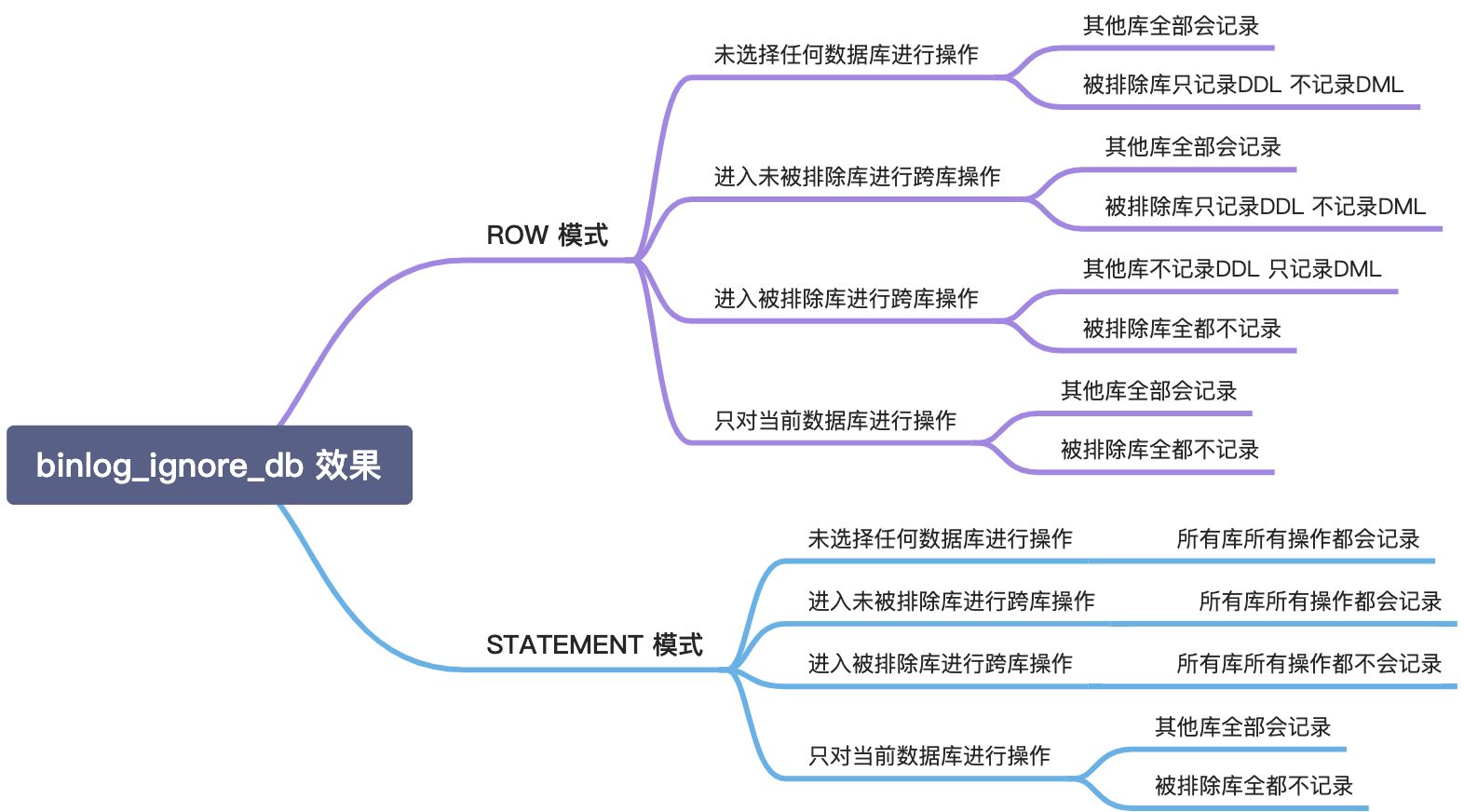
这么看来 binlog_ignore_db 参数的效果确实和诸多因素有关,特别是有从库的情况下,主库要特别小心使用此参数,很容易产生主从同步错误。不过,按照严格标准只对当前数据库进行操作,则不会产生问题。这也告诉我们要严格按照标准来,只赋予业务账号某个单库的权限,也能避免各种问题发生。
总结:
不清楚各位读者是否对这种介绍参数的文章感兴趣呢?可能这些是数据库运维人员比较关注的吧。本篇文章主要介绍关于 binlog 的 binlog_ignore_db 参数的具体作用,可能本篇文章实验环境还不够考虑周全,有兴趣的同学可以参考下官方文档,有助于对该参数有更深入的了解。
MySQL binlog_ignore_db 参数最全解析的更多相关文章
- MySQL慢日志查询全解析:从参数、配置到分析工具【转】
转自: MySQL慢日志查询全解析:从参数.配置到分析工具 - MySQL - DBAplus社群——围绕数据库.大数据.PaaS云,运维圈最专注围绕“数据”的学习交流和专业社群http://dbap ...
- MySql配置参数很全的Mysql配置参数说明
MySql配置参数 很全的Mysql配置参数说明 1. back_log 指定MySQL可能的连接数量.当MySQL主线程在很短的时间内得到非常多的连接请求,该参数就起作用,之后主线程花些时间(尽管很 ...
- 你真的会用mysql行级锁吗?mysql 行级锁全解析
在互联网大并发应用大行其道的今天,应用的开发总是离不开锁,在分布式应用中,最常见的莫过于基于数据库的行级锁了,由于互联网公司中比较主流的数据库还是mysql,所以这一话题绕不开的就是mysql了,但是 ...
- MySQL字段类型最全解析
前言: 要了解一个数据库,我们必须了解其支持的数据类型.MySQL 支持大量的字段类型,其中常用的也有很多.前面文章我们也讲过 int 及 varchar 类型的用法,但一直没有全面讲过字段类型,本篇 ...
- Mysql的视图、存储过程、函数、索引全解析
视图是查询命令结果构成的一个虚拟表(非真实存在),其本质是[根据SQL语句获取动态的数据集,并为其命名],用户使用时只需使用[名称]即可获取结果集合,并可以当作表来查询使用. 1创建视图 --格式:C ...
- (转)MySQL配置文件mysql.ini参数详解、MySQL性能优化
本文转自:http://www.cr173.com/html/18331_1.html my.ini(Linux系统下是my.cnf),当mysql服务器启动时它会读取这个文件,设置相关的运行环境参数 ...
- MySQL配置文件mysql.ini参数详解、MySQL性能优化
my.ini(Linux系统下是my.cnf),当mysql服务器启动时它会读取这个文件,设置相关的运行环境参数. my.ini分为两块:Client Section和Server Section. ...
- Oracle AWR报告指标全解析-11011552
1-5 Top 5 Timed EventsWaits : 该等待事件发生的次数, 对于DB CPU此项不可用Times : 该等待事件消耗的总计时间,单位为秒, 对于DB CPU 而言是前台进程所消 ...
- mysql 常见参数
my.cnf[client] 对mysql的所有客端都生效的[mysql] 只对mysql这个命令有效了[mysqd][mysqld_multi] 多实例启动[mysqld_safe][mysqldN ...
随机推荐
- python tempfile 创建临时目录
一.tempfile介绍 该模块创建临时文件和目录.它适用于所有支持的平台.TemporaryFile,NamedTemporaryFile,TemporaryDirectory,和SpooledTe ...
- python使用try...except语句处理异常
try....except语句语法格式: try: <语句> except(异常名称): <语句> 注意在except语句中的括号中的异常名称是可以省略的,当省略时就是全捕捉 ...
- mongodb安装及常见命令操作
Mongodb是一个介于关系数据库和非关系数据库之间的产品(Nosql),是非关系数据库当中功能最丰富,最像关系数据库的,语法有点类似javascript面向对象的查询语言,它是一个面向集合的,模式自 ...
- 【MCU】移植AT32库&FreeRTOS教程
目录 前言 1. 移植AT库 1.1 移植内核相关文件 1.2 移植芯片型号相关文件 1.3 移植芯片外设驱动库 1.4 移植配置文件及中断回调函数文件 2. 移植FreeRTOS源码 2.1 获取 ...
- Detach blobs with a contact point
https://answers.opencv.org/question/87583/detach-blobs-with-a-contact-point/ 一.问题描述 带有接触点的斑点时遇到问题,需要 ...
- PAT (Advanced Level) Practice 1005 Spell It Right (20 分) 凌宸1642
PAT (Advanced Level) Practice 1005 Spell It Right (20 分) 凌宸1642 题目描述: Given a non-negative integer N ...
- 计划任务统一集中管理系统cronsun(替代crontab)
一.背景 crontab 是 Linux 系统里面最简单易用的定时任务管理工具,相信绝大多数开发和运维都用到过,很多业务系统的定时任务都是通过 crontab 来定义的,时间长了后会发现存在很多问题: ...
- vm16 安装 || 待检验 || 预测无问题
vm16 安装 安装 下载 下载地址 管理员运行 安装 其余都点下一步/NEXT 激活 完成
- Vue学习笔记(三)
1 监听 在Vue.js中可以通过watch来监听数据的变化,比如通过watch实现的简单计数器: <div id="app"> <p>计数器:{{coun ...
- 简介TLS 1.3
0x00 前言 最近在阅读论文,其中阅读了 WWW2021的一篇文章"TLS 1.3 in Practice: How TLS 1.3 Contributes to the Internet ...