
springsecurity 源码解读 之 RememberMeAuthenticationFilter
RememberMeAuthenticationFilter 的作用很简单,就是用于当session 过期后,系统自动通过读取cookie 让系统自动登录。
我们来看看Springsecurity的过滤器链条。
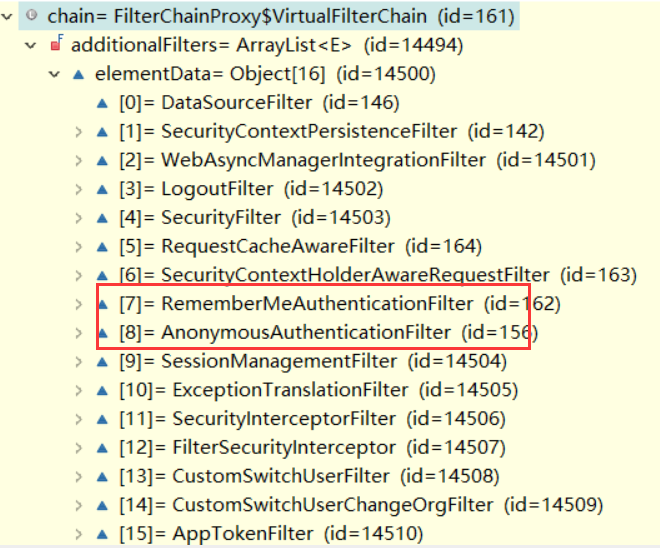
我们发现这个 RememberMeAuthenticationFilter 在 匿名构造器之前,这个是为什么呢?
还是从源码来分析:
if (SecurityContextHolder.getContext().getAuthentication() == null) {

            Authentication rememberMeAuth = rememberMeServices.autoLogin(request, response);

            if (rememberMeAuth != null) {
代码中有这样的一行,当SecurityContext 中 Authentication 为空时,他就会调用 rememberMeServices 自动登录。
因此刚刚的问题也就好解释了,因为如果RememberMeAuthenticationFilter 没有实现自动登录,那么他的Authentication 还是为空,
这是可以创建一个匿名登录,如果先创建了匿名登录,那么这个 RememberMeAuthenticationFilter 的判断就不会为null,过滤器将失效。
我们看看rememberMeServices 的autoLogin 登录
我们贴出实现的代码:
public final Authentication autoLogin(HttpServletRequest request, HttpServletResponse response) {

        String rememberMeCookie = extractRememberMeCookie(request);

        if (rememberMeCookie == null) {

            return null;

        }

        logger.debug("Remember-me cookie detected");

        if (rememberMeCookie.length() == 0) {

            logger.debug("Cookie was empty");

            cancelCookie(request, response);

            return null;

        }

        UserDetails user = null;

        try {

            String[] cookieTokens = decodeCookie(rememberMeCookie);

            user = processAutoLoginCookie(cookieTokens, request, response);

            userDetailsChecker.check(user);

            logger.debug("Remember-me cookie accepted");

            return createSuccessfulAuthentication(request, user);

        } catch (CookieTheftException cte) {

            cancelCookie(request, response);

            throw cte;

        } catch (UsernameNotFoundException noUser) {

            logger.debug("Remember-me login was valid but corresponding user not found.", noUser);

        } catch (InvalidCookieException invalidCookie) {

            logger.debug("Invalid remember-me cookie: " + invalidCookie.getMessage());

        } catch (AccountStatusException statusInvalid) {

            logger.debug("Invalid UserDetails: " + statusInvalid.getMessage());

        } catch (RememberMeAuthenticationException e) {

            logger.debug(e.getMessage());

        }

        cancelCookie(request, response);

        return null;

    }
extractRememberMeCookie这个方法判断 SPRING_SECURITY_REMEMBER_ME_COOKIE 这样的cookie,如果没有就直接返回了null。
processAutoLoginCookie:这个是处理cookie 并从cookie加载用户。

默认springsecurity 使用类 TokenBasedRememberMeServices 来解析 cookie。

实现代码如下:
protected UserDetails processAutoLoginCookie(String[] cookieTokens, HttpServletRequest request,

            HttpServletResponse response) {

        if (cookieTokens.length != 3) {

            throw new InvalidCookieException("Cookie token did not contain 3" +

                    " tokens, but contained '" + Arrays.asList(cookieTokens) + "'");

        }

        long tokenExpiryTime;

        try {

            tokenExpiryTime = new Long(cookieTokens[1]).longValue();

        }

        catch (NumberFormatException nfe) {

            throw new InvalidCookieException("Cookie token[1] did not contain a valid number (contained '" +

                    cookieTokens[1] + "')");

        }

        if (isTokenExpired(tokenExpiryTime)) {

            throw new InvalidCookieException("Cookie token[1] has expired (expired on '"

                    + new Date(tokenExpiryTime) + "'; current time is '" + new Date() + "')");

        }

        // Check the user exists.

        // Defer lookup until after expiry time checked, to possibly avoid expensive database call.

        UserDetails userDetails = getUserDetailsService().loadUserByUsername(cookieTokens[0]);

        // Check signature of token matches remaining details.

        // Must do this after user lookup, as we need the DAO-derived password.

        // If efficiency was a major issue, just add in a UserCache implementation,

        // but recall that this method is usually only called once per HttpSession - if the token is valid,

        // it will cause SecurityContextHolder population, whilst if invalid, will cause the cookie to be cancelled.

        String expectedTokenSignature = makeTokenSignature(tokenExpiryTime, userDetails.getUsername(),

                userDetails.getPassword());

        if (!equals(expectedTokenSignature,cookieTokens[2])) {

            throw new InvalidCookieException("Cookie token[2] contained signature '" + cookieTokens[2]

                                                                                                    + "' but expected '" + expectedTokenSignature + "'");

        }

        return userDetails;

    }
 protected String makeTokenSignature(long tokenExpiryTime, String username, String password) {

        String data = username + ":" + tokenExpiryTime + ":" + password + ":" + getKey();

        MessageDigest digest;

        try {

            digest = MessageDigest.getInstance("MD5");

        } catch (NoSuchAlgorithmException e) {

            throw new IllegalStateException("No MD5 algorithm available!");

        }

        return new String(Hex.encode(digest.digest(data.getBytes())));

    }
这个代码就是加载用户,并验证cookie 是否有效。
因此我们在写入cookie 时,产生的cookie 过程如下:
String enPassword=EncryptUtil.hexToBase64(password);

        long tokenValiditySeconds = 1209600; // 14 days

        long tokenExpiryTime = System.currentTimeMillis() + (tokenValiditySeconds * 1000);

        String signatureValue = makeTokenSignature(tokenExpiryTime,username,enPassword);

        String tokenValue = username + ":" + tokenExpiryTime + ":" + signatureValue;

        String tokenValueBase64 = new String(Base64.encodeBase64(tokenValue.getBytes()));

        CookieUtil.addCookie(TokenBasedRememberMeServices.SPRING_SECURITY_REMEMBER_ME_COOKIE_KEY,

                tokenValueBase64,60 * 60 * 24 * 365, true, request, response);
springsecurity 源码解读 之 RememberMeAuthenticationFilter的更多相关文章
- springsecurity 源码解读之 SecurityContext
在springsecurity 中,我们一般可以通过代码: SecurityContext securityContext = SecurityContextHolder.getContext(); ...
- springsecurity 源码解读之 AnonymousAuthenticationFilter
我们知道springsecutity 是通过一系列的 过滤器实现的,我们可以看看这系列的过滤器到底长成什么样子呢? 一堆过滤器,这个过滤器的设计设计上是 责任链设计模式. 这里我们可以看到有一个 An ...
- SDWebImage源码解读之SDWebImageDownloaderOperation
第七篇 前言 本篇文章主要讲解下载操作的相关知识,SDWebImageDownloaderOperation的主要任务是把一张图片从服务器下载到内存中.下载数据并不难,如何对下载这一系列的任务进行设计 ...
- SDWebImage源码解读 之 NSData+ImageContentType
第一篇 前言 从今天开始,我将开启一段源码解读的旅途了.在这里先暂时不透露具体解读的源码到底是哪些?因为也可能随着解读的进行会更改计划.但能够肯定的是,这一系列之中肯定会有Swift版本的代码. 说说 ...
- SDWebImage源码解读 之 UIImage+GIF
第二篇 前言 本篇是和GIF相关的一个UIImage的分类.主要提供了三个方法: + (UIImage *)sd_animatedGIFNamed:(NSString *)name ----- 根据名 ...
- SDWebImage源码解读 之 SDWebImageCompat
第三篇 前言 本篇主要解读SDWebImage的配置文件.正如compat的定义,该配置文件主要是兼容Apple的其他设备.也许我们真实的开发平台只有一个,但考虑各个平台的兼容性,对于框架有着很重要的 ...
- SDWebImage源码解读_之SDWebImageDecoder
第四篇 前言 首先,我们要弄明白一个问题? 为什么要对UIImage进行解码呢?难道不能直接使用吗? 其实不解码也是可以使用的,假如说我们通过imageNamed:来加载image,系统默认会在主线程 ...
- SDWebImage源码解读之SDWebImageCache(上)
第五篇 前言 本篇主要讲解图片缓存类的知识,虽然只涉及了图片方面的缓存的设计,但思想同样适用于别的方面的设计.在架构上来说,缓存算是存储设计的一部分.我们把各种不同的存储内容按照功能进行切割后,图片缓 ...
- SDWebImage源码解读之SDWebImageCache(下)
第六篇 前言 我们在SDWebImageCache(上)中了解了这个缓存类大概的功能是什么?那么接下来就要看看这些功能是如何实现的? 再次强调,不管是图片的缓存还是其他各种不同形式的缓存,在原理上都极 ...
随机推荐
- Filter过滤器 不登陆无法访问其他页面
package com.cscy.Filter; import java.io.IOException; import javax.servlet.Filter; import javax.servl ...
- C#客户端和服务端数据的同步传输 (转载)
客户端: using System;using System.Collections.Generic;using System.ComponentModel;using System.Data;u ...
- Linux root目录下.gvfs问题处理
最近收到一些关于磁盘的告警. 查了一下相关的信息. 知道了.gvfs文件夹是GNOME桌面系统的虚拟文件系统.可能是一些其它远程桌面之前连接所产生的一个文件,确定没有人再远程后.可以手动干掉它. 通过 ...
- winform窗体运行时的大小和设计时不一致
窗体设置的尺寸为1946*850,而电脑分辨率是1920*1280 按说宽度已经超过屏幕大小很多了,应该显示占满屏幕宽度才对,但是运行时宽度只有设计时的一半 高度最多只能是1946像素,再拉大也不管用 ...
- 使用Hbuilder手机debug
① 真机连接上数据线. ②选择要调试的页面 ③
- Juniper BGP配置
网络拓扑如下: XRV1配置 =========================================================== root@XRV1# run show confi ...
- VS code 代码格式整理的配置
{ "workbench.iconTheme": "material-icon-theme", "vetur.validation.template& ...
- redis集群搭建及设置账户(转)
Redis集群搭建以及为集群设置密码 介绍安装环境与版本 用两台虚拟机模拟6个节点,一台机器3个节点,创建出3 master.3 salve 环境. redis 采用 redis-3.2.4 版本. ...
- ios下,<input type="checkbox"> 点击时出现黑色块
ios下,<input type="checkbox"> 点击时出现黑色块如下图 解决方法:
- Tornado创建一个web服务
import tornado.web import tornado.ioloop import tornado.httpserver import tornado.options import con ...