
spring boot metrics信息推送开发
上一篇文章是关于 “spring boot +RabbitMQ +InfluxDB+Grafara监控实践” 主要讲spring boot应用新能监控信息的收集方案实践
实践是hystrix信息推送的mq而metrics信息需要扫描,文章的最后也有相应的思考metrics信息能不能是应用本身也推送到mq那?
本篇文章就实践关于metrics信息的推送实现
有了上面的思考之后我就回过头来去看hystrix是怎么实现推送的。经过一番跟踪之后找到了具体干活的task代码
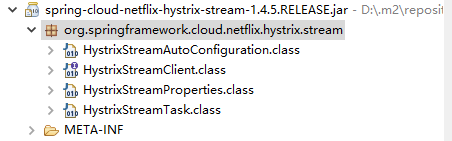
有了这个代码就可以参考具体怎样实现metrics信息的推送了
但是还有一个问题就是metrics信息虽然暴露了url接口但是应用内我怎么获取那???
这里又引发了我们一探究竟的兴趣!。。。。。。继续看源码!!!!!!!!!!!
从spring boot启动展示的日志中我们可以发现线索,具体/metrics路径具体执行的是哪里
Mapped "{[/metrics || /metrics.json],methods=[GET],produces=[application/vnd.spring-boot.actuator.v1+json || application/json]}" onto public java.lang.Object org.springframework.boot.actuate.endpoint.mvc.EndpointMvcAdapter.invoke()
从org.springframework.boot.actuate.endpoint.mvc.EndpointMvcAdapter.invoke()这里我们发现了端倪
好的 我们就去这个包去找相关线索
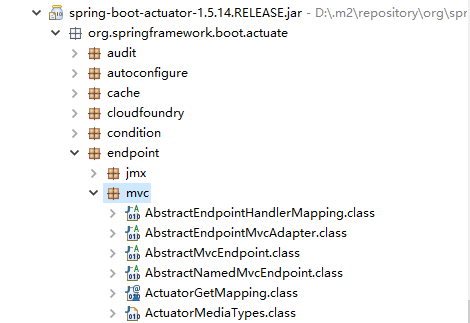
好的我们找到了这个包往下看
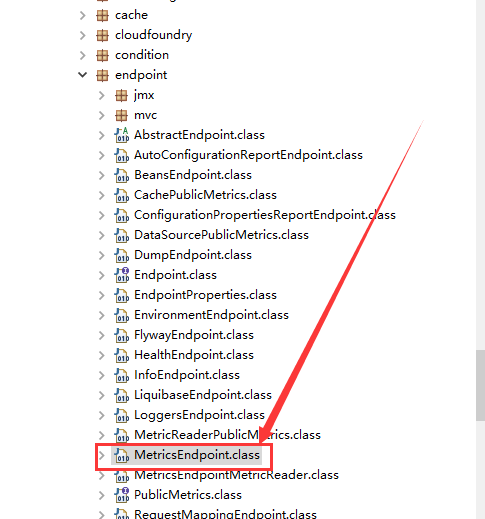
终于找到他了这里我们就可以用定时器进行轮训调用了。基础准备已经ok,好了不多说了直接上写好的代码
package com.zjs.mic.metrics.stream;

import javax.annotation.PostConstruct;

import org.springframework.beans.factory.annotation.Autowired;

import org.springframework.boot.actuate.endpoint.mvc.MetricsMvcEndpoint;

import org.springframework.boot.autoconfigure.condition.ConditionalOnClass;

import org.springframework.boot.autoconfigure.condition.ConditionalOnProperty;

import org.springframework.boot.context.properties.EnableConfigurationProperties;

import org.springframework.cloud.client.ServiceInstance;

import org.springframework.cloud.client.actuator.HasFeatures;

import org.springframework.cloud.client.discovery.simple.SimpleDiscoveryClient;

import org.springframework.cloud.client.serviceregistry.Registration;

import org.springframework.cloud.context.config.annotation.RefreshScope;

import org.springframework.cloud.stream.annotation.EnableBinding;

import org.springframework.cloud.stream.annotation.Output;

import org.springframework.cloud.stream.config.BindingProperties;

import org.springframework.cloud.stream.config.BindingServiceProperties;

import org.springframework.context.annotation.Bean;

import org.springframework.context.annotation.Configuration;

import org.springframework.messaging.MessageChannel;

import org.springframework.scheduling.annotation.EnableScheduling;

@RefreshScope

@Configuration

@ConditionalOnClass({EnableBinding.class })

@ConditionalOnProperty(value = "metrics.stream.queue.enabled", matchIfMissing = true)

@EnableConfigurationProperties

@EnableScheduling

@EnableBinding(MetricsStreamClient.class)

public class MetricsStreamAutoConfiguration {

    @Autowired

    private BindingServiceProperties bindings;

    @Autowired

    private MetricsStreamProperties properties;

    @Autowired

    @Output(MetricsStreamClient.OUTPUT)

    private MessageChannel outboundChannel;

    @Autowired(required = false)

    private Registration registration;

    @Autowired

    MetricsMvcEndpoint mme;

    @Bean

    public HasFeatures metricsStreamQueueFeature() {

        return HasFeatures.namedFeature("Metrics Stream (Queue)",

                MetricsStreamAutoConfiguration.class);

    }

    @PostConstruct

    public void init() {

        BindingProperties outputBinding = this.bindings.getBindings()

                .get(MetricsStreamClient.OUTPUT);

        if (outputBinding == null) {

            this.bindings.getBindings().put(MetricsStreamClient.OUTPUT,

                    new BindingProperties());

        }

        BindingProperties output = this.bindings.getBindings()

                .get(MetricsStreamClient.OUTPUT);

        if (output.getDestination() == null) {

            output.setDestination(this.properties.getDestination());

        }

        if (output.getContentType() == null) {

            output.setContentType(this.properties.getContentType());

        }

    }

    @Bean

    public MetricsStreamTask metricsStreamTask(SimpleDiscoveryClient simpleDiscoveryClient) {

        ServiceInstance serviceInstance = this.registration;

        if (serviceInstance == null) {

            serviceInstance = simpleDiscoveryClient.getLocalServiceInstance();

        }

        return new MetricsStreamTask(this.outboundChannel, serviceInstance,

                this.properties,this.mme);

    }

}
package com.zjs.mic.metrics.stream;

import org.springframework.boot.context.properties.ConfigurationProperties;

@ConfigurationProperties("metrics.stream.queue")

public class MetricsStreamProperties {

    private boolean enabled = true;

    private boolean prefixMetricName = true;

    private boolean sendId = true;

    private String destination = "springCloudMetricsStream";

    private String contentType = "application/json";

    private String pathTail = "mem.*|heap.*|threads.*|gc.*|nonheap.*|classes.*";

    private long sendRate = 1000;

    private long gatherRate = 1000;

    private int size = 1000;

    public String getPathTail() {

        return pathTail;

    }

    public void setPathTail(String pathTail) {

        this.pathTail = pathTail;

    }

    public boolean isEnabled() {

        return enabled;

    }

    public void setEnabled(boolean enabled) {

        this.enabled = enabled;

    }

    public boolean isPrefixMetricName() {

        return prefixMetricName;

    }

    public void setPrefixMetricName(boolean prefixMetricName) {

        this.prefixMetricName = prefixMetricName;

    }

    public boolean isSendId() {

        return sendId;

    }

    public void setSendId(boolean sendId) {

        this.sendId = sendId;

    }

    public String getDestination() {

        return destination;

    }

    public void setDestination(String destination) {

        this.destination = destination;

    }

    public String getContentType() {

        return contentType;

    }

    public void setContentType(String contentType) {

        this.contentType = contentType;

    }

    public long getSendRate() {

        return sendRate;

    }

    public void setSendRate(long sendRate) {

        this.sendRate = sendRate;

    }

    public long getGatherRate() {

        return gatherRate;

    }

    public void setGatherRate(long gatherRate) {

        this.gatherRate = gatherRate;

    }

    public int getSize() {

        return size;

    }

    public void setSize(int size) {

        this.size = size;

    }

}
package com.zjs.mic.metrics.stream;

import java.io.StringWriter;

import java.util.ArrayList;

import java.util.Map;

import java.util.concurrent.LinkedBlockingQueue;

import org.slf4j.Logger;

import org.slf4j.LoggerFactory;

import org.springframework.boot.actuate.endpoint.mvc.MetricsMvcEndpoint;

import org.springframework.cloud.client.ServiceInstance;

import org.springframework.messaging.MessageChannel;

import org.springframework.messaging.MessageHeaders;

import org.springframework.messaging.support.MessageBuilder;

import org.springframework.scheduling.annotation.EnableScheduling;

import org.springframework.scheduling.annotation.Scheduled;

import org.springframework.util.Assert;

import com.fasterxml.jackson.core.JsonFactory;

import com.fasterxml.jackson.core.JsonGenerator;

@EnableScheduling

public class MetricsStreamTask {

    private final static Logger log = LoggerFactory.getLogger(MetricsStreamTask.class);

    private MessageChannel outboundChannel;

    private ServiceInstance registration;

    private MetricsStreamProperties properties;

    private MetricsMvcEndpoint mme;

    // Visible for testing

    final LinkedBlockingQueue<String> jsonMetrics;

    private final JsonFactory jsonFactory = new JsonFactory();

    public MetricsStreamTask(MessageChannel outboundChannel,

                             ServiceInstance registration, MetricsStreamProperties properties, MetricsMvcEndpoint mme) {

        Assert.notNull(outboundChannel, "outboundChannel may not be null");

        Assert.notNull(registration, "registration may not be null");

        Assert.notNull(properties, "properties may not be null");

        Assert.notNull(mme, "properties may not be null");

        this.outboundChannel = outboundChannel;

        this.registration = registration;

        this.properties = properties;

        this.jsonMetrics = new LinkedBlockingQueue<>(properties.getSize());

        this.mme=mme;

    }

    // TODO: use integration to split this up?

    @Scheduled(fixedRateString = "${metrics.stream.queue.sendRate:1000}")

    public void sendMetrics() {

        log.info("推送metrics信息");

        ArrayList<String> metrics = new ArrayList<>();

        this.jsonMetrics.drainTo(metrics);

        if (!metrics.isEmpty()) {

            if (log.isTraceEnabled()) {

                log.trace("sending stream Metrics metrics size: " + metrics.size());

            }

            for (String json : metrics) {

                // TODO: batch all metrics to one message

                try {

                    // TODO: remove the explicit content type when s-c-stream can handle

                    // that for us

                    this.outboundChannel.send(MessageBuilder.withPayload(json)

                            .setHeader(MessageHeaders.CONTENT_TYPE,

                                    this.properties.getContentType())

                            .build());

                }

                catch (Exception ex) {

                    if (log.isTraceEnabled()) {

                        log.trace("failed sending stream Metrics metrics: " + ex.getMessage());

                    }

                }

            }

        }

    }

    @Scheduled(fixedRateString = "${metrics.stream.queue.gatherRate:1000}")

    public void gatherMetrics() {

        log.info("开始获取metrics信息");

        try {

            StringWriter jsonString = new StringWriter();

            JsonGenerator json = this.jsonFactory.createGenerator(jsonString);

            json.writeStartObject();

            json.writeObjectField("instanceId",registration.getServiceId() + ":" + registration.getHost() + ":"

                    + registration.getPort());

            json.writeObjectField("type", "metrics");

            json.writeObjectField("currentTime",System.currentTimeMillis());

            @SuppressWarnings("unchecked")

            Map<String, Object> map = (Map<String, Object>) mme.value(this.properties.getPathTail());

            for (String str : map.keySet()) {

                json.writeObjectField(str, map.get(str));

            }

            json.writeEndObject();

            json.close();

            // output to stream

            this.jsonMetrics.add(jsonString.getBuffer().toString());

        }

        catch (Exception ex) {

            log.error("Error adding metrics metrics to queue", ex);

        }

    }

}
package com.zjs.mic.metrics.stream;

import org.springframework.cloud.stream.annotation.Output;

import org.springframework.messaging.MessageChannel;

public interface MetricsStreamClient {

    String OUTPUT = "metricsStreamOutput";

    @Output(OUTPUT)

    MessageChannel metricsStreamOutput();

}
package com.zjs.mic.metrics.stream;

import java.lang.annotation.ElementType;

import java.lang.annotation.Retention;

import java.lang.annotation.RetentionPolicy;

import java.lang.annotation.Target;

import org.springframework.boot.context.properties.EnableConfigurationProperties;

import org.springframework.context.annotation.Import;

@Target(ElementType.TYPE)

@Retention(RetentionPolicy.RUNTIME)

@Import(MetricsStreamAutoConfiguration.class)

@EnableConfigurationProperties({MetricsStreamProperties.class})

public @interface EnableMetricsStream {

}
已经将上面的代码包装成注解打好包 在入口类加@EnableMetricsStream 注解就能生效
剩下的就是我们去mq接收信息传递到响应数据库中进行处理就行了
从而我们在“spring boot +RabbitMQ +InfluxDB+Grafara监控实践” 这篇文章中的图就变成下面这样了
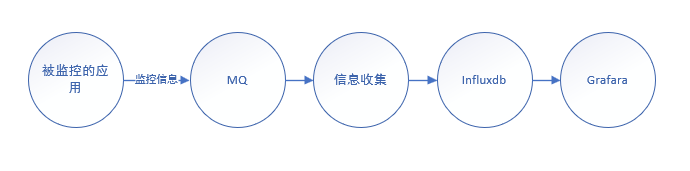
好实践部分就到这里
总结思考
监控信息hystrix和metrics到底是拉取好还是主动推送好!一下简单分析:
拉取,对于被监控的应用来说值引用少量的包节省了推送信息的线程,基本没有什么开发量,对于一些严格权限控制的springboot应用,就需要额外开接口或者拉取进行权限验证很不方便
推送,应用主动推送应用相关的包和注解占用对应的线程资源,应用可以进行严格的权限控制不用对接口做例外不需要扫描程序开发。
我的结论是两者并存,不知道大家有没有什么其他想法可以说来听听!
spring boot metrics信息推送开发的更多相关文章
- Spring Boot + Mybatis + Redis二级缓存开发指南
Spring Boot + Mybatis + Redis二级缓存开发指南 背景 Spring-Boot因其提供了各种开箱即用的插件,使得它成为了当今最为主流的Java Web开发框架之一.Mybat ...
- 《推送开发全面盘点当前Android后台保活方案的真实运行效果》
登录 立即注册 TCP/IP详解 资讯 动态 社区 技术精选 首页 即时通讯网›专项技术区›推送开发全面盘点当前Android后台保活方案的真实运行效果(截止2 ... 帖子 打赏 分 ...
- Spring Boot 的Maven多模块开发web项目使用外部容器进行部署
Spring Boot中自带有Tomcat容器,因此Spring Boot项目只需要运行main函数,就可以运行,但是以往的web项目,我们习惯于使用自己安装的Tomcat运行或者使用Tomcat.J ...
- spring boot + vue + element-ui全栈开发入门——开篇
最近经常看到很多java程序员朋友还在使用Spring 3.x,Spring MVC(struts),JSP.jQuery等这样传统技术.其实,我并不认为这些传统技术不好,而我想表达的是,技术的新旧程 ...
- spring boot + vue + element-ui全栈开发入门——基于Electron桌面应用开发
前言 Electron是由Github开发,用HTML,CSS和JavaScript来构建跨平台桌面应用程序的一个开源库. Electron通过将Chromium和Node.js合并到同一个运行时环 ...
- spring boot + vue + element-ui全栈开发入门
今天想弄弄element-ui 然后就在网上找了个例子 感觉还是可以用的 第一步是完成了 果断 拿过来 放到我这里这 下面直接是连接 点进去 就可以用啊 本想着不用vue 直接导入连接 ...
- Pushlet实现后台信息推送(二)
上一篇日志利用推送源周期性地向订阅了某一事件的所有网页端推送信息,但怎么实现向特定的某一个用户推送信息呢,想象一个网络聊天室,怎么向单独的一个好友私聊呢.问题的关键就是那个SessionID,Push ...
- php 微信客服信息推送失败 微信重复推送客服消息 40001 45047
/*** * 微信客服发送信息 * 微信客服信息推送失败 微信重复推送客服消息 40001 45047 * 递归提交到微信 直到提交成功 * @param $openid * @param int $ ...
- iOS开发:创建推送开发证书和生产证书,以及往极光推送官网上传证书的步骤方法
在极光官网上面上传应用的极光推送证书的实质其实就是上传导出的p12文件,在极光推送应用管理里面,需要上传两个p12文件,一个是生产证书,一个是开发证书 ,缺一不可,具体如下所示: 在开发者账号里面创建 ...
随机推荐
- Python系列:二、数据类型--技术流ken
标准数据类型 Python3 中有六个标准的数据类型: Number(数字) String(字符串) List(列表) Tuple(元组) Set(集合) Dictionary(字典) Python3 ...
- Spark学习(一)
一.启动Spark 1.standalone模式 方法一: (1)启动主节点 ./sbin/start-master.sh 访问http://127.0.0.1:8080,得到如下页面 注意标记到的链 ...
- c# json 序列化时遇到错误 error Self referencing loop detected for type
参考网址:http://blog.csdn.net/adenfeng/article/details/41622255 在写redis缓存帮助类的时候遇到的这个问题,本来打算先序列化一个实体为json ...
- echarts X轴显示不全 有省略
代码如下: xAxis: [ { type: 'category', data: result.weekListAndYear,//result.weekList, axisLabel:{ // in ...
- spring_02工具及接口案例
1.spring工具类:ApplicationContextUtil.java,可以返回加载配置文件的容器对象 package com.ahd.utils; import org.springfram ...
- 我是如何解决java.security.cert.CertPathValidatorException异常的
目录 问题来了 问题分析 解决问题 重新安装服务器端证书 日志带来曙光 刨根到底 总结 附录 tomcat的SSL配置 服务器端证书配置 Keytool命令常用参数 问题来了 昨天,我还在我的工位上愉 ...
- No.3 数组中重复的数字 (P39)
题目1:找出数组中重复的数字 [题目描述] 在一个长度为n的数组里的所有数字都在0到n-1的范围内. 数组中某些数字是重复的,但不知道有几个数字是重复的.也不知道每个数字重复几次.请找出数组中任意一个 ...
- ajax 跨域请求解决方案
1.为什么出现跨域: 前端和后端同一个项目下,ajax请求的地址是localhost同一个端口是话,是不会出现跨域问题的,所以相反前端和后端分开时,ajax请求的地址或者端口不是跟后台相同时就会出现跨 ...
- javascript浅拷贝深拷贝详解
一.浅拷贝 浅拷贝在现实中最常见的表现在赋值上面,例如 <!DOCTYPE html> <html lang="en"> <head> < ...
- js 原生手写AJAX
前言:最近在学习react,在练习中模拟一个button通过AJAX向后台发送POST请求,懒得引入AXIOS,就顺便练习了js原生ajax. 正文: 注:我忽略了IE6及以下版本 submit(){ ...