
Ubuntu 12.04上安装Hadoop并运行
Ubuntu 12.04上安装Hadoop并运行
作者:凯鲁嘎吉 - 博客园 http://www.cnblogs.com/kailugaji/
在官网上下载好四个文件
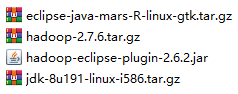
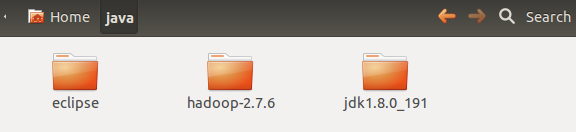
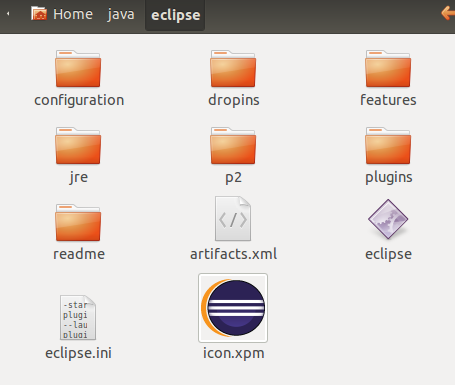
在Ubuntu的/home/wrr/下创建一个文件夹java,将这四个文件拷到Ubuntu的/home/wrr/java/下,将eclipse、hadoop-2.7.6与jdk进行解压,将.iar文件复制到eclipse/plugins,将/jdk1.8.0_191/下的jre文件夹拷到eclipse中,如下图所示

在/home/wrr/下新建文件夹data,里面新建三个文件夹data、name与tmp,创建文件夹的命令:sudo mkdir java

添加环境变量
sudo gedit ~/.bashrc
打开.bashrc,在后面添加环境变量
export JAVA_HOME=/home/wrr/java/jdk1.8.0_191

export JRE_HOME=/home/wrr/java/jdk1.8.0_191/jre

export CLASSPATH=.:$JAVA_HOME/lib/dt.jar:$JAVA_HOME/lib/tools.jar:$JAVA_HOME/lib

export PATH=$PATH:$JAVA_HOME/bin:$JRE_HOME/bin

export HADOOP_HOME=/home/wrr/java/hadoop-2.7.6

export PATH=$PATH:$HADOOP_HOME/bin

export HADOOP_COMMON_LIB_NATIVE_DIR=$HADOOP_HOME/lib/native
再键入
source ~/.bashrc
此时环境变量添加成功,现在输入hadoop version 与 java -version来查看版本。

配置/home/wrr/java/hadoop-2.7.6/etc/hadoop下的集群参数
hadoop-env.sh
# Licensed to the Apache Software Foundation (ASF) under one

# or more contributor license agreements.  See the NOTICE file

# distributed with this work for additional information

# regarding copyright ownership.  The ASF licenses this file

# to you under the Apache License, Version 2.0 (the

# "License"); you may not use this file except in compliance

# with the License.  You may obtain a copy of the License at

#

#     http://www.apache.org/licenses/LICENSE-2.0

#

# Unless required by applicable law or agreed to in writing, software

# distributed under the License is distributed on an "AS IS" BASIS,

# WITHOUT WARRANTIES OR CONDITIONS OF ANY KIND, either express or implied.

# See the License for the specific language governing permissions and

# limitations under the License.

# Set Hadoop-specific environment variables here.

# The only required environment variable is JAVA_HOME.  All others are

# optional.  When running a distributed configuration it is best to

# set JAVA_HOME in this file, so that it is correctly defined on

# remote nodes.

# The java implementation to use.

export JAVA_HOME=/home/wrr/java/jdk1.8.0_191

# The jsvc implementation to use. Jsvc is required to run secure datanodes

# that bind to privileged ports to provide authentication of data transfer

# protocol.  Jsvc is not required if SASL is configured for authentication of

# data transfer protocol using non-privileged ports.

#export JSVC_HOME=${JSVC_HOME}

export HADOOP_CONF_DIR=${HADOOP_CONF_DIR:-"/etc/hadoop"}

# Extra Java CLASSPATH elements.  Automatically insert capacity-scheduler.

for f in $HADOOP_HOME/contrib/capacity-scheduler/*.jar; do

  if [ "$HADOOP_CLASSPATH" ]; then

    export HADOOP_CLASSPATH=$HADOOP_CLASSPATH:$f

  else

    export HADOOP_CLASSPATH=$f

  fi

done

# The maximum amount of heap to use, in MB. Default is 1000.

#export HADOOP_HEAPSIZE=

#export HADOOP_NAMENODE_INIT_HEAPSIZE=""

# Extra Java runtime options.  Empty by default.

export HADOOP_OPTS="$HADOOP_OPTS -Djava.net.preferIPv4Stack=true"

# Command specific options appended to HADOOP_OPTS when specified

export HADOOP_NAMENODE_OPTS="-Dhadoop.security.logger=${HADOOP_SECURITY_LOGGER:-INFO,RFAS} -Dhdfs.audit.logger=${HDFS_AUDIT_LOGGER:-INFO,NullAppender} $HADOOP_NAMENODE_OPTS"

export HADOOP_DATANODE_OPTS="-Dhadoop.security.logger=ERROR,RFAS $HADOOP_DATANODE_OPTS"

export HADOOP_SECONDARYNAMENODE_OPTS="-Dhadoop.security.logger=${HADOOP_SECURITY_LOGGER:-INFO,RFAS} -Dhdfs.audit.logger=${HDFS_AUDIT_LOGGER:-INFO,NullAppender} $HADOOP_SECONDARYNAMENODE_OPTS"

export HADOOP_NFS3_OPTS="$HADOOP_NFS3_OPTS"

export HADOOP_PORTMAP_OPTS="-Xmx512m $HADOOP_PORTMAP_OPTS"

# The following applies to multiple commands (fs, dfs, fsck, distcp etc)

export HADOOP_CLIENT_OPTS="-Xmx512m $HADOOP_CLIENT_OPTS"

#HADOOP_JAVA_PLATFORM_OPTS="-XX:-UsePerfData $HADOOP_JAVA_PLATFORM_OPTS"

# On secure datanodes, user to run the datanode as after dropping privileges.

# This **MUST** be uncommented to enable secure HDFS if using privileged ports

# to provide authentication of data transfer protocol.  This **MUST NOT** be

# defined if SASL is configured for authentication of data transfer protocol

# using non-privileged ports.

export HADOOP_SECURE_DN_USER=${HADOOP_SECURE_DN_USER}

# Where log files are stored.  $HADOOP_HOME/logs by default.

#export HADOOP_LOG_DIR=${HADOOP_LOG_DIR}/$USER

# Where log files are stored in the secure data environment.

export HADOOP_SECURE_DN_LOG_DIR=${HADOOP_LOG_DIR}/${HADOOP_HDFS_USER}

###

# HDFS Mover specific parameters

###

# Specify the JVM options to be used when starting the HDFS Mover.

# These options will be appended to the options specified as HADOOP_OPTS

# and therefore may override any similar flags set in HADOOP_OPTS

#

# export HADOOP_MOVER_OPTS=""

###

# Advanced Users Only!

###

# The directory where pid files are stored. /tmp by default.

# NOTE: this should be set to a directory that can only be written to by

#       the user that will run the hadoop daemons.  Otherwise there is the

#       potential for a symlink attack.

export HADOOP_PID_DIR=${HADOOP_PID_DIR}

export HADOOP_SECURE_DN_PID_DIR=${HADOOP_PID_DIR}

# A string representing this instance of hadoop. $USER by default.

export HADOOP_IDENT_STRING=$USER
core-site.xml
<?xml version="1.0" encoding="UTF-8"?>

<?xml-stylesheet type="text/xsl" href="configuration.xsl"?>

<!--

  Licensed under the Apache License, Version 2.0 (the "License");

  you may not use this file except in compliance with the License.

  You may obtain a copy of the License at

    http://www.apache.org/licenses/LICENSE-2.0

  Unless required by applicable law or agreed to in writing, software

  distributed under the License is distributed on an "AS IS" BASIS,

  WITHOUT WARRANTIES OR CONDITIONS OF ANY KIND, either express or implied.

  See the License for the specific language governing permissions and

  limitations under the License. See accompanying LICENSE file.

-->

<!-- Put site-specific property overrides in this file. -->

<configuration>

	<property>

		<name>hadoop.tmp.dir</name>

		<value>/home/wrr/data/tmp</value>

		<description>A base for other temporary directories.</description>

	</property>

	<property>

		<name>io.file.buffer.size</name>

		<value>131072</value>

	</property>

	<property>

		<name>fs.default.name</name>

		<value>hdfs://localhost:9000</value>

	</property>

	<property>

		<name>hadoop.proxyuser.root.hosts</name>

		<value>*</value>

	</property>

	<property>

		<name>hadoop.proxyuser.root.groups</name>

		<value>*</value>

	</property>

</configuration>
hdfs-site.xml
<?xml version="1.0" encoding="UTF-8"?>
<?xml-stylesheet type="text/xsl" href="configuration.xsl"?>
<!--
Licensed under the Apache License, Version 2.0 (the "License");
you may not use this file except in compliance with the License.
You may obtain a copy of the License at http://www.apache.org/licenses/LICENSE-2.0 Unless required by applicable law or agreed to in writing, software
distributed under the License is distributed on an "AS IS" BASIS,
WITHOUT WARRANTIES OR CONDITIONS OF ANY KIND, either express or implied.
See the License for the specific language governing permissions and
limitations under the License. See accompanying LICENSE file.
--> <!-- Put site-specific property overrides in this file. --> <configuration>
<property>
<name>dfs.replication</name>
<value>3</value>
</property>
<property>
<name>dfs.namenode.name.dir</name>
<value>/home/wrr/data/name</value>
<final>true</final>
</property>
<property>
<name>dfs.datanode.data.dir</name>
<value>/home/wrr/data/data</value>
<final>true</final>
</property>
<property>
<name>dfs.namenode.secondary.httpaddress</name>
<value>localhost:9001</value>
</property>
<property>
<name>dfs.webhdfs.enabled</name>
<value>true</value>
</property>
<property>
<name>dfs.permissions</name>
<value>false</value>
</property>
</configuration>
mapred-site.xml
<?xml version="1.0"?>

<?xml-stylesheet type="text/xsl" href="configuration.xsl"?>

<!--

  Licensed under the Apache License, Version 2.0 (the "License");

  you may not use this file except in compliance with the License.

  You may obtain a copy of the License at

    http://www.apache.org/licenses/LICENSE-2.0

  Unless required by applicable law or agreed to in writing, software

  distributed under the License is distributed on an "AS IS" BASIS,

  WITHOUT WARRANTIES OR CONDITIONS OF ANY KIND, either express or implied.

  See the License for the specific language governing permissions and

  limitations under the License. See accompanying LICENSE file.

-->

<!-- Put site-specific property overrides in this file. -->

<configuration>

    <property>

        <name>mapreduce.framework.name</name>

        <value>yarn</value>

    </property>

</configuration>
yarn-site.xml
<?xml version="1.0"?>
<!--
Licensed under the Apache License, Version 2.0 (the "License");
you may not use this file except in compliance with the License.
You may obtain a copy of the License at http://www.apache.org/licenses/LICENSE-2.0 Unless required by applicable law or agreed to in writing, software
distributed under the License is distributed on an "AS IS" BASIS,
WITHOUT WARRANTIES OR CONDITIONS OF ANY KIND, either express or implied.
See the License for the specific language governing permissions and
limitations under the License. See accompanying LICENSE file.
-->
<configuration> <!-- Site specific YARN configuration properties --> <property>
<name>yarn.resourcemanager.address</name>
<value>localhost:18040</value>
</property>
<property>
<name>yarn.resourcemanager.scheduler.address</name>
<value>localhost:18030</value>
</property>
<property>
<name>yarn.resourcemanager.webapp.address</name>
<value>localhost:18088</value>
</property>
<property>
<name>yarn.resourcemanager.resourcetracker.address</name>
<value>localhost:18025</value>
</property>
<property>
<name>yarn.resourcemanager.admin.address</name>
<value>localhost:18141</value>
</property>
<property>
<name>yarn.nodemanager.auxservices</name>
<value>mapreduce.shuffle</value>
</property>
<property>
<name>yarn.nodemanager.auxservices.mapreduce.shuffle.class</name>
<value>org.apache.hadoop.mapred.ShuffleHandler</value>
</property> </configuration>
启动hadoop。首先导入/home/wrr/java/hadoop-2.7.6/sbin一下目录,再启动namenode,datanode与yarn
wrr@ubuntu:~$ cd /home/wrr/java/hadoop-2.7.6/sbin

wrr@ubuntu:~/java/hadoop-2.7.6/sbin$ jps

6559 Jps

wrr@ubuntu:~/java/hadoop-2.7.6/sbin$ ./hadoop-daemon.sh start datanode

starting datanode, logging to /home/wrr/java/hadoop-2.7.6/logs/hadoop-wrr-datanode-ubuntu.out

wrr@ubuntu:~/java/hadoop-2.7.6/sbin$ ./start-yarn.sh

starting yarn daemons

starting resourcemanager, logging to /home/wrr/java/hadoop-2.7.6/logs/yarn-wrr-resourcemanager-ubuntu.out

localhost: ssh: connect to host localhost port 22: Connection refused

wrr@ubuntu:~/java/hadoop-2.7.6/sbin$ ./hadoop-daemon.sh start namenode

starting namenode, logging to /home/wrr/java/hadoop-2.7.6/logs/hadoop-wrr-namenode-ubuntu.out

wrr@ubuntu:~/java/hadoop-2.7.6/sbin$ jps

6978 NameNode

6692 ResourceManager

7013 Jps

6587 DataNode
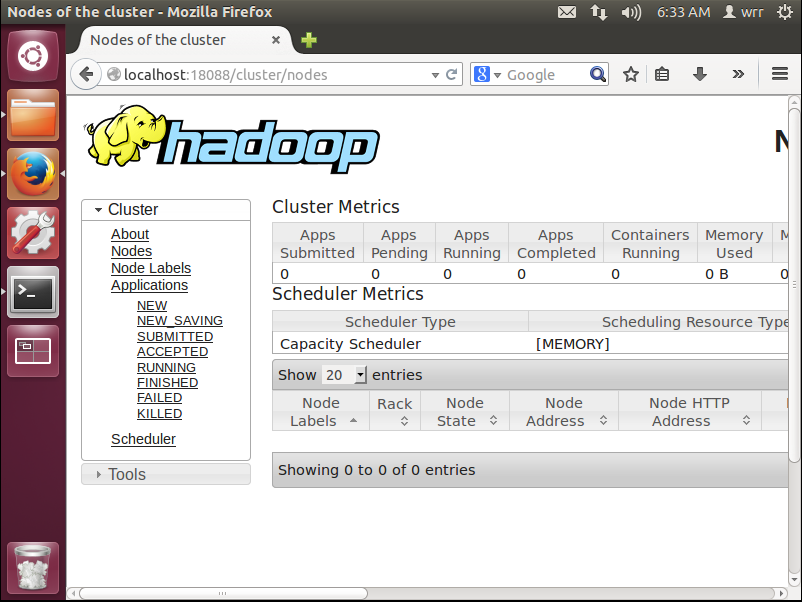
都启动之后,在浏览器上输入http://localhost:18088,即可出现如下界面
停止hadoop
wrr@ubuntu:~/java/hadoop-2.7.6/sbin$ ./hadoop-daemon.sh stop namenode

wrr@ubuntu:~/java/hadoop-2.7.6/sbin$ ./hadoop-daemon.sh stop datanode

wrr@ubuntu:~/java/hadoop-2.7.6/sbin$ ./stop-yarn.sh

wrr@ubuntu:~/java/hadoop-2.7.6/sbin$ jps

7259 Jps
如果想看更详细的解读,请看Hadoop安装教程_单机/伪分布式配置_Hadoop2.6.0/Ubuntu14.04_厦大数据库实验室博客
Ubuntu 12.04上安装Hadoop并运行的更多相关文章
- Ubuntu 12.04上安装HBase并运行
Ubuntu 12.04上安装HBase并运行 作者:凯鲁嘎吉 - 博客园 http://www.cnblogs.com/kailugaji/ 一.HBase的安装 在官网上下载HBase-1.1.2 ...
- Ubuntu 12.04上安装MySQL并运行
Ubuntu 12.04上安装MySQL并运行 作者:凯鲁嘎吉 - 博客园 http://www.cnblogs.com/kailugaji/ 安装MySQL数据库 sudo apt-get upda ...
- Ubuntu 12.04上安装 MongoDB并运行
Ubuntu 12.04上安装 MongoDB并运行 作者:凯鲁嘎吉 - 博客园 http://www.cnblogs.com/kailugaji/ 在Terminal输入 sudo apt-key ...
- Ubuntu 12.04上安装R语言
Ubuntu 12.04上安装R语言 作者:凯鲁嘎吉 - 博客园 http://www.cnblogs.com/kailugaji/ R的安装 sudo gedit /etc/apt/sources. ...
- 在 Ubuntu 12.04 上安装 GitLab6.0
安装环境: 操作系统: Ubuntu 12.4 LTS 英文 数据库: mysql5.5.32 web服务器: nginx1.4.1 首先, 添加git和nginx的ppa,并升级 ...
- ubuntu 12.04上安装QQ2013(转载)
转自:http://www.cnblogs.com/wocn/p/linux_ubuntu_QQ_install.html 环境介绍: OS:Ubuntu12.04 64bit QQ:WineQQ20 ...
- 在 Ubuntu 12.04 上安装 GitLab7.x
安装环境: 操作系统: Ubuntu 12.4 LTS 英文 数据库: postgresql webserver: nginx 能够说到7.x的时候,GitLab的文档已经相当完好 ...
- ubuntu 12.04上安装OpenERP 7的一次记录
登陆ssh, 先更新系统: sudo apt-get update && sudo apt-get dist-upgrade 接着再为openerp运行创建一个系统用户,用户名就叫op ...
- 在ubuntu 12.04上安装tomcat 7.40
因为源上的版本问题,所以没有使用源上的自动安装包,老规矩,Tomcat 7.0.40 Core下载地址:http://mirror.bit.edu.cn/apache/tomcat/tomcat-7/ ...
随机推荐
- Python系列:二、数据类型--技术流ken
标准数据类型 Python3 中有六个标准的数据类型: Number(数字) String(字符串) List(列表) Tuple(元组) Set(集合) Dictionary(字典) Python3 ...
- shell编程基础(七): 处理文件命令sed与awk
一.sed(以行为单位处理文件) sed意为流编辑器(Stream Editor),在Shell脚本和Makefile中作为过滤器使用非常普遍,也就是把前一个程序的输出引入sed的输入,经过一系列编辑 ...
- 【转载】阿里云Windows服务器重置远程登录密码
在使用阿里云Windows系统的云服务器的时候,有时候忘记了远程连接密码,可在浏览器上登录阿里云官网,进入ECS云服务器管理后台重置远程连接的密码,因为此步操作对于服务器安全来说关系重大,所以有时候在 ...
- 解决命名空间“System.Web.Mvc”中不存在类型或命名空间名称“Ajax”(是否缺少程序集引用?)
解决命名空间“System.Web.Mvc”中不存在类型或命名空间名称“Ajax”(是否缺少程序集引用?) 1.右击引用中的System.Web.MVC,点击“属性” 把"复制本地" ...
- Linux学习笔记之基本指令
1.ll 注:详细展示当前文件夹下的所有文件及目录 ,与 ls -al 有异曲同工的作用 2.free -m/-h 注:-m:显示当前的内存信息,-m表示以MB为单位显示:-h:以人类能读懂的形式显 ...
- struts2_项目运行报404
1.缺少jar包,commons-lang3-3.2.jar 参考网址:https://blog.csdn.net/u013457382/article/details/50972401 2.stru ...
- cas单点登录
一般一家企业内部会有多个业务系统,多个系统相互协作,但每个系统都需要登陆密码,比如:权限系统,发布系统,配置系统,邮件系统等,用户使用每个系统都需要登陆操作,使用起来比较繁琐,工作效率低下.此时就需要 ...
- struts配置文件说明
(1)DOCTYPE(文档类型),所有的struts配置文件都需要有正确的doctype. (2)<struts>是根标记元素,在其下使用<package>标签声明不同的包. ...
- [转]JS学习总结-技巧、方法、细节
变量转换 var myVar = "3.14159", str = ""+ myVar,// string类型 int = ~~myVar, // number ...
- iOS------Xcode 的clang 扫描器可以检测出所有的内存泄露吗
在苹果没有出ARC(自动内存管理机制)时,我们几乎有一半的开发时间都耗费在这么管理内存上.后来苹果很人性的出了ARC,虽然在很大程度上,帮助我们开发者节省了精力和时间.但是我们在开发过程中,由于种种原 ...