
element-ui upload组件上传

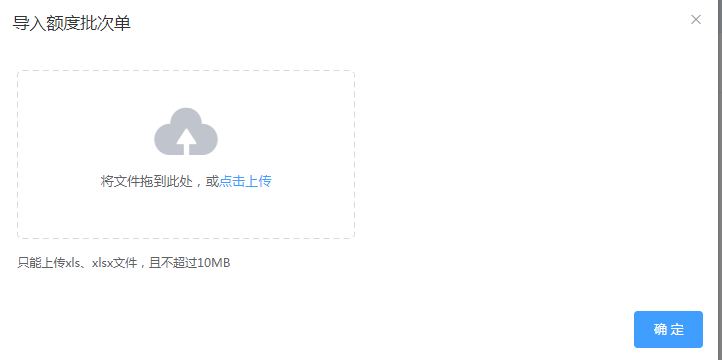
方法一:
<el-table-column label="操作">

    <template slot-scope="scope">

        <el-button icon="el-icon-circle-plus-outline" type="primary" v-on:click="addOp(scope.row)"></el-button>

        <el-button type="primary" v-on:click="importQuato(scope.row)">导入额度批次表</el-button>

    </template>

</el-table-column>

<el-button type="primary" v-on:click="importQuato(scope.row)">导入额度批次表</el-button>//导入按钮

scope.row可以获取每一列的id

<el-dialog :title="title" :visible.sync="dialogVisible">

        <el-upload

                class="upload-demo"

                drag

                class='ensure ensureButt'

                action="123" //这里可以随意不影响

                :before-upload="beforeAvatarUpload" //上传前文件校验

                multiple>

            <i class="el-icon-upload"></i>

            <div class="el-upload__text">将文件拖到此处,或<em>点击上传</em></div>

            <div class="el-upload__tip" slot="tip">只能上传xls、xlsx文件,且不超过10MB</div>

        </el-upload>

        <div slot="footer" class="dialog-footer">

            <!--<el-button v-on:click="dialogVisible = false">取 消</el-button>-->

            <el-button type="primary" v-on:click="dialogVisible = false">确 定</el-button>

        </div>

    </el-dialog>
// 上传前对文件的大小的判断

            beforeAvatarUpload (file) {

                var fileName=new Array()

                fileName =file.name.split('.');

                const extension = fileName[fileName.length-1] === 'xls'

                const extension2 =  fileName[fileName.length-1]=== 'xlsx'

                const isLt2M = file.size / 1024 / 1024 < 10

                if (!extension && !extension2) {

                    this.$message({

                        message: '上传模板只能是xls、xlsx格式!',

                        type: 'warning'

                    });

//                    console.log('上传模板只能是xls、xlsx格式!')

                }

                if (!isLt2M) {

                    this.$message({

                        message: '上传模板大小不能超过 10MB!',

                        type: 'warning'

                    });

//                    console.log('上传模板大小不能超过 10MB!')

                }

                if (extension || extension2 && isLt2M == true) {

                    console.log(file)

                    let fd = new FormData()

                    fd.append('invoiceTypeId', this.invoice_type_id)//随文件上传的其他参数

                    fd.append('epid', this.epid)

                    fd.append('file', file)

                    // console.log(fd)

                    this.newImport(fd).then(function (res) {//校验完成后提交

                        console.log(res)

                    }, function () {

                        console.log('failed');

                    });

                    return true

                }

                return extension || extension2 && isLt2M

            },

            //提示信息

            open: function (msg, code) {

                if (code == '000') {

                    this.$alert(msg, '提示', {

                        confirmButtonText: '确定',

                        type: 'success',

                        callback: action => {

                            this.dialogFormVisible = false;

                            location.reload();

                        }

                    });

                } else {

                    this.$alert(msg, '提示', {

                        confirmButtonText: '确定',

                        type: 'error',

                        callback: action => {

                            this.dialogFormVisible = false;

                            location.reload();

                        }

                    });

                }

            },

            newImport (data) {

                this.$http.post('../enterPriseQuota/importEnterPriseQuota', data).then(function (res) {//成功后回调

                    let code = res.data.returncode;//返回json结果

                    let msg = res.data.msg;

                    this.open(msg, code);

                    console.log('success');

                }, function () {

                    console.log('failed');

                });

            },

        }
 @RequestMapping("/importEnterPriseQuota")

    @ResponseBody

    public Map importEnterPriseQuota(@RequestParam(value = "invoiceTypeId") String invoiceTypeId,

                                     @RequestParam(value = "epid") String epid,

                                     @RequestParam("file") MultipartFile proFile, HttpServletRequest request) {

        String fileDir = request.getSession().getServletContext().getRealPath("/tmp");

        File dir = new File(fileDir);

        Map resMap = null;

        File file = null;

        try {

            file = new File(fileDir, proFile.getOriginalFilename());

            if (!dir.exists()) {

                dir.mkdir();

            }

            if (!file.exists()) {

                file.createNewFile();

            }

            proFile.transferTo(file);

            Date a = new Date();

            resMap = enterPriseQuotaService.importEnterPriseQuato(invoiceTypeId,file,epid);

            Date b = new Date();

            log.info("************all_time*************************" + (b.getTime() - a.getTime()));

            return resMap;

        } catch (IOException e) {

            e.printStackTrace();

        } finally {

            if (file != null && file.exists()) {

                file.delete();

            }

        }

        resMap.put("returncode", "999");

        resMap.put("msg", "程序异常,请联系管理员");

        return resMap;

    }
方法二:
<el-dialog :title="tagName" :visible.sync="dialogVisible">

        <el-upload

                class="upload-demo"

                drag

                class='ensure ensureButt'

                :action="importFileUrl"//在初始时指定url地址即可

                :on-error="uploadError"

                :on-success="uploadSuccess"

                :before-upload="beforeAvatarUpload"

                multiple>

            <i class="el-icon-upload"></i>

            <div class="el-upload__text">将文件拖到此处,或<em>点击上传</em></div>

            <div class="el-upload__tip" slot="tip">只能上传xls、xlsx文件,且不超过10MB</div>

        </el-upload>

        <div slot="footer" class="dialog-footer">

            <!--<el-button v-on:click="dialogVisible = false">取 消</el-button>-->

            <el-button type="primary" v-on:click="dialogVisible = false">确 定</el-button>

        </div>

    </el-dialog>
//有时候 :on-success,:on-error 这个函数会无法调用,之前看另一个帖子是用的:onError="uploadError" :onSuccess="uploadSuccess"
http://blog.csdn.net/qq_39685062/article/details/77036582
2018-01-12: 昨天又遇到上传成功但是无法调用成功回调函数的问题,这里涉及到vue的生命周期,导致无法调用,js也不会报错,把对应函数放到methods顶部可解决。

 // 上传成功后的回调

            uploadSuccess (response) {

                let code = response.returncode;

                let msg = response.msg;

                this.open(msg, code);

            },

            // 上传错误

            uploadError (response) {

                this.open("500", "文件导入异常!");

            },
 @RequestMapping("inEmployee")

    @ResponseBody

    public Map inEmployee(HttpServletRequest servletRequest) {

        MultipartHttpServletRequest request = (MultipartHttpServletRequest) servletRequest;

        Iterator<String> itr = request.getFileNames();

        MultipartFile proFile = null;

        while (itr.hasNext()) {

            String str = itr.next();

            proFile = request.getFile(str);

        }

        String fileDir = request.getSession().getServletContext().getRealPath("/tmp");

        File dir = new File(fileDir);

        Map resMap = null;

        File file = null;

        try {

            file = new File(fileDir, proFile.getOriginalFilename());

            if (!dir.exists()) {

                dir.mkdir();

            }

            if (!file.exists()) {

                file.createNewFile();

            }

            proFile.transferTo(file);

            Date a = new Date();

            resMap = employeeService.insEm(file,fileDir);

            Date b = new Date();

            log.info("************all_time*************************" + (b.getTime() - a.getTime()));

            return resMap;

        } catch (IOException e) {

            e.printStackTrace();

        } finally {

            if (file != null && file.exists()) {

                file.delete();

            }

        }

        resMap.put("returncode", "999");

        resMap.put("msg", "程序异常,请联系管理员");

        return resMap;

    }
element-ui upload组件上传的更多相关文章
- React antd如何实现<Upload>组件上传附件再次上传已清除附件缓存问题。
最近在公司做React+antd的项目,遇到一个上传组件的问题,即上传附件成功后,文件展示处仍然还有之前上传附件的缓存信息,需要解决的问题是,要把上一次上传的附件缓存在上传成功或者取消后,可以进行清除 ...
- vue watch 监听element upload组件上传成功返回的url列表
因为 on-success 上传成功返回的是一个异步的结果....如果父组件需要这个结果的话 必须用watch 监听 然后里面建立一个 save()方法 save方法里面再调用接口 传需要的上传之后的 ...
- element ui实现手动上传文件,且只能上传单个文件,并能覆盖上传。
element ui提供了成熟的组件场景,但实际工作中难免会遇到认(sha)真(diao)的产品.比如,最近遇到的,要求实现手动上传特定格式文件(用户点击“上传文件”按钮,确定之后,只是单纯选择了文件 ...
- Vue+Element UI 实现视频上传
一.前言 项目中需要提供一个视频介绍,使用户能够快速.方便的了解如何使用产品以及注意事项. 前台使用Vue+Element UI中的el-upload组件实现视频上传及进度条展示,后台提供视频上传AP ...
- Ant Design Upload 组件上传文件到云服务器 - 七牛云、腾讯云和阿里云的分别实现
在前端项目中经常遇到上传文件的需求,ant design 作为 react 的前端框架,提供的 upload 组件为上传文件提供了很大的方便,官方提供的各种形式的上传基本上可以覆盖大多数的场景,但是对 ...
- Element UI中的上传文件功能
上传文件给后台: <el-upload style="display:inline-block" :limit=" class="upload-demo& ...
- VUE -- iview table 组件 中使用 upload组件 上传组件 on render 事件不会触发问题
碰到的问题是: upload 组件在 on中写的监听事件不会被触发 在 props 中来监听:==>
- 关于本地使用antd的upload组件上传文件,ngnix报错405的问题
使用阿里的ui框架antd的upload,会自动请求ngnix上面的一个路径,也就是action所在的位置,一直报错405 not allowed,后来经讨论,统一将action写成一个路径,后端对这 ...
- 使用element的upload组件实现一个完整的文件上传功能(上)
说到标题就有点心塞了,前段时间项目上需要实现一个文件上传的功能,然后就咔咔的去用了element的upload组件,不用不知道一用吓一跳哇. 在使用的过程中遇到了很多让意想不到的问题,后来也因为时间问 ...
随机推荐
- linux之各目录作用
/opt目录 目录用来安装附加软件包,用户调用软件包程序放在目录/opt/package_name/bin下,package_name是安装软件包的名称 /etc目录 是用来放一些核心的配置文件 附各 ...
- nginx代理跨域(mac)
首先找到nginx.conf文件,修改并添加如下配置 html 文件 <!DOCTYPE html> <html lang="en"> <head&g ...
- 【转载】中文输入法下onKeyPress不能触发的问题
onKeypress---->oninput https://segmentfault.com/a/1190000008820968
- x学生管理系统(用中间件)-------基于FORM组件
目的:实现学生,老师,课程的增删改查 models.py from django.db import models # Create your models here. class UserInfo( ...
- zoj3659
#include<iostream> #include<algorithm> #include<cstring> #define ll long long #inc ...
- Nginx详解二十七:Nginx架构篇之安全篇
1.常见的恶意行为:爬虫行为和恶意抓取.资源盗用 解决方案: 基础防盗链功能:不让恶意用户能轻易爬去网站对外数据 secure_link_module模块:对数据安全性提高,加密验证和失效性,适合核心 ...
- git bash中的快捷键
转载: https://www.cnblogs.com/dhuhewang/p/6504914.html 1.bash命令格式 命令 [-options] [参数],如:tar zxvf dem ...
- Java 画一个5X5的方形矩阵
效果图如下: 思路:创建一个窗口,使其居中于屏幕中央,使用drawRect(x, y, width, height)画正方形. import java.awt.Graphics; import jav ...
- azkaban group分组,权限
翻译自:https://azkaban.readthedocs.io/en/latest/userManager.html?highlight=group 1.job project,名为" ...
- 【C++ Primer | 15】访问控制与继承、继承中的类作用域
1. 只有D继承B的方式是public时,用户代码才能使用派生类向基类的转换:如果D继承B的方式是受保护的或者私有的,则用户代码不能使用该转换. 2. 不论D以什么方式继承B,D的成员函数和友员函数都 ...