
Razor Pages with ASP.NET Core 2
With ASP.NET Core 2 we get another way of building web applications. It’s one of those new things that is actually forgotten old thing and it is called Razor Pages. Are we going back to WebMatrix days? This blog post is short introduction to Razor Pages in ASP.NET Core 2.
One of new features of ASP.NET Core 2.0 is support for Razor Pages. Yes, those same pages that came times ago with WebMatrix. Today Razor Pages is subset of MVC on ASP.NET Core. Yes, support for Razor Pages comes with ASP.NET Core MVC meaning that Razor Pages application is technically MVC application. Also Razor Pages have same features as MVC views.
Why Razor Pages?
MVC developers want probably ask why we need one more way to build web sites on ASP.NET Core? Isn’t MVC enough? From information I have found from public space I found the following reasoning:
- It’s easier to get to web development for beginners as Razor pages are more lightweight than MVC. Besides beginners there are people who are coming from other scripting languages be it old ASP or PHP or something else.
- Razor Pages fit well to smaller scenarios where building controllers and models as separate classes is overkill.
I don’t fully agree with these points as MVC on ASP.NET Core is lightweight and flexible enough. I cover also smaller scenarios with it and it goes way faster as I’m using things I already know very well. The amount of code that MVC introduces is not so big that it makes a lot of difference for small applications.
But I know – based on my early days – that there are young developers like me who want to jump in and start with something very simple to gain more skills and then move to “real” tools.
Creating Razor Pages application
In Visual Studio 2017 Preview 2 we have web application template for Razor Pages.
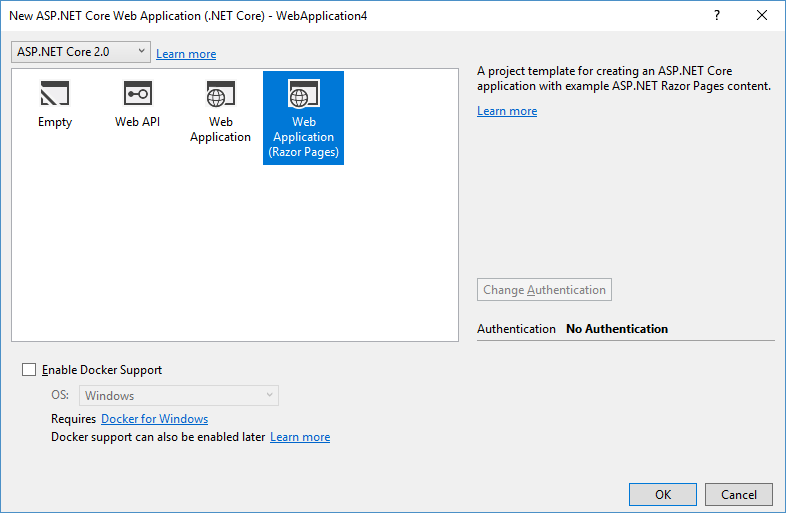
Just select Web Application (Razor Pages) and click OK.
Application structure
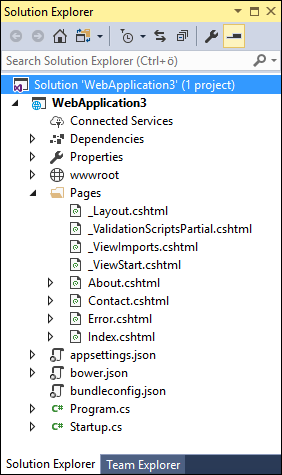 Application structure is similar to MVC but there are no folders for controllers and views. The folder called Pages contains all Razor views that in this context are called “pages”. These pages are like regular MVC views but they also contain code that for MVC is held in controller classes. I will cover this part of Razor Pages later.
Program and Startup classes are exactly the same as for MVC applications. Not just by name but also by code. As said before, Razor Pages are supported by MVC and they are part of it.
Separating logic from presentation is also possible here. We can create code-behind files for pages and name these as PageName.cshtml.cs. Class that code-behind file contains is called “page model” now. Note the arrows before About, Contacts, Error and Index pages on Solution Explorer screenshot. These views have code-behind files.
As I show later then by architecture Razor Pages are following their own pattern I would call View-ViewModel. It is like mix of MVC and MVVM with some missing genes by both parents.
Exploring Razor page
Back in days Razor pages were closer to old ASP when thinking about coding. Now it’s more object-oriented and it is keeping closer to MVC. This is the code of About page that is part of default Razor Pages application.
@page
@model AboutModel
@{
    ViewData["Title"] = "About";
}
<h2>@ViewData["Title"].</h2>
<h3>@Model.Message</h3>

<p>Use this area to provide additional information.</p>
Pages are always marked with @page directive that tells view engine this is Razor page and not a regular MVC view. We can specify model that is acting more like a view model than regular MVC model. Actually model here is more like mix of controller and model. Those who have used XAML should find it familiar by concept. Here is the code-behind or model of About page.
public class AboutModel : PageModel
{
    public string Message { get; set; }

    public void OnGet()
    {
        Message = "Your application description page.";
    }
}
OnGet() is handler method that is called with GET-request. There is also similar handler available for POST-method and both of these methods have also asynchronous counterparts supported (OnGetAsync() and OnPostAsync()). Personally I find these OnGet() and OnPost() methods more cryptic than MVC controller actions that clearly communicate their purpose.
Razor page with no code-behind
Now let’s see how previous page looks without code-behind file. It works exactly like the version with code-behind class.
@page
@{
    ViewData["Title"] = "About";
}
@functions {
    public string Message { get; set; }

    public void OnGet()
    {
        Message = "Your application description page.";
    }
}
<h2>@ViewData["Title"].</h2>
<h3>@Message</h3>

<p>Use this area to provide additional information.</p>
Methods and properties are defined in @functions section. I just moved the contents of page model to page itself and it works. In practice it’s better idea to have those code-behind files and views clean from code as code in views is not so easy to test using automated tests. Also if views grow more complex over time it’s only good if growing codebase is in code files.
Wrapping up
I’m not sure how many people are using Razor Pages today or how many new people it will bring in but it is still lightweight option for those who just want to get started. I also think it’s perhaps option for simple in-house webs where great granularity and control over code is not needed but still I feel that going with MVC in these cases is also okay. Anyway it’s never bad to have more options and entry-level technologies. I hope there will be clear use-cases for Razor Pages as otherwise this technology will always be a little brother in a shadow of well-known MVC.
Razor Pages with ASP.NET Core 2的更多相关文章
- Introduction to Razor Pages in ASP.NET Core
https://docs.microsoft.com/en-us/aspnet/core/mvc/razor-pages/ 从ASP.NET Core 2.0.0版本之后,添加了新的特性Razor p ...
- ASP.NET Core Razor 标签助手 - ASP.NET Core 基础教程 - 简单教程,简单编程
原文:ASP.NET Core Razor 标签助手 - ASP.NET Core 基础教程 - 简单教程,简单编程 ASP.NET Core Razor 标签助手 上一章节我们介绍了视图导入,学习了 ...
- ASP.NET Core Razor 视图导入 - ASP.NET Core 基础教程 - 简单教程,简单编程
原文:ASP.NET Core Razor 视图导入 - ASP.NET Core 基础教程 - 简单教程,简单编程 ASP.NET Core Razor 视图导入 上一章节我们介绍了视图起始页,学习 ...
- ASP.NET Core Razor 视图起始页 - ASP.NET Core 基础教程 - 简单教程,简单编程
原文:ASP.NET Core Razor 视图起始页 - ASP.NET Core 基础教程 - 简单教程,简单编程 ASP.NET Core Razor 视图起始页 上一章节中我们介绍了布局视图, ...
- ASP.NET Core Razor 布局视图 - ASP.NET Core 基础教程 - 简单教程,简单编程
原文:ASP.NET Core Razor 布局视图 - ASP.NET Core 基础教程 - 简单教程,简单编程 ASP.NET Core Razor 布局视图 上一章节中我们学习了如何使用 EF ...
- ASP.NET CORE RAZOR :在 ASP.NET Core 中开始使用 Razor Pages
来自:https://docs.microsoft.com/zh-cn/aspnet/core/tutorials/razor-pages/razor-pages-start 系统必备安装以下组件:. ...
- [译]ASP.NET Core揭秘 - Razor Pages
原文 什么是Razor Pages? Razor pages是ASP.NET Core 2.0的新特性,它被设计用来更快的开发页面,比传统的MVC模式更便捷. 创建项目 为了使用Razor Pages ...
- 【翻译】介绍 ASP.NET Core 中的 Razor Pages
介绍 ASP.NET Core 中的 Razor Pages 原文地址:Introduction to Razor Pages in ASP.NET Core 译文地址:介绍 asp. ...
- ASP.NET Core Razor页面 vs MVC
作为.NET Core 2.0发行版的一部分,还有一些ASP.NET的更新.其中之一是添加了一个新的Web框架来创建"页面",而不需要复杂的ASP.NET MVC.新的Razor页 ...
随机推荐
- 移动端h5页面编写样式重置
@charset "UTF-8"; /* stylelint-enable */ /* 重置样式 */ * { -webkit-tap-highlight-color: trans ...
- C学习笔记-一些知识
memset可以方便的清空一个结构类型的变量或数组. 如: struct sample_struct { ]; int iSeq; int iType; }; 对于变量 struct sample_s ...
- Android/Linux boot time分析优化
如果需要优化boot time,就需要一个量化的工具来分析每个阶段的时间消耗.这种类型的优化特别适合使用基于timeline的图表,有着明显的时间顺序.要求不但能给出整个流程消耗的时间,还要能对流程进 ...
- phpstorm 免费激活码
打开网址 http://idea.lanyus.com/ 选择获取注册码,复制生成的验证码 安装完成后,打开软件,依次选择菜单栏 Help -> Register-> Activation ...
- 《React Native 精解与实战》书籍连载「配置 iOS 与 Android 开发环境」
此文是我的出版书籍<React Native 精解与实战>连载分享,此书由机械工业出版社出版,书中详解了 React Native 框架底层原理.React Native 组件布局.组件与 ...
- 使用模块PIL 生成 随机验证码
--------------默认自己无能,无疑是给失败制造机会!你认为自己是什么样的人,就将成为什么样的人. 要使用PIL模块. 安装: 1 pip3 install pillow 基本使用 1. 创 ...
- MRO C3算法 super的运用
-------------态度决定成败,无论情况好坏,都要抱着积极的态度,莫让沮丧取代热心.生命可以价值极高,也可以一无是处,随你怎么去选择.# --------------------------- ...
- 接口自动化框架(Pytest+request+Allure)
前言: 接口自动化是指模拟程序接口层面的自动化,由于接口不易变更,维护成本更小,所以深受各大公司的喜爱. 接口自动化包含2个部分,功能性的接口自动化测试和并发接口自动化测试. 本次文章着重介绍第一种, ...
- Win10系统如何安装Linux Mint
导读 随着windows10系统免费升级期限的靠近,越来越多朋友都将自己的电脑系统升级到了win10正式版.今天,小编就要在这里为大家分享Windows10系统安装Linux Mint的方法,希望能够 ...
- scrapy之五大核心组件
scrapy之五大核心组件 scrapy一共有五大核心组件,分别为引擎.下载器.调度器.spider(爬虫文件).管道. 爬虫文件的作用: a. 解析数据 b. 发请求 调度器: a. 队列 队列是一 ...