
C#通讯录——Windows Form Contact List
C#通讯录
Windows Form Contact List
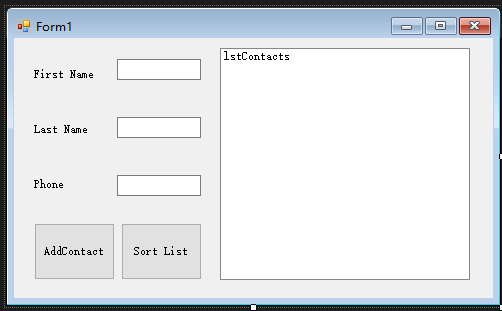
主窗口
using System;

using System.Collections.Generic;

using System.ComponentModel;

using System.Data;

using System.Drawing;

using System.IO;

using System.Linq;

using System.Text;

using System.Threading.Tasks;

using System.Windows.Forms;

namespace WindowsFormsApplication2

{

    public partial class Form1 : Form

    {

        public Form1()

        {

            InitializeComponent();

        }

        private Contact[] phoneBook = new Contact[];

        private void Write(Contact obj)

        {

                StreamWriter sw = new StreamWriter("contact.txt");

                sw.WriteLine(phoneBook.Length + );

                sw.WriteLine(obj.FirstName);

                sw.WriteLine(obj.LastName);

                sw.WriteLine(obj.Phone);

                for (int x = ; x < phoneBook.Length; x++)

                {

                    sw.WriteLine(phoneBook[x].FirstName);

                    sw.WriteLine(phoneBook[x].LastName);

                    sw.WriteLine(phoneBook[x].Phone);

                }

                sw.Close();

        }

        private void Read()

        {

                StreamReader sr = new StreamReader("contact.txt");

                phoneBook = new Contact[Convert.ToInt32(sr.ReadLine())];

                for (int x = ; x < phoneBook.Length; x++)

                {

                    phoneBook[x] = new Contact();

                    phoneBook[x].FirstName = sr.ReadLine();

                    phoneBook[x].LastName = sr.ReadLine();

                    phoneBook[x].Phone = sr.ReadLine();

                }

                sr.Close();

        }

        private void Display()

        {

                lstContacts.Items.Clear();

                for (int x = ; x < phoneBook.Length; x++)

                {

                    lstContacts.Items.Add(phoneBook[x].ToString());

                }

        }

        private void ClearForm()

        {

            textFirstName.Text = string.Empty;

            textLastName.Text = string.Empty;

            textPhone.Text = string.Empty;

        }

        private void btnAddContact_Click(object sender, EventArgs e)

        {

            Contact obj = new Contact();

            obj._Contact(textFirstName.Text,textLastName.Text,textPhone.Text);

            //lstContacts.Items.Add(obj.ToString());

            BubbleSort();

            FileIf();

            Write(obj);

            Read();

            Display();

            ClearForm();

        }

        private void FileIf()

        {

            if (File.Exists("contact.txt"))

            {

                return;

            }else

            {

                FileStream NewText = File.Create("contact.txt");

                NewText.Close();

            }

        }

        private void Form1_Load(object sender, EventArgs e)

        {

            FileIf();

            Read();

            Display();

        }

        private void  BubbleSort()

        {

            Contact temp;

            bool swap;

            do

            {

                swap = false;

                for(int x = ; x<(phoneBook.Length -);x++)

                {

                    if (phoneBook[x].LastName.CompareTo(phoneBook[x+].LastName)>){

                        temp = phoneBook[x];

                        phoneBook[x]=phoneBook[x+];

                        phoneBook[x+]=temp;

                        swap =true;

                    }

                }

            }while(swap == true);

        }

        private void btnSort_Click(object sender, EventArgs e)

        {

            BubbleSort();

            Display();

        }

    }//end of class

}//end of namespace
Contact类
using System;

using System.Collections.Generic;

using System.Linq;

using System.Text;

using System.Threading.Tasks;

namespace WindowsFormsApplication2

{

    class Contact

    {

        //public Contact()

        //{

        //    FirstName = "landv";

        //    LastName = "li";

        //    Phone = "13903120312";

        //}

        //public Contact(string _FirstName, string _LastName, string _Phone)

        //{

        //    FirstName = _FirstName;

        //    LastName = _LastName;

        //    Phone = _Phone;

        //}

        public void  _Contact(string _FirstName, string _LastName, string _Phone)

        {

            FirstName = _FirstName;

            LastName = _LastName;

            Phone = _Phone;

        }

        private string _FirstName;

        private string _LastName;

        private string _Phone;

        public string FirstName

        {

            get { return _FirstName; }

            set { _FirstName = value; }

        }

        public string LastName

        {

            get { return _LastName; }

            set { _LastName = value; }

        }

        public string Phone

        {

            get { return _Phone; }

            set

            {

                if(value.Length == )

                {

                    _Phone = value;

                }

                else

                {

                    _Phone = "";

                }

            }

        }

       public override string ToString()

       {

           string output = string.Empty;

           output += string.Format("{0},{1}", LastName, FirstName);

           output += string.Format(",{0} {1} {2}", Phone.Substring(, ), Phone.Substring(, ), Phone.Substring(, ));

           return output;

       }

    }// end of class

}//end of namespace
源码下载地址:
http://files.cnblogs.com/files/landv/WindowsFormContactList.zip
C#通讯录——Windows Form Contact List的更多相关文章
- 如何用Web技术开发Windows Form应用
现在H5很热,很多互联网公司的产品都采用混合编程,其中各个平台客户端的“壳”为原生控件,但是内容很多都是Web网页,因此可以做出很多炫酷的效果.随着Node.js和Ionic等框架的出现,现在感觉Ja ...
- Windows Form 中快捷键设置
在Windows Form程序中使用带下划线的快捷键只需要进行设置: 就能够工作.
- VS2008 Windows Form项目安装包生成详解
2008 Windows Form项目的发布对有经验的程序员来说,可能不值一提,但对很多新手来说却不知道如何操作,因为在很多关于Visual Studio的书籍中也没有相关介绍,权威如<C# 2 ...
- VISUAL STUDIO 2008 WINDOWS FORM项目发布生成安装包详解(转)
转自:http://www.cnblogs.com/killerofyang/archive/2012/05/31/2529193.html Visual Studio 2008 Windows Fo ...
- C# Adding Hyperlink to Windows Form z
When creating a Windows form in C#, we would like to create a hyperlink so that when the user click ...
- windows form (窗体) 之间传值小结
windows form (窗体) 之间传值小结 windows form (窗体) 之间传值小结 在windows form之间传值,我总结了有四个方法:全局变量.属性.窗体构造函数和deleg ...
- Ninject之旅之十二:Ninject在Windows Form程序上的应用(附程序下载)
摘要: 下面的几篇文章介绍如何使用Ninject创建不同类型的应用系统.包括: Windows Form应用系统 ASP.NET MVC应用系统 ASP.NET Web Form应用系统 尽管对于不同 ...
- Windows Form线程同步
.Net多线程开发中,经常需要启动工作线程Worker thread处理某些事情,而工作线程中又需要更新主线程UI thread的界面状态.我们只能在主线程中操作界面控件,否则.Net会抛出异常. 那 ...
- 在WPF中添加Windows Form控件(包括 ocx控件)
首先,需要向项目中的reference添加两个dll,一个是.NET库中的System.Windows.Forms,另外一个是WindowsFormsIntegration,它的位置一般是在C:\ ...
随机推荐
- pyinstaller 打包exe可执行文件
Python打包EXE方法之一 一.安装Pyinstaller 1.安装pywin32 下载安装文件:查找到跟自己适用的python版本及window系统版本匹配的pywin32,下载后安装 使用pi ...
- 817. Linked List Components
1. 原始题目 We are given head, the head node of a linked list containing unique integer values. We are a ...
- C/C++经典面试题一
1.变量的声明和定义有什么区别? 常量:在程序执行过程中,不会发生改变的量,不能被改变的量 变量:在程序执行过程中,可以被改变的量 定义变量的方式:数据类型 变量名 = 常量: int num = 1 ...
- 1.Spring Boot入门及其jar包依赖模型分析
Spring Boot介绍 Spring Boot是由Pivotal团队提供的新框架,其设计目的是简化Spring应用的搭建以及开发过程.其目标是: 为所有Spring开发提供一个从根本上更快,且方便 ...
- MySQL数据库之auto_increment【转】
一.概述 在数据库应用中,我们经常需要用到自动递增的唯一编号来标识记录.在MySQL中,可通过数据列的auto_increment属性来自动生成.可在建表时可用“auto_increment=n”选项 ...
- 负载均衡获得真实源IP的6种方法 【转】
除了X-FORWARD-FOR,负载均衡中获得真实源IP的方法还有很多种, 本文抛砖引玉,主要介绍获得真实源IP的多种方法,而不是具体配置, 负载均衡获得真实IP的方法有很多种,将形成专题文章, 本文 ...
- pt-table-sync同步报错Called not_in_left in state 0 at /usr/bin/pt-table-sync line 5231【原创】
试验环境MySQL5.7.19,自己使用pt-table-sync 3.0.2版本同步后,手动在从库执行后,在用pt-table-sync验证时报错 命令如下: pt-table-,u=用户名,p=, ...
- VC 为程序创建快捷方式的详细讲解
有时候,为了方便用户使用我们编写的程序,需要在桌面,快速启动或程序组中创建程序的快捷方式.下面就介绍在VC下如何为程序创建快捷方式. 一.得到桌面,快速启动或程序组的路径这里介绍二个win32 API ...
- struts2框架之文件下载(参考第三天学习笔记)
下载 1. 下载是一种响应方式 正常的响应:响应正文是html:response.getWriter().print("html"); 下载的响应: 1.一个流:字节数据:resp ...
- 我理解的vue生命周期
说些题外话,引出vue的生命周期. 比如人出生到寿终正寝,这是人的一个生命周期.他会经历出生,婴儿时期,童年时期,少年时期,青年,中年,老年,到 end.然后,每个时期都会有一定的历史任务在等着去完成 ...