
五、文件IO——dup 函数
5.1 dup 函数---复制文件描述符
5.1.1 简单cat实现及输入输出重定向
io.c
 #include <sys/types.h>

 #include <sys/stat.h>

 #include <fcntl.h>

 #include <unistd.h>

 #include "io.h"

 #include <string.h>

 #include <errno.h>

 #include <stdlib.h>

 #include <stdio.h>

 #include <fcntl.h>

 #define BUFFER_LEN 1024

 /* 文件的读写拷贝 */

 void copy(int fdin, int fdout)

 {

     char buff[BUFFER_LEN];

     ssize_t size;

 //    printf("file length: %ld\n", lseek(fdin, 0L, SEEK_END));//将文件定位到文件尾部,偏移量为0L

 //    lseek(fdin, 0L, SEEK_SET);// 定位到文件开头

     while((size = read(fdin, buff, BUFFER_LEN)) > ) { //从 fdin 中读取 BUFFER_LEN 个字节存放入  buff 中

 //        printf("current: %ld\n", lseek(fdin, 0L, SEEK_CUR));

         if(write(fdout, buff, size) != size) {

             fprintf(stderr, "write error: %s\n", strerror(errno));

             exit();

         }

     }

     if(size < ) {

         fprintf(stderr, "read error:%s\n", strerror(errno));

         exit(); // 相当于 return 1;

     }

 }
cat.c
 #include <sys/types.h>

 #include <sys/stat.h>

 #include <fcntl.h>

 #include <unistd.h>

 #include "io.h"

 #include <string.h>

 #include <errno.h>

 #include <stdlib.h>

 #include <stdio.h>

 #include <fcntl.h>

 int main(int argc, const char *argv[])

 {

     int fd_in = STDIN_FILENO;

     int fd_out = STDOUT_FILENO;

     int i;

     for(i = ; i < argc; i++) {

         fd_in = open(argv[i], O_RDONLY);

         if(fd_in < ) {

             perror("open error");

             continue;

         }

         copy(fd_in, fd_out);

         close(fd_in);

     }

     if(argc == )

         copy(fd_in, fd_out);

     return ;

 }
编译:gcc -o bin/cat -Iinclude src/io.c src/cat.c
调试:
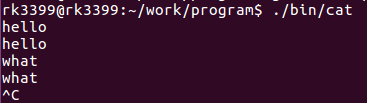

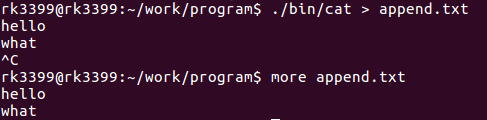
cat 的作用就输入和输出的重定向功能,而 dup 和 dup2 就是用来完成此功能的。
5.1.2 dup 和 dup2 函数说明
 #include<unistd.h>

 int dup (int oldfd);

 int dup2(int odlfd,int newfd);
- 函数说明:
- dup() 用来复制参数 oldfd 所指的文件描述符,并将它返回。此新的文件描述符和参数oldfd指的是同一个文件,共享所有的锁定、读写位置和各项权限或旗标。例如,当利用 lseek() 对某个文件描述符作用时,另一个文件描述词的读写位置也会随着改变。不过,文件描述符之间并不共享 close-on-exec 旗标。
- dup2() 用来复制参数 oldfd 所指的文件描述符,并将它拷贝至参数 newfd 后一块返回。若参数 newfd 为一已打开的文件描述词,则 newfd 所指的文件会先被关闭。如若 oldfd 等于 newfd,则dup2 返回 newfd,而不关闭它。dup2() 所复制的文件描述符,与原来的文件描述符共享各种文件状态,详情可参考 dup() 。
- 参数:
- oldfd:原先的文件描述符
- newfd:新的文件描述符
- 返回值:当复制成功时,则返回最小及尚未使用的文件描述符。若有错误则返回-1,errno会存放错误代码。
- 附加说明:
- dup2() 相当于调用 fcntl(oldfd,F_DUPFD,newfd);请参考 fcntl()
- 在进程间通信时可用来改变进程的标准输入和标准输出。
文件描述符的赋值是文件描述符表结构体成员中指针的复制。
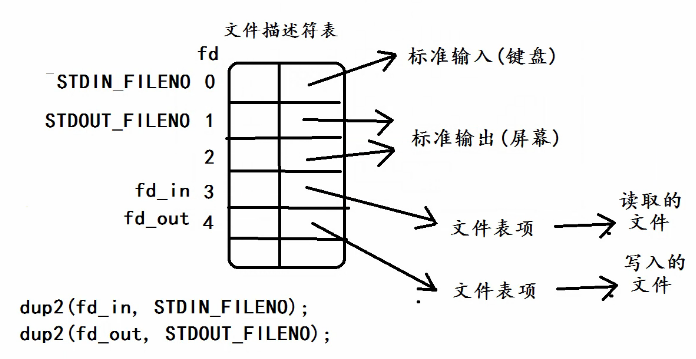
dup2(fd_in, STDIN_FILENO),相当于就是将 fd_in 文件描述符中的指向文件表项的指针赋值给 STDIN_FILENO 中的指向标准输入的指针,此时,STDIN_FILENO 中的指针指向了fd_in 中的指针指向的文件表项(地址一样了),最终指向了读取的文件。
则此时 dup1 中 STDIN_FILENO 不再是从标准输入读取,而是从 fd_in 中去读取。这种就是重定向
5.1.3 实例
将+ 和 - 改为输入输出重定向
mcat.c
 #include <sys/types.h>

 #include <sys/stat.h>

 #include <fcntl.h>

 #include <unistd.h>

 #include "io.h"

 #include <string.h>

 #include <errno.h>

 #include <stdlib.h>

 #include <stdio.h>

 #include <fcntl.h>

 /*

  * bin/mcat + append.txt(+ 为输入重定向)

  * bin/mcat - append.txt(- 为输出重定向)

  */

 int main(int argc, const char *argv[])

 {

     int fd_in;

     int fd_out;

     int i;

     int flag = ;

     for(i = ; i < argc; i++) {

         if(!strcmp("+", argv[i])) {

             fd_in = open(argv[++i], O_RDONLY);

             if(fd_in < ) {

                 perror("open error");

                 exit();

             }

             //将标准输入重定向到文件

             if(dup2(fd_in, STDIN_FILENO) != STDIN_FILENO) {

                 perror("dup2 error");

                 exit();

             }

             close(fd_in);

         } else if(!strcmp("-", argv[i])) {

             fd_out = open(argv[++i], O_WRONLY | O_CREAT | O_TRUNC, );

             if(fd_out < ) {

                 perror("open error");

                 exit();

             }

             //将标准输出重定向到文件

             if(dup2(fd_out, STDOUT_FILENO) != STDOUT_FILENO) {

                 perror("dup2 error");

                 exit();

             }

             close(fd_out);

         } else {

             flag = ;

             fd_in = open(argv[i], O_RDONLY);

             if(fd_in < ) {

                 perror("open error");

                 exit();

             }

             if(dup2(fd_in, STDIN_FILENO) != STDIN_FILENO) {

                 perror("dup2 error");

                 exit();

             }

             copy(STDIN_FILENO, STDOUT_FILENO);

             close(fd_in);

         }

     }

     if(!flag) {

         copy(STDIN_FILENO, STDOUT_FILENO);

     }

     return ;

 }
编译调试如下:
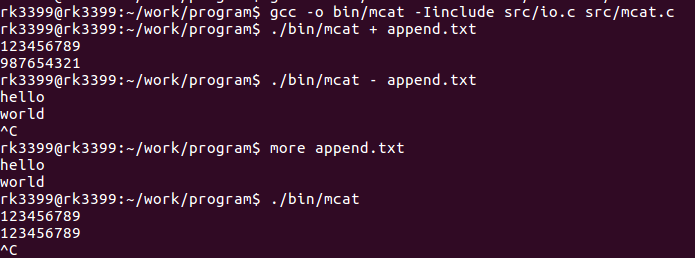
五、文件IO——dup 函数的更多相关文章
- 六、文件IO——fcntl 函数 和 ioctl 函数
6.1 fcntl 函数 6.1.1 函数介绍 #include <unistd.h> #include <fcntl.h> int fcntl(int fd, int cmd ...
- Linux文件IO操作函数概述
文件概述 Linux中,一切皆文件.文件为操作系统服务和设备提供了一个简单而一致的接口.这意味着程序完全可以像使用文件那样使用磁盘文件.串行口.打印机和其他设备. 也就是说,大多数情况下,你只需要使用 ...
- C标准库函数--文件IO操作函数。
C标准库文件读写函数总结:都是对文件流进行输入输出的函数分为对文件的有格式读写以及无格式读写 一.文件的无格式读写根据每次读写字符的数量,分为三类:1.按字符读写文件 按字符读有三个函数:以下三个函数 ...
- 文件IO和标准IO
2015.2.26 星期四,阴天 今天的内容主要是文件IO man 手册的分册: man -f open 查看那些分册中有openman 1 -- 普通的命令程序man 2 -- 系统调用man 3 ...
- 第八篇:文件共享和使用 dup 函数创建新描述符的区别
前言 文件共享是指同时打开一个文件 用 dup 函数能对指定文件描述符再创建一个新的描述符,且这个新的描述符和旧的描述符指向的是同一个文件. 这两种行为有什么区别呢?下面给出的两张文件系统的图形象的解 ...
- 初级文件IO——IO过程、open、close、write、read、lseek、dup、dup2、errno、perror
先要回答的问题 文件IO指的是什么? 本文主要讲述如何调用Linux OS所提供的相关的OS API,实现文件的读写. 如何理解文件IO? IO就是input output的意思,文件io就是文件输入 ...
- 【Linux 应用编程】文件IO操作 - 常用函数
Linux 系统中的各种输入输出,设计为"一切皆文件".各种各样的IO统一用文件形式访问. 文件类型及基本操作 Linux 系统的大部分系统资源都以文件形式提供给用户读写.这些文件 ...
- 文件IO函数和标准IO库的区别
摘自 http://blog.chinaunix.net/uid-26565142-id-3051729.html 1,文件IO函数,在Unix中,有如下5个:open,read,write,lsee ...
- (二) 一起学 Unix 环境高级编程 (APUE) 之 文件 IO
. . . . . 目录 (一) 一起学 Unix 环境高级编程 (APUE) 之 标准IO (二) 一起学 Unix 环境高级编程 (APUE) 之 文件 IO (三) 一起学 Unix 环境高级编 ...
随机推荐
- 单片机的外围功能电路 LET′S TRY“嵌入式编程”: 2 of 6
单片机的外围功能电路 LET′S TRY“嵌入式编程”: 2 of 6 本连载讲解作为嵌入式系统开发技术人员所必需具备的基础知识.这些基础知识是硬件和软件技术人员都应该掌握的共通技术知识. 上期在&l ...
- DNA Consensus String
题目(中英对照): DNA (Deoxyribonucleic Acid) is the molecule which contains the genetic instructions. It co ...
- PHP基础学习----函数
一.函数的定义 function 函数名([参数1,参数2,参数3,...]){ 函数体: [return 返回值;] } //函数调用 函数名([参数1,参数2,参数3,...]): 二.可变函数 ...
- 【洛谷P3275】糖果
题目大意:维护 M 个差分约束关系,问是否可以满足所有约束,如果满足输出一组解.\(N<=1e5\) 题解:差分约束模型可以通过构建一张有向图来求解.是否满足所有约束可以利用 spfa 进行判断 ...
- 使用selenium 模拟人操作请求网页
首先要 pip install selenium 安装插件 然后要下载驱动驱动根据你的浏览器 Chrome selenium 驱动下载地址 http://chromedriver.storage. ...
- python 当前时间获取方法
1.先导入库:import datetime 2.获取当前日期和时间:now_time = datetime.datetime.now() 3.格式化成我们想要的日期:strftime() 比如:“2 ...
- MySQL排序函数field()详解
在日常开发过程中,排序是经常用到的,有时候有这样的需求. 比如,需要在查询结果中根据某个字段的具体值来排序.如下面例子 上面是一张个人信息 表,假如我们想按照'seiki','iris','xut'来 ...
- Java多线程-详细版
基本概念解释 并发:一个处理器处理多个任务,这些任务对于处理器来说是交替运行的,每个时间点只有一个任务在进行. 并行:多个处理器处理多个任务,这些任务是同时运行的.每个时间点有多个任务同时进行. 进程 ...
- mybatis源码分析(方法调用过程)
十一月月底,宿舍楼失火啦,搞得20多天没有网,目测直到放假也不会来了... 正题 嗯~,其实阅读源码不是为了应付面试,更重要的让你知道,大师是怎样去写代码的,同样是用Java,为啥Clinton Be ...
- CentOS 7 (Linux) 下载百度网盘大文件
这个方法不仅适合下载 "百度网盘" 中的文件,还可以下载磁链之类的,总之,就是能够加快下载速度的方法. (参考了网上的多篇文章,自行实践,成功下载度盘大文件,并且提升了下载速度) ...