
kubernetes之收集集群的events,监控集群行为
一、概述
线上部署的k8s已经扛过了双11的洗礼,期间先是通过对网络和监控的优化顺利度过了双11并且表现良好。先简单介绍一下我们kubernetes的使用方式:
物理机系统:Ubuntu-16.04(kernel 升级到4.17)
kuberneets-version:1.13.2
网络组件:calico(采用的是BGP模式+bgp reflector)
kube-proxy:使用的是ipvs模式
监控:prometheus+grafana
日志: fluentd + ES
metrics: metrics-server
HPA:cpu + memory
告警:钉钉
CI/CD: gitlab-ci/gitlab-runner
应用管理工具:helm、chartmuseum(不建议直接使用helm,helm charts可读性很差,学习成本较高)
由于k8s、物理环境共存,需要打通通网络提供访问:kube-gateway
有的地方涉及到公司内部的东西不方便写出来,但是绝大部分在我之前的博客都有介绍,有兴趣的可以参考一下。
自己的反思:
开始的时候,k8s集群在线上跑了一段时间,但是我发现我对集群内部的变化没有办法把控的很清楚,比如某个pod被重新调度了、某个node节点上的imagegc失败了、某个hpa被触发了等等,而这些都是可以通过events拿到的,但是events并不是永久存储的,它包含了集群各种资源的状态变化,所以我们可以通过收集分析events来了解整个集群内部的变化,经过一番探索找到一个开源的eventrouter来收集events事件,经过一些改造使其符合我们的业务场景,更名为eventrouter-kafka(https://github.com/cuishuaigit/eventrouter-kafka)直接将修改配置直传kafka,而不是需要各种配置,感觉原版的配置有些繁琐不是很好用,而我们的日志也是走kafka队列的,减轻ES的写压力。现在的events收集流程:
eventrouter---->kafka---->logstash(过滤、解析)----->ES------elastalert---->钉钉
经过添加上面的收集events使k8s集群又完善了一步。
二、简述流程
1、部署eventrouter
eventrouter是使用golang写的,可以根据自己的需求二次开发,部署很简单,参考:https://github.com/cuishuaigit/eventrouter-kafka。这里就不细述了。
2、kafka集群
参考:https://github.com/cuishuaigit/k8s-kafka
3、logstash
现在相应版本的logstash,下载地址:https://www.elastic.co/guide/en/logstash/6.5/installing-logstash.html
然后进行配置,这里贴一下我的测试配置:
input{

   kafka{

      bootstrap_servers => ["kafka-0.kafka-svc.kafka.svc.cluster.local:9092,kafka-1.kafka-svc.kafka.svc.cluster.local:9092,kafka-2.kafka-svc.kafka.svc.cluster.local:9092"]

      client_id => "eventrouter-prod"

      #auto_offset_reset => "latest"

      group_id => "eventrouter"

      consumer_threads =>

      #decorate_events  => true

      id => "eventrouter"

      topics => ["eventrouter"]

}

}

filter {

  if [message] =~ 'DNSConfigForming' {

     drop { }

  }

  json {

    source => "message"

  }

  mutate {

    remove_field => [ "message","old_event" ]

}

}

output{

 elasticsearch {

                        hosts => "10.4.9.28:9200"

                        index => "eventrouter-%{+YYYY-MM-dd}"

                 }

}
4、ES
version: ''

services:

  elasticsearch:

    image: docker.elastic.co/elasticsearch/elasticsearch:6.5.

    container_name: elasticsearch

    environment:

      - cluster.name=docker-cluster

      - bootstrap.memory_lock=true

      - "ES_JAVA_OPTS=-Xms4096m -Xmx4096m"

    ulimits:

      memlock:

        soft: -

        hard: -

    volumes:

      - /data/es1:/usr/share/elasticsearch/data

      - /data/backups:/usr/share/elasticsearch/backups

      - /data/longterm_backups:/usr/share/elasticsearch/longterm_backups

      - ./config/jvm.options:/usr/share/elasticsearch/config/jvm.options

    ports:

      - "9200:9200"

    networks:

      - esnet

#  elasticsearch2:

#    image: docker.elastic.co/elasticsearch/elasticsearch:6.5.

#    container_name: elasticsearch2

#    environment:

#      - cluster.name=docker-cluster

#      - bootstrap.memory_lock=true

#      - "ES_JAVA_OPTS=-Xms512m -Xmx512m"

#      - "discovery.zen.ping.unicast.hosts=elasticsearch"

#    ulimits:

#      memlock:

#        soft: -

#        hard: -

#    volumes:

#      - /data/es2:/usr/share/elasticsearch/data

#    networks:

#      - esnet

  kibana:

    image: docker.elastic.co/kibana/kibana:6.5.

    container_name: kibana

    environment:

      SERVER_NAME: kibana

      SERVER_HOST: "0.0.0.0"

      ELASTICSEARCH_URL: http://elasticsearch:9200

      XPACK_MONITORING_UI_CONATINER_ELASTICSEARCH_ENABLED: "true"

    volumes:

      - /data/plugin:/usr/share/kibana/plugin

      - /tmp/:/etc/archives

    ports:

      - "5601:5601"

    networks:

      - esnet

    depends_on:

      - elasticsearch

networks:

 esnet:

   driver: bridge
cat config/jvm.properties
## JVM configuration

################################################################

## IMPORTANT: JVM heap size

################################################################

##

## You should always set the min and max JVM heap

## size to the same value. For example, to set

## the heap to  GB, set:

##

## -Xms4g

## -Xmx4g

##

## See https://www.elastic.co/guide/en/elasticsearch/reference/current/heap-size.html

## for more information

##

################################################################

# Xms represents the initial size of total heap space

# Xmx represents the maximum size of total heap space

-Xms2g

-Xmx2g

################################################################

## Expert settings

################################################################

##

## All settings below this section are considered

## expert settings. Don't tamper with them unless

## you understand what you are doing

##

################################################################

## GC configuration

-XX:+UseConcMarkSweepGC

-XX:CMSInitiatingOccupancyFraction=

-XX:+UseCMSInitiatingOccupancyOnly

## G1GC Configuration

# NOTE: G1GC is only supported on JDK version  or later.

# To use G1GC uncomment the lines below.

# -:-XX:-UseConcMarkSweepGC

# -:-XX:-UseCMSInitiatingOccupancyOnly

# -:-XX:+UseG1GC

# -:-XX:InitiatingHeapOccupancyPercent=

## optimizations

# pre-touch memory pages used by the JVM during initialization

-XX:+AlwaysPreTouch

## basic

# explicitly set the stack size

-Xss1m

# set to headless, just in case

-Djava.awt.headless=true

# ensure UTF- encoding by default (e.g. filenames)

-Dfile.encoding=UTF-

# use our provided JNA always versus the system one

-Djna.nosys=true

# turn off a JDK optimization that throws away stack traces for common

# exceptions because stack traces are important for debugging

-XX:-OmitStackTraceInFastThrow

# flags to configure Netty

-Dio.netty.noUnsafe=true

-Dio.netty.noKeySetOptimization=true

-Dio.netty.recycler.maxCapacityPerThread=

# log4j

-Dlog4j.shutdownHookEnabled=false

-Dlog4j2.disable.jmx=true

-Djava.io.tmpdir=${ES_TMPDIR}

## heap dumps

# generate a heap dump when an allocation from the Java heap fails

# heap dumps are created in the working directory of the JVM

-XX:+HeapDumpOnOutOfMemoryError

# specify an alternative path for heap dumps; ensure the directory exists and

# has sufficient space

-XX:HeapDumpPath=data

# specify an alternative path for JVM fatal error logs

-XX:ErrorFile=logs/hs_err_pid%p.log

## JDK  GC logging

:-XX:+PrintGCDetails

:-XX:+PrintGCDateStamps

:-XX:+PrintTenuringDistribution

:-XX:+PrintGCApplicationStoppedTime

:-Xloggc:logs/gc.log

:-XX:+UseGCLogFileRotation

:-XX:NumberOfGCLogFiles=

:-XX:GCLogFileSize=64m

# JDK + GC logging

-:-Xlog:gc*,gc+age=trace,safepoint:file=logs/gc.log:utctime,pid,tags:filecount=,filesize=64m

# due to internationalization enhancements in JDK  Elasticsearch need to set the provider to COMPAT otherwise

# time/date parsing will break in an incompatible way for some date patterns and locals

-:-Djava.locale.providers=COMPAT

# temporary workaround for C2 bug with JDK  on hardware with AVX-

-:-XX:UseAVX=
5、elastalert
部署参考https://github.com/Yelp/elastalert.git
使用:
mkdir /etc/elastalert
将clone的elastalert目录下面的config.yaml.example拷贝到上面创建的目录里面:
cpoy elastalert/config.yaml.example /etc/elastalert/config.yaml
只需要修改:
rules_folder、es_host、es_port,如果设置了用户密码,还需要修改。
创建rules
mkdir /etc/elastalert/rules
6、钉钉
创建机器人参考我其他的博客,获取token,下载钉钉plugin, https://github.com/xuyaoqiang/elastalert-dingtalk-plugin
将elastalert_modules拷贝到/etc/elastalert目录下面
cp -r elastalert-dingtalk-plugin/elastalert_modules /etc/elastalert/elastalert
rules example
# Alert when the rate of events exceeds a threshold

# (Optional)

# Elasticsearch host

es_host: 10.2.9.28

# (Optional)

# Elasticsearch port

es_port:

# (OptionaL) Connect with SSL to Elasticsearch

#use_ssl: True

# (Optional) basic-auth username and password for Elasticsearch

#es_username: someusername

#es_password: somepassword

# (Required)

# Rule name, must be unique

name: Other event frequency rule

# (Required)

# Type of alert.

# the frequency rule type alerts when num_events events occur with timeframe time

type: frequency

# (Required)

# Index to search, wildcard supported

index: eventrouter-*

# (Required, frequency specific)

# Alert when this many documents matching the query occur within a timeframe

num_events:

# (Required, frequency specific)

# num_events must occur within this amount of time to trigger an alert

timeframe:

  #hours:

  minutes:

# (Required)

# A list of Elasticsearch filters used for find events

# These filters are joined with AND and nested in a filtered query

# For more info: http://www.elasticsearch.org/guide/en/elasticsearch/reference/current/query-dsl.html

filter:

#- term:

#    some_field: "some_value"

- query:

    query_string:

      query: "event.type: Warning NOT event.involvedObject.kind: Node"

# (Required)

# The alert is use when a match is found

#smtp_host: smtp.exmail.qq.com

#smtp_port:

#smtp_auth_file: /etc/elastalert/smtp_auth_file.yaml

#email_reply_to: ci@qq.com

#from_addr: ci@qq.com

realert:

  minutes:

exponential_realert:

  hours:

alert:

#- "email"

- "elastalert_modules.dingtalk_alert.DingTalkAlerter"

dingtalk_webhook: "https://oapi.dingtalk.com/robot/send?access_token=47194e6904c6e3133a9080980984444c8e5d7745e1f76c12cefa99c8c8ac718dd88d4c"

dingtalk_msgtype: "text"

alert_text_type: alert_text_only

alert_text: "

   ====elastalert message====\n

   EventTime>>:  {}\n

   Event_involvedObject_name>>:  {}\n

   Event_involvedObject_kind>>:  {}\n

   Event_involvedObject_namespace>>:  {}\n

   Message>>:  {}\n

   Event_reason>>: {}\n

   verb>>: {}

"

alert_text_args:

- "@timestamp"

- event.involvedObject.name

- event.source.component

- event.involvedObject.namespace

- event.message

- event.reason

- verb

# (required, email specific)

# a list of email addresses to send alerts to

#email:

#- "ci@qq.com"
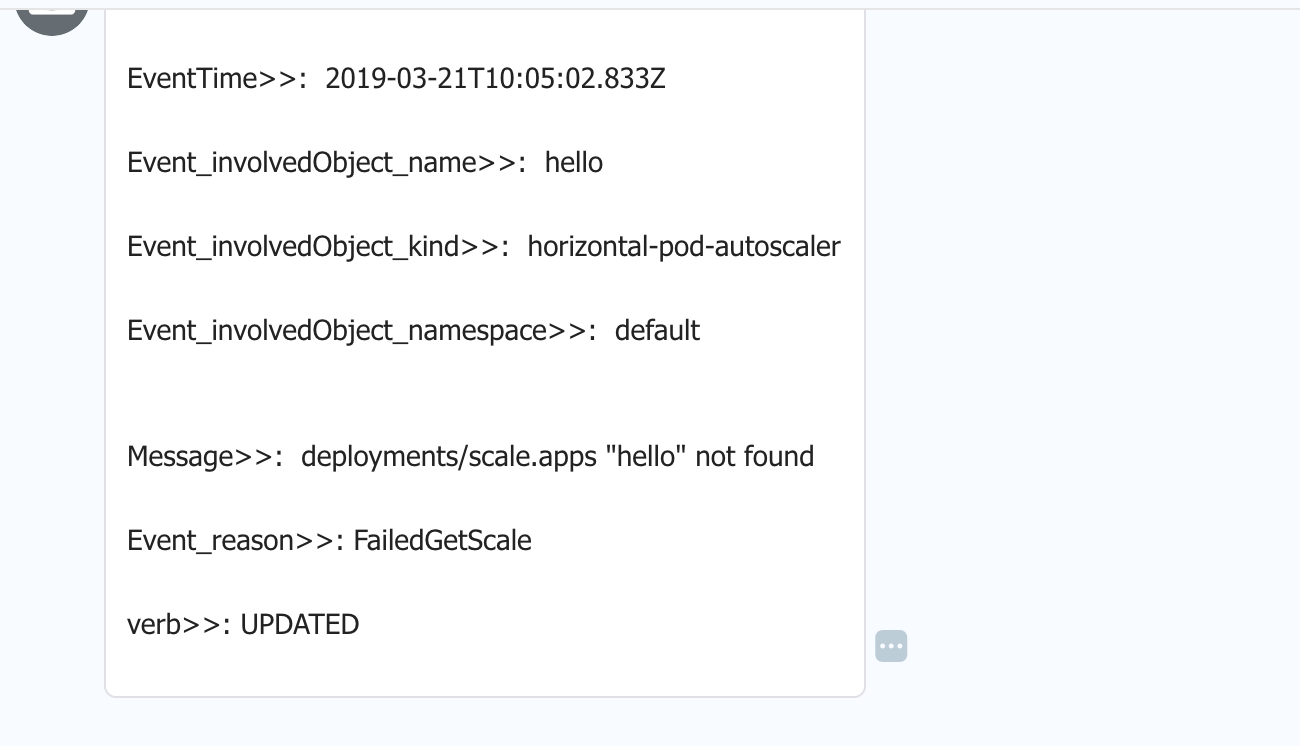
自己定制的告警消息格式:
alert:

#- "email"

- "elastalert_modules.dingtalk_alert.DingTalkAlerter"

dingtalk_webhook: "https://oapi.dingtalk.com/robot/send?access_token=47194e6904c6e3133a9080980984444c8e5d7745e1f76c12cefa99c8c8ac718dd88d4c"

dingtalk_msgtype: "text"

alert_text_type: alert_text_only

alert_text: "

   ====elastalert message====\n

   EventTime>>:  {}\n

   Event_involvedObject_name>>:  {}\n

   Event_involvedObject_kind>>:  {}\n

   Event_involvedObject_namespace>>:  {}\n

   Message>>:  {}\n

   Event_reason>>: {}\n

   verb>>: {}

"

alert_text_args:

- "@timestamp"

- event.involvedObject.name

- event.source.component

- event.involvedObject.namespace

- event.message

- event.reason

- verb
详细信息参考官网:https://elastalert.readthedocs.io/en/latest/recipes/writing_filters.html#writingfilters
kubernetes之收集集群的events,监控集群行为的更多相关文章
- nagios新增监控集群、卸载监控集群批量操作
1.一定要找应用侧确认每台节点上需要监控的进程,不要盲目以为所有hadoop集群的zk.journal啥的都一样,切记! 2.被监控节点只需要安装nagios-plugin和nrpe,依赖需要安装xi ...
- Kubernetes 集群和应用监控方案的设计与实践
目录 Kubernetes 监控 监控对象 Prometheus 指标 实践 节点监控 部署 Prometheus 部署 Kube State Metrics 部署 Grafana 应用如何接入 Pr ...
- Spring Boot + Spring Cloud 构建微服务系统(六):熔断监控集群(Turbine)
Spring Cloud Turbine 上一章我们集成了Hystrix Dashboard,使用Hystrix Dashboard可以看到单个应用内的服务信息,显然这是不够的,我们还需要一个工具能让 ...
- 熔断监控集群(Turbine)
Spring Cloud Turbine 上一章我们集成了Hystrix Dashboard,使用Hystrix Dashboard可以看到单个应用内的服务信息,显然这是不够的,我们还需要一个工具能让 ...
- Spring Cloud Hystrix理解与实践(一):搭建简单监控集群
前言 在分布式架构中,所谓的断路器模式是指当某个服务发生故障之后,通过断路器的故障监控,向调用方返回一个错误响应,这样就不会使得线程因调用故障服务被长时间占用不释放,避免故障的继续蔓延.Spring ...
- Kubernetes使用集群联邦实现多集群管理
Kubernetes在1.3版本之后,增加了“集群联邦”Federation的功能.这个功能使企业能够快速有效的.低成本的跨区跨域.甚至在不同的云平台上运行集群.这个功能可以按照地理位置创建一个复制机 ...
- 基于k8s集群部署prometheus监控ingress nginx
目录 基于k8s集群部署prometheus监控ingress nginx 1.背景和环境概述 2.修改prometheus配置 3.检查是否生效 4.配置grafana图形 基于k8s集群部署pro ...
- 基于k8s集群部署prometheus监控etcd
目录 基于k8s集群部署prometheus监控etcd 1.背景和环境概述 2.修改prometheus配置 3.检查是否生效 4.配置grafana图形 基于k8s集群部署prometheus监控 ...
- kubernetes(K8S)快速安装与配置集群搭建图文教程
kubernetes(K8S)快速安装与配置集群搭建图文教程 作者: admin 分类: K8S 发布时间: 2018-09-16 12:20 Kubernetes是什么? 首先,它是一个全新的基于容 ...
- Kubernetes 深入学习(一) —— 入门和集群安装部署
一.简介 1.Kubernetes 是什么 Kubernetes 是一个全新的基于容器技术的分布式架构解决方案,是 Google 开源的一个容器集群管理系统,Kubernetes 简称 K8S. Ku ...
随机推荐
- bgfx入门练习3——编译自定义Shader
马个鸡,总算编译过了自定义Shader,在此感谢自己,感谢自己,以及感谢自己.没有自己的努力,我是不可能解决这个问题的,自己真是太叼了.妈的智障!!! 管方那屎一样的make工具根本没用,反正我是折腾 ...
- 关于Idea里设置Terminal为Git/bin/bash.exe中文乱码的问题的终极解决方案
1.这里如果设置为Git/git-bash.exe确实不会乱码,但是每次点Idea里的Terminal都会弹出一个单独的terminal窗口而非在idea子窗口里出现: 2.因此需要设置为Git/bi ...
- vue中集成pdfjs自定义分页
<template> <div id="div_read_area_scrool" class="no-scrollbar--x" :styl ...
- js之Ajax下载文件
传统上,客户端将依靠浏览器来处理从服务器下载文件.然而,这种方法需要打开一个新的浏览器窗口,iframe或任何其他类型的不友好和黑客行为.为下载请求添加额外的头信息也很困难.更好的解决方案是使用HTM ...
- vscode配置git及码云
1.将代码放到码云 到码云里新建一个仓库,完成后码云会有一个命令教程按上面的来就行了 码云中的使用教程: Git 全局设置: git config --global user.name "A ...
- ZOJ1994有源汇上下界可行流
http://fastvj.rainng.com/contest/236779#problem/G Description: n 行 m 列 给你行和 与 列和 然后有Q个限制,表示特定单元格元素大小 ...
- 模拟poj1350
http://poj.org/problem?id=1350 题意:给你一个数,你用这个数重排序后的最大值减去最小值,当这个差值等于0或者6174时就结束,否则就用这个差值再排序再求差值.如果这个数不 ...
- Ftp主动模式和被动模式以及java连接ftp模式设置
Ftp主动模式和被动模式以及java连接ftp模式设置 https://www.cnblogs.com/huhaoshida/p/5412615.html (1) PORT(主动模式) PORT中文称 ...
- Windows 10 IoT Core 17115 for Insider 版本更新
今天,微软发布了Windows 10 IoT Core 17115 for Insider 版本更新,本次更新只修正了一些Bug,没有发布新的特性. 一些已知的问题如下: F5 driver depl ...
- FFmpeg开发实战(一):FFmpeg 打印日志
在Visual Studio 开发(二):VS 2017配置FFmpeg开发环境一文中,我们配置好了FFmpeg的开发环境,下面我们开始边实战,边学习FFmpeg. 首先,我们要学习的就是FFmpeg ...