
自动化测试基础篇--Selenium等待时间
摘自https://www.cnblogs.com/sanzangTst/p/8376221.html
当你觉得你的定位没有问题,但是却直接报了元素不可见,那你就可以考虑是不是因为程序运行太快或者页面加载太慢造成了元素不可见,那就必须要加等待了,等待元素可见再继续运行程序。
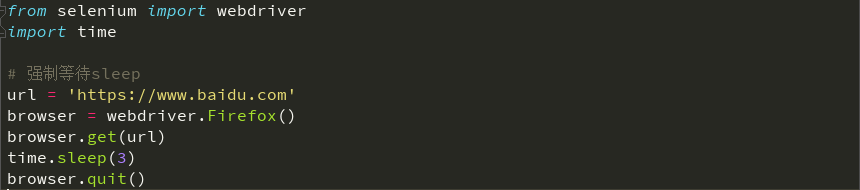
一、强制等待(sleep)
设置等待最简单的方法就是强制等待,其实就是time.sleep()方法,不管它什么情况,让程序暂停运行一定时间,时间过后继续运行;缺点时不智能,设置的时间太短,元素还没有加载出来,那照样会报错;设置的时间太长,则会浪费时间,不要小瞧每次几秒的时间,case多了,代码量大了,很多个几秒就会影响整体的运行速度了。
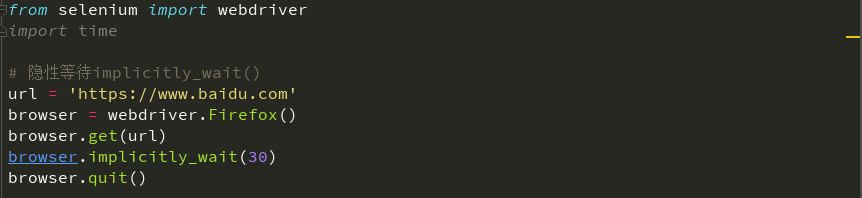
二、隐性等待(implicitly_wait())
driver.implicitly_wait(),隐性等待设置了一个时间,在一段时间内网页是否加载完成,如果完成了,就进行下一步;在设置的时间内没有加载完成,则会报超时加载。
缺点是不智能,因为随着ajax技术的广泛应用,页面的元素往往都可以时间局部加载,也就是在整个页面没有加载完的时候,可能我们需要的元素已经加载完成了,那就么有必要再等待整个页面的加载,执行进行下一步,而隐性等待满足不了这一点;
另外一点,隐性等待的设置时全局性的,在开头设置过之后,整个的程序运行过程中都会有效,都会等待页面加载完成;不需要每次设置一遍;
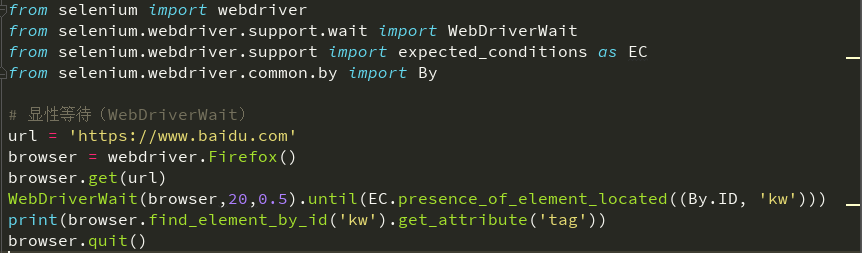
三、显性等待(WebDriverWait)
WebDriverWait(driver, 20, 0.5).until(expected_conditions.presence_of_element_located(locator)),selenium中的wait模块的WebDriverWait()方法,配合until或者until_not方法,再辅助以一些判断条件,就可以构成这样一个场景:每经过多少秒就查看一次locator的元素是否可见,如果可见就停止等待,如果不可见就继续等待直到超过规定的时间后,报超时异常;当然也可以判断某元素是否在规定时间内不可见等等的各种场景吧,需要根据你自己实际的场景选择判断条件。
expected_conditions模块中提供了很多可以提供判断的条件:

text_to_be_present_in_element

text_to_be_present_in_element_value

#这个条件判断frame是否可切入,可传入locator元组或者直接传入定位方式:id、name、index或WebElement

frame_to_be_available_and_switch_to_it

# 这个条件判断是否有alert出现

alert_is_present

# 这个条件判断元素是否可点击,传入locator

element_to_be_clickable

# 这四个条件判断元素是否被选中,第一个条件传入WebElement对象,第二个传入locator元组

# 第三个传入WebElement对象以及状态,相等返回True,否则返回False

# 第四个传入locator以及状态,相等返回True,否则返回False

element_to_be_selected

element_located_to_be_selected

element_selection_state_to_be

element_located_selection_state_to_be

# 最后一个条件判断一个元素是否仍在DOM中,传入WebElement对象,可以判断页面是否刷新

staleness_of
四、WebDriverWait源码
# Licensed to the Software Freedom Conservancy (SFC) under one

# or more contributor license agreements.  See the NOTICE file

# distributed with this work for additional information

# regarding copyright ownership.  The SFC licenses this file

# to you under the Apache License, Version 2.0 (the

# "License"); you may not use this file except in compliance

# with the License.  You may obtain a copy of the License at

#

#   http://www.apache.org/licenses/LICENSE-2.0

#

# Unless required by applicable law or agreed to in writing,

# software distributed under the License is distributed on an

# "AS IS" BASIS, WITHOUT WARRANTIES OR CONDITIONS OF ANY

# KIND, either express or implied.  See the License for the

# specific language governing permissions and limitations

# under the License.

import time

from selenium.common.exceptions import NoSuchElementException

from selenium.common.exceptions import TimeoutException

POLL_FREQUENCY = 0.5  # How long to sleep inbetween calls to the method

IGNORED_EXCEPTIONS = (NoSuchElementException,)  # exceptions ignored during calls to the method

class WebDriverWait(object):

    def __init__(self, driver, timeout, poll_frequency=POLL_FREQUENCY, ignored_exceptions=None):

        """Constructor, takes a WebDriver instance and timeout in seconds.

           :Args:

            - driver - Instance of WebDriver (Ie, Firefox, Chrome or Remote)

            - timeout - Number of seconds before timing out

            - poll_frequency - sleep interval between calls

              By default, it is 0.5 second.

            - ignored_exceptions - iterable structure of exception classes ignored during calls.

              By default, it contains NoSuchElementException only.

           Example:

            from selenium.webdriver.support.ui import WebDriverWait \n

            element = WebDriverWait(driver, 10).until(lambda x: x.find_element_by_id("someId")) \n

            is_disappeared = WebDriverWait(driver, 30, 1, (ElementNotVisibleException)).\ \n

                        until_not(lambda x: x.find_element_by_id("someId").is_displayed())

        """

        self._driver = driver

        self._timeout = timeout

        self._poll = poll_frequency

        # avoid the divide by zero

        if self._poll == 0:

            self._poll = POLL_FREQUENCY

        exceptions = list(IGNORED_EXCEPTIONS)

        if ignored_exceptions is not None:

            try:

                exceptions.extend(iter(ignored_exceptions))

            except TypeError:  # ignored_exceptions is not iterable

                exceptions.append(ignored_exceptions)

        self._ignored_exceptions = tuple(exceptions)

    def __repr__(self):

        return '<{0.__module__}.{0.__name__} (session="{1}")>'.format(

            type(self), self._driver.session_id)

    def until(self, method, message=''):

        """Calls the method provided with the driver as an argument until the \

        return value is not False."""

        screen = None

        stacktrace = None

        end_time = time.time() + self._timeout

        while True:

            try:

                value = method(self._driver)

                if value:

                    return value

            except self._ignored_exceptions as exc:

                screen = getattr(exc, 'screen', None)

                stacktrace = getattr(exc, 'stacktrace', None)

            time.sleep(self._poll)

            if time.time() > end_time:

                break

        raise TimeoutException(message, screen, stacktrace)

    def until_not(self, method, message=''):

        """Calls the method provided with the driver as an argument until the \

        return value is False."""

        end_time = time.time() + self._timeout

        while True:

            try:

                value = method(self._driver)

                if not value:

                    return value

            except self._ignored_exceptions:

                return True

            time.sleep(self._poll)

            if time.time() > end_time:

                break

        raise TimeoutException(message)
自动化测试基础篇--Selenium等待时间的更多相关文章
- 自动化测试基础篇--Selenium简单的163邮箱登录实例
摘自https://www.cnblogs.com/sanzangTst/p/7472556.html 前面几篇内容一直讲解Selenium Python的基本使用方法.学习了什么是selenium: ...
- 自动化测试基础篇--Selenium文件上传send_keys
摘自https://www.cnblogs.com/sanzangTst/p/8358165.html 文件上传是web页面上很常见的一个功能,自动化成功中操作起来却不是那么简单. 一般分两个场景:一 ...
- 自动化测试基础篇--Selenium鼠标键盘事件
摘自https://www.cnblogs.com/sanzangTst/p/7477382.html 前面几篇文章我们学习了怎么定位元素,同时通过实例也展示了怎么切换到iframe,怎么输入用户名和 ...
- 自动化测试基础篇--Selenium元素定位
摘自https://www.cnblogs.com/sanzangTst/p/7457111.html 一.Selenium元素定位的重要性: Web自动化测试的操作:获取UI页面的元素,对元素进行操 ...
- 自动化测试基础篇--Selenium简介
摘自https://www.cnblogs.com/sanzangTst/p/7452636.html 一.软件开发的一般流程 二.什么叫软件测试? 软件测试(英语:Software Testing) ...
- 自动化测试基础篇--Selenium Python环境搭建
学习selenium python需要的工具: 1.浏览器 2.Python 3.Selenium 4.FireBug(Firefox) 5.chromedriver.IEDriverServer.g ...
- 引用 自动化测试基础篇--Selenium简介
原文链接:http://www.cnblogs.com/sanzangTst/p/7452636.html 鸣谢参藏法师 一.软件开发的一般流程 二.什么叫软件测试? 软件测试(英语:Software ...
- 引用 自动化测试基础篇--Selenium Python环境搭建
原文链接:https://www.cnblogs.com/sanzangTst/p/7452922.html 鸣谢参藏法师. 学习selenium python需要的工具: 1.浏览器 2.Pytho ...
- 自动化测试基础篇--Selenium框架设计(POM)
一.自动化测试框架 感谢木棉花的漂泊分享,内容转自链接:http://www.cnblogs.com/fengyiru6369/p/8053035.html 1.什么是自动化测试框架 简单来说,自动化 ...
随机推荐
- 深度学习Trick——用权重约束减轻深层网络过拟合|附(Keras)实现代码
在深度学习中,批量归一化(batch normalization)以及对损失函数加一些正则项这两类方法,一般可以提升模型的性能.这两类方法基本上都属于权重约束,用于减少深度学习神经网络模型对训练数据的 ...
- 为什么LINQ to XML的性能要优于XmlDocument?
一直很忙,压了很多贴,今天发一篇吧.后面的看心情吧. 今天群里有人问如何解析web.config方便,然后我就推荐了Linq to XML,然后就有人说“我宁可XmlDocument,再SeleteN ...
- Back-off pulling image \"registry.access.redhat.com/rhel7/pod-infrastructure:latest
Error syncing pod, skipping: failed to "StartContainer" for "POD" with ImagePull ...
- 记一次SSM项目小结(一)
记一次SSM项目小结(一) ssm框架 环境配置 服务器配置 解决方法 拦截器重定向到localhost nginx和tomcat中session失效 mybatis的xml文件不生效 数据库用户创 ...
- ZAB协议简介
Zookeeper 使用 Zookeeper Atomic Broadcast (ZAB) 协议来保障分布式数据一致性. ZAB是一种支持崩溃恢复的消息广播协议,采用类似2PC的广播模式保证正常运行时 ...
- Linux终端会话实时共享(kibitz)
另一篇关于终端会话共享的文章:Linux录制.回放和共享终端操作 kibitz可以将一个会话(你所操作的)实时分享给本机的其它登陆用户(你想让别人看到的).通过这个工具,你敲什么命令,输出了什么内容对 ...
- Perl回调函数和闭包
在Perl中,子程序的引用常用来做回调函数(callback).闭包(closure),特别是匿名子程序. 回调函数(callback) 关于什么是回调函数,见一文搞懂:词法作用域.动态作用域.回调函 ...
- Python函数属性和PyCodeObject
函数属性 python中的函数是一种对象,它有属于对象的属性.除此之外,函数还可以自定义自己的属性.注意,属性是和对象相关的,和作用域无关. 自定义属性 自定义函数自己的属性方式很简单.假设函数名称为 ...
- B树与B+详解
承接上篇SQLite采用B树结构使得SQLite内存占用资源较少,本篇将讲述B树的具体操作(建树,插入,删除等操作).在看博客时,建议拿支笔和纸,一点一点操作,毕竟知识是自己的,自己也要消化的.本篇通 ...
- python之strip()小记
描述 Python strip() 方法用于移除字符串头尾指定的字符(默认为空格或换行符)或字符序列. 注意:该方法只能删除开头或是结尾的字符,不能删除中间部分的字符. 语法 strip()方法语法: ...