
Android自动登录功能的实现
登陆页面布局设计:
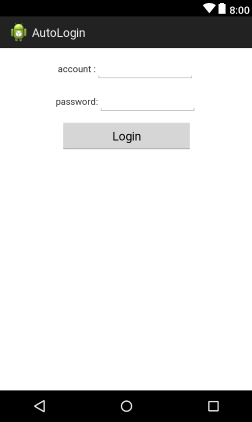
 <LinearLayout

        android:layout_width="wrap_content"

        android:layout_height="wrap_content"

        android:layout_marginTop="10dp"

        android:orientation="horizontal" >

        <TextView

            android:layout_width="wrap_content"

            android:layout_height="wrap_content"

            android:text="@string/account" />

        <EditText

            android:id="@+id/edtaccount"

            android:layout_width="150dp"

            android:layout_height="wrap_content"

            android:inputType="number"

            android:singleLine="true" />

    </LinearLayout>

    <LinearLayout

        android:layout_width="wrap_content"

        android:layout_height="wrap_content"

        android:layout_marginTop="10dp"

        android:orientation="horizontal" >

        <TextView

            android:layout_width="wrap_content"

            android:layout_height="wrap_content"

            android:text="@string/password" />

        <EditText

            android:id="@+id/edtpassword"

            android:layout_width="150dp"

            android:layout_height="wrap_content"

            android:inputType="textPassword"

            android:singleLine="true" />

    </LinearLayout>

    <Button

        android:id="@+id/btnlogin"

        android:layout_width="200dp"

        android:layout_height="wrap_content"

        android:layout_marginTop="10dp"

        android:text="@string/login" />
注销页面布局设计:

    <TextView

        android:layout_width="wrap_content"

        android:layout_height="wrap_content"

        android:layout_marginTop="10dp"

        android:text="@string/注销页面"

        android:textSize="15sp" />

    <Button

        android:id="@+id/btncancel"

        android:layout_width="200dp"

        android:layout_height="wrap_content"

        android:text="@string/cancel" />
LoginActivity.java:
package com.xiaoyan.autologin;

import android.app.Activity;

import android.content.Context;

import android.content.Intent;

import android.content.SharedPreferences;

import android.content.SharedPreferences.Editor;

import android.os.Bundle;

import android.view.View;

import android.widget.Button;

import android.widget.EditText;

import android.widget.Toast;

public class LoginActivity extends Activity {

	// 定义组件

	private EditText edtAccount;

	private EditText edtPassword;

	private Button btnLogin;

	// 用于记录帐号和密码

	private String strAccount = "";

	private String strPassword = "";

	@Override

	protected void onCreate(Bundle savedInstanceState) {

		super.onCreate(savedInstanceState);

		setContentView(R.layout.login_main);

		// 设置标题

		setTitle("Login");

		// 获取sharedpreferences对象

		SharedPreferences share = getSharedPreferences("Login",

				Context.MODE_PRIVATE);

		strAccount = share.getString("Account", "");

		strPassword = share.getString("Password", "");

		// 判断是否是之前有登录过

		if (share == null) {

			init();

		} else {

			// 判断是否刚注销

			if (share.getBoolean("LoginBool", false)) {

				// 跳转到注销页面并销毁当前activity

				Intent intent = new Intent(LoginActivity.this,

						CancelActivity.class);

				startActivity(intent);

				finish();

			} else {

				init();

			}

		}

	}

	private void init() {

		// 初始化组件

		edtAccount = (EditText) findViewById(R.id.edtaccount);

		edtPassword = (EditText) findViewById(R.id.edtpassword);

		btnLogin = (Button) findViewById(R.id.btnlogin);

		edtAccount.setText(strAccount);

		edtPassword.setText(strPassword);

		// 监听按钮

		btnLogin.setOnClickListener(new View.OnClickListener() {

			@Override

			public void onClick(View arg0) {

				// 判断帐号和密码是输入是否为空

				if (edtAccount.getText().toString().equals("")

						|| edtPassword.getText().toString().equals("")) {

					Toast.makeText(LoginActivity.this, "帐号或密码不能为空",

							Toast.LENGTH_SHORT).show();

				} else {

					// 创建SharedPreferences对象用于储存帐号和密码,并将其私有化

					SharedPreferences share = getSharedPreferences("Login",

							Context.MODE_PRIVATE);

					// 获取编辑器来存储数据到sharedpreferences中

					Editor editor = share.edit();

					editor.putString("Account", edtAccount.getText().toString());

					editor.putString("Password", edtPassword.getText()

							.toString());

					editor.putBoolean("LoginBool", true);

					// 将数据提交到sharedpreferences中

					editor.commit();

					// 跳转到注销页面并销毁当前activity

					Intent intent = new Intent(LoginActivity.this,

							CancelActivity.class);

					startActivity(intent);

					finish();

				}

			}

		});

	}

}
CancelActivity.java:
package com.xiaoyan.autologin;

import android.app.Activity;

import android.content.Context;

import android.content.Intent;

import android.content.SharedPreferences;

import android.os.Bundle;

import android.view.View;

import android.widget.Button;

public class CancelActivity extends Activity {

	// 定义组件

	private Button btnCancel;

	@Override

	protected void onCreate(Bundle savedInstanceState) {

		// TODO Auto-generated method stub

		super.onCreate(savedInstanceState);

		setContentView(R.layout.cancel_activity);

		// 设置标题

		setTitle("Cancel");

		// 初始化页面

		init();

	}

	private void init() {

		// 初始化组件

		btnCancel = (Button) findViewById(R.id.btncancel);

		// 监听注销按钮

		btnCancel.setOnClickListener(new View.OnClickListener() {

			@Override

			public void onClick(View arg0) {

				// TODO Auto-generated method stub

				// 注销帐号并销毁当前页面

				SharedPreferences share = getSharedPreferences("Login",

						Context.MODE_PRIVATE);

				share.edit().putBoolean("LoginBool", false).commit();

				Intent intent = new Intent(CancelActivity.this,

						LoginActivity.class);

				startActivity(intent);

				finish();

			}

		});

	}

}
Android自动登录功能的实现的更多相关文章
- yii2.0自动登录功能的实现方法
参考地址:http://www.kuitao8.com/20150518/3747.shtml 自动登录的原理很简单.主要就是利用cookie来实现的在第一次登录的时候,如果登录成功并且选中了下次自动 ...
- 自己Cookie写的自动登录功能 包含BASE64 和MD5的使用
sql表 username password字段 User类 有 id username password等字段 Service有一函数 @Override public User findUser ...
- spring security实现记住我下次自动登录功能
目录 spring security实现记住我下次自动登录功能 一.原理分析 二.实现方式 2.1 简单实现方式 2.2 数据库实现方式 三.区分是密码登录还是rememberme登录 spring ...
- cookie理解与实践【实现简单登录以及自动登录功能】
cookie理解 Cookie是由W3C组织提出,最早由netscape社区发展的一种机制 http是无状态协议.当某次连接中数据提交完,连接会关闭,再次访问时,浏览器与服务器需要重新建立新的连接: ...
- 二十 Filter&自动登录功能
Filter过滤器 过滤器,其实就是对客户端发出来的请求进行过滤,浏览器发出,然后服务器用Servelt处理.在中间就可以过滤,起到的是拦截的作用. 不仅仅作用于客户端请求,而且过滤服务器响应 作用: ...
- Vue+Vuex 实现自动登录功能
刚刚实现了Vue+Vuex的自动登录功能,在实现的时候遇到了一些问题,这里记录一下: 因为这个还不够完善,在写完下列代码后,又进行了补充,可以从https://www.cnblogs.com/xiao ...
- 使用token实现在有效期内APP自动登录功能
实现此功能的场景是在当下用户对手机APP体验要求高,并且相对安全前提的推动下诞生:当你下载了一个QQ,微信第一次进行了账号和密码的登录,你从此以后打开应用免去了你每日打开应用都要输入账号跟密码的痛苦过 ...
- Android自动登录与记住密码
// 获取实例对象 sp = this.getSharedPreferences("userInfo", Context.MODE_WORLD_READABLE); rem_pw ...
- java代码实现自动登录功能
通常我们登录某网站,会有选择保存几天,或者是几个星期不用登录,之后输入该网站地址无需登录直接进入主页面,那么这就叫做自动登录,怎么实现呢,下面我以一个小例子来演示一下 登录页面:login.jsp & ...
随机推荐
- 继承、接口、static、abstract
继承: 1.用extends来完成继承 2.子类可以继承父类全部的数据域但是只有部分的数据域对子类可见 3.在java中支持单继承 4.单继承和多继承的比较 (1)多继承比单继承能够更好的提高代码的复 ...
- js对象工厂函数与构造函数
转自:http://www.cnblogs.com/Jener/p/5920963.html ★概述: 使用对象字面量,或者向空对象中动态地添加新成员,是最简单易用的对象创建方法.然而 ...
- 常见js面试题
包含内容: Array indexOf(). 数组扁平化 isArray() 数组的去重 Object.is() Array.filter 用一行代码实现数组扁平化? JavaScript isArr ...
- javascript中加号(+)操作符的作用
// 16进制转换:+”0xFF”; // -> 255 // 获取当前的时间戳,相当于`new Date().getTime()`:+new Date(); // 比 ...
- 小tips:JS严格模式(use strict)下不能使用arguments.callee的替代方案
在函数内部,有两个特殊的对象:arguments 和 this.其中, arguments 的主要用途是保存函数参数, 但这个对象还有一个名叫 callee 的属性,该属性是一个指针,指向拥有这个 a ...
- 洛谷P3966 [TJOI2013]单词(AC自动机)
题目描述 小张最近在忙毕设,所以一直在读论文.一篇论文是由许多单词组成但小张发现一个单词会在论文中出现很多次,他想知道每个单词分别在论文中出现了多少次. 输入输出格式 输入格式: 第一行一个整数N,表 ...
- listview reclyerview上下拉刷新
x写控件挺麻烦的,因为有很多细节要处理好,列表控件使用太频繁了,网上也各种自定义的方法,一般的listview自定义肯定会联想到加个头部,然后监听事件加动画,其实方式很多种,今天记录的方式是另外一种方 ...
- 快速开发跨平台应用之Xamarin技术
Xamarin 介绍 Xamarin 是一个允许开发人员有效创建可跨 iOS.Android.Windows 应用程序的开发工具集.Xamarin是免费且开源的,遵循 MIT (麻省理工学院许可证)协 ...
- <API自动化测试>Centos-Newman
一.介绍: 在测试和开发中,有一款API测试工具一直占据着武林盟主的地位,那就是声名远播的Google公司的Postman. Postman原先是Chrome浏览器的一个插件,后面发展成了一个应用程序 ...
- Python 实例方法、类方法、静态方法的区别与作用
Python中至少有三种比较常见的方法类型,即实例方法,类方法.静态方法.它们是如何定义的呢?如何调用的呢?它们又有何区别和作用呢?且看下文. 首先,这三种方法都定义在类中.下面我先简单说一下怎么定义 ...