
Android自动登录功能的实现
登陆页面布局设计:
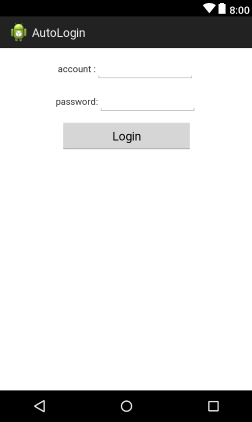
 <LinearLayout

        android:layout_width="wrap_content"

        android:layout_height="wrap_content"

        android:layout_marginTop="10dp"

        android:orientation="horizontal" >

        <TextView

            android:layout_width="wrap_content"

            android:layout_height="wrap_content"

            android:text="@string/account" />

        <EditText

            android:id="@+id/edtaccount"

            android:layout_width="150dp"

            android:layout_height="wrap_content"

            android:inputType="number"

            android:singleLine="true" />

    </LinearLayout>

    <LinearLayout

        android:layout_width="wrap_content"

        android:layout_height="wrap_content"

        android:layout_marginTop="10dp"

        android:orientation="horizontal" >

        <TextView

            android:layout_width="wrap_content"

            android:layout_height="wrap_content"

            android:text="@string/password" />

        <EditText

            android:id="@+id/edtpassword"

            android:layout_width="150dp"

            android:layout_height="wrap_content"

            android:inputType="textPassword"

            android:singleLine="true" />

    </LinearLayout>

    <Button

        android:id="@+id/btnlogin"

        android:layout_width="200dp"

        android:layout_height="wrap_content"

        android:layout_marginTop="10dp"

        android:text="@string/login" />
注销页面布局设计:

    <TextView

        android:layout_width="wrap_content"

        android:layout_height="wrap_content"

        android:layout_marginTop="10dp"

        android:text="@string/注销页面"

        android:textSize="15sp" />

    <Button

        android:id="@+id/btncancel"

        android:layout_width="200dp"

        android:layout_height="wrap_content"

        android:text="@string/cancel" />
LoginActivity.java:
package com.xiaoyan.autologin;

import android.app.Activity;

import android.content.Context;

import android.content.Intent;

import android.content.SharedPreferences;

import android.content.SharedPreferences.Editor;

import android.os.Bundle;

import android.view.View;

import android.widget.Button;

import android.widget.EditText;

import android.widget.Toast;

public class LoginActivity extends Activity {

	// 定义组件

	private EditText edtAccount;

	private EditText edtPassword;

	private Button btnLogin;

	// 用于记录帐号和密码

	private String strAccount = "";

	private String strPassword = "";

	@Override

	protected void onCreate(Bundle savedInstanceState) {

		super.onCreate(savedInstanceState);

		setContentView(R.layout.login_main);

		// 设置标题

		setTitle("Login");

		// 获取sharedpreferences对象

		SharedPreferences share = getSharedPreferences("Login",

				Context.MODE_PRIVATE);

		strAccount = share.getString("Account", "");

		strPassword = share.getString("Password", "");

		// 判断是否是之前有登录过

		if (share == null) {

			init();

		} else {

			// 判断是否刚注销

			if (share.getBoolean("LoginBool", false)) {

				// 跳转到注销页面并销毁当前activity

				Intent intent = new Intent(LoginActivity.this,

						CancelActivity.class);

				startActivity(intent);

				finish();

			} else {

				init();

			}

		}

	}

	private void init() {

		// 初始化组件

		edtAccount = (EditText) findViewById(R.id.edtaccount);

		edtPassword = (EditText) findViewById(R.id.edtpassword);

		btnLogin = (Button) findViewById(R.id.btnlogin);

		edtAccount.setText(strAccount);

		edtPassword.setText(strPassword);

		// 监听按钮

		btnLogin.setOnClickListener(new View.OnClickListener() {

			@Override

			public void onClick(View arg0) {

				// 判断帐号和密码是输入是否为空

				if (edtAccount.getText().toString().equals("")

						|| edtPassword.getText().toString().equals("")) {

					Toast.makeText(LoginActivity.this, "帐号或密码不能为空",

							Toast.LENGTH_SHORT).show();

				} else {

					// 创建SharedPreferences对象用于储存帐号和密码,并将其私有化

					SharedPreferences share = getSharedPreferences("Login",

							Context.MODE_PRIVATE);

					// 获取编辑器来存储数据到sharedpreferences中

					Editor editor = share.edit();

					editor.putString("Account", edtAccount.getText().toString());

					editor.putString("Password", edtPassword.getText()

							.toString());

					editor.putBoolean("LoginBool", true);

					// 将数据提交到sharedpreferences中

					editor.commit();

					// 跳转到注销页面并销毁当前activity

					Intent intent = new Intent(LoginActivity.this,

							CancelActivity.class);

					startActivity(intent);

					finish();

				}

			}

		});

	}

}
CancelActivity.java:
package com.xiaoyan.autologin;

import android.app.Activity;

import android.content.Context;

import android.content.Intent;

import android.content.SharedPreferences;

import android.os.Bundle;

import android.view.View;

import android.widget.Button;

public class CancelActivity extends Activity {

	// 定义组件

	private Button btnCancel;

	@Override

	protected void onCreate(Bundle savedInstanceState) {

		// TODO Auto-generated method stub

		super.onCreate(savedInstanceState);

		setContentView(R.layout.cancel_activity);

		// 设置标题

		setTitle("Cancel");

		// 初始化页面

		init();

	}

	private void init() {

		// 初始化组件

		btnCancel = (Button) findViewById(R.id.btncancel);

		// 监听注销按钮

		btnCancel.setOnClickListener(new View.OnClickListener() {

			@Override

			public void onClick(View arg0) {

				// TODO Auto-generated method stub

				// 注销帐号并销毁当前页面

				SharedPreferences share = getSharedPreferences("Login",

						Context.MODE_PRIVATE);

				share.edit().putBoolean("LoginBool", false).commit();

				Intent intent = new Intent(CancelActivity.this,

						LoginActivity.class);

				startActivity(intent);

				finish();

			}

		});

	}

}
Android自动登录功能的实现的更多相关文章
- yii2.0自动登录功能的实现方法
参考地址:http://www.kuitao8.com/20150518/3747.shtml 自动登录的原理很简单.主要就是利用cookie来实现的在第一次登录的时候,如果登录成功并且选中了下次自动 ...
- 自己Cookie写的自动登录功能 包含BASE64 和MD5的使用
sql表 username password字段 User类 有 id username password等字段 Service有一函数 @Override public User findUser ...
- spring security实现记住我下次自动登录功能
目录 spring security实现记住我下次自动登录功能 一.原理分析 二.实现方式 2.1 简单实现方式 2.2 数据库实现方式 三.区分是密码登录还是rememberme登录 spring ...
- cookie理解与实践【实现简单登录以及自动登录功能】
cookie理解 Cookie是由W3C组织提出,最早由netscape社区发展的一种机制 http是无状态协议.当某次连接中数据提交完,连接会关闭,再次访问时,浏览器与服务器需要重新建立新的连接: ...
- 二十 Filter&自动登录功能
Filter过滤器 过滤器,其实就是对客户端发出来的请求进行过滤,浏览器发出,然后服务器用Servelt处理.在中间就可以过滤,起到的是拦截的作用. 不仅仅作用于客户端请求,而且过滤服务器响应 作用: ...
- Vue+Vuex 实现自动登录功能
刚刚实现了Vue+Vuex的自动登录功能,在实现的时候遇到了一些问题,这里记录一下: 因为这个还不够完善,在写完下列代码后,又进行了补充,可以从https://www.cnblogs.com/xiao ...
- 使用token实现在有效期内APP自动登录功能
实现此功能的场景是在当下用户对手机APP体验要求高,并且相对安全前提的推动下诞生:当你下载了一个QQ,微信第一次进行了账号和密码的登录,你从此以后打开应用免去了你每日打开应用都要输入账号跟密码的痛苦过 ...
- Android自动登录与记住密码
// 获取实例对象 sp = this.getSharedPreferences("userInfo", Context.MODE_WORLD_READABLE); rem_pw ...
- java代码实现自动登录功能
通常我们登录某网站,会有选择保存几天,或者是几个星期不用登录,之后输入该网站地址无需登录直接进入主页面,那么这就叫做自动登录,怎么实现呢,下面我以一个小例子来演示一下 登录页面:login.jsp & ...
随机推荐
- Struts2_属性驱动
在jsp页面提交到action中的表单元素在action中是以对象的形式存在的, action中的对象name必须与jsp页面中的表单元素name相同,struts框架自动为action的对象赋值. ...
- 28-30 js 文本全选
要点:使用select(); 上代码: if (e.keyCode === 27){ document.getElementById('input').select() } //当点击键盘esc键时候 ...
- Jedis 简单案例
POM 依赖 <!-- https://mvnrepository.com/artifact/redis.clients/jedis --> <dependency> < ...
- DEM山体阴影原理以及算法具体解释
山体阴影原理以及算法具体解释 山体阴影基本原理: 山体阴影是假想一个光源在某个方向和某个太阳高度的模拟下.用过临近像元的计算来生成一副0-255的灰度图. 一.山体阴影的主要參数: 1. 太阳光线的 ...
- iOS ----------字符串处理
//一.NSString/*----------------创建字符串的方法----------------*/ //1.创建常量字符串.NSString *astring = @"This ...
- RTP 流媒体
RTMP协议是Adobe的私有协议,未完全公开,RTSP协议和HTTP协议是共有协议,并有专门机构做维护. RTMP协议一般传输的是flv,f4v格式流,RTSP协议一般传输的是ts,mp4格式的流. ...
- DAY4(PYTHON)列表的嵌套,range,for
li=['a','b','开心','c'] print(li[2].replace ( ' 心 ', ' kaixin ' ) ) 输出:'a','b','开kaixin','c' li= ['abc ...
- git 入门教程之忽略文件
忽略文件 "并不是所有的牛奶都叫特仑苏",在版本控制系统中也有相似的表达,那就是"并不是所有的文件都需要提交". 有的是因为没必要提交,比如日志文件,系统缓存文 ...
- peewee基本操作
本文将简单的介绍Peewee,一览它的主要特点,主要涉及到: 模型定义 存储数据 检索数据 注意:如果你偏爱稍微高级一点的教程, peewee建立类似twitter应用 是一篇结合Flask框架与pe ...
- 四、Tableau如何设置数据格式
一.要求 ‘销售额’:K为单位 ‘利润’: M为单位,负值用括号括起来,但是正值 ‘利润率’:带百分号,负值用括号括起来仍然时负值 二.解决方案 1.‘销售额’:m为单位 2.‘利润’: ...