
GitLab 环境搭建【CentOS7】
RPM安装方式
https://mirrors.tuna.tsinghua.edu.cn/gitlab-ce/yum/el7

【最好给服务器分配至少4G内存】
先检查一下依赖:sshd
[root@localhost soft]# rpm -qa|grep openssh-server

openssh-server-.4p1-.el7.x86_64

[root@localhost soft]# ps -e|grep sshd

   ?        :: sshd

  ?        :: sshd

  ?        :: sshd
如果你没有,那么:
sudo yum install -y curl policycoreutils-python openssh-server

sudo systemctl enable sshd

sudo systemctl start sshd

sudo firewall-cmd --permanent --add-service=http

sudo systemctl reload firewalld
再检查一下postfix
[root@localhost soft]# rpm -qa|grep postfix

postfix-2.10.-.el7.x86_64

[root@localhost soft]# ps -e|grep postfix
如果你没有,那么
sudo yum install postfix

sudo systemctl enable postfix

sudo systemctl start postfix
..
最后找到你存放rpm目录并进入
[root@localhost soft]# wget https://mirrors.tuna.tsinghua.edu.cn/gitlab-ce/yum/el7/gitlab-ce-11.0.6-ce.0.el7.x86_64.rpm

---- ::--  https://mirrors.tuna.tsinghua.edu.cn/gitlab-ce/yum/el7/gitlab-ce-11.0.6-ce.0.el7.x86_64.rpm

Resolving mirrors.tuna.tsinghua.edu.cn (mirrors.tuna.tsinghua.edu.cn)... 101.6.8.193, :f000:::::

Connecting to mirrors.tuna.tsinghua.edu.cn (mirrors.tuna.tsinghua.edu.cn)|101.6.8.193|:... connected.

HTTP request sent, awaiting response...  OK

Length:  (416M) [application/x-redhat-package-manager]

Saving to: ‘gitlab-ce-11.0.-ce..el7.x86_64.rpm’

%[=========================================================================================================================================================>] ,, .50MB/s   in 4m 37s

-- :: (1.50 MB/s) - ‘gitlab-ce-11.0.-ce..el7.x86_64.rpm’ saved [/]
..查看
[root@localhost soft]# ll

total

-rw-r--r--.  root root  Sep   : gitlab-ce-11.0.6-ce.0.el7.x86_64.rpm

-rw-r--r--.  root root  Mar  : jdk-8u161-linux-x64.tar.gz

-rw-r--r--.  root root   Mar  : kafka_2.11-1.0.1.tgz

-rw-r--r--.  root root   Mar  : zookeeper-3.4.11.tar.gz

[root@localhost soft]#
安装
[root@localhost soft]# rpm -ivh gitlab-ce-11.0.-ce..el7.x86_64.rpm

warning: gitlab-ce-11.0.-ce..el7.x86_64.rpm: Header V4 RSA/SHA1 Signature, key ID f27eab47: NOKEY

Preparing...                          ################################# [%]

Updating / installing...

   :gitlab-ce-11.0.-ce..el7        ################################# [%]

It looks like GitLab has not been configured yet; skipping the upgrade script.

       *.                  *.

      ***                 ***

     *****               *****

    .******             *******

    ********            ********

   ,,,,,,,,,***********,,,,,,,,,

  ,,,,,,,,,,,*********,,,,,,,,,,,

  .,,,,,,,,,,,*******,,,,,,,,,,,,

      ,,,,,,,,,*****,,,,,,,,,.

         ,,,,,,,****,,,,,,

            .,,,***,,,,

                ,*,.

     _______ __  __          __

    / ____(_) /_/ /   ____ _/ /_

   / / __/ / __/ /   / __ `/ __ \

  / /_/ / / /_/ /___/ /_/ / /_/ /

  \____/_/\__/_____/\__,_/_.___/

Thank you for installing GitLab!

GitLab was unable to detect a valid hostname for your instance.

Please configure a URL for your GitLab instance by setting `external_url`

configuration in /etc/gitlab/gitlab.rb file.

Then, you can start your GitLab instance by running the following command:

  sudo gitlab-ctl reconfigure

For a comprehensive list of configuration options please see the Omnibus GitLab readme

https://gitlab.com/gitlab-org/omnibus-gitlab/blob/master/README.md
然后编辑
vim /etc/gitlab/gitlab.rb
修改

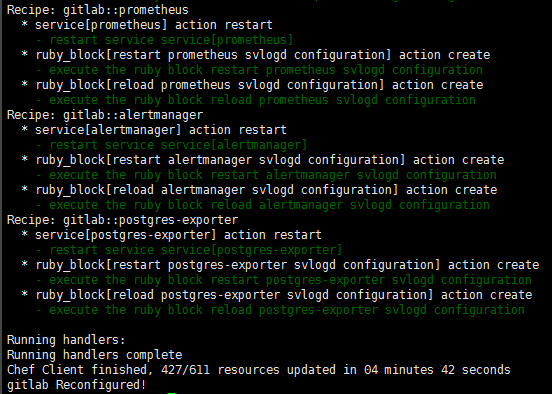
然后执行
gitlab-ctl reconfigure
..
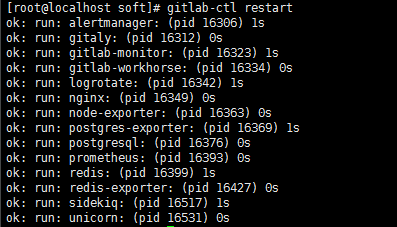
..启动
gitlab-ctl restart
..
..
查看端口占用
[root@localhost soft]# netstat -tunlp

Active Internet connections (only servers)

Proto Recv-Q Send-Q Local Address           Foreign Address         State       PID/Program name

tcp               127.0.0.1:          0.0.0.0:*               LISTEN      /node_exporter

tcp               127.0.0.1:          0.0.0.0:*               LISTEN      /gitlab-workho

tcp               0.0.0.0:             0.0.0.0:*               LISTEN      /systemd

tcp               127.0.0.1:          0.0.0.0:*               LISTEN      /unicorn maste

tcp               127.0.0.1:          0.0.0.0:*               LISTEN      /ruby

tcp        0      0 0.0.0.0:80              0.0.0.0:*               LISTEN      18765/nginx: master

tcp               127.0.0.1:          0.0.0.0:*               LISTEN      /sidekiq 5.1.

tcp               127.0.0.1:          0.0.0.0:*               LISTEN      /gitaly

tcp               192.168.122.1:        0.0.0.0:*               LISTEN      /dnsmasq

tcp               0.0.0.0:              0.0.0.0:*               LISTEN      /sshd

tcp               127.0.0.1:           0.0.0.0:*               LISTEN      /cupsd

tcp               127.0.0.1:            0.0.0.0:*               LISTEN      /master

tcp               0.0.0.0:            0.0.0.0:*               LISTEN      /nginx: master

tcp               0.0.0.0:            0.0.0.0:*               LISTEN      /alertmanager

tcp               127.0.0.1:          0.0.0.0:*               LISTEN      /redis_exporte

tcp               127.0.0.1:          0.0.0.0:*               LISTEN      /prometheus

tcp               127.0.0.1:          0.0.0.0:*               LISTEN      /postgres_expo

tcp               127.0.0.1:          0.0.0.0:*               LISTEN      /alertmanager

tcp6              :::                  :::*                    LISTEN      /systemd

tcp6              :::                :::*                    LISTEN      /ruby

tcp6              :::                   :::*                    LISTEN      /sshd

tcp6              :::                 :::*                    LISTEN      /cupsd

tcp6              :::                  :::*                    LISTEN      /master

udp               0.0.0.0:           0.0.0.0:*                           /avahi-daemon: r

udp               0.0.0.0:            0.0.0.0:*                           /avahi-daemon: r

udp               192.168.122.1:        0.0.0.0:*                           /dnsmasq

udp               0.0.0.0:              0.0.0.0:*                           /dnsmasq

udp               0.0.0.0:              0.0.0.0:*                           /dhclient

udp               0.0.0.0:           0.0.0.0:*                           /dhclient

udp               127.0.0.1:           0.0.0.0:*                           /chronyd

udp6              :::                :::*                                /dhclient

udp6              :::                 :::*                                /chronyd
..
查看防火墙
[root@localhost soft]#  firewall-cmd --zone=public --list-ports

/tcp /tcp /tcp

[root@localhost soft]# firewall-cmd --zone=public --add-port=/tcp --permanent

success

[root@localhost soft]# firewall-cmd --reload

success
打开浏览器,访问

..会让你重置密码,并且至少8位,我输入的12345678。然后会让你登录,用户名是root,密码是你重置的那个

你可以创建用户,创建项目。还可以设置SSH Key。

到此就完成啦。
脚本安装
打开:https://packages.gitlab.com/gitlab/gitlab-ce/install
现在我们换一台机器
[root@localhost admin]# cd /soft/

[root@localhost soft]# curl -s https://packages.gitlab.com/install/repositories/gitlab/gitlab-ce/script.rpm.sh | bash

Detected operating system as centos/.

Checking for curl...

Detected curl...

Downloading repository file: https://packages.gitlab.com/install/repositories/gitlab/gitlab-ce/config_file.repo?os=centos&dist=7&source=script

done.

Installing pygpgme to verify GPG signatures...

Loaded plugins: fastestmirror, langpacks

base                                                                                                                                                                        | 3.6 kB  ::

extras                                                                                                                                                                      | 3.4 kB  ::

https://packages.gitlab.com/gitlab/gitlab-ce/el/7/SRPMS/repodata/repomd.xml: [Errno 12] Timeout on https://packages-gitlab-com.s3-accelerate.amazonaws.com/empty/rpm/repomd.xml?AWSAccessKeyId=AKIAJ74R7IHMTQVGFCEA&Signature=iiqnja2rIZZgVhZPOxxLPMg8vWI=&Expires=1537345200: (28, 'Operation timed out after 30827 milliseconds with 0 out of 0 bytes received')

Trying other mirror.
问题在于访问超时
我不玩了好吧~
GitLab 环境搭建【CentOS7】的更多相关文章
- 基于【 centos7】五 || GitLab环境搭建
一.基于Docker部署GitLab环境搭建 1.下载镜像 docker pull beginor/gitlab-ce:11.0.1-ce.0 2.创建GitLab 的配置 (etc) . 日志 (l ...
- 基于CentOS7.x gitlab环境搭建,卸载,汉化 --汉化篇
gitlab环境搭建,卸载,汉化--汉化篇 注意gitlab的版本需和汉化版本一致 安装git yum install -y git 下载最新的汉化包 cd git clone https://git ...
- 基于CentOS7.x gitlab环境搭建,卸载,汉化 --卸载篇
gitlab环境搭建,卸载,汉化 --卸载篇 完全卸载 停止gitlab gitlab-ctl stop 卸载gitlab rpm -e gitlab-ce 查看gitlab进程 ps aux | ...
- 基于CentOS7.x gitlab环境搭建,卸载,汉化 --搭建篇
gitlab环境搭建,卸载,汉化 --搭建篇 环境搭建 安装依赖软件 yum -y install policycoreutils openssh-server openssh-clients pos ...
- LNMP环境搭建--Centos7
LNMP环境搭建--Centos7 | 刘鹏--博客 盒子 盒子 博客 分类 搜索 文章目录 在Centos7环境安装LAMP环境,备忘哈哈. 准备 首先去官网下载php,nginx 编译安装php ...
- 基于Bitnami gitlab OVA包的gitlab 环境搭建
前言 最近在折腾gitlab,本篇记录搭建的过程方便以后查找 环境 Windows server + VMware 安装 为方便本次我们直接采用Bitnami的VOA安装包(VOA格式可同时兼容Vir ...
- gitlab环境搭建
企业级的git管理程序.最好用的之一吧.估计其它的也得叫之二. 怎么搭建呢? 2G以上配置的机器才可以搞. . 如下 安装需要注意的是.如果开了80端口,8080的需要修改配置文件 下面会提到 1. ...
- Hyperledger Fabric 开发环境搭建 centos7系统
一.安装GO语言 下载最新版的go 打开Terminal,输入命令(以下命令都是以root管理员的角色进行的) su 输入密码:***** wget https://storage.googleapi ...
- EOS2.0环境搭建-centos7
需要安装启动的有三个组件 nodes,keosd,cleos,看看三者的关系 nodeos:核心程序,用于启动eos节点服务,在后台运行,可以配置不同 插件.该进程负责账户管理.区块生成.共识建立,并 ...
随机推荐
- jenkins和jdk版本问题
问题:公司业务是用的jdk1.7的,但最新版的jenkins (jenkins-2.138.2-1.1.noarch.rpm)却只支持jdk1.8 分析: 1.公司业务用的jdk1.7不能换,不然影响 ...
- PHP爬虫框架Snoopy的使用
参考文档: http://ibillxia.github.io/blog/2010/08/10/php-connecting-tool-snoopy-introduction-and-applicat ...
- 一个实际的案例介绍Spring Boot + Vue 前后端分离
介绍 最近在工作中做个新项目,后端选用Spring Boot,前端选用Vue技术.众所周知现在开发都是前后端分离,本文就将介绍一种前后端分离方式. 常规的开发方式 采用Spring Boot 开发项目 ...
- DataSet 取值,DataSet行数,DataSet列数 从DataSet中取出特定值
1 DataSet.Table[0].Rows[ i ][ j ] 其中i 代表第 i 行数, j 代表第 j 列数 2 DataSet.Table[0].Rows[ i ].ItemArray[ j ...
- hibernate主配置文件的配置
<?xml version="1.0" encoding="UTF-8"?> <!DOCTYPE hibernate-configuratio ...
- Python多进程、多线程、协程
转载:https://www.cnblogs.com/huangguifeng/p/7632799.html 首先我们来了解下python中的进程,线程以及协程! 从计算机硬件角度: 计算机的核心是C ...
- Power Network POJ - 1459 网络流 DInic 模板
#include<cstring> #include<cstdio> #define FOR(i,f_start,f_end) for(int i=f_startl;i< ...
- BZOJ4818 [SDOI2017] 序列计数 【矩阵快速幂】
题目分析: 一个很显然的同类项合并.注意到p的大小最大为100,考虑把模p意义下相同的求出来最后所有的减去没有质数的做矩阵快速幂即可. 代码: #include<bits/stdc++.h> ...
- STL的一些基本操作
STL是一个神奇的东西,在NOIP考试中非常重要. 什么是STL? STL(Standard Template Library),即标准模板库,是一个具有工业强度的,高效的C++程序库.它被容纳于C+ ...
- 局域网共享hfs 软件使用
前言 由于想从局域网同学电脑上偷点小片,又不想用u盘拷贝.所有在同学电脑上打开hfs软件,通过自己电脑ie浏览器(chrome不行报错)下载即可. 流程 1.两台电脑在同一局域网下,在同学电脑上打开h ...