
全网最详细的基于Ubuntu14.04/16.04 + Anaconda2 / Anaconda3 + Python2.7/3.4/3.5/3.6安装Tensorflow详细步骤(图文)(博主推荐)
不多说,直接上干货!
前言
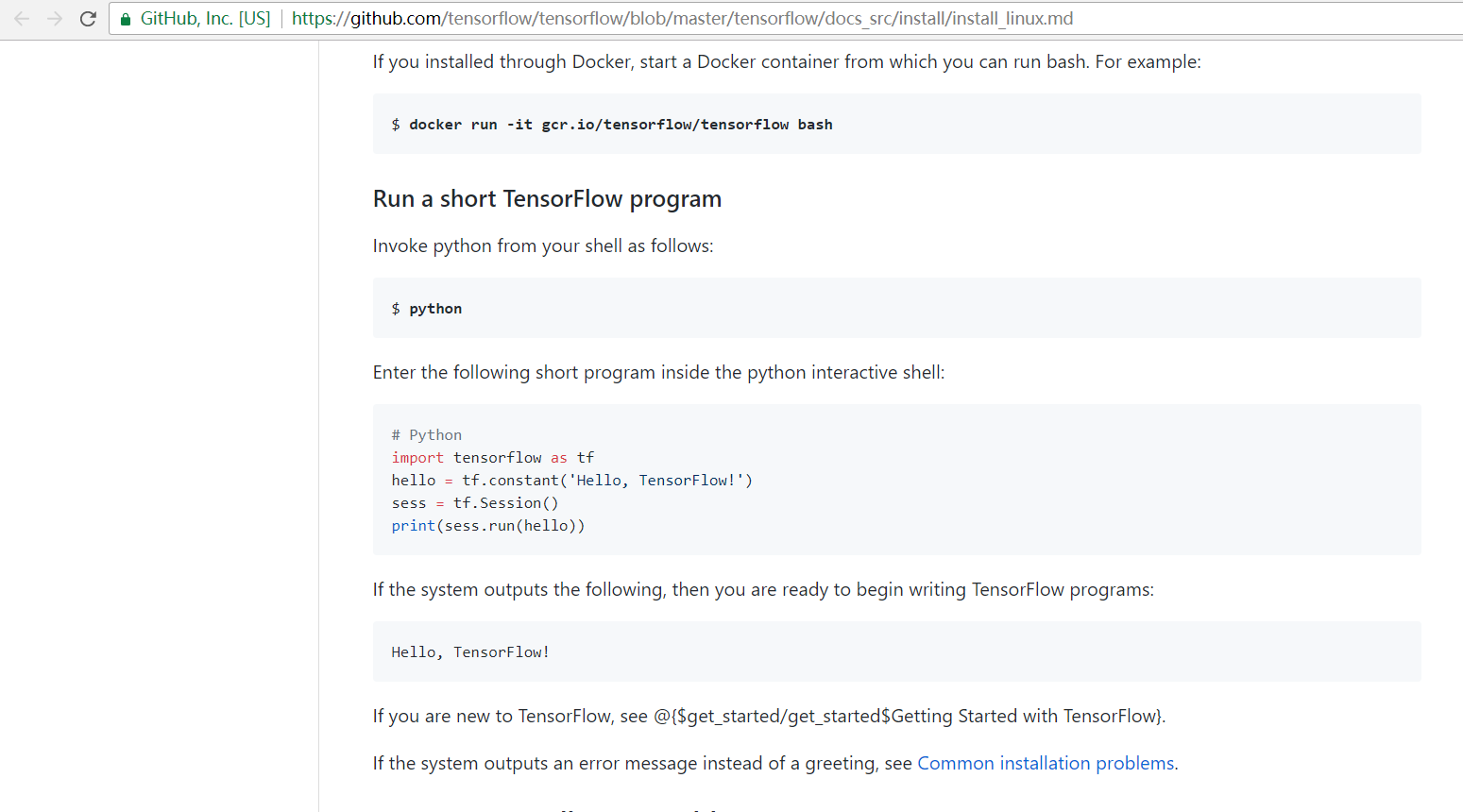
建议参照最新的tensorflow安装步骤(Linux,官方网站经常访问不是很稳定,所以给了一个github的地址): https://github.com/tensorflow/tensorflow/blob/master/tensorflow/docs_src/install/install_linux.md
最近,tensorflow网站上给出了新的使用Anaconda配置和安装Tensorflow的步骤,经过测试,在国内可以无障碍的访问。Anaconda 是一个基于python的科学计算包集合,目前支持Python 2.7,3.4,3.5,3.6。
注意:在安装过程中如果出现很长的报错,观察错误信息的末尾,如果是网络链接相关,就重新运行一遍语句即可(如出现进度条不动的情况,也可重新运行语句),Anaconda自身约500M,tensorflow所需软件包约几十M。
操作系统: Ubuntu 14.04 或 Ubuntu16.04
这是Github官网给出的安装步骤
https://github.com/tensorflow/tensorflow/blob/master/tensorflow/docs_src/install/install_linux.md

第一步、 安装Anaconda
从anaconda官网(https://www.continuum.io/downloads)上下载linux版本的安装文件,运行完成安装。
我这里是以Anaconda2-5.0.1-Linux-x86_64.sh为例,Anaconda3一样啦。这个很简单。

deeplearning@deeplearningsinglenode:~/SoftWare$ pwd

/home/deeplearning/SoftWare

deeplearning@deeplearningsinglenode:~/SoftWare$ ll

total

drwxrwxr-x   deeplearning deeplearning       12月   : ./

drwxr-xr-x  deeplearning deeplearning       12月   : ../

-rwxrw-r--   deeplearning deeplearning  12月   : Anaconda2-5.0.-Linux-x86_64.sh*

drwxr-xr-x   deeplearning deeplearning        8月     jdk1..0_60/

drwxrwxr-x  deeplearning deeplearning       12月   : pycharm-2017.3/

deeplearning@deeplearningsinglenode:~/SoftWare$ bash ./Anaconda2-5.0.-Linux-x86_64.sh

Welcome to Anaconda2 5.0.

In order to continue the installation process, please review the license

agreement.

Please, press ENTER to continue

>>>

===================================

Anaconda End User License Agreement

===================================

Copyright , Anaconda, Inc.

All rights reserved under the -clause BSD License:

Redistribution and use in source and binary forms, with or without modification, are permitted provided that the following conditio

ns are met:

  * Redistributions of source code must retain the above copyright notice, this list of conditions and the following disclaimer.

  * Redistributions in binary form must reproduce the above copyright notice, this list of conditions and the following disclaimer

in the documentation and/or other materials provided with the distribution.

  * Neither the name of Continuum Analytics, Inc. (dba Anaconda, Inc.) ("Continuum") nor the names of its contributors may be used

to endorse or promote products derived from this software without specific prior written permission.

THIS SOFTWARE IS PROVIDED BY THE COPYRIGHT HOLDERS AND CONTRIBUTORS "AS IS" AND ANY EXPRESS OR IMPLIED WARRANTIES, INCLUDING, BUT N

OT LIMITED TO, THE IMPLIED WARRANTIES OF MERCHANTABILITY AND FITNESS FOR A PARTICULAR PURPOSE ARE DISCLAIMED. IN NO EVENT SHALL CON

TINUUM BE LIABLE FOR ANY DIRECT, INDIRECT, INCIDENTAL, SPECIAL, EXEMPLARY, OR CONSEQUENTIAL DAMAGES (INCLUDING, BUT NOT LIMITED TO,

 PROCUREMENT OF SUBSTITUTE GOODS OR SERVICES; LOSS OF USE, DATA, OR PROFITS; OR BUSINESS INTERRUPTION) HOWEVER CAUSED AND ON ANY TH

EORY OF LIABILITY, WHETHER IN CONTRACT, STRICT LIABILITY, OR TORT (INCLUDING NEGLIGENCE OR OTHERWISE) ARISING IN ANY WAY OUT OF THE

 USE OF THIS SOFTWARE, EVEN IF ADVISED OF THE POSSIBILITY OF SUCH DAMAGE.

Notice of Third Party Software Licenses

=======================================

Anaconda contains open source software packages from third parties. These are available on an "as is" basis and subject to their in

dividual license agreements. These licenses are available in Anaconda or at https://docs.anaconda.com/anaconda/packages/pkg-docs .

Any binary packages of these third party tools you obtain via Anaconda are subject to their individual licenses as well as the Anac

onda license. Continuum reserves the right to change which third party tools are provided in Anaconda.

In particular, Anaconda contains re-distributable, run-time, shared-library files from the Intel(TM) Math Kernel Library ("MKL bina

ries"). You are specifically authorized to use the MKL binaries with your installation of Anaconda. You are also authorized to redi

stribute the MKL binaries with Anaconda or in the conda package that contains them. Use and redistribution of the MKL binaries are

subject to the licensing terms located at https://software.intel.com/en-us/license/intel-simplified-software-license. If needed, in

structions for removing the MKL binaries after installation of Anaconda are available at http://www.anaconda.com.

Anaconda also contains cuDNN software binaries from NVIDIA Corporation ("cuDNN binaries"). You are specifically authorized to use t

he cuDNN binaries with your installation of Anaconda. You are also authorized to redistribute the cuDNN binaries with an Anaconda p

ackage that contains them. If needed, instructions for removing the cuDNN binaries after installation of Anaconda are available at

http://www.anaconda.com.

Cryptography Notice

===================

This distribution includes cryptographic software. The country in which you currently reside may have restrictions on the import, p

ossession, use, and/or re-export to another country, of encryption software. BEFORE using any encryption software, please check you

r country's laws, regulations and policies concerning the import, possession, or use, and re-export of encryption software, to see

if this is permitted. See the Wassenaar Arrangement <http://www.wassenaar.org/> for more information.

Continuum has self-classified this software as Export Commodity Control Number (ECCN) 5D002.C., which includes information securit

y software using or performing cryptographic functions with asymmetric algorithms. The form and manner of this distribution makes i

t eligible for export under the License Exception ENC Technology Software Unrestricted (TSU) exception (see the BIS Export Administ

ration Regulations, Section 740.13) for both object code and source code. In addition, the Intel(TM) Math Kernel Library contained

in Continuum's software is classified by Intel(TM) as ECCN 5D992b with no license required for export to non-embargoed countries.

The following packages are included in this distribution that relate to cryptography:

openssl

    The OpenSSL Project is a collaborative effort to develop a robust, commercial-grade, full-featured, and Open Source toolkit imp

lementing the Transport Layer Security (TLS) and Secure Sockets Layer (SSL) protocols as well as a full-strength general purpose cr

yptography library.

pycrypto

    A collection of both secure hash functions (such as SHA256 and RIPEMD160), and various encryption algorithms (AES, DES, RSA, El

Gamal, etc.).

pyopenssl

    A thin Python wrapper around (a subset of) the OpenSSL library.

kerberos (krb5, non-Windows platforms)

    A network authentication protocol designed to provide strong authentication for client/server applications by using secret-key

cryptography.

cryptography

    A Python library which exposes cryptographic recipes and primitives.
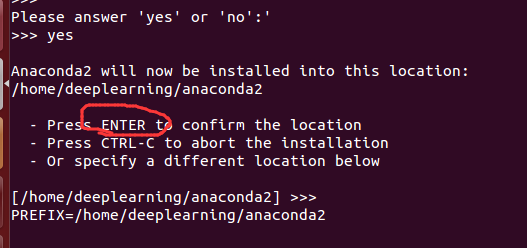
Please answer 'yes' or 'no':'

>>> yes

Anaconda2 will now be installed into this location:

/home/deeplearning/anaconda2

  - Press ENTER to confirm the location

  - Press CTRL-C to abort the installation

  - Or specify a different location below

[/home/deeplearning/anaconda2] >>>

PREFIX=/home/deeplearning/anaconda2
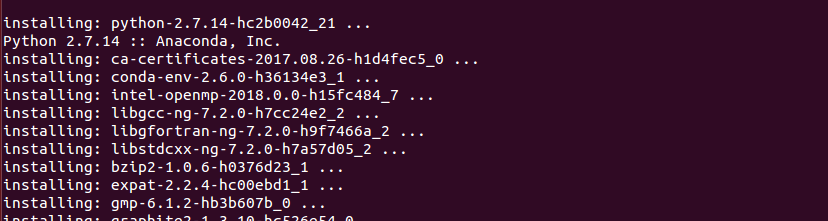

installing: python-2.7.-hc2b0042_21 ...

Python 2.7. :: Anaconda, Inc.

installing: ca-certificates-2017.08.-h1d4fec5_0 ...

installing: conda-env-2.6.-h36134e3_1 ...

installing: intel-openmp-2018.0.-h15fc484_7 ...

installing: libgcc-ng-7.2.-h7cc24e2_2 ...

installing: libgfortran-ng-7.2.-h9f7466a_2 ...

installing: libstdcxx-ng-7.2.-h7a57d05_2 ...

installing: bzip2-1.0.-h0376d23_1 ...

installing: expat-2.2.-hc00ebd1_1 ...

installing: gmp-6.1.-hb3b607b_0 ...

installing: graphite2-1.3.-hc526e54_0 ...

installing: icu-58.2-h211956c_0 ...

installing: jbig-2.1-hdba287a_0 ...

installing: jpeg-9b-habf39ab_1 ...

installing: libffi-3.2.-h4deb6c0_3 ...

installing: libsodium-1.0.-h31c71d8_2 ...

installing: libssh2-1.8.-h8c220ad_2 ...

installing: libtool-2.4.-hd50d1a6_0 ...

installing: libxcb-1.12-h84ff03f_3 ...

installing: lzo-2.10-h1bfc0ba_1 ...

installing: mkl-2018.0.-hb491cac_4 ...

installing: ncurses-6.0-h06874d7_1 ...

installing: openssl-1.0.2l-h077ae2c_5 ...

installing: patchelf-0.9-hf79760b_2 ...

installing: pcre-8.41-hc71a17e_0 ...

installing: pixman-0.34.-h83dc358_2 ...

installing: tk-8.6.-h5979e9b_1 ...

installing: unixodbc-2.3.-hc36303a_1 ...

installing: xz-5.2.-h2bcbf08_1 ...

installing: yaml-0.1.-h96e3832_1 ...

installing: zlib-1.2.-hfbfcf68_1 ...

installing: curl-7.55.-hcb0b314_2 ...

installing: glib-2.53.-hc861d11_1 ...

installing: hdf5-1.10.-hb0523eb_0 ...

installing: libedit-3.1-heed3624_0 ...

installing: libpng-1.6.-hda9c8bc_2 ...

installing: libtiff-4.0.-h90200ff_9 ...

installing: libxml2-2.9.-h6b072ca_5 ...

installing: mpfr-3.1.-h12ff648_1 ...

installing: pandoc-1.19.2.1-hea2e7c5_1 ...

installing: readline-7.0-hac23ff0_3 ...

installing: zeromq-4.2.-hb0b69da_1 ...

installing: dbus-1.10.-h3b5a359_0 ...

installing: freetype-2.8-h52ed37b_0 ...

installing: gstreamer-1.12.-h4f93127_0 ...

installing: libxslt-1.1.-hcf9102b_5 ...

installing: mpc-1.0.-hf803216_4 ...

installing: sqlite-3.20.-h6d8b0f3_1 ...

installing: fontconfig-2.12.-h88586e7_1 ...

installing: gst-plugins-base-1.12.-he3457e5_0 ...

installing: alabaster-0.7.-py27he5a193a_0 ...

installing: asn1crypto-0.22.-py27h94ebe91_1 ...

installing: backports-1.0-py27h63c9359_1 ...

installing: backports_abc-0.5-py27h7b3c97b_0 ...

installing: beautifulsoup4-4.6.-py27h3f86ba9_1 ...

installing: bitarray-0.8.-py27h304d4c6_0 ...

installing: boto-2.48.-py27h9556ac2_1 ...

installing: cairo-1.14.-haa5651f_5 ...

installing: cdecimal-2.3-py27h4e63abe_1 ...

installing: certifi-2017.7.27.1-py27h9ceb091_0 ...

installing: chardet-3.0.-py27hfa10054_1 ...

installing: click-6.7-py27h4225b90_0 ...

installing: cloudpickle-0.4.-py27ha64365b_0 ...

installing: colorama-0.3.-py27h5cde069_0 ...

installing: configparser-3.5.-py27h5117587_0 ...

installing: contextlib2-0.5.-py27hbf4c468_0 ...

installing: dask-core-0.15.-py27h53a7ee6_0 ...

installing: decorator-4.1.-py27h1544723_0 ...

installing: docutils-0.14-py27hae222c1_0 ...

installing: enum34-1.1.-py27h99a27e9_1 ...

installing: et_xmlfile-1.0.-py27h75840f5_0 ...

installing: fastcache-1.0.-py27h4cb8e01_0 ...

installing: filelock-2.0.-py27h38fa839_0 ...

installing: funcsigs-1.0.-py27h83f16ab_0 ...

installing: functools32-3.2.3.2-py27h4ead58f_1 ...

installing: futures-3.1.-py27hdbc8cbb_0 ...

installing: glob2-0.5-py27hd3b7d1f_1 ...

installing: gmpy2-2.0.-py27hc856308_1 ...

installing: greenlet-0.4.-py27hac09c53_0 ...

installing: grin-1.2.-py27h54abee7_1 ...

installing: heapdict-1.0.-py27h33770af_0 ...

installing: idna-2.6-py27h5722d68_1 ...

installing: imagesize-0.7.-py27hd17bf80_0 ...

installing: ipaddress-1.0.-py27h337fd85_0 ...

installing: ipython_genutils-0.2.-py27h89fb69b_0 ...

installing: itsdangerous-0.24-py27hb8295c1_1 ...

installing: jdcal-1.3-py27h2cc5433_0 ...

installing: jedi-0.10.-py27h8af4e35_0 ...

installing: lazy-object-proxy-1.3.-py27h682c727_0 ...

installing: locket-0.2.-py27h73929a2_1 ...

installing: lxml-4.1.-py27hb025457_0 ...

installing: markupsafe-1.0-py27h97b2822_1 ...

installing: mccabe-0.6.-py27h0e7c7be_1 ...

installing: mistune-0.7.-py27h6da7e90_0 ...

installing: mkl-service-1.1.-py27hb2d42c5_4 ...

installing: mpmath-0.19-py27h4bb41bd_2 ...

installing: msgpack-python-0.4.-py27hc2fa789_0 ...

installing: multipledispatch-0.4.-py27h9b5f95a_0 ...

installing: numpy-1.13.-py27hbcc08e0_0 ...

installing: olefile-0.44-py27h4bd3e3c_0 ...

installing: pandocfilters-1.4.-py27h428e1e5_1 ...

installing: path.py-10.3.-py27hc258cac_0 ...

installing: pep8-1.7.-py27h444351c_0 ...

installing: pkginfo-1.4.-py27hee1a9ad_1 ...

installing: ply-3.10-py27hd6d9ae5_0 ...

installing: psutil-5.4.-py27h7da3062_0 ...

installing: ptyprocess-0.5.-py27h4ccb14c_0 ...

installing: py-1.4.-py27he5894e4_1 ...

installing: pycodestyle-2.3.-py27h904819d_0 ...

installing: pycosat-0.6.-py27h1cf261c_1 ...

installing: pycparser-2.18-py27hefa08c5_1 ...

installing: pycrypto-2.6.-py27h9abbf5c_1 ...

installing: pycurl-7.43.-py27hcf8ebea_3 ...

installing: pyodbc-4.0.-py27h7f7627d_0 ...

installing: pyparsing-2.2.-py27hf1513f8_1 ...

installing: pysocks-1.6.-py27he2db6d2_1 ...

installing: pytz-2017.2-py27hcac29fa_1 ...

installing: pyyaml-3.12-py27h2d70dd7_1 ...

installing: pyzmq-16.0.-py27h297844f_2 ...

installing: qt-5.6.-h974d657_12 ...

installing: qtpy-1.3.-py27h63d3751_0 ...

installing: rope-0.10.-py27hcb0a616_0 ...

installing: ruamel_yaml-0.11.-py27h672d447_2 ...

installing: scandir-1.6-py27hf7388dc_0 ...

installing: simplegeneric-0.8.-py27h19e43cd_0 ...

installing: sip-4.18.-py27he9ba0ab_2 ...

installing: six-1.11.-py27h5f960f1_1 ...

installing: snowballstemmer-1.2.-py27h44e2768_0 ...

installing: sortedcontainers-1.5.-py27he59936f_0 ...

installing: sphinxcontrib-1.0-py27h1512b58_1 ...

installing: sqlalchemy-1.1.-py27hb0a01da_0 ...

installing: subprocess32-3.2.-py27h373dbce_0 ...

installing: tblib-1.3.-py27h51fe5ba_0 ...

installing: toolz-0.8.-py27hd3b1e7e_0 ...

installing: typing-3.6.-py27h66f49e2_0 ...

installing: unicodecsv-0.14.-py27h5062da9_0 ...

installing: wcwidth-0.1.-py27h9e3e1ab_0 ...

installing: webencodings-0.5.-py27hff10b21_1 ...

installing: werkzeug-0.12.-py27hbf75dff_0 ...

installing: wrapt-1.10.-py27h04f6869_0 ...

installing: xlrd-1.1.-py27ha77178f_1 ...

installing: xlsxwriter-1.0.-py27h12cbc6b_0 ...

installing: xlwt-1.3.-py27h3d85d97_0 ...

installing: babel-2.5.-py27h20693cd_0 ...

installing: backports.shutil_get_terminal_size-1.0.-py27h5bc021e_2 ...

installing: bottleneck-1.2.-py27h21b16a3_0 ...

installing: cffi-1.10.-py27hf1aaaf4_1 ...

installing: conda-verify-2.0.-py27hf052a9d_0 ...

installing: cycler-0.10.-py27hc7354d3_0 ...

installing: cytoolz-0.8.-py27hf14aec9_0 ...

installing: entrypoints-0.2.-py27h502b47d_2 ...

installing: h5py-2.7.-py27h71d1790_1 ...

installing: harfbuzz-1.5.-h2545bd6_0 ...

installing: html5lib-0.999999999-py27hdf15f34_0 ...

installing: llvmlite-0.20.-py27_0 ...

installing: networkx-2.0-py27hfc23926_0 ...

installing: nltk-3.2.-py27h41293c3_0 ...

installing: numexpr-2.6.-py27he5efce1_1 ...

installing: openpyxl-2.4.-py27h9f0c937_1 ...

installing: packaging-16.8-py27h5e07c7c_1 ...

installing: partd-0.3.-py27h4e55004_0 ...

installing: pathlib2-2.3.-py27h6e9d198_0 ...

installing: pexpect-4.2.-py27hcf82287_0 ...

installing: pillow-4.2.-py27h7cd2321_0 ...

installing: pycairo-1.13.-py27hea6d626_0 ...

installing: pyqt-5.6.-py27h4b1e83c_5 ...

installing: python-dateutil-2.6.-py27h4ca5741_1 ...

installing: pywavelets-0.5.-py27hecda097_0 ...

installing: qtawesome-0.4.-py27hd7914c3_0 ...

installing: scipy-0.19.-py27h1edc525_3 ...

installing: setuptools-36.5.-py27h68b189e_0 ...

installing: singledispatch-3.4.0.3-py27h9bcb476_0 ...

installing: sortedcollections-0.5.-py27h135218e_0 ...

installing: sphinxcontrib-websupport-1.0.-py27hf906f22_1 ...

installing: ssl_match_hostname-3.5.0.1-py27h4ec10b9_2 ...

installing: sympy-1.1.-py27hc28188a_0 ...

installing: traitlets-4.3.-py27hd6ce930_0 ...

installing: zict-0.1.-py27h12c336c_0 ...

installing: backports.functools_lru_cache-1.4-py27he8db605_1 ...

installing: bleach-2.0.-py27h3a0dcc8_0 ...

installing: clyent-1.2.-py27h7276e6c_1 ...

installing: cryptography-2.0.-py27hea39389_1 ...

installing: cython-0.26.-py27hdbcff32_0 ...

installing: datashape-0.5.-py27hf507385_0 ...

installing: get_terminal_size-1.0.-haa9412d_0 ...

installing: gevent-1.2.-py27h475ea6a_0 ...

installing: imageio-2.2.-py27hf108a7f_0 ...

installing: isort-4.2.-py27hcfa4749_0 ...

installing: jinja2-2.9.-py27h82327ae_1 ...

installing: jsonschema-2.6.-py27h7ed5aa4_0 ...

installing: jupyter_core-4.3.-py27hcd9ae3a_0 ...

installing: navigator-updater-0.1.-py27h0f9cd39_0 ...

installing: nose-1.3.-py27heec2199_2 ...

installing: numba-0.35.-np113py27_10 ...

installing: pandas-0.20.-py27h820b67f_2 ...

installing: pango-1.40.-h8191d47_0 ...

installing: patsy-0.4.-py27hd1cf8c0_0 ...

installing: pickleshare-0.7.-py27h09770e1_0 ...

installing: pyflakes-1.6.-py27h904a57d_0 ...

installing: pygments-2.2.-py27h4a8b6f5_0 ...

installing: pytables-3.4.-py27h1f7bffc_2 ...

installing: pytest-3.2.-py27h98000ae_1 ...

installing: scikit-learn-0.19.-py27h445a80a_0 ...

installing: testpath-0.3.-py27hc38d2c4_0 ...

installing: tornado-4.5.-py27h97b179f_0 ...

installing: wheel-0.29.-py27h411dd7b_1 ...

installing: astroid-1.5.-py27h8f8f47c_0 ...

installing: astropy-2.0.-py27h57072c0_4 ...

installing: bkcharts-0.2-py27h241ae91_0 ...

installing: bokeh-0.12.-py27he46cc6b_0 ...

installing: distributed-1.19.-py27h38c4a05_0 ...

installing: flask-0.12.-py27h6d5c1cd_0 ...

installing: jupyter_client-5.1.-py27hbee1118_0 ...

installing: matplotlib-2.1.-py27h09aba24_0 ...

installing: nbformat-4.4.-py27hed7f2b2_0 ...

installing: pip-9.0.-py27hbf658b2_3 ...

installing: prompt_toolkit-1.0.-py27h1b593e1_0 ...

installing: pyopenssl-17.2.-py27h189ff3b_0 ...

installing: statsmodels-0.8.-py27hc87d62d_0 ...

installing: terminado-0.6-py27h4be8df9_0 ...

installing: dask-0.15.-py27hb94b45f_0 ...

installing: flask-cors-3.0.-py27h1a8a27f_0 ...

installing: ipython-5.4.-py27h36c99b6_1 ...

installing: nbconvert-5.3.-py27he041f76_0 ...

installing: pylint-1.7.-py27h6bc7935_0 ...

installing: seaborn-0.8.-py27h9d2aaa1_0 ...

installing: urllib3-1.22-py27ha55213b_0 ...

installing: ipykernel-4.6.-py27hc93e584_0 ...

installing: odo-0.5.-py27h9170de3_0 ...

installing: requests-2.18.-py27hc5b0589_1 ...

installing: scikit-image-0.13.-py27h06cb35d_1 ...

installing: anaconda-client-1.6.-py27hc8169bf_0 ...

installing: blaze-0.11.-py27h5f341da_0 ...

installing: conda-4.3.-py27h6ae6dc7_0 ...

installing: jupyter_console-5.2.-py27hc6bee7e_1 ...

installing: notebook-5.0.-py27h3661c2b_2 ...

installing: qtconsole-4.3.-py27hc444b0d_0 ...

installing: sphinx-1.6.-py27hf9b1778_0 ...

installing: anaconda-project-0.8.-py27hd7a9a97_0 ...

installing: conda-build-3.0.-py27hff9f855_0 ...

installing: jupyterlab_launcher-0.4.-py27h0e16d15_0 ...

installing: numpydoc-0.7.-py27h9647a75_0 ...

installing: widgetsnbextension-3.0.-py27hcb77dec_1 ...

installing: anaconda-navigator-1.6.-py27hfbc306d_0 ...

installing: ipywidgets-7.0.-py27h4fda95d_0 ...

installing: jupyterlab-0.27.-py27h42ebfef_2 ...

installing: spyder-3.2.-py27h04a3490_0 ...

installing: _ipyw_jlab_nb_ext_conf-0.1.-py27h08a7f0c_0 ...

installing: jupyter-1.0.-py27h505fd4b_0 ...

installing: anaconda-5.0.-py27hd9359a7_1 ...

installation finished.

Do you wish the installer to prepend the Anaconda2 install location

to PATH in your /home/deeplearning/.bashrc ? [yes|no]

[no] >>>

You may wish to edit your .bashrc to prepend the Anaconda2 install location to PATH:

export PATH=/home/deeplearning/anaconda2/bin:$PATH

Thank you for installing Anaconda2!
因为这是一个坑,是安装时最后一步添加环境变量的时候没有选择yes导致运行 conda info 时出错,很好解决,根据错误提示:
然后,紧接着去配置Anaconda2的环境变量。怎么做呢?很简单。
在命令行输入就可以了。

$ export PATH=/home/deeplearning/anaconda2/bin:$PATH

第二步、建立一个tensorflow的运行环境
# Python 2.7 (选好自己的)

$ conda create -n tensorflow python=2.7

# Python 3.4  (选好自己的)

$ conda create -n tensorflow python=3.4

# Python 3.5  (选好自己的)

$ conda create -n tensorflow python=3.5
注意:在这一步,你也许会遇到conda: command not found

遇到这个问题的时候,
解决方法是:
export PATH="/home/[your_name]/anaconda/bin:$PATH"
比如我这里是
export PATH=/home/deeplearning/anaconda2/bin:$PATH
但是下一次重启之后,还是会出现这个问题,所以我们要激活下 ~/.bash_profile
. ~/.bash_profile

#或者

source ~/.bash_profile
或者source /etc/profile
那是因为我的环境变量是如下:
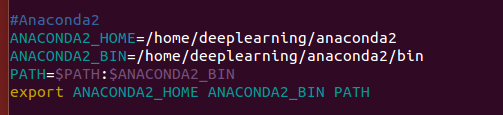
#Anaconda2

ANACONDA2_HOME=/home/deeplearning/anaconda2

ANACONDA2_BIN=/home/deeplearning/anaconda2/bin

PATH=$PATH:$ANACONDA2_BIN

export ANACONDA2_HOME ANACONDA2_BIN PATH
所以,

deeplearning@deeplearningsinglenode:~$ conda create -n tensorflow python=2.7

Fetching package metadata ...........

Solving package specifications: .

Package plan for installation in environment /home/deeplearning/anaconda2/envs/tensorflow:

The following NEW packages will be INSTALLED:

    ca-certificates: 2017.08.-h1d4fec5_0

    certifi:         2017.11.-py27h71e7faf_0

    libedit:         3.1-heed3624_0

    libffi:          3.2.-hd88cf55_4

    libgcc-ng:       7.2.-h7cc24e2_2

    libstdcxx-ng:    7.2.-h7a57d05_2

    ncurses:         6.0-h9df7e31_2

    openssl:         1.0.2m-h26d622b_1

    pip:             9.0.-py27ha730c48_4

    python:          2.7.-hdd48546_24

    readline:        7.0-ha6073c6_4

    setuptools:      36.5.-py27h68b189e_0

    sqlite:          3.20.-hb898158_2

    tk:              8.6.-hc745277_3

    wheel:           0.30.-py27h2bc6bb2_1

    zlib:            1.2.-ha838bed_2

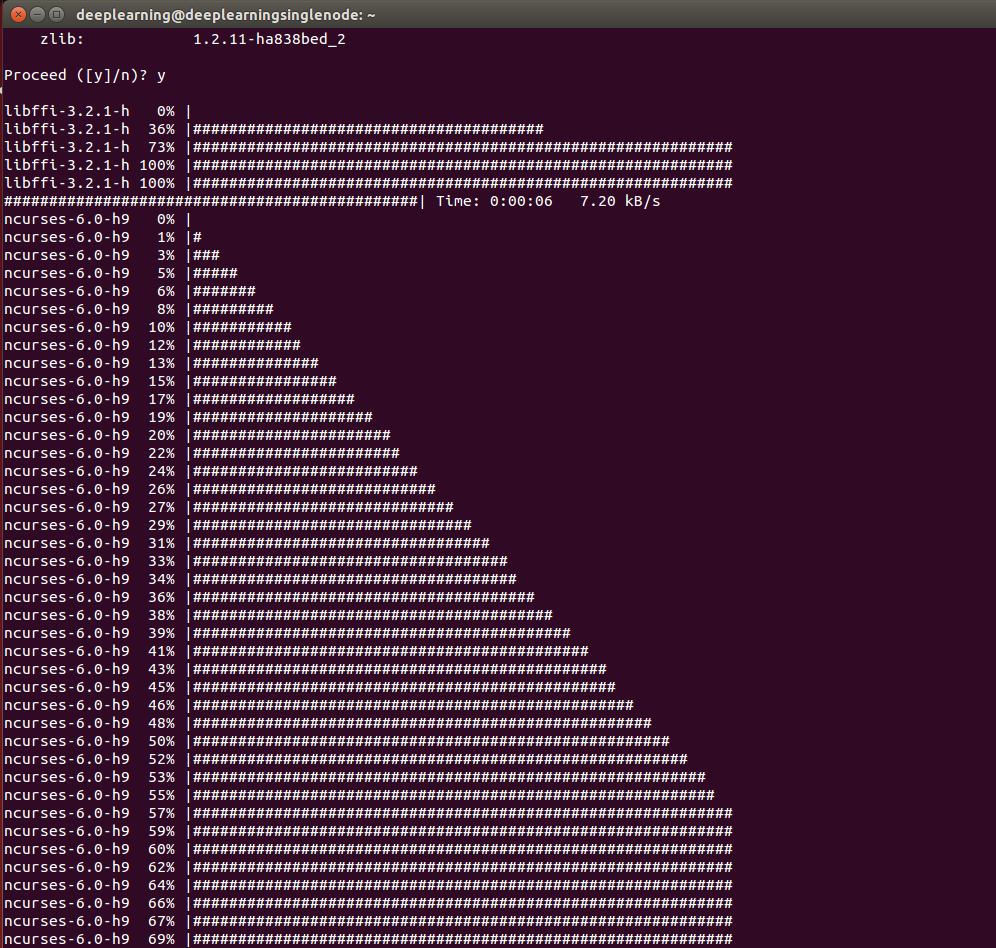
Proceed ([y]/n)? y
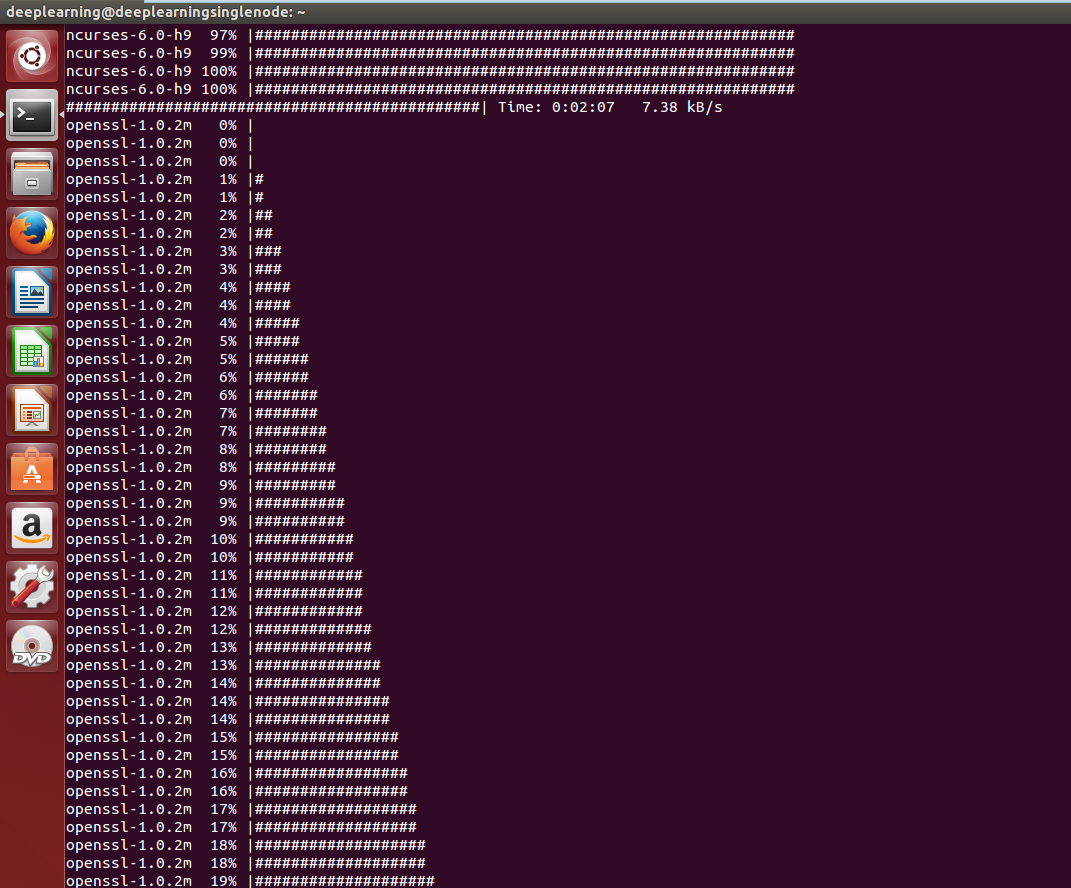
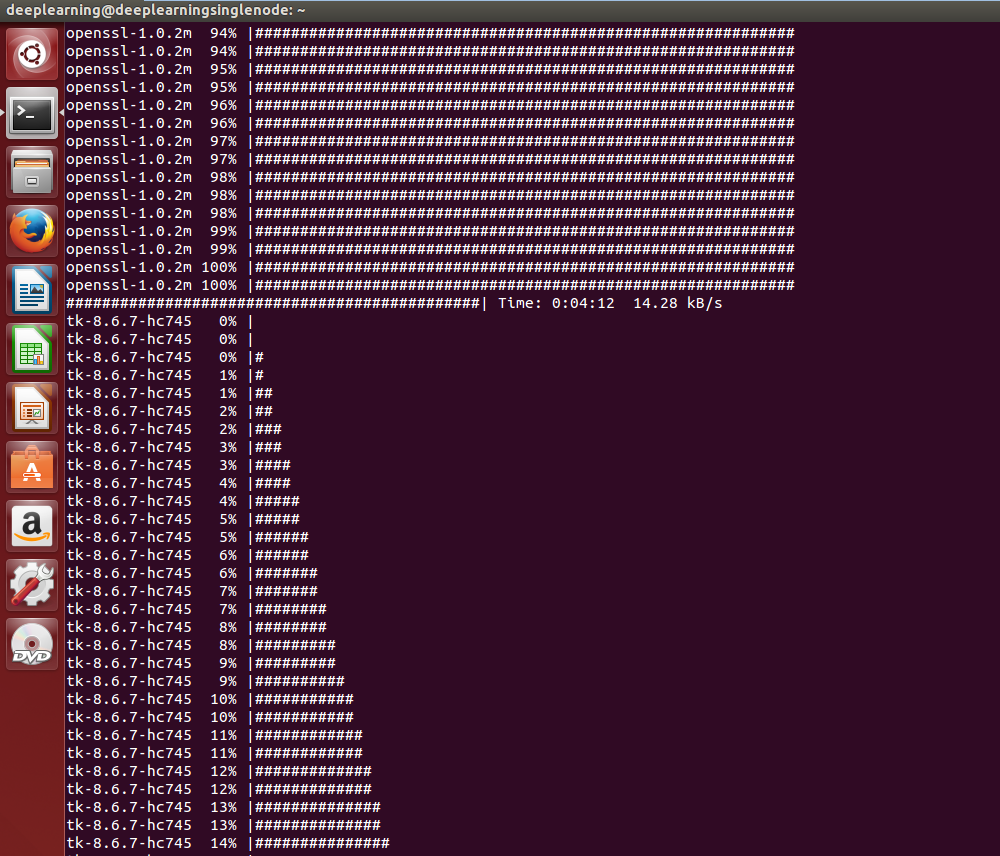
第三步、在conda环境中安装tensorflow
在conda环境中安装tensorflow的好处是可以便捷的管理tensorflow的依赖包。
分为两个步骤:激活上一步建立的名为tensorflow的conda环境;用conda或者pip工具安装Tensorflow,我选择的是pip方式。
3.1 pip方式(可以这种方式来安装)
pip方式需要首先激活conda环境

deeplearning@deeplearningsinglenode:~$ source activate tensorflow

(tensorflow) deeplearning@deeplearningsinglenode:~$
然后根据要安装的不同tensorflow版本选择对应的一条环境变量设置export语句(操作系统,Python版本,CPU版本还是CPU+GPU版本)
# Ubuntu/Linux -bit, CPU only, Python 2.7

(tensorflow)$ export TF_BINARY_URL=https://storage.googleapis.com/tensorflow/linux/cpu/tensorflow-0.10.0-cp27-none-linux_x86_64.whl

# Ubuntu/Linux -bit, GPU enabled, Python 2.7

# Requires CUDA toolkit 7.5 and CuDNN v5. For other versions, see "Install from sources" below.

(tensorflow)$ export TF_BINARY_URL=https://storage.googleapis.com/tensorflow/linux/gpu/tensorflow-0.10.0-cp27-none-linux_x86_64.whl

# Mac OS X, CPU only, Python 2.7:

(tensorflow)$ export TF_BINARY_URL=https://storage.googleapis.com/tensorflow/mac/cpu/tensorflow-0.10.0-py2-none-any.whl

# Mac OS X, GPU enabled, Python 2.7:

(tensorflow)$ export TF_BINARY_URL=https://storage.googleapis.com/tensorflow/mac/gpu/tensorflow-0.10.0-py2-none-any.whl

# Ubuntu/Linux -bit, CPU only, Python 3.4

(tensorflow)$ export TF_BINARY_URL=https://storage.googleapis.com/tensorflow/linux/cpu/tensorflow-0.10.0-cp34-cp34m-linux_x86_64.whl

# Ubuntu/Linux -bit, GPU enabled, Python 3.4

# Requires CUDA toolkit 7.5 and CuDNN v5. For other versions, see "Install from sources" below.

(tensorflow)$ export TF_BINARY_URL=https://storage.googleapis.com/tensorflow/linux/gpu/tensorflow-0.10.0-cp34-cp34m-linux_x86_64.whl

# Ubuntu/Linux -bit, CPU only, Python 3.5

(tensorflow)$ export TF_BINARY_URL=https://storage.googleapis.com/tensorflow/linux/cpu/tensorflow-0.10.0-cp35-cp35m-linux_x86_64.whl

# Ubuntu/Linux -bit, GPU enabled, Python 3.5

# Requires CUDA toolkit 7.5 and CuDNN v5. For other versions, see "Install from sources" below.

(tensorflow)$ export TF_BINARY_URL=https://storage.googleapis.com/tensorflow/linux/gpu/tensorflow-0.10.0-cp35-cp35m-linux_x86_64.whl

# Mac OS X, CPU only, Python 3.4 or 3.5:

(tensorflow)$ export TF_BINARY_URL=https://storage.googleapis.com/tensorflow/mac/cpu/tensorflow-0.10.0-py3-none-any.whl

# Mac OS X, GPU enabled, Python 3.4 or 3.5:

(tensorflow)$ export TF_BINARY_URL=https://storage.googleapis.com/tensorflow/mac/gpu/tensorflow-0.10.0-py3-none-any.whl

最后根据是python 2还是3版本选择一句进行安装。
# Python

(tensorflow)$ pip install --ignore-installed --upgrade $TF_BINARY_URL

# Python

(tensorflow)$ pip3 install --ignore-installed --upgrade $TF_BINARY_URL
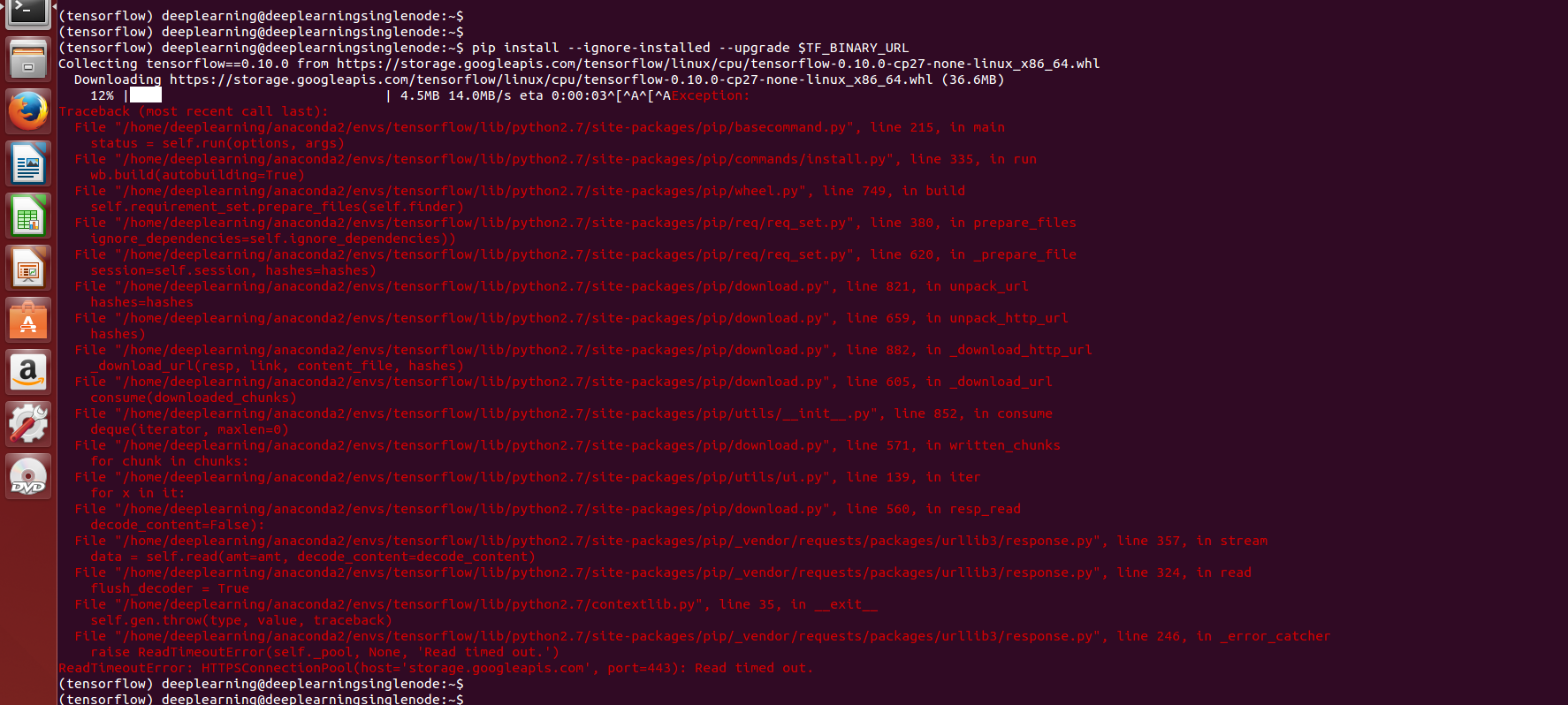
(tensorflow) deeplearning@deeplearningsinglenode:~$ pip install --ignore-installed --upgrade $TF_BINARY_URL

Collecting tensorflow==0.10. from https://storage.googleapis.com/tensorflow/linux/cpu/tensorflow-0.10.0-cp27-none-linux_x86_64.whl

  Downloading https://storage.googleapis.com/tensorflow/linux/cpu/tensorflow-0.10.0-cp27-none-linux_x86_64.whl (36.6MB)

    % |████                            | .5MB .0MB/s eta ::^[^A^[^AException:

Traceback (most recent call last):

  File "/home/deeplearning/anaconda2/envs/tensorflow/lib/python2.7/site-packages/pip/basecommand.py", line , in main

    status = self.run(options, args)

  File "/home/deeplearning/anaconda2/envs/tensorflow/lib/python2.7/site-packages/pip/commands/install.py", line , in run

    wb.build(autobuilding=True)

  File "/home/deeplearning/anaconda2/envs/tensorflow/lib/python2.7/site-packages/pip/wheel.py", line , in build

    self.requirement_set.prepare_files(self.finder)

  File "/home/deeplearning/anaconda2/envs/tensorflow/lib/python2.7/site-packages/pip/req/req_set.py", line , in prepare_files

    ignore_dependencies=self.ignore_dependencies))

  File "/home/deeplearning/anaconda2/envs/tensorflow/lib/python2.7/site-packages/pip/req/req_set.py", line , in _prepare_file

    session=self.session, hashes=hashes)

  File "/home/deeplearning/anaconda2/envs/tensorflow/lib/python2.7/site-packages/pip/download.py", line , in unpack_url

    hashes=hashes

  File "/home/deeplearning/anaconda2/envs/tensorflow/lib/python2.7/site-packages/pip/download.py", line , in unpack_http_url

    hashes)

  File "/home/deeplearning/anaconda2/envs/tensorflow/lib/python2.7/site-packages/pip/download.py", line , in _download_http_url

    _download_url(resp, link, content_file, hashes)

  File "/home/deeplearning/anaconda2/envs/tensorflow/lib/python2.7/site-packages/pip/download.py", line , in _download_url

    consume(downloaded_chunks)

  File "/home/deeplearning/anaconda2/envs/tensorflow/lib/python2.7/site-packages/pip/utils/__init__.py", line , in consume

    deque(iterator, maxlen=)

  File "/home/deeplearning/anaconda2/envs/tensorflow/lib/python2.7/site-packages/pip/download.py", line , in written_chunks

    for chunk in chunks:

  File "/home/deeplearning/anaconda2/envs/tensorflow/lib/python2.7/site-packages/pip/utils/ui.py", line , in iter

    for x in it:

  File "/home/deeplearning/anaconda2/envs/tensorflow/lib/python2.7/site-packages/pip/download.py", line , in resp_read

    decode_content=False):

  File "/home/deeplearning/anaconda2/envs/tensorflow/lib/python2.7/site-packages/pip/_vendor/requests/packages/urllib3/response.py", line , in stream

    data = self.read(amt=amt, decode_content=decode_content)

  File "/home/deeplearning/anaconda2/envs/tensorflow/lib/python2.7/site-packages/pip/_vendor/requests/packages/urllib3/response.py", line , in read

    flush_decoder = True

  File "/home/deeplearning/anaconda2/envs/tensorflow/lib/python2.7/contextlib.py", line , in __exit__

    self.gen.throw(type, value, traceback)

  File "/home/deeplearning/anaconda2/envs/tensorflow/lib/python2.7/site-packages/pip/_vendor/requests/packages/urllib3/response.py", line , in _error_catcher

    raise ReadTimeoutError(self._pool, None, 'Read timed out.')

ReadTimeoutError: HTTPSConnectionPool(host='storage.googleapis.com', port=): Read timed out.

(tensorflow) deeplearning@deeplearningsinglenode:~$
注意:这是在安装tensorflow的时候创建tensorflow环境失败,这是个坑,因为有些版本地址失效了。
换其他版本试试。比如如下我现在是2017年12月份,采用conda方式安装tensorflow,版本已经是1.4.0-py27_0

3.2 conda方式(或者也可以这种方式来安装)
conda上面目前有人已经做好了tensorflow的pkg,但是版本不一定最新,且只有CPU版本,不支持GPU。
步骤也是首先激活conda环境,然后调用conda install 语句安装.
$ source activate tensorflow

(tensorflow)$  # Your prompt should change

# Linux/Mac OS X, Python 2.7/3.4/3.5, CPU only:

(tensorflow)$ conda install -c conda-forge tensorflow
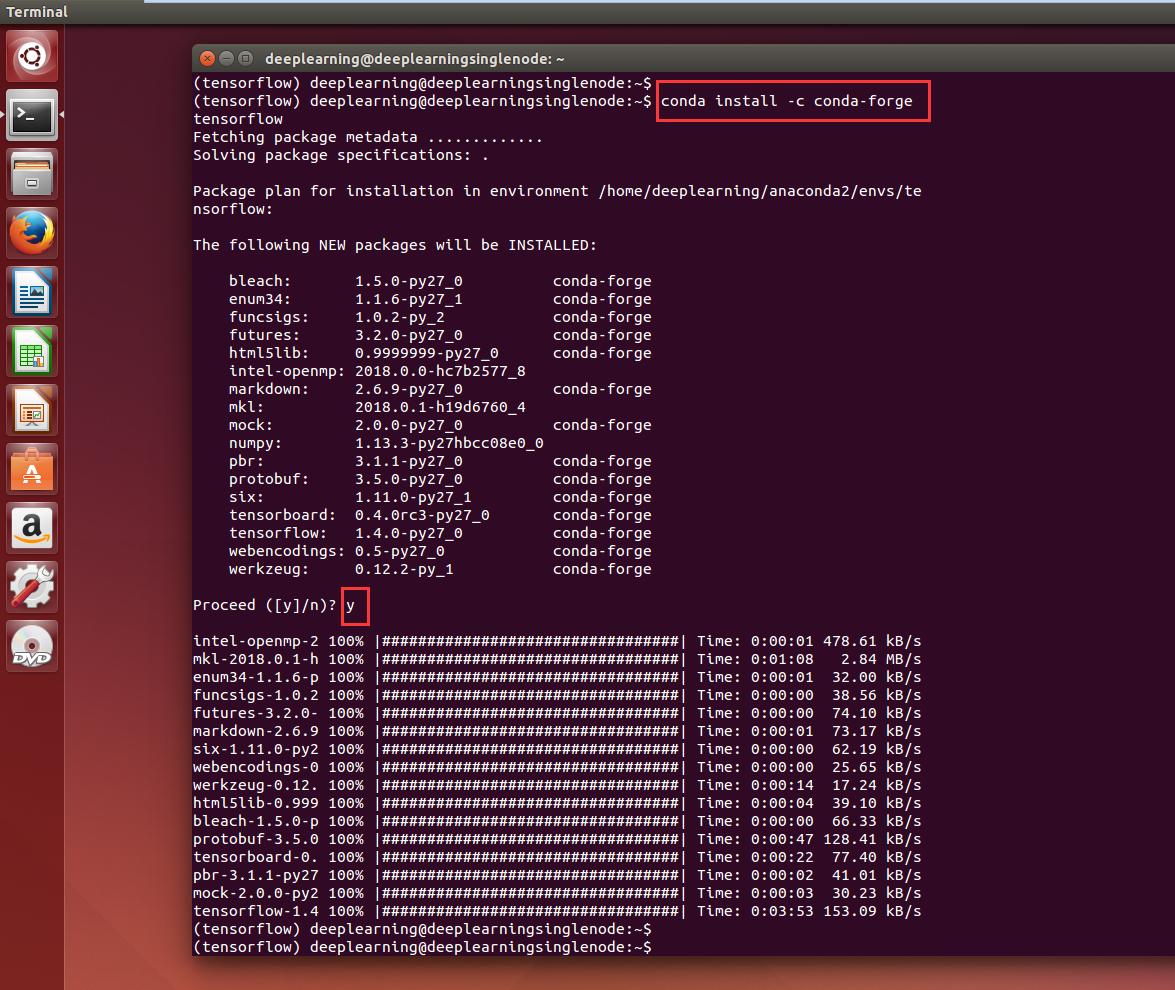
(tensorflow) deeplearning@deeplearningsinglenode:~$ conda install -c conda-forge tensorflow

Fetching package metadata .............

Solving package specifications: .

Package plan for installation in environment /home/deeplearning/anaconda2/envs/tensorflow:

The following NEW packages will be INSTALLED:

    bleach:       1.5.-py27_0          conda-forge

    enum34:       1.1.-py27_1          conda-forge

    funcsigs:     1.0.-py_2            conda-forge

    futures:      3.2.-py27_0          conda-forge

    html5lib:     0.9999999-py27_0      conda-forge

    intel-openmp: 2018.0.-hc7b2577_8

    markdown:     2.6.-py27_0          conda-forge

    mkl:          2018.0.-h19d6760_4

    mock:         2.0.-py27_0          conda-forge

    numpy:        1.13.-py27hbcc08e0_0

    pbr:          3.1.-py27_0          conda-forge

    protobuf:     3.5.-py27_0          conda-forge

    six:          1.11.-py27_1         conda-forge

    tensorboard:  0.4.0rc3-py27_0       conda-forge

    tensorflow:   1.4.-py27_0          conda-forge

    webencodings: 0.5-py27_0            conda-forge

    werkzeug:     0.12.-py_1           conda-forge

Proceed ([y]/n)? y

intel-openmp- % |#################################| Time: :: 478.61 kB/s

mkl-2018.0.-h % |#################################| Time: ::   2.84 MB/s

enum34-1.1.-p % |#################################| Time: ::  32.00 kB/s

funcsigs-1.0. % |#################################| Time: ::  38.56 kB/s

futures-3.2.- % |#################################| Time: ::  74.10 kB/s

markdown-2.6. % |#################################| Time: ::  73.17 kB/s

six-1.11.-py2 % |#################################| Time: ::  62.19 kB/s

webencodings- % |#################################| Time: ::  25.65 kB/s

werkzeug-0.12. % |#################################| Time: ::  17.24 kB/s

html5lib-0.999 % |#################################| Time: ::  39.10 kB/s

bleach-1.5.-p % |#################################| Time: ::  66.33 kB/s

protobuf-3.5. % |#################################| Time: :: 128.41 kB/s

tensorboard-. % |#################################| Time: ::  77.40 kB/s

pbr-3.1.-py27 % |#################################| Time: ::  41.01 kB/s

mock-2.0.-py2 % |#################################| Time: ::  30.23 kB/s

tensorflow-1.4 % |#################################| Time: :: 153.09 kB/s

(tensorflow) deeplearning@deeplearningsinglenode:~$

(tensorflow) deeplearning@deeplearningsinglenode:~$
上面的步骤完成后,从conda环境中退出:

(tensorflow)$ source deactivate
第四步、测试安装是否成功
首先激活 tensorflow 环境,然后进入 python,最后导入 tensorflow 库。如果导入成功则表明安装成功。
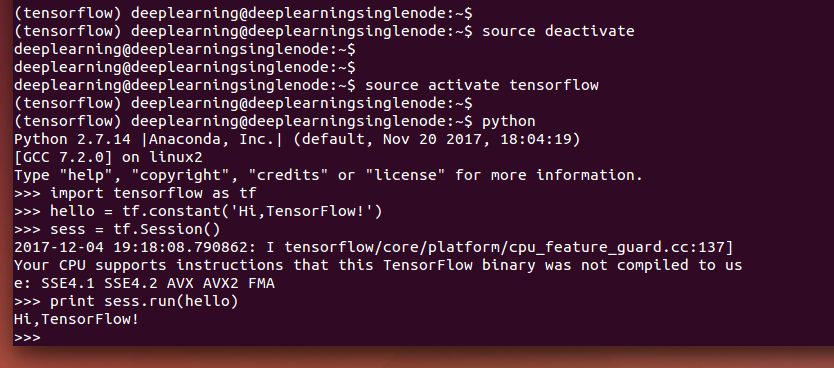
(tensorflow) deeplearning@deeplearningsinglenode:~$ source deactivate

deeplearning@deeplearningsinglenode:~$

deeplearning@deeplearningsinglenode:~$

deeplearning@deeplearningsinglenode:~$ source activate tensorflow

(tensorflow) deeplearning@deeplearningsinglenode:~$

(tensorflow) deeplearning@deeplearningsinglenode:~$ python

Python 2.7. |Anaconda, Inc.| (default, Nov  , ::)

[GCC 7.2.] on linux2

Type "help", "copyright", "credits" or "license" for more information.

>>> import tensorflow as tf

>>> hello = tf.constant('Hi,TensorFlow!')

>>> sess = tf.Session()

-- ::08.790862: I tensorflow/core/platform/cpu_feature_guard.cc:] Your CPU supports instructions that this TensorFlow binary was not compiled to use: SSE4. SSE4. AVX AVX2 FMA

>>> print sess.run(hello)

Hi,TensorFlow!

>>>
第五步、需要使用 TensorFlow 的时候必须重新激活
当使用完毕后,关闭 tensorflow 环境。

Use exit() or Ctrl-D (i.e. EOF) to exit

>>> exit()

(tensorflow) deeplearning@deeplearningsinglenode:~$

(tensorflow) deeplearning@deeplearningsinglenode:~$

(tensorflow) deeplearning@deeplearningsinglenode:~$

(tensorflow) deeplearning@deeplearningsinglenode:~$ source deactivate

deeplearning@deeplearningsinglenode:~$
然后你的终端提示符就会变会原的样子。
当你需要再次使用的时候就必须再次激活 tensorflow 环境。
source activate tensorflow
..........
......
关闭 tensorflow 环境,并重新激活
第五步、 Finally
至此,你已经拥有了一个可以玩耍机器学习的 tensorflow 环境,好好玩耍吧:)
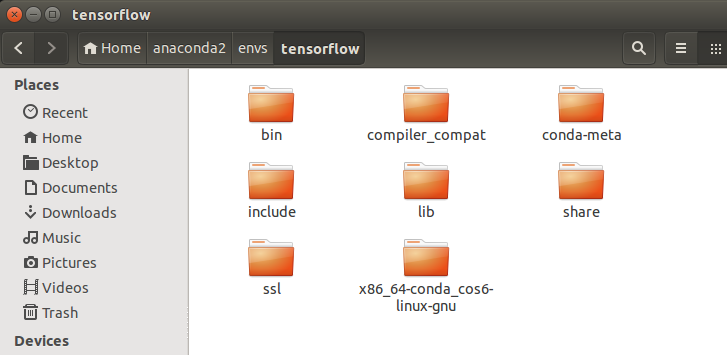
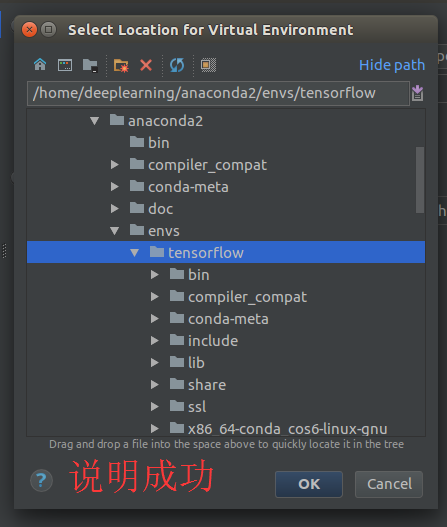
你可以参照官方文档快速的运行一个手写数字识别的示例。友情提示:仅 CPU 版本你需要有足够的耐心。。。。。。
同时,大家可以关注我的个人博客:
http://www.cnblogs.com/zlslch/ 和 http://www.cnblogs.com/lchzls/ http://www.cnblogs.com/sunnyDream/
详情请见:http://www.cnblogs.com/zlslch/p/7473861.html
人生苦短,我愿分享。本公众号将秉持活到老学到老学习无休止的交流分享开源精神,汇聚于互联网和个人学习工作的精华干货知识,一切来于互联网,反馈回互联网。
目前研究领域:大数据、机器学习、深度学习、人工智能、数据挖掘、数据分析。 语言涉及:Java、Scala、Python、Shell、Linux等 。同时还涉及平常所使用的手机、电脑和互联网上的使用技巧、问题和实用软件。 只要你一直关注和呆在群里,每天必须有收获
对应本平台的讨论和答疑QQ群:大数据和人工智能躺过的坑(总群)(161156071)



全网最详细的基于Ubuntu14.04/16.04 + Anaconda2 / Anaconda3 + Python2.7/3.4/3.5/3.6安装Tensorflow详细步骤(图文)(博主推荐)的更多相关文章
- 基于Ubuntu Server 16.04 LTS版本安装和部署Django之(五):测试项目
基于Ubuntu Server 16.04 LTS版本安装和部署Django之(一):安装Python3-pip和Django 基于Ubuntu Server 16.04 LTS版本安装和部署Djan ...
- 基于Ubuntu Server 16.04 LTS版本安装和部署Django之(四):安装MySQL数据库
基于Ubuntu Server 16.04 LTS版本安装和部署Django之(一):安装Python3-pip和Django 基于Ubuntu Server 16.04 LTS版本安装和部署Djan ...
- 基于Ubuntu Server 16.04 LTS版本安装和部署Django之(三):设置上传文件夹权限(这里测试用完全共享)
基于Ubuntu Server 16.04 LTS版本安装和部署Django之(一):安装Python3-pip和Django 基于Ubuntu Server 16.04 LTS版本安装和部署Djan ...
- 基于Ubuntu Server 16.04 LTS版本安装和部署Django之(二):Apache安装和配置
基于Ubuntu Server 16.04 LTS版本安装和部署Django之(一):安装Python3-pip和Django 基于Ubuntu Server 16.04 LTS版本安装和部署Djan ...
- 基于Ubuntu Server 16.04 LTS版本安装和部署Django之(一):安装Python3-pip和Django
近期开始学习基于Linux平台的Django开发,想配置一台可以发布的服务器,经过近一个月的努力,终于掌握了基于Apache和mod-wsgi插件的部署模式,自己也写了一个教程,一是让自己有个记录,二 ...
- Ubuntu 14.04 16.04 Linux nvidia 驱动下载与安装
Ubuntu 14.04 16.04 nvidia 驱动安装 最简单直观的方式是在如下的对话框中直接选择驱动安装即可 但是有时候,驱动不够新,比如14.04用的是340.98版本,如果手动安装驱动可以 ...
- Ubuntu LTS 系统学习使用体会和实用工具软件汇总 6.04 8.04 10.04 12.04 14.04 16.04
Ubuntu LTS 系统学习体会和工具软件汇总 6.04 8.04 10.04 12.04 14.04 16.04 ubuntu入门必备pdf:http://download.csdn.net/de ...
- Ubuntu14.04下Neo4j图数据库官网安装部署步骤(图文详解)(博主推荐)
不多说,直接上干货! 说在前面的话 首先,查看下你的操作系统的版本. root@zhouls-virtual-machine:~# cat /etc/issue Ubuntu 14.04.4 LTS ...
- Ubuntu网络配置IP和DNS等,适用于14.04,16.04和17.10
本文主要介绍Ubuntu系统的网络设置,包括IP,DNS和主机名等,适用于14.04,16.04和17.10等版本 =============== 完美的分割线 ================ = ...
随机推荐
- Open quote is expected for attribute "{1}" associated with an element type "column".
这个的错误的意思很简单:就是自己的配置文件是否缺少""号
- 关于下载calipso数据集以及用python将其读到记事本小结
今天终于把老板交代的事情忙完了,对于我这位计算机语言的小白来说,其中的艰辛不用说,一把辛酸泪啊!在有计算机语言经验的老手而言,我这些问题似乎也不能算是问题,但我却卡了很久,对此,想把自己所遇到的困难和 ...
- 2019.03.09 codeforces620E. New Year Tree(线段树+状态压缩)
传送门 题意:给一棵带颜色的树,可以给子树染色或者问子树里有几种不同的颜色,颜色值不超过606060. 思路:颜色值很小,因此状压一个区间里的颜色用线段树取并集即可. 代码: #include< ...
- PowerShell工作流学习-5-自定义活动
关键点: a)除了内置活动和自定义活动,还可以用C# 编写自定义活动,并将其包括在 XAML 工作流和脚本工作流中,若要将自定义活动添加到脚本工作流中,请使用 #Requires 语句的 Assemb ...
- Linux 目录结构详解
Linux目录详解 Linux目录详解(RHEL5.4) 由于linux是开放源代码,各大公司和团体根据linux的核心代码做各自的操作,编程.这样就造成在根下的目录的不同.这样就造成个人不能使用他人 ...
- C#使用Dotfuscator混淆代码的加密方法
C#编写的代码如果不进行一定程度的混淆和加密,那么是非常容易被反编译进行破解的,特别是对于一些商业用途的C#软件来说,因为盯着的人多,更是极易被攻破.使用VS自带的Dotfuscator可以实现混淆代 ...
- 更改了ssh文件下,还没有权限
执行 cd /root/.ssh chmod 600 id_*
- 《python语言程序设计》_第6章_函数
# 6.1_引言 程序1: 结果: Sum from 1 to 10 is 55Sum from 20 to 38 is 513Sum from 35 to 50 is 630 程序2: #程序1和2 ...
- Stacking Plates(存档待续.....(没有写思路和程序))
问题描述 盘子装运公司是一家网络零售商,顾名思义,是一家只销售盘子的公司.该公司销售的盘子由不计其数的生产厂商提供,品种是全宇宙最多的,为此公司的员工倍感自豪. 在最近的一次成本分析中,公司员工发现, ...
- 安卓端 - H5页面在微信分享、收藏、保存图片不成功
经过代码实践: 原因是微信在分享.收藏和保存时会获取到图片信息,当图片过大时,造成失败