
nginx的with-http_sub_module模块使用之替换字符串
一、介绍
该ngx_http_sub_module模块是一个过滤器,通过将一个指定的字符串替换为另一个字符串来修改响应。该模块不是默认生成的,它应该使用--with-http_sub_module 配置参数启用 。
二、指令介绍
2.1、sub_filter指令
作用:用于替换字符串
用法:sub_filter 要替换的字符串 替换后的字符串,不区分字符串的大小写
范围:http server location
默认:-
2.2、sub_filter_last_modified指令
作用:允许在替换期间保留来自原始响应的“Last-Modified”标题字段以促进响应缓存。默认情况下,在处理期间修改响应的内容时,标题字段被删除。
用法:sub_filter_last_modified on | off
范围:http server location
默认:sub_filter_last_modified on
2.3、sub_filter_once
作用:指示是否查找每个字符串以替换一次或重复替换。
用法:sub_filter_once on | off
范围:http server location
默认:http server location
2.4、sub_filter_types
作用:指定MIME类型的字符串替换,除了“ text/html” 之外,还可以在指定MIME类型的响应中启用字符串替换。特殊值“ *”匹配任何MIME类型
用法:sub_filter_types mime-type ...
范围:http server location
默认:sub_filter_types text / html;
三、操作演示
3.1、编译安装nginx
编译安装nginx,注意加上--with-http_sub_module模块,这里提供编译的参数:
./configure \

--prefix=/usr \

--sbin-path=/usr/sbin/nginx \

--conf-path=/etc/nginx/nginx.conf \

--error-log-path=/var/log/nginx/error.log \

--pid-path=/var/run/nginx/nginx.pid \

--with-http_ssl_module \

--with-http_flv_module \

--with-http_stub_status_module \

--with-http_gzip_static_module \

--http-log-path=/var/log/nginx/access.log \

--http-client-body-temp-path=/var/tmp/nginx/client \

--http-proxy-temp-path=/var/tmp/nginx/proxy \

--http-fastcgi-temp-path=/var/tmp/nginx/fcgi \

--with-http_stub_status_module \

--with-http_sub_module \
3.2、安装nginx
make && make install
3.3修改配置文件nginx.conf
 location / {

           sub_filter 'nginx.com' 'baidu.com'; --把nginx.com替换成了baidu.com

           sub_filter 'nginx.org' 'buy.jiegeng.com';--把ngin.org替换成了buy.jiegeng.com

           sub_filter_types css/html;--替换的类型

           sub_filter_once off;--全部替换

           root  html;

           index  index.html index.htm;

        }
3.4、重启
/usr/sbin/nginx -s reload
3.5、验证
3.5.1修改后页面
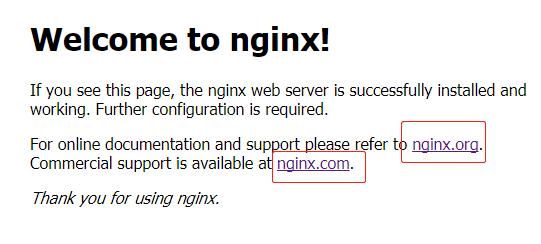
3.5.2原始页面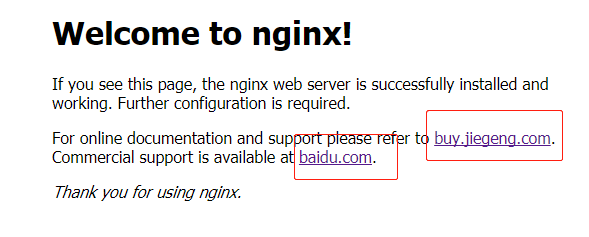
四、支持正则的第三方模块
使用ngx_http_sub_module模块好处是nginx内置该模块使用方便,不足之处在于该模块不支持正则替换,灵活性不够,
支持正则匹配替换的第三方模块ngx_http_substitutions_filter_module:
4.1、下载
下载地址:https://github.com/yaoweibin/ngx_http_substitutions_filter_module/archive/master.zip
添加参数--add-module=/模块解压后文件路径
./configure \

--prefix=/usr \

--sbin-path=/usr/sbin/nginx \

--conf-path=/etc/nginx/nginx.conf \

--error-log-path=/var/log/nginx/error.log \

--pid-path=/var/run/nginx/nginx.pid \

--with-http_ssl_module \

--with-http_flv_module \

--with-http_stub_status_module \

--with-http_gzip_static_module \

--http-log-path=/var/log/nginx/access.log \

--http-client-body-temp-path=/var/tmp/nginx/client \

--http-proxy-temp-path=/var/tmp/nginx/proxy \

--http-fastcgi-temp-path=/var/tmp/nginx/fcgi \

--with-http_stub_status_module \

--with-http_sub_module \

--add-module=../ngx_http_substitutions_filter_module-master
4.2、subs_filter的使用介绍
* subs_filter

subs_filter 语法: subs_filter source_str destination_str [gior]

默认: none

适用: http,server,location

subs_filter 是用来替换文本的,可以使用正则

g(默认):替换匹配项。

i  :区分大小写的匹配

o : 只匹配发现的第一个。

r  : 正则匹配。
nginx的with-http_sub_module模块使用之替换字符串的更多相关文章
- nginx的http_sub_module模块使用之替换字符串
Nginx可以实现很多功能,提供了许多插件,其中一个比较冷门的http_sub_module,是用来替换指定字符串的,它的原理是Nginx解析到文件后,执行这个插件进行拦截后返回. 昨天碰到一个场景, ...
- yum安装下的nginx,如何添加模块,和添加第三方模块
需求:生产有个接口是通过socket通信.nginx1.9开始支持tcp层的转发,通过stream实现的,而socket也是基于tcp通信. 实现方法:Centos7.2下yum直接安装的nginx, ...
- Nginx编译安装第三方模块http_substitutions_filter_module2222
Nginx编译安装第三方模块http_substitutions_filter_module Rming -- 阅读 安装 Http 编译 module filter nginx 模块 >> ...
- Nginx编译安装第三方模块http_substitutions_filter_module
Nginx编译安装第三方模块http_substitutions_filter_module 分类:服务器技术 作者:rming 时间:-- . >>ngx_http_substitu ...
- 不重装nginx实现动态添加模块
如果项目在提供服务的过程中,因为需求使然,需要对nginx进行模块的动态添加,可以按照如下流程进行操作 一.查看nginx当前已经安装了那些模块 1) 进入nginx执行文件目录 cd /usr/ ...
- 线上nginx 平滑添加新模块;如(--with-http_realip_module)
nginx 添加模块1.查看当前nginx信息(配置文件路径,启动用户...) ps aux | grep nginx 2.查看当前nginx已启用的模块(记录模块信息,安装路径)./nginx -V ...
- Nginx一致性哈希模块的Lua实现
Nginx一致性哈希模块的Lua重新实现 技术背景: 最近在工作中使用了nginx+redis 的架构,redis在后台做分布式存储,每个redis都存放不同的数据,这些数据都是某门户网站通过Hado ...
- nginx图片过滤处理模块http_image_filter_module安装配置笔记
http_image_filter_module是nginx提供的集成图片处理模块,支持nginx-0.7.54以后的版本,在网站访问量不是很高磁盘有限不想生成多余的图片文件的前提下可,就可以用它实时 ...
- Nginx加载ngx_pagespeed模块,加快网站打开的速度
[页面加速]配置Nginx加载ngx_pagespeed模块,加快网站打开的速度 ngx_pagespeed 是一个 Nginx 的扩展模块,可以加速你的网站,减少页面加载时间,它会自动将一些提升 ...
随机推荐
- 浏览器开启桌面通知Web Notification
本文主要描述如何开启各个浏览器的桌面通知功能 一.谷歌浏览器(chrome) 点击地址栏前面的图标
- web页面加载、解析、渲染过程
仅做学习参考,侵权删 原文链接:风吹De麦浪 https://www.cnblogs.com/CandyManPing/p/6635008.html 一.浏览器 浏览器的主要功能是将用户选择的we ...
- 005_tcp/ip监控
system.monitor.tcpstat 一.listen+established+time wait+close wait. listen:SELECT mean("listen&qu ...
- RF运行脚本报错:WebDriverException: Message: unknown error: call function result missing
原因:浏览器驱动与浏览器版本不对应
- webpack配置的基本介绍
https://github.com/DDFE/DDFE-blog/issues/10 全局安装 webpack :(当前笔记版本: webpack 3.10.0 , mac环境) 1. npm i ...
- ASP.NET MVC5高级编程 之 路由
每个ASP.NET MVC应用程序都需要路由来定义自己处理请求的方式.路由是MVC应用程序的入口点.路由的核心工作是将一个请求映射到一个操作 路由主要有两种用途: 匹配传入的请求(该请求不匹配服务器文 ...
- Spring Cloud Sleuth超详细实战
为什么需要Spring Cloud Sleuth 微服务架构是一个分布式架构,它按业务划分服务单元,一个分布式系统往往有很多个服务单元.由于服务单元数量众多,业务的复杂性,如果出现了错误和异常,很难去 ...
- Python- 索引 B+数 比如书的目录
1.索引 为何要有索引? 一般的应用系统,读写比例在10:1左右,而且插入操作和一般的更新操作很少出现性能问题, 在生产环境中,我们遇到最多的,也是最容易出问题的,还是一些复杂的查询操作, 因此对查询 ...
- 39)django-XSS 过滤
使用kingedit别人是可以输入script代码.这在后台是不允许script代码运行的. 这里主要使用beatifulSoup过滤 示例1 beatufulsoup4 from bs4 impor ...
- Java学习——集合框架【4】
一.集合框架 集合框架是一个用来代表和操纵集合的统一架构.所有的集合框架都包含如下内容: 接口:是代表集合的抽象数据类型.接口允许集合独立操纵其代表的细节.在面向对象的语言,接口通常形成一个层次. 实 ...