
nginx的with-http_sub_module模块使用之替换字符串
一、介绍
该ngx_http_sub_module模块是一个过滤器,通过将一个指定的字符串替换为另一个字符串来修改响应。该模块不是默认生成的,它应该使用--with-http_sub_module 配置参数启用 。
二、指令介绍
2.1、sub_filter指令
作用:用于替换字符串
用法:sub_filter 要替换的字符串 替换后的字符串,不区分字符串的大小写
范围:http server location
默认:-
2.2、sub_filter_last_modified指令
作用:允许在替换期间保留来自原始响应的“Last-Modified”标题字段以促进响应缓存。默认情况下,在处理期间修改响应的内容时,标题字段被删除。
用法:sub_filter_last_modified on | off
范围:http server location
默认:sub_filter_last_modified on
2.3、sub_filter_once
作用:指示是否查找每个字符串以替换一次或重复替换。
用法:sub_filter_once on | off
范围:http server location
默认:http server location
2.4、sub_filter_types
作用:指定MIME类型的字符串替换,除了“ text/html” 之外,还可以在指定MIME类型的响应中启用字符串替换。特殊值“ *”匹配任何MIME类型
用法:sub_filter_types mime-type ...
范围:http server location
默认:sub_filter_types text / html;
三、操作演示
3.1、编译安装nginx
编译安装nginx,注意加上--with-http_sub_module模块,这里提供编译的参数:
./configure \

--prefix=/usr \

--sbin-path=/usr/sbin/nginx \

--conf-path=/etc/nginx/nginx.conf \

--error-log-path=/var/log/nginx/error.log \

--pid-path=/var/run/nginx/nginx.pid \

--with-http_ssl_module \

--with-http_flv_module \

--with-http_stub_status_module \

--with-http_gzip_static_module \

--http-log-path=/var/log/nginx/access.log \

--http-client-body-temp-path=/var/tmp/nginx/client \

--http-proxy-temp-path=/var/tmp/nginx/proxy \

--http-fastcgi-temp-path=/var/tmp/nginx/fcgi \

--with-http_stub_status_module \

--with-http_sub_module \
3.2、安装nginx
make && make install
3.3修改配置文件nginx.conf
 location / {

           sub_filter 'nginx.com' 'baidu.com'; --把nginx.com替换成了baidu.com

           sub_filter 'nginx.org' 'buy.jiegeng.com';--把ngin.org替换成了buy.jiegeng.com

           sub_filter_types css/html;--替换的类型

           sub_filter_once off;--全部替换

           root  html;

           index  index.html index.htm;

        }
3.4、重启
/usr/sbin/nginx -s reload
3.5、验证
3.5.1修改后页面
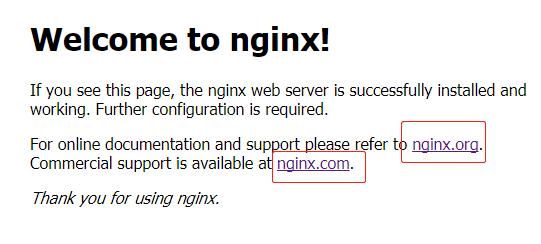
3.5.2原始页面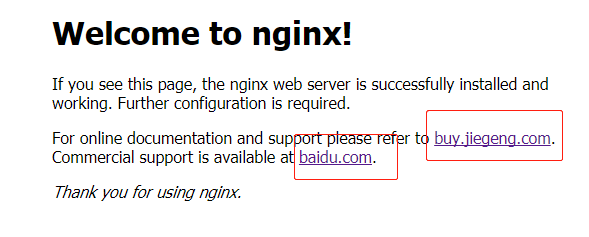
四、支持正则的第三方模块
使用ngx_http_sub_module模块好处是nginx内置该模块使用方便,不足之处在于该模块不支持正则替换,灵活性不够,
支持正则匹配替换的第三方模块ngx_http_substitutions_filter_module:
4.1、下载
下载地址:https://github.com/yaoweibin/ngx_http_substitutions_filter_module/archive/master.zip
添加参数--add-module=/模块解压后文件路径
./configure \

--prefix=/usr \

--sbin-path=/usr/sbin/nginx \

--conf-path=/etc/nginx/nginx.conf \

--error-log-path=/var/log/nginx/error.log \

--pid-path=/var/run/nginx/nginx.pid \

--with-http_ssl_module \

--with-http_flv_module \

--with-http_stub_status_module \

--with-http_gzip_static_module \

--http-log-path=/var/log/nginx/access.log \

--http-client-body-temp-path=/var/tmp/nginx/client \

--http-proxy-temp-path=/var/tmp/nginx/proxy \

--http-fastcgi-temp-path=/var/tmp/nginx/fcgi \

--with-http_stub_status_module \

--with-http_sub_module \

--add-module=../ngx_http_substitutions_filter_module-master
4.2、subs_filter的使用介绍
* subs_filter

subs_filter 语法: subs_filter source_str destination_str [gior]

默认: none

适用: http,server,location

subs_filter 是用来替换文本的,可以使用正则

g(默认):替换匹配项。

i  :区分大小写的匹配

o : 只匹配发现的第一个。

r  : 正则匹配。
nginx的with-http_sub_module模块使用之替换字符串的更多相关文章
- nginx的http_sub_module模块使用之替换字符串
Nginx可以实现很多功能,提供了许多插件,其中一个比较冷门的http_sub_module,是用来替换指定字符串的,它的原理是Nginx解析到文件后,执行这个插件进行拦截后返回. 昨天碰到一个场景, ...
- yum安装下的nginx,如何添加模块,和添加第三方模块
需求:生产有个接口是通过socket通信.nginx1.9开始支持tcp层的转发,通过stream实现的,而socket也是基于tcp通信. 实现方法:Centos7.2下yum直接安装的nginx, ...
- Nginx编译安装第三方模块http_substitutions_filter_module2222
Nginx编译安装第三方模块http_substitutions_filter_module Rming -- 阅读 安装 Http 编译 module filter nginx 模块 >> ...
- Nginx编译安装第三方模块http_substitutions_filter_module
Nginx编译安装第三方模块http_substitutions_filter_module 分类:服务器技术 作者:rming 时间:-- . >>ngx_http_substitu ...
- 不重装nginx实现动态添加模块
如果项目在提供服务的过程中,因为需求使然,需要对nginx进行模块的动态添加,可以按照如下流程进行操作 一.查看nginx当前已经安装了那些模块 1) 进入nginx执行文件目录 cd /usr/ ...
- 线上nginx 平滑添加新模块;如(--with-http_realip_module)
nginx 添加模块1.查看当前nginx信息(配置文件路径,启动用户...) ps aux | grep nginx 2.查看当前nginx已启用的模块(记录模块信息,安装路径)./nginx -V ...
- Nginx一致性哈希模块的Lua实现
Nginx一致性哈希模块的Lua重新实现 技术背景: 最近在工作中使用了nginx+redis 的架构,redis在后台做分布式存储,每个redis都存放不同的数据,这些数据都是某门户网站通过Hado ...
- nginx图片过滤处理模块http_image_filter_module安装配置笔记
http_image_filter_module是nginx提供的集成图片处理模块,支持nginx-0.7.54以后的版本,在网站访问量不是很高磁盘有限不想生成多余的图片文件的前提下可,就可以用它实时 ...
- Nginx加载ngx_pagespeed模块,加快网站打开的速度
[页面加速]配置Nginx加载ngx_pagespeed模块,加快网站打开的速度 ngx_pagespeed 是一个 Nginx 的扩展模块,可以加速你的网站,减少页面加载时间,它会自动将一些提升 ...
随机推荐
- 博客主Judge已跳槽搬家emmm
跳槽网站:博客园 顺便带一下:洛谷blog (好久没更了QAQ...) ### 不过csdn上还是会照常更新的,毕竟用着方便
- 022_nginx常用模块之ngx_http_upstream_check_module
ngx_http_upstream_check_module 该模块可以为Tengine提供主动式后端服务器健康检查的功能. 该模块在Tengine-1.4.0版本以前没有默认开启,它可以在配置编译选 ...
- 阿里云rds mysql数据库数据恢复到ecs中
背景:aliyun上的rds数据库快满了,于是删除了某个备份的表后面大boss说是有用的表,需要恢复回来,阿里云有7天内的物理全量备份(通过percona-xtrabackup备份的)第一时间应该延长 ...
- Linux系统的命令别名功能(转)
在管理和维护Linux系统的过程中,将会使用到大量命令,有一些很长的命令或用法经常被用到,重复而频繁地输入某个很长命令或用法是不可取的.这时可以使用命令别名功能将这个过程简单化. 1.系统定义的别名通 ...
- mybatis xml中不能直接用大于号、小于号要用转义字符
2.使用 <![CDATA[ ]]>标记
- linux云主机cpu一直很高降不下来,系统日志报nf_conntrack: table full, dropping packet.
在启用了iptables web服务器上,流量高的时候经常会出现下面的错误: ip_conntrack: table full, dropping packet 这个问题的原因是由于web服务器收到了 ...
- 41)django-admin
一:介绍 通过django admin可以快速生成后台管理功能. 二:设置 工程同名下settings.py 1)在INSTALLED_APPS中增加django.contrib.admin 2)在I ...
- 最近Android真的凉凉了?
都说Android最近行情不好,很多人都遇到瓶颈或放弃或转行.其实这种情况15年16年也是如此,相对比之下,个人认为今年比去年好多了,Android接下来将会走向复苏的春天. 自从Google开始推出 ...
- 解决 安装或卸载软件时报错Error 1001 的问题
卸载或安装程序时出错1001:错误1001可能发生在试图更新.修复或卸载windows os中的特定程序时.此问题通常是由于程序的先前安装损坏而引起的. 错误“1001”通常会遇到,因为程序的先前安装 ...
- nginx实践(二)之静态资源web服务(浏览器缓存场景)
配置语法-expires