
Android之AlarmManager
Android平台中,Alarm Manager Service控制着闹钟和唤醒功能。和其他系统服务一样,提供了一个辅助管理类-AlarmManager,我们只需要使用AlarmManager即可调用Alarm Manager Service。
在AlarmManager提供了如下方法:

1、void cancel(pendingIntent operatioin):取消一个已注册的定时器
2、void set(int type,long triggerAtTime,PendingIntent operation):设置一个新的定时器。
3、void setInecactRepeating(int type,long triggerAtMillis,long intervalMills,PendingIntent operation):设置一个不精确的重复类型的定时器。
4、void setRepeating(int type,long triggerAtMills,long intervalMills,PendingIntent operation):设置一个重复类型的定时器
5、void setTime(long millis):设置系统时钟时间。
6、void setTimeZone(String timeZone):设置时区
在上面设置时钟的方法中,第一个参数要设置一个闹钟的类型,在系统中提供了如下类型:
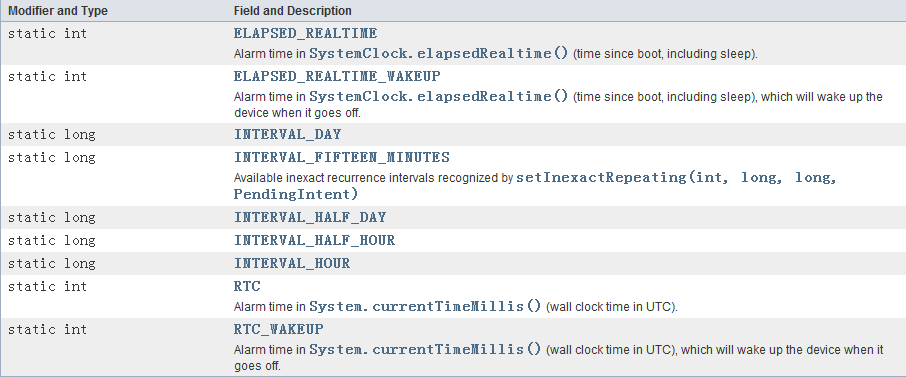
1、ELAPSED_REALTIME:此类型的闹钟在系统休眠状态下是不可用的,不能唤醒系统。使用的时间是相对于系统的启动时间,该时间可以通过SystemClock.elapsedRealTime()来获取。
2、ELAPSED_REALTIME_WAKEUP:此类型的闹钟在系统休眠状态下是可用的,使用的时间是相对于系统的启动时间。
3、RTC:此类型在系统休眠状态下是不可用的,使用的是真实时间。
4、RTC_WAKEUP:此类型在系统休眠状态下可用,使用的是真实时间。
在上面的设置可重复的时钟的方法中,intervalMillis参数的取值可以如下:
1、INTERVAL_FIFTEEN_MINUTES
2、INTERVAL_HALF_HOUR
3、INTERVAL_HOUR
4、INTERVAL_HALF_DAY
5、INTERVAL_DAY
具体如何使用AlarmManager呢,我们通过一个案例来说明。
public class AlarmManagerActivity extends ActionBarActivity {

    private AlarmManager alarmManager;

    @Override

    protected void onCreate(Bundle savedInstanceState) {

        super.onCreate(savedInstanceState);

        setContentView(R.layout.activity_alarm_manager);

        alarmManager = (AlarmManager)getSystemService(Context.ALARM_SERVICE);

        IntentFilter filter = new IntentFilter("com.jredu.action.MyAlarm");

        registerReceiver(receiver,filter);

    }

    public void setClock(View v){

        Intent i = new Intent("com.jredu.action.MyAlarm");

        PendingIntent intent=

                PendingIntent.getBroadcast(this,0,i,PendingIntent.FLAG_UPDATE_CURRENT);

        alarmManager.setRepeating(AlarmManager.RTC_WAKEUP,

                System.currentTimeMillis(),

                30*1000,intent);

    }

    public void cancleClock(View v){

        Intent i = new Intent("com.jredu.action.MyAlarm");

        PendingIntent intent=

                PendingIntent.getBroadcast(this,0,i,PendingIntent.FLAG_UPDATE_CURRENT);

        alarmManager.cancel(intent);

    }

    private BroadcastReceiver receiver = new BroadcastReceiver() {

        @Override

        public void onReceive(Context context, Intent intent) {

            if(intent.getAction().equals("com.jredu.action.MyAlarm")){

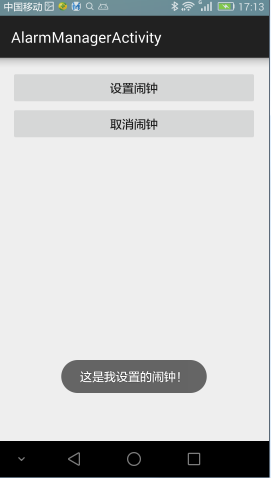
                Toast.makeText(AlarmManagerActivity.this,"这是我设置的闹钟!",Toast.LENGTH_LONG).show();

            }

        }

    };

    @Override

    protected void onDestroy() {

        super.onDestroy();

        unregisterReceiver(receiver);

    }

}
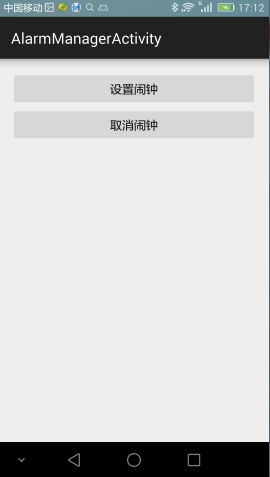
运行效果图如下:
出处:http://www.cnblogs.com/jerehedu/
版权声明:本文版权归烟台杰瑞教育科技有限公司和博客园共有,欢迎转载,但未经作者同意必须保留此段声明,且在文章页面明显位置给出原文连接,否则保留追究法律责任的权利。
技术咨询:

Android之AlarmManager的更多相关文章
- Android中AlarmManager使用示例(持续更新,已经更改)
现在普遍的手机都会有一个闹钟的功能,如果使用Android来实现一个闹钟可以使用AtarmManager来实现.AtarmManager提供了一种系统级的提示服务,允许你安排在将来的某个时间执行一个服 ...
- Android闹钟 AlarmManager的使用
Android闹钟 AlarmManager的使用 AlarmManager介绍 AlarmManager这个类提供对系统闹钟服务的访问接口. 你可以为你的应用设定一个在未来某个时间唤醒的功能. 当闹 ...
- Android 的 AlarmManager 和 wakeLock联合使用
http://stackoverflow.com/questions/6864712/android-alarmmanager-not-waking-phone-up 主要说的是,对于android ...
- Android 开发 AlarmManager 定时器
介绍 AlarmManager是Android中常用的一种系统级别的提示服务,在特定的时刻为我们广播一个指定的Intent.简单的说就是我们设定一个时间,然后在该时间到来时,AlarmManager为 ...
- 我的Android进阶之旅------>Android使用AlarmManager全局定时器实现定时更换壁纸
该DEMO将会通过AlarmManager来周期的调用ChangeService,从而让系统实现定时更换壁纸的功能. 更换壁纸的API为android.app.WallpaperManager,它提供 ...
- Android利用AlarmManager执行定时任务
Android中的AlarmManager功能很强大,它是一个全局定时器,可以在指定时间或者指定周期启动其他组件(包括Activity.Service.BroadcastReceiver). 使用Al ...
- android 定时器AlarmManager
1.android中通常是使用AlarmManager来定时启动一个单次或重复多次操作的.具体的说就是我们通过AlarmManager设定一个时间和注册一个intent到系统中,然后在该时间到来时,系 ...
- android 通过AlarmManager实现守护进程
场景:在app崩溃或手动退出或静默安装后能够自动重启应用activity 前提:得到系统签名 platform.pk8.platform.x509.pem及signapk.jar 三个文件缺一不可(系 ...
- 深入学习android之AlarmManager
对应AlarmManage有一个AlarmManagerServie服务程 序,该服务程序才是正真提供闹铃服务的,它主要维护应用程序注册下来的各类闹铃并适时的设置即将触发的闹铃给闹铃设备(在系统中,l ...
- android之AlarmManager 全局定时器
AlarmManager实质是一个全局的定时器,是Android中常用的一种系统级别的提示服务,在指定时间或周期性启动其它组件(包括Activity,Service,BroadcastReceiver ...
随机推荐
- CodeForces528A (STLset)
题面 CodeForces 题解 横着切和竖着切是互相不影响的. 假设现在横着切成了很多段,显然此时面积最大的矩形的一边长就是这些段中长度最长的一段.竖着切的也是一样的. 所以就可以用\(set\)来 ...
- 2018用IDEA搭建SSM框架(Spring+SpringMVC+Mybatis)
使用IDEA搭建ssm框架 环境 工具:IDEA 2018.1 jdk版本:jdk1.8.0_171 Maven版本:apache-maven-3.5.3 Tomcat版本:apache-tomcat ...
- tkinter-clock实例
模仿着前辈的脚步,画了个临时的时钟显示: 代码如下: # coding:utf-8 from tkinter import * import math,time global List global ...
- [BZOJ5291][BJOI2018]链上二次求和(线段树)
感觉自己做的麻烦了,但常数似乎不算差.(只是Luogu最慢的点不到2s本地要跑10+s) 感觉我的想法是最自然的,但不明白为什么网上似乎找不到这种做法.(不过当然所有的做法都是分类大讨论,而我的方法手 ...
- bzoj 4408: [Fjoi 2016]神秘数 数学 可持久化线段树 主席树
https://www.lydsy.com/JudgeOnline/problem.php?id=4299 一个可重复数字集合S的神秘数定义为最小的不能被S的子集的和表示的正整数.例如S={1,1,1 ...
- [BZOJ 4809] 相逢是问候
Link: 传送门 Solution: 以前没见过的套路题…… 1.使用EXT欧拉定理降幂的套路: $a^{x}=a^{xmod\phi(P)+\phi(P)} mod P$,且$x\ge P$ 这样 ...
- Educational Codeforces Round 44 (Rated for Div. 2)
题目链接:https://codeforces.com/contest/985 ’A.Chess Placing 题意:给了一维的一个棋盘,共有n(n必为偶数)个格子.棋盘上是黑白相间的.现在棋盘上有 ...
- BZOJ 1174 [Balkan2007]Toponyms(Trie)
[题目链接] http://www.lydsy.com/JudgeOnline/problem.php?id=1174 [题目大意] 选出一些字符串,使得字符串的最长公共前缀*字符串的总个数最大化 [ ...
- 【漏洞预警】方程式又一波大规模 0day 攻击泄漏,微软这次要血崩
一大早起床是不是觉得阳光明媚岁月静好?然而网络空间刚刚诞生了一波核弹级爆炸!Shadow Brokers再次泄露出一份震惊世界的机密文档,其中包含了多个精美的 Windows 远程漏洞利用工具,可以覆 ...
- Windows安装绿色版git管理软件GitStack 2.3.8
1.原来 GitStack 是安装在局域网的,为了更好开展工作,迁移到公网的服务器.(安全性未知) 2.公网服务器已经在运行一个 Apache 2.4 (占用80端口): 3.GitStack 2. ...