
Python之paramiko模块和SQL连接API
堡垒机前戏
开发堡垒机之前,先来学习Python的paramiko模块,该模块机遇SSH用于连接远程服务器并执行相关操作
SSHClient
用于连接远程服务器并执行基本命令
基于用户名密码连接:
import paramiko

# 创建SSH对象

ssh = paramiko.SSHClient()

# 允许连接不在know_hosts文件中的主机

ssh.set_missing_host_key_policy(paramiko.AutoAddPolicy())

# 连接服务器

ssh.connect(hostname='c1.salt.com', port=22, username='weibinf', password='')

# 执行命令

stdin, stdout, stderr = ssh.exec_command('df')

# 获取命令结果

result = stdout.read()

# 关闭连接

ssh.close()
import paramiko

transport = paramiko.Transport(('hostname', 22))

transport.connect(username='wupeiqi', password='')

ssh = paramiko.SSHClient()

ssh._transport = transport

stdin, stdout, stderr = ssh.exec_command('df')

print stdout.read()

transport.close()
SSHClient 封装 Transport
基于公钥密钥连接:
import paramiko

private_key = paramiko.RSAKey.from_private_key_file('/home/auto/.ssh/id_rsa')

# 创建SSH对象

ssh = paramiko.SSHClient()

# 允许连接不在know_hosts文件中的主机

ssh.set_missing_host_key_policy(paramiko.AutoAddPolicy())

# 连接服务器

ssh.connect(hostname='c1.salt.com', port=22, username='weibinf', key=private_key)

# 执行命令

stdin, stdout, stderr = ssh.exec_command('df')

# 获取命令结果

result = stdout.read()

# 关闭连接

ssh.close()
import paramiko

private_key = paramiko.RSAKey.from_private_key_file('/home/auto/.ssh/id_rsa')

transport = paramiko.Transport(('hostname', 22))

transport.connect(username='weibinf', pkey=private_key)

ssh = paramiko.SSHClient()

ssh._transport = transport

stdin, stdout, stderr = ssh.exec_command('df')

transport.close()
SSHClient 封装 Transport
SFTPClient
用于连接远程服务器并执行上传下载
基于用户名密码上传下载
import paramiko

transport = paramiko.Transport(('hostname',22))

transport.connect(username='weibinf',password='')

sftp = paramiko.SFTPClient.from_transport(transport)

# 将location.py 上传至服务器 /tmp/test.py

sftp.put('/tmp/location.py', '/tmp/test.py')

# 将remove_path 下载到本地 local_path

sftp.get('remove_path', 'local_path')

transport.close()
基于公钥密钥上传下载
import paramiko

private_key = paramiko.RSAKey.from_private_key_file('/home/auto/.ssh/id_rsa')

transport = paramiko.Transport(('hostname', 22))

transport.connect(username='weibinf', pkey=private_key )

sftp = paramiko.SFTPClient.from_transport(transport)

# 将location.py 上传至服务器 /tmp/test.py

sftp.put('/tmp/location.py', '/tmp/test.py')

# 将remove_path 下载到本地 local_path

sftp.get('remove_path', 'local_path')

transport.close()
堡垒机的实现
实现思路:
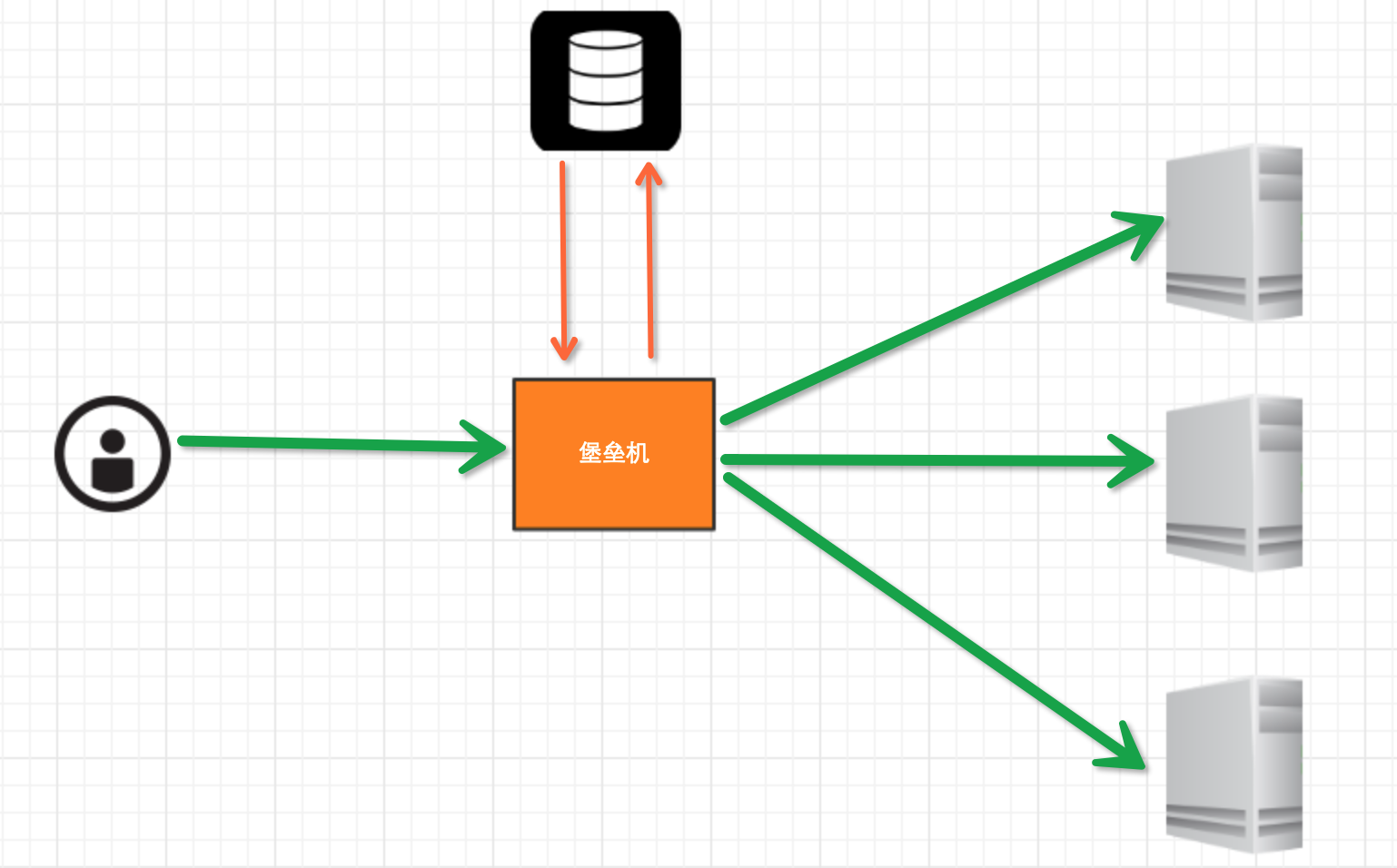
堡垒机执行流程:
- 管理员为用户在服务器上创建账号(将公钥放置服务器,或者使用用户名密码)
- 用户登陆堡垒机,输入堡垒机用户名密码,现实当前用户管理的服务器列表
- 用户选择服务器,并自动登陆
- 执行操作并同时将用户操作记录
注:配置.brashrc实现ssh登陆后自动执行脚本,如:/usr/bin/python /home/weibinf/menu.py
实现过程
步骤一,实现用户登陆
import getpass

user = raw_input('username:')

pwd = getpass.getpass('password')

if user == 'weibinf' and pwd == '':

    print '登陆成功'

else:

    print '登陆失败'
步骤二,根据用户获取相关服务器列表
dic = {

    'weibinf': [

        '172.16.103.189',

        'c10.puppet.com',

        'c11.puppet.com',

    ],

    'xs': [

        'c100.puppet.com',

    ]

}

host_list = dic['weibinf']

print 'please select:'

for index, item in enumerate(host_list, 1):

    print index, item

inp = raw_input('your select (No):')

inp = int(inp)

hostname = host_list[inp-1]

port = 22
步骤三,根据用户名、私钥登陆服务器
tran = paramiko.Transport((hostname, port,))

tran.start_client()

default_path = os.path.join(os.environ['HOME'], '.ssh', 'id_rsa')

key = paramiko.RSAKey.from_private_key_file(default_path)

tran.auth_publickey('wupeiqi', key)

# 打开一个通道

chan = tran.open_session()

# 获取一个终端

chan.get_pty()

# 激活器

chan.invoke_shell()

#########

# 利用sys.stdin,肆意妄为执行操作

# 用户在终端输入内容,并将内容发送至远程服务器

# 远程服务器执行命令,并将结果返回

# 用户终端显示内容

#########

chan.close()

tran.close()
while True:

    # 监视用户输入和服务器返回数据

    # sys.stdin 处理用户输入

    # chan 是之前创建的通道,用于接收服务器返回信息

    readable, writeable, error = select.select([chan, sys.stdin, ],[],[],1)

    if chan in readable:

        try:

            x = chan.recv(1024)

            if len(x) == 0:

                print '\r\n*** EOF\r\n',

                break

            sys.stdout.write(x)

            sys.stdout.flush()

        except socket.timeout:

            pass

    if sys.stdin in readable:

        inp = sys.stdin.readline()

        chan.sendall(inp)
Linux连接方式一
# 获取原tty属性

oldtty = termios.tcgetattr(sys.stdin)

try:

    # 为tty设置新属性

    # 默认当前tty设备属性:

    #   输入一行回车,执行

    #   CTRL+C 进程退出,遇到特殊字符,特殊处理。

    # 这是为原始模式,不认识所有特殊符号

    # 放置特殊字符应用在当前终端,如此设置,将所有的用户输入均发送到远程服务器

    tty.setraw(sys.stdin.fileno())

    chan.settimeout(0.0)

    while True:

        # 监视 用户输入 和 远程服务器返回数据(socket)

        # 阻塞,直到句柄可读

        r, w, e = select.select([chan, sys.stdin], [], [], 1)

        if chan in r:

            try:

                x = chan.recv(1024)

                if len(x) == 0:

                    print '\r\n*** EOF\r\n',

                    break

                sys.stdout.write(x)

                sys.stdout.flush()

            except socket.timeout:

                pass

        if sys.stdin in r:

            x = sys.stdin.read(1)

            if len(x) == 0:

                break

            chan.send(x)

finally:

    # 重新设置终端属性

    termios.tcsetattr(sys.stdin, termios.TCSADRAIN, oldtty)
Linux连接方式二
def windows_shell(chan):

    import threading

    sys.stdout.write("Line-buffered terminal emulation. Press F6 or ^Z to send EOF.\r\n\r\n")

    def writeall(sock):

        while True:

            data = sock.recv(256)

            if not data:

                sys.stdout.write('\r\n*** EOF ***\r\n\r\n')

                sys.stdout.flush()

                break

            sys.stdout.write(data)

            sys.stdout.flush()

    writer = threading.Thread(target=writeall, args=(chan,))

    writer.start()

    try:

        while True:

            d = sys.stdin.read(1)

            if not d:

                break

            chan.send(d)

    except EOFError:

        # user hit ^Z or F6

        pass

肆意妄为方式三
Windows连接方式
注:密码验证 t.auth_password(username, pw)
详见:paramiko源码demo
数据库操作
Python 操作 Mysql 模块的安装
linux:

    yum install MySQL-python

window:

    http://files.cnblogs.com/files/wupeiqi/py-mysql-win.zip
SQL基本使用
1、数据库操作
show databases;

use [databasename];

create database  [name];
2、数据表操作
show tables;

create table students

    (

        id int  not null auto_increment primary key,

        name char(8) not null,

        sex char(4) not null,

        age tinyint unsigned not null,

        tel char(13) null default "-"

    );
CREATE TABLE `wb_blog` (

    `id` smallint(8) unsigned NOT NULL,

    `catid` smallint(5) unsigned NOT NULL DEFAULT '',

    `title` varchar(80) NOT NULL DEFAULT '',

    `content` text NOT NULL,

    PRIMARY KEY (`id`),

    UNIQUE KEY `catename` (`catid`)

) ;
数据库插入表
3、数据操作
insert into students(name,sex,age,tel) values('alex','man',18,'')

delete from students where id =2;

update students set name = 'sb' where id =1;

select * from students
4、其他
主键

外键

左右连接
Python MySQL API
一、插入数据
import MySQLdb

conn = MySQLdb.connect(host='127.0.0.1',user='root',passwd='',db='mydb')

cur = conn.cursor()

reCount = cur.execute('insert into UserInfo(Name,Address) values(%s,%s)',('weibinf','usa'))

conn.commit()

cur.close()

conn.close()

print reCount
import MySQLdb

conn = MySQLdb.connect(host='127.0.0.1',user='root',passwd='',db='mydb')

cur = conn.cursor()

li =[

     ('weibinf','usa'),

     ('xs','usa'),

]

reCount = cur.executemany('insert into UserInfo(Name,Address) values(%s,%s)',li)

conn.commit()

cur.close()

conn.close()

print reCount

批量插入数据
批量插入数据
注意:cur.lastrowid
二、删除数据
import MySQLdb

conn = MySQLdb.connect(host='127.0.0.1',user='root',passwd='',db='mydb')

cur = conn.cursor()

reCount = cur.execute('delete from UserInfo')

conn.commit()

cur.close()

conn.close()

print reCount
三、修改数据
import MySQLdb

conn = MySQLdb.connect(host='127.0.0.1',user='root',passwd='',db='mydb')

cur = conn.cursor()

reCount = cur.execute('update UserInfo set Name = %s',('alin',))

conn.commit()

cur.close()

conn.close()

print reCount
四、查数据
# ############################## fetchone/fetchmany(num)  ##############################

import MySQLdb

conn = MySQLdb.connect(host='127.0.0.1',user='root',passwd='',db='mydb')

cur = conn.cursor()

reCount = cur.execute('select * from UserInfo')

print cur.fetchone()

print cur.fetchone()

cur.scroll(-1,mode='relative')

print cur.fetchone()

print cur.fetchone()

cur.scroll(0,mode='absolute')

print cur.fetchone()

print cur.fetchone()

cur.close()

conn.close()

print reCount

# ############################## fetchall  ##############################

import MySQLdb

conn = MySQLdb.connect(host='127.0.0.1',user='root',passwd='',db='mydb')

#cur = conn.cursor(cursorclass = MySQLdb.cursors.DictCursor)

cur = conn.cursor()

reCount = cur.execute('select Name,Address from UserInfo')

nRet = cur.fetchall()

cur.close()

conn.close()

print reCount

print nRet

for i in nRet:

    print i[0],i[1]
参考:http://www.cnblogs.com/wupeiqi/articles/5095821.html
Python之paramiko模块和SQL连接API的更多相关文章
- 使用python的Paramiko模块登陆SSH
使用python的Paramiko模块登陆SSH paramiko是用Python语言写的一个模块,遵循SSH2协议,支持以加密和认证的方式,进行远程服务器的连接. python的paramiko模块 ...
- (转)python的paramiko模块
python的paramiko模块 原文:http://www.cnblogs.com/breezey/p/6663546.html paramiko是用python语言写的一个模块,遵循S ...
- Python之paramiko模块
今天我们来了解一下python的paramiko模块 paramiko是python基于SSH用于远程服务器并执行相应的操作. 我们先在windows下安装paramiko 1.cmd下用pip安装p ...
- 利用python 下paramiko模块无密码登录
利用python 下paramiko模块无密码登录 上次我个大家介绍了利用paramiko这个模块,可以模拟ssh登陆远程服务器,并且可以返回执行的命令结果,这次给大家介绍下如何利用已经建立的密钥 ...
- python的paramiko模块
paramiko是用python语言写的一个模块,遵循SSH2协议,支持以加密和认证的方式,进行远程服务器的连接.paramiko支持Linux, Solaris, BSD, MacOS X, ...
- python的paramiko模块的安装与使用
一:简介 paramiko是用python语言写的一个模块,遵循SSH2协议,支持以加密和认证的方式,进行远程服务器的连接. 由于使用的是python这样的能够跨平台运行的语言,所以所有python支 ...
- Python修改paramiko模块开发运维审计保垒机
目前市面上,专门做IT审计堡垒机的厂商有很多,他们的产品都有一个特点,那就是基本上每台的售价都在20万以上.像我们做技术的,不可能每次待的公司都是大公司,那么在小公司,是不太可能投资20多万买一台硬件 ...
- python(paramiko模块的简单使用)
#通过paramiko模块连接主机运行bash命令 import paramiko hostname = '192.168.88.31' port = 22 username = 'root' pas ...
- python paramiko模块:远程连接服务器
1. SFTP基于 用户名密码 登录服务器,实现上传下载: import paramiko transport = paramiko.Transport(()) # 生成trasport,配置主机名 ...
随机推荐
- 20162328蔡文琛 week10 大二
20162328 2017-2018-1 <程序设计与数据结构>第十周学习总结 教材学习内容总结 理解图与有向图.无向图 理解带权图 会应用带权图 理解图的广度优先遍历和深度优先遍历 掌握 ...
- Sprint10
进展:设置事件提醒部分已经完成,接下来是实现完成后在添加主界面显示已添加的事件及时间,并可设置可用与不可用.
- matconvnet编译
1.安装matconvnet 网上教程很多 2.编译 cd matconvnet/ addpath matlab/ vl_compilenn('enableGpu',true,'cudaRoot',' ...
- Head First Java & 异常
- mac下使用marsedit写博客
在Windows习惯了使用Windows live write写好博客,然后发布上去,到了mac下,发现了一个很好的替代品 MarseEdit 下载安装后,打开出现如下解码,选择 I already ...
- 作死实验,删除libc.so.6
参考https://www.cnblogs.com/fjping0606/p/4551475.html https://www.cnblogs.com/weijing24/p/5890031.html ...
- 远程修改VMware ESXi服务器的密码(SSH)
1,用vSphere client登录到服务器,将SSH启用. 2,使用ssh连接工具(我用的是secureCRT)远程登录,输入passwd,键入两次新密码,OK.
- (一)Jmeter 简单的录制
JMeter介绍 1.JMeter,一个100%的纯Java桌面应用,它是Apache组织的开放源代码项目,它是功能和性能测试的工具.JMeter可以用于测试静态或者动态资源的性能(文件.Servle ...
- Python高级特性:Python迭代、生成器、列表生成式
迭代 给定一个list或tuple,我们可以通过for循环来遍历这个list或tuple,这种遍历称为迭代(Iteration). 在java和C语言中,迭代是通过循环list的下标来完成的,Pyth ...
- Java并发编程之线程安全、线程通信
Java多线程开发中最重要的一点就是线程安全的实现了.所谓Java线程安全,可以简单理解为当多个线程访问同一个共享资源时产生的数据不一致问题.为此,Java提供了一系列方法来解决线程安全问题. syn ...