
IOS项目之弹出动画一
小区宝首页导航栏左边有一个物业按钮,点击时会出现一个视图动画,之前用的是一个POP第三方,想着几个POP动画就要引用一堆的第三方有点麻烦,就试着自己写了一下,功能实现了,下一步就是优化将其封装一下。下面我用DatePicker做的主要是想着再做出点击弹出按钮在底部出现DatePicker选择器。


#import "ViewController.h"
#import "PageViewController.h"
#import "myView.h"

@interface ViewController ()
@property(nonatomic,strong) myView *myview;
@property(nonatomic,strong) UIDatePicker *dataPicker;
@end

@implementation ViewController

- (void)viewDidLoad {
    [super viewDidLoad];
//    self.navigationItem.rightBarButtonItem=[[UIBarButtonItem alloc]initWithTitle:@"预览" style:UIBarButtonItemStyleDone target:self action:@selector(rightClick)];
    self.navigationItem.leftBarButtonItem=[[UIBarButtonItem alloc]initWithTitle:@"弹出" style:UIBarButtonItemStyleDone target:self action:@selector(leftClick)];

    //遮罩层
    _myview=[[myView alloc]initWithFrame:CGRectMake(,-self.view.bounds.size.height, self.view.bounds.size.width, self.view.bounds.size.height)];
    _myview.backgroundColor = [UIColor colorWithWhite:0.5 alpha:0.1f];
    //为遮罩层添加手势识别 可以点击遮罩层空白处隐藏视图
    UIGestureRecognizer *tapgesture=[[UITapGestureRecognizer alloc]initWithTarget:self action:@selector(tapclick)];
    _myview.userInteractionEnabled=YES;
    [_myview addGestureRecognizer:tapgesture];

    //设置DatePicker
    _dataPicker=[[UIDatePicker alloc]init];
    _dataPicker.frame=CGRectMake(, , , );
//    datepicker.backgroundColor=[UIColor grayColor];
    [_myview addSubview:_dataPicker];

    //设置DatePicker上面的视图
    UIView *view=[[UIView alloc]initWithFrame:CGRectMake(, , self.view.bounds.size.width, )];
    view.backgroundColor=[UIColor blueColor];
    UIButton *btnright=[UIButton buttonWithType:UIButtonTypeSystem];
    [btnright setTitle:@"确定" forState:UIControlStateNormal];
    [btnright addTarget:self action:@selector(btnrightClick:) forControlEvents:UIControlEventTouchUpInside];
    btnright.frame=CGRectMake(self.view.bounds.size.width-, , , );
    [view addSubview:btnright];
    [_myview addSubview:view];
    [self.view addSubview:_myview];
}
-(void)leftClick
{
    //下落动画 时间短一些
   [UIView beginAnimations:@"text" context:nil];
    [UIView setAnimationDelay:];
    [UIView setAnimationCurve:UIViewAnimationCurveEaseInOut];
    [UIView setAnimationDuration:0.3];
    _myview.frame=CGRectMake(,, self.view.bounds.size.width, self.view.bounds.size.height);
    [UIView commitAnimations];

    //恢复动画 时间长一些
    [UIView beginAnimations:@"text" context:nil];
    [UIView setAnimationDelay:];
    [UIView setAnimationCurve:UIViewAnimationCurveEaseIn];
    [UIView setAnimationDuration:0.5];
    _myview.frame=CGRectMake(,, self.view.bounds.size.width, self.view.bounds.size.height);
    [UIView commitAnimations];

}
-(void)tapclick
{
    [UIView beginAnimations:@"text" context:nil];
    [UIView setAnimationDelay:];
    [UIView setAnimationCurve:UIViewAnimationCurveEaseOut];
    [UIView setAnimationDuration:0.3];
    _myview.frame=CGRectMake(, -self.view.bounds.size.height, self.view.bounds.size.width, self.view.bounds.size.height);
    [UIView commitAnimations];
}
-(void)btnrightClick:(id)sender
{
    NSLog(@"%@",_dataPicker.date);
    [self tapclick];
}
- (void)didReceiveMemoryWarning {
    [super didReceiveMemoryWarning];
    // Dispose of any resources that can be recreated.
}

@end
我们稍加改动就可以变成从底部弹出视图 这样就完成了闪购模块 宝贝详情中的选择规格的功能
#import "ViewController.h"
#import "PageViewController.h"
#import "myView.h"

@interface ViewController ()
@property(nonatomic,strong) myView *myview;
@property(nonatomic,strong) UIDatePicker *dataPicker;
@end

@implementation ViewController

- (void)viewDidLoad {
    [super viewDidLoad];
//    self.navigationItem.rightBarButtonItem=[[UIBarButtonItem alloc]initWithTitle:@"预览" style:UIBarButtonItemStyleDone target:self action:@selector(rightClick)];
    self.navigationItem.leftBarButtonItem=[[UIBarButtonItem alloc]initWithTitle:@"弹出" style:UIBarButtonItemStyleDone target:self action:@selector(leftClick)];

    //遮罩层
    _myview=[[myView alloc]initWithFrame:CGRectMake(,self.view.bounds.size.height, self.view.bounds.size.width, self.view.bounds.size.height)];
    _myview.backgroundColor = [UIColor colorWithWhite:0.5 alpha:0.1f];
    //为遮罩层添加手势识别 可以点击遮罩层空白处隐藏视图
    UIGestureRecognizer *tapgesture=[[UITapGestureRecognizer alloc]initWithTarget:self action:@selector(tapclick)];
    _myview.userInteractionEnabled=YES;
    [_myview addGestureRecognizer:tapgesture];

    //设置DatePicker
    _dataPicker=[[UIDatePicker alloc]init];
    _dataPicker.frame=CGRectMake(, self.view.bounds.size.height-, , );
//    datepicker.backgroundColor=[UIColor grayColor];
    [_myview addSubview:_dataPicker];

    //设置DatePicker上面的视图
    UIView *view=[[UIView alloc]initWithFrame:CGRectMake(, self.view.bounds.size.height-, self.view.bounds.size.width, )];
    view.backgroundColor=[UIColor blueColor];
    UIButton *btnright=[UIButton buttonWithType:UIButtonTypeSystem];
    [btnright setTitle:@"确定" forState:UIControlStateNormal];
    [btnright addTarget:self action:@selector(btnrightClick:) forControlEvents:UIControlEventTouchUpInside];
    btnright.frame=CGRectMake(self.view.bounds.size.width-, , , );
    [view addSubview:btnright];
    [_myview addSubview:view];
    [self.view addSubview:_myview];
}
-(void)leftClick
{
    //下落动画 时间短一些
   [UIView beginAnimations:@"text" context:nil];
    [UIView setAnimationDelay:];
    [UIView setAnimationCurve:UIViewAnimationCurveEaseInOut];
    [UIView setAnimationDuration:0.3];
    _myview.frame=CGRectMake(,, self.view.bounds.size.width, self.view.bounds.size.height);
    [UIView commitAnimations];

//    //恢复动画 时间长一些
//    [UIView beginAnimations:@"text" context:nil];
//    [UIView setAnimationDelay:0];
//    [UIView setAnimationCurve:UIViewAnimationCurveEaseIn];
//    [UIView setAnimationDuration:0.5];
//    _myview.frame=CGRectMake(0,0, self.view.bounds.size.width, self.view.bounds.size.height);
//    [UIView commitAnimations];

}
-(void)tapclick
{
    [UIView beginAnimations:@"text" context:nil];
    [UIView setAnimationDelay:];
    [UIView setAnimationCurve:UIViewAnimationCurveEaseOut];
    [UIView setAnimationDuration:0.3];
    _myview.frame=CGRectMake(, self.view.bounds.size.height, self.view.bounds.size.width, self.view.bounds.size.height);
    [UIView commitAnimations];
}
-(void)btnrightClick:(id)sender
{
    NSLog(@"%@",_dataPicker.date);
    [self tapclick];
}
- (void)didReceiveMemoryWarning {
    [super didReceiveMemoryWarning];
    // Dispose of any resources that can be recreated.
}

@end
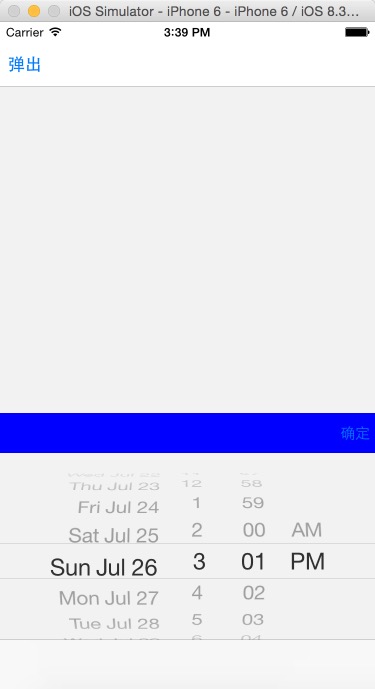
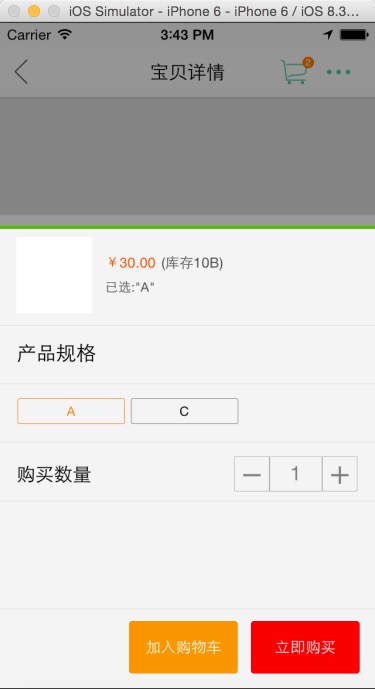
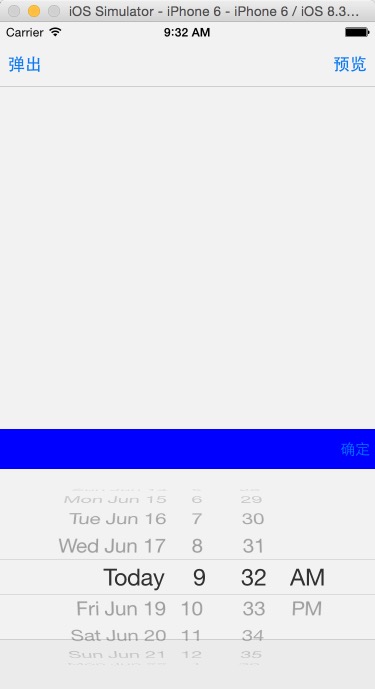
上面的导航控制器并未被遮罩 ,这样添加时才能使导航控制器遮罩[[UIApplication sharedApplication].keyWindow addSubview:_myview];
//
//  ViewController.m
//  PhotoBrower
//
//  Created by City--Online on 15/6/16.
//  Copyright (c) 2015年 City--Online. All rights reserved.
//
#define WIDTH self.view.bounds.size.width
#define HEIGHT self.view.bounds.size.height
#define SCREENWIDTH  [UIScreen mainScreen].bounds.size.width
#define SCREENHEIGHT [UIScreen mainScreen].bounds.size.height

#import "ViewController.h"
#import "PageViewController.h"
#import "ImageViewController.h"
#import "myView.h"

@interface ViewController ()
@property(nonatomic,strong) myView *myview;
@property(nonatomic,strong) UIDatePicker *dataPicker;
@end

@implementation ViewController

- (void)viewDidLoad {
    [super viewDidLoad];

//    self.navigationItem.rightBarButtonItem=[[UIBarButtonItem alloc]initWithTitle:@"预览" style:UIBarButtonItemStyleDone target:self action:@selector(rightClick)];
    self.navigationItem.leftBarButtonItem=[[UIBarButtonItem alloc]initWithTitle:@"弹出" style:UIBarButtonItemStyleDone target:self action:@selector(leftClick)];

    //遮罩层
    _myview=[[myView alloc]initWithFrame:CGRectMake(,SCREENHEIGHT, WIDTH, SCREENHEIGHT)];
    _myview.backgroundColor = [UIColor colorWithWhite:0.5 alpha:0.1f];
    //为遮罩层添加手势识别 可以点击遮罩层空白处隐藏视图
    UIGestureRecognizer *tapgesture=[[UITapGestureRecognizer alloc]initWithTarget:self action:@selector(tapclick)];
    _myview.userInteractionEnabled=YES;
    [_myview addGestureRecognizer:tapgesture];

    //设置DatePicker
    _dataPicker=[[UIDatePicker alloc]init];
    _dataPicker.frame=CGRectMake(, SCREENHEIGHT-, , );
    //    datepicker.backgroundColor=[UIColor grayColor];
    [_myview addSubview:_dataPicker];

    //设置DatePicker上面的视图
    UIView *view=[[UIView alloc]initWithFrame:CGRectMake(, SCREENHEIGHT-, WIDTH, )];
    view.backgroundColor=[UIColor blueColor];
    UIButton *btnright=[UIButton buttonWithType:UIButtonTypeSystem];
    [btnright setTitle:@"确定" forState:UIControlStateNormal];
    [btnright addTarget:self action:@selector(btnrightClick:) forControlEvents:UIControlEventTouchUpInside];
    btnright.frame=CGRectMake(self.view.bounds.size.width-, , , );
    [view addSubview:btnright];
    [_myview addSubview:view];
    [[UIApplication sharedApplication].keyWindow  addSubview:_myview];
//    [self.view addSubview:_myview];
//    [[UIApplication sharedApplication].delegate.window addSubview:_myview];
}
-(void)leftClick
{
    //下落动画 时间短一些
    [UIView beginAnimations:@"text" context:nil];
    [UIView setAnimationDelay:];
    [UIView setAnimationCurve:UIViewAnimationCurveEaseInOut];
    [UIView setAnimationDuration:0.3];
    _myview.frame=CGRectMake(,, self.view.bounds.size.width, SCREENHEIGHT);
    [UIView commitAnimations];

    //恢复动画 时间长一些
//    [UIView beginAnimations:@"text" context:nil];
//    [UIView setAnimationDelay:0];
//    [UIView setAnimationCurve:UIViewAnimationCurveEaseIn];
//    [UIView setAnimationDuration:0.5];
//    _myview.frame=CGRectMake(0,0, self.view.bounds.size.width, self.view.bounds.size.height);
//    [UIView commitAnimations];

//    PageViewController *pageVc=[[PageViewController alloc]init];
//    pageVc.hidesBottomBarWhenPushed=YES;
////    [self presentViewController:pageVc animated:YES completion:nil];
//    [self.navigationController pushViewController:pageVc animated:YES];

}
-(void)tapclick
{
    [UIView beginAnimations:@"text" context:nil];
    [UIView setAnimationDelay:];
    [UIView setAnimationCurve:UIViewAnimationCurveEaseOut];
    [UIView setAnimationDuration:0.3];
    _myview.frame=CGRectMake(, SCREENHEIGHT, self.view.bounds.size.width, SCREENHEIGHT);
    [UIView commitAnimations];
}
-(void)btnrightClick:(id)sender
{
    NSLog(@"%@",_dataPicker.date);
    [self tapclick];
}
- (void)didReceiveMemoryWarning {
    [super didReceiveMemoryWarning];
    // Dispose of any resources that can be recreated.
}
@end
IOS项目之弹出动画一的更多相关文章
- IOS项目之弹出动画终结篇
在之前写过IOS项目之弹出动画一.IOS项目之弹出动画二.IOS项目之弹出动画三,今天来一个终极封装已经上传到Github上弹出动画总结篇UIPopoverTableView. UIPopoverTa ...
- IOS项目之弹出动画二
在IOS项目之弹出动画一中只是实现也功能,并没有体现面向对象的思想 ,今天就试着把它封装了一下,弹出视图的内容可以根据自定义,此处只是用UIDatePicker来演示 我把它传到了GitHub上 ...
- IOS项目之弹出动画三
前面写了弹出动画两个,今天做商城时又用到了,看着这个用着蛮普遍的,所以记了下来 // // mallMoreView.h // XQB // // Created by City--Online on ...
- ios等待ualertview弹出动画完成后再跳转至其他页面
[self performSelector:@selector(popView:) withObject:nil afterDelay:2.0];
- 阶段一:为View设置阴影和弹出动画(天气应用)
“阶段一”是指我第一次系统地学习Android开发.这主要是对我的学习过程作个记录. 上一篇阶段一:通过网络请求,获得并解析JSON数据(天气应用)完成了应用的核心功能,接下来就要对它进行优化.今天我 ...
- mac关闭渐隐和弹出动画效果
苹果系统应用程序的窗口和对话框每次使用的时候都有华丽的特效,但是如果你感觉这种特效显得有点慢(MacGG闲的蛋疼),那该如何取消掉他呢? 方法很简单,打开"终端"(Finder-& ...
- 清除ios系统alert弹出框的域名
清除ios系统alert弹出框的域名 <script> window.alert = function(name) { var iframe = document.createElemen ...
- iOS 15 无法弹出授权弹框之解决方案---Your app uses the AppTrackingTransparency framework, but we are unable to locate the App Tracking Transparency permission request when reviewed on iOS 15.0
2021年9月30日下午:我正愉快的期盼着即将到来的国庆假期,时不时刷新下appstoreconnect的网址,28号就提上去的包,今天还在审核中....由于这个版本刚升级的xcode系统和新出的iO ...
- WPF制作子窗体的弹出动画效果
创建一个WPF应用程序WpfApplication1,新建个窗体DialogWin <Windowx:Class="WpfApplication1.DialogWin" xm ...
随机推荐
- sklearn使用小记GridSearchCV
def test_grid_search(): from sklearn import datasets,svm iris = datasets.load_iris() parameters = {' ...
- ASP.NET控制HTTP缓存
请求 响应 If-Modified-Since Last-Modified If-None-Match ETag 至于Expires和Cache-Control 附上几张高手的图 Etag 在使用 ...
- 数据分析融入至BI工具的新思路
欢迎访问网易云社区,了解更多网易技术产品运营经验. 很认同一种说法:BI对企业的作用不是BI本身,而是数据本身.那么BI的作用和意义是干什么的呢-是让有意义的数据自己说出自己意义的工具. BI发展至今 ...
- 为什么选择AJPFX
外汇贵金属交易市场是全球最大的金融产品市场,日均交易量达到5万亿美元,相当于美国证券市场的40倍,中国股票市场日均交易量的700倍,它的主要优势在于其透明度较高,由于交易量巨大,主力资金(如政府外汇储 ...
- C语言作业03-函数
1.本章学习总结 1.1 思维导图 1.2本章学习体会,代码量学习体会 1.2.1学习体会 通过这几周的函数学习,让我明白了函数的重要性,在很多时候运用函数,会使得代码分工明确,逻辑严密,不繁琐.函数 ...
- Java基础学习篇---------String、集合的学习
一.String常用的方法: 1. == 实质比较两个对象的地址数值 String a = "hello" (hello为匿名对象) String a1 = "hell ...
- 《JAVA与模式》之适配器模式
在阎宏博士的<JAVA与模式>一书中开头是这样描述适配器(Adapter)模式的: 适配器模式把一个类的接口变换成客户端所期待的另一种接口,从而使原本因接口不匹配而无法在一起工作的两个类能 ...
- day 65 crm(2) admin源码解析,以及简单的仿造admin组件
前情提要: crm中的admin组件重写. 一:admin的autodiscover 作用:实现扫面该项目中的所有的admin 1:执行顺序-> 按照注册的顺序执行 二:单例模式 1:普通案例的 ...
- css实现响应式九宫格效果
1. 首先看下九宫格的效果图: 2. html代码比较简单,如下: <div class="main"> <div class="box1"& ...
- 【xsy1232】Magic 最小割
题目大意:给你一个$n$个点,$m$条有向边的图,每个点有一个点权$a_i$,同时你可以用$b_i$的代价将$a_i$变为$0$ 另外你要付出$\sum\limits_{i=1}^n\max\limi ...