
[转] 如何应用设计模式设计你的足球引擎(三和四)----Design Football Game(Part III and IV)
原文地址:http://www.codeproject.com/KB/cpp/applyingpatterns2.aspx
译者:赖勇浩(http://blog.csdn.net/lanphaday )
解决方案架构师:你的进度怎么样?
愚蠢的开发者:是的,我觉得我学会了如何应用 Observer 模式去解决所有问题
解决方案架构师:一个模式解决所有问题?
愚蠢的开发者:啊,还不够么?
介绍
关于本文
本文是这个系列的第二篇文章,在阅读本文之前,你应该已经读过并且理解这个系列的第一篇,题为
- 学习如何应用设计模式设计你的足球引擎(第一、二部分)
在第一篇文章中,我们讨论了
- 什么是模式,如何使用它们
- 如何支持方案应用模式
- 如何用观察者模式来解决我们的足球引擎的设计问题
本文是前一篇文章的延续,在这里我们将讨论
- 第三部分:应用 Strategy 模式解决“球队(Team)”和“球队策略(TeamStrategy)”相关的设计问题
- 第四部分:应用 Decorator 模式来解决“球员(Player)”相关的设计问题
如果你已经不记得这些设计问题,最好翻回第一篇文章去看看再回来继续。
第三部分
Strategy 模式
在这一节我们将深入策略模式,然后我们应用这个模式来解决第二个设计问题。像前一篇文章那样,在这里我们再来回顾一下我们的第二个设计问题。
如何你能够记起,我们的第二个设计问题是:
- 特定的设计问题:在比赛进行时,终端用户能够改变它的球队的策略(如从进攻改为防守)
- 问题泛化:需要客户端(在这里就是球队)使用的算法(球队策略)能够独立改变
如前文所言,当比赛进行时,我们需要改变球队的策略(如从进攻改为防守)。确切来说就是需要从球队分享球队的策略。
我们已知可以利用策略模式来解决上述设计问题,因为它可使客户端(例如球队)使用的算法(例如球队策略)能够独立改变;那么我们来看看如何利用 Strategy 模式来解决这个设计问题。
理解 Strategy 模式
Strategy 模式非常简单,下面是 Strategy 模式的 UML 图:
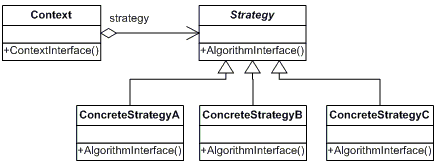
Fig - Strategy Pattern
它包括如何几个部分
- 策略(Strategy)
这是一个算法(策略)的抽象类,所有的具体的算法都派生自它。简单地说,它为所有的具体算法(或具体的策略)提供了一个通用的接口。换言之,如果类 Strategy 有个抽象函数叫 foo(),那么所有具体的策略类都应该重载foo() 函数。
- 具体的策略(ConcreteStrategy)
这个类是我们真正实现算法的地方,或者说,它是类 Strategy 的具体实现。例如 Sort 是实现算法的策略类,而具体的策略可以是 MergeSort 或 QuickSort 等等。
- 上下文(Context)
Context可由一个或多个策略类配置,它通常策略接口访问具体策略对象。
应用 Strategy 模式
现在让我们想想如何用 Strategy 模式来解决问题。
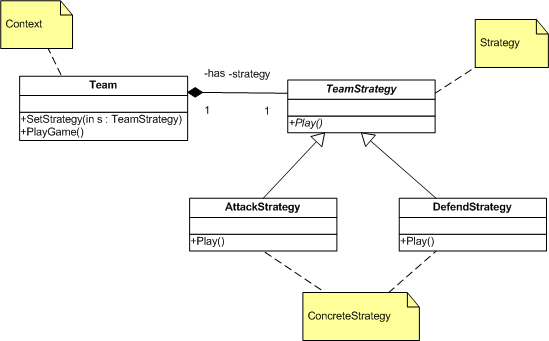
Fig - Solving Our Second Design Problem
类 TeamStrategy 包含 Play 函数,AttackStrategy 和 DefendStrategy 是它的具体实现。Team 包含策略,策略可以根据比赛的形势而改变(例如,在领先了若干个进球后从进攻策略改为防守策略)。当用 Team 的PlayGame 函数时,它会调用当前策略的 Play 函数,这一切马上生效,干净利索。
通过策略模式,就可以从类 Team 中分离算法(例如团队的策略)。
Strategy 模式实现
TeamStrategy (Strategy)
下面是类 TeamStrategy 的代码:
'Strategy: The TeamStrategy class

'This class provides an abstract interface

'to implement concrete strategy algorithms

Public MustInherit Class TeamStrategy

'AlgorithmInterface : This is the interface provided

Public MustOverride Sub Play ()

End Class ' END CLASS DEFINITION TeamStrategy
AttackStrategy (ConcreteStrategy)
下面是类 AttackStrategy 的代码,它派生自 TeamStrategy:
'ConcreteStrategy: The AttackStrategy class

'This class is a concrete implementation of the

'strategy class.

Public Class AttackStrategy

Inherits TeamStrategy

    'Overrides the Play function.

    'Let us play some attacking game

    Public Overrides Sub Play()

        'Algorithm to attack

        System.Console.WriteLine(" Playing in attacking mode")

    End Sub

End Class ' END CLASS DEFINITION AttackStrategy
DefendStrategy (ConcreteStrategy)
下面是类 DefendStrategy 的代码,它也派生自 TeamStrategy:
'ConcreteStrategy: The DefendStrategy class

'This class is a concrete implementation of the

'strategy class.

Public Class DefendStrategy

Inherits TeamStrategy

    'Overrides the Play function.

    'Let us go defensive

    Public Overrides Sub Play()

        'Algorithm to defend

        System.Console.WriteLine(" Playing in defensive mode")

    End Sub

End Class ' END CLASS DEFINITION DefendStrategy
Team (Context)
下面是类 Team 的代码,根据我们的设计,一个球队在同一时间只能有一种策略:
'Context: The Team class

'This class encapsulates the algorithm

Public Class Team

    'Just a variable to keep the name of team

    Private teamName As String

    'A reference to the strategy algorithm to use

    Private strategy As TeamStrategy

    'ContextInterface to set the strategy

    Public Sub SetStrategy(ByVal s As TeamStrategy)

        'Set the strategy

        strategy = s

    End Sub

    'Function to play

    Public Sub PlayGame()

        'Print the team's name

        System.Console.WriteLine(teamName)

        'Play according to the strategy

        strategy.Play()

    End Sub

    'Constructor to create this class, by passing the team's name

    Public Sub New(ByVal teamName As String)

        'Set the team name to use later

        Me.teamName = teamName

    End Sub

End Class ' END CLASS DEFINITION Team
组合起来
创建球队,然后设置它们的策略,并开始比赛。下面的代码颇为简单而且有详细的注释。
'GameEngine class for demonstration

Public Class GameEngine

    Public Shared Sub Main()

        'Let us create a team and set its strategy,

        'and make the teams play the game

        'Create few strategies

        Dim attack As New AttackStrategy()

        Dim defend As New DefendStrategy()

        'Create our teams

        Dim france As New Team("France")

        Dim italy As New Team("Italy")

        System.Console.WriteLine("Setting the strategies..")

        'Now let us set the strategies

        france.SetStrategy(attack)

        italy.SetStrategy(defend)

        'Make the teams start the play

        france.PlayGame()

        italy.PlayGame()

        System.Console.WriteLine()

        System.Console.WriteLine("Changing the strategies..")

        'Let us change the strategies

        france.SetStrategy(defend)

        italy.SetStrategy(attack)

        'Make them play again

        france.PlayGame()

        italy.PlayGame()

        'Wait for a key press

        System.Console.Read()

    End Sub

End Class
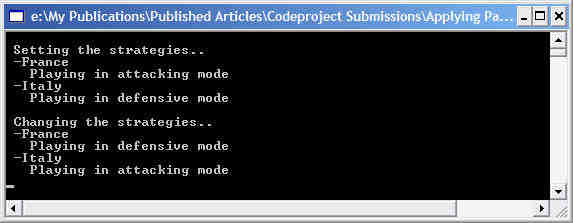
运行
程序运行后的输出如下:
第四部分
Decorator 模式
在这一节我们来讲讲如何应用 Decorator 模式来解决第三个设计问题(如有必要可参考前一篇文章)。这个问题是与球员的运行时职责指派相关的(如前锋、后卫等)。
你可以考虑创建一个球员类,然后基于它派生出类似前锋、中锋和后卫等多个子类。但它并非最好的解决方案,正如我们之前讨论的——一个球员可以在某个时刻是前锋,另一个时刻又变成了中锋。至少,在我们的足球引擎中是这样的,所以这是我们的设计问题。
特定的设计问题:球员拥有额外的职责,如前锋、后卫等,而且可以在运行时切换。
问题泛化:在不使用子类化的情况下,需要能够动态地为对象(在这里是指球员)挂接额外的职责(如前锋、中锋等)。
理解 Decorator 模式
Decorator 模式可以动态地为对象增加职责,是子类化之外的完美之选。下面是 Decorator 模式的 UML 图:
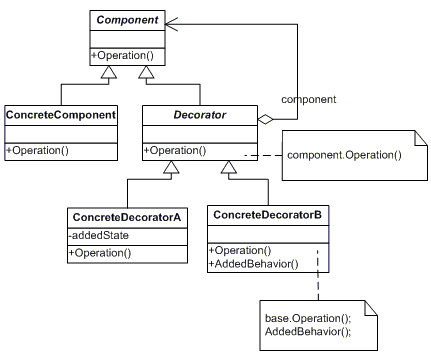
Fig - Decorator Pattern
这个模式由以下部分组成
- 组件(Component)
类 Component 为组件声明了一个抽象接口,我们能够在这些组件上挂接额外的职责。
- 具体的组件(ConcreteComponent)
类 ConcreteComponent 是类 Component 的具体实现,它真正定义了一个能够挂接的额外职责。
- 装饰者(Decorator)
类 Decorator 从类 Component 继承而来,这意味着它继承了组件的所有接口(函数、属性等),而且持有一个从组件类继承下来的对象的引用。其实一个具体的装饰者甚至能够持有其它装饰者的引用(因为类 Decorator 本来就是由类 Component 派生而来)。
- 具体的装饰者(Concrete Decorator)
这个类是真正为组件挂接职责的地方。
应用 Decorator 模式
现在看看如何应用 Decorator 模式来解决与球员相关的设计问题。
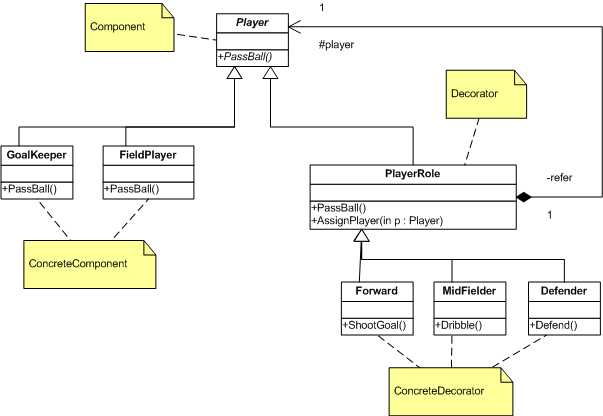
Fig - Solving Our Third Design Problem
可以看到从类 Player 继承两个具体的组件——GoalKeeper 和FieldPlayer,另外还有三个具体的装饰者——Forward、MidFielder和Defender。一个球队有 11 个全场球员和一个守门员(译注:作者写错了,应该是 10个全场球员,后文相同的错误不再指出)。我们的设计问题是需要在运行时指派类似前锋、后卫之类的职责给球员。虽然我们只有 11 全场球员,但可能同时有 11 个前锋和 11 个中锋,因为一个球员可以同时既是前锋又是中锋。通过给球员指派多个角色,和交换它们的角色等,使我们能够规划极佳的比赛策略。
例如可以在比赛的某一时刻通过暂时给一个球员指派 Forward 装饰者,使他可以冲刺和射门。
为具体的组件增加额外的职责,首先可以创建一个具体的组件,然后以引用的形式把它指派给装饰者。比如你可以创建一个全场球员,和一个中锋装饰者,将全场球员指派给中锋装饰者可以为它增加中锋的职责。最后,如果你想,你也可以把同一个球员指派给前锋装饰者。在示例代码中的 GameEngine 模块很好地解释了 Decorator 模式。
下面来看看它的实现,代码都加上了很多注释。
Decorator 模式实现
Player (Component)
类 Player 的实现如下:
' Component: The Player class

Public MustInherit Class Player

    'Just give a name for this player

    Private myName As String

    'The property to get/set the name

    Public Property Name() As String

        Get

            Return myName

        End Get

        Set(ByVal Value As String)

            myName = Value

        End Set

    End Property

    'This is the Operation in the component

    'and this will be overrided by concrete components

    Public MustOverride Sub PassBall()

End Class ' END CLASS DEFINITION Player
FieldPlayer (ConcreteComponent)
下面是类 FieldPlayer 的实现:
' ConcreteComponent : Field Player class

'This is a concrete component. Later, we will add additional responsibilities

'like Forward, Defender etc to a field player.

Public Class FieldPlayer

Inherits Player

    'Operation: Overrides PassBall operation

    Public Overrides Sub PassBall ()

        System.Console.WriteLine(_

          " Fieldplayer ({0}) - passed the ball", _

          MyBase.Name)

    End Sub

    'A constructor to accept the name of the player

    Public Sub New(ByVal playerName As String)

        MyBase.Name = playerName

    End Sub

End Class ' END CLASS DEFINITION FieldPlayer
GoalKeeper (ConcreteComponent)
下面是类 GoalKeeper 的实现:
' ConcreteComponent : GaolKeeper class

'This is a concrete component.

'Later, we can add additional responsibilities

'to this class if required.

Public Class GoalKeeper

Inherits Player

    'Operation: Overriding the base class operation

    Public Overrides Sub PassBall ()

    System.Console.WriteLine(" GoalKeeper " & _

      "({0}) - passed the ball", MyBase.Name)

    End Sub

    'A constructor to accept the name of the player

    Public Sub New(ByVal playerName As String)

        MyBase.Name = playerName

    End Sub

End Class ' END CLASS DEFINITION GoalKeeper
PlayerRole (Decorator)
下面是类 PlayerRole 的实现:
'Decorator: PlayerRole is the decorator

Public Class PlayerRole

Inherits player

    'The reference to the player

    Protected player As player

    'Call the base component's function

    Public Overrides Sub PassBall()

        player.PassBall()

    End Sub

    'This function is used to assign a player to this role

    Public Sub AssignPlayer(ByVal p As player)

        'Keep a reference to the player, to whom this

        'role is given

        player = p

    End Sub

End Class ' END CLASS DEFINITION PlayerRole
Forward (ConcreteDecorator)
下面是类 Forward 的实现:
'ConcreteDecorator: Forward class is a Concrete implementation

'of the PlayerRole (Decorator) class

Public Class Forward

Inherits PlayerRole

    'Added Behavior: This is a responsibility exclusively for the Forward

    Public Sub ShootGoal()

        System.Console.WriteLine(" Forward ({0}) - " & _

          "Shooted the ball to goalpost", _

          MyBase.player.Name)

    End Sub

End Class ' END CLASS DEFINITION Forward
MidFielder (ConcreteDecorator)
下面是类 MidFielder 的实现:
'ConcreteDecorator: MidFielder class is a Concrete implementation

'of the PlayerRole (Decorator) class

Public Class MidFielder

Inherits PlayerRole

    'AddedBehavior: This is a responsibility exclusively for the Midfielder

    '(Don't ask me whether only mid filders can dribble the ball - atleast

    'it is so in our engine)

    Public Sub Dribble()

        System.Console.WriteLine(_

          " Midfielder ({0}) - dribbled the ball", _

          MyBase.player.Name)

    End Sub

End Class ' END CLASS DEFINITION Midfielder
Defender (ConcreteDecorator)
下面是类 Defender 的实现:
'ConcreteDecorator: Defender class is a Concrete implementation

'of the PlayerRole (Decorator) class

Public Class Defender

Inherits PlayerRole

    'Added Behavior: This is a responsibility exclusively for the Defender

    Public Sub Defend()

        System.Console.WriteLine(_

          " Defender ({0}) - defended the ball", _

          MyBase.player.Name)

    End Sub

End Class ' END CLASS DEFINITION Defender
组合起来
'Let us put it together

Public Class GameEngine

Public Shared Sub Main()

    '-- Step 1:

    'Create few players (concrete components)

    'Create few field Players

    Dim owen As New FieldPlayer("Owen")

    Dim beck As New FieldPlayer("Beckham")

    'Create a goal keeper

    Dim khan As New GoalKeeper("Khan")

    '-- Step 2:

    'Just make them pass the ball

    '(during a warm up session ;))

    System.Console.WriteLine()

    System.Console.WriteLine(" > Warm up Session... ")

    owen.PassBall()

    beck.PassBall()

    khan.PassBall()

    '-- Step 3: Create and assign the responsibilities

    '(when the match starts)

    System.Console.WriteLine()

    System.Console.WriteLine(" > Match is starting.. ")

    'Set owen as our first forward

    Dim forward1 As New Forward()

    forward1.AssignPlayer(owen)

    'Set Beckham as our midfielder

    Dim midfielder1 As New MidFielder()

    midfielder1.AssignPlayer(beck)

    'Now, use these players to do actions

    'specific to their roles

    'Owen can pass the ball

    forward1.PassBall()

    'And owen can shoot as well

    forward1.ShootGoal()

    'Beckham can pass ball

    midfielder1.PassBall()

    'Beckham can dribble too

    midfielder1.Dribble()

    ' [ Arrange the above operations to some meaningfull sequence, like

    ' "Beckham dribbled and passed the ball to owen and owen shooted the

    ' goal ;) - just for some fun ]"

    '-- Step 4: Now, changing responsibilities

    '(during a substitution)

    'Assume that owen got injured, and we need a new player

    'to play as our forward1

    System.Console.WriteLine()

    System.Console.WriteLine(" > OOps, Owen " _

       "got injured. " & _

       "Jerrard replaced Owen.. ")

    'Create a new player

    Dim jerrard As New FieldPlayer("Jerrard")

    'Ask Jerrard to play in position of owen

    forward1.AssignPlayer(jerrard)

    forward1.ShootGoal()

    '-- Step 5: Adding multiple responsibilities

    '(When a player need to handle multiple roles)

    'We already have Beckham as our midfielder.

    'Let us ask him to play as an additional forward

    Dim onemoreForward As New Forward()

    onemoreForward.AssignPlayer(beck)

    System.Console.WriteLine()

    System.Console.WriteLine(" > Beckham has " & _

           "multiple responsibilities.. ")

    'Now Beckham can shoot

    onemoreForward.ShootGoal()

    'And use his earlier responsibility to dribble too

    midfielder1.Dribble()

    'According to our design, you can attach the responsibility of

    'a forward to a goal keeper too, but when you actually

    'play football, remember that it is dangerous ;)

    'Wait for key press

    System.Console.Read()

End Sub

End Class
运行
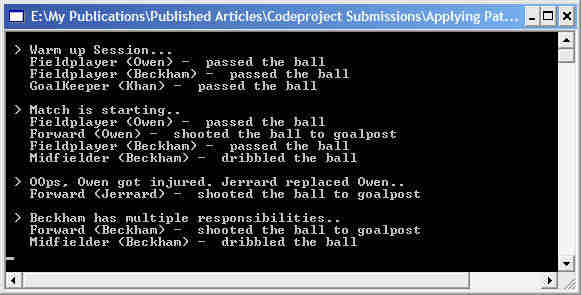
下面是运行程序的输出
结论
在本文中我们讨论了
- 策略模式及其实现
- 装饰模式及其实现
暂时就这么多了。事实上,正是 code project 社区对我前一篇文章的支持才鼓气我的勇气来发表这一篇。谢谢所有人的支持和鼓励!
[转] 如何应用设计模式设计你的足球引擎(三和四)----Design Football Game(Part III and IV)的更多相关文章
- [转] 如何应用设计模式设计你的足球引擎(一和二)----Design Football Game(Part I and II)
原文地址: http://www.codeproject.com/KB/architecture/applyingpatterns.aspx 作者:An 'OOP' Madhusudanan 译者:赖 ...
- 如何一步一步用DDD设计一个电商网站(四)—— 把商品卖给用户
阅读目录 前言 怎么卖 领域服务的使用 回到现实 结语 一.前言 上篇中我们讲述了“把商品卖给用户”中的商品和用户的初步设计.现在把剩余的“卖”这个动作给做了.这里提醒一下,正常情况下,我们的每一步业 ...
- 《Linux内核设计与实现》课本第四章自学笔记——20135203齐岳
<Linux内核设计与实现>课本第四章自学笔记 进程调度 By20135203齐岳 4.1 多任务 多任务操作系统就是能同时并发的交互执行多个进程的操作系统.多任务操作系统使多个进程处于堵 ...
- 设计模式-设计原则(Design Principle)
本文由@呆代待殆原创,转载请注明出处. 写在前面:所谓设计原则并不是一定要遵守的法则,只是一种建议,因为保持这些原则本身会有一定代价,若是这些代价超过了带来的好处就得不偿失了,所以一切还是以简单为准. ...
- Python设计模式——设计原则
1.单一职责原则:每个类都只有一个职责,修改一个类的理由只有一个 2.开放-封闭远程(OCP):开放是指可拓展性好,封闭是指一旦一个类写好了,就尽量不要修改里面的代码,通过拓展(继承,重写等)来使旧的 ...
- JAVA设计模式-设计原则
6大原则: 单一职责原则 里氏替换原则 依赖倒置原则 接口隔离原则 迪米特法则 开闭原则 一.单一职责原则 定义:应该有且仅有一个原因引起类的变更 带来的好处: 类的复杂性降低,实现什么职责有清晰明确 ...
- MVVM设计模式和WPF中的实现(四)事件绑定
MVVM设计模式和在WPF中的实现(四) 事件绑定 系列目录: MVVM模式解析和在WPF中的实现(一)MVVM模式简介 MVVM模式解析和在WPF中的实现(二)数据绑定 MVVM模式解析和在WPF中 ...
- C#进阶系列——MEF实现设计上的“松耦合”(四):构造函数注入
前言:今天十一长假的第一天,本因出去走走,奈何博主最大的乐趣是假期坐在电脑前看各处堵车,顺便写写博客,有点收获也是好的.关于MEF的知识,之前已经分享过三篇,为什么有今天这篇?是因为昨天分享领域服务的 ...
- 《IDEO,设计改变一切》(Change By Design)- 读书笔记
一.关于IDEO与设计思维 IDEO是一家世界顶级创意公司,而作者蒂姆布朗是IDEO的CEO.当然,在未阅读本书之前,我都是不知道的,也不会主动去了解IDEO和蒂姆布朗的.那么,我为什么要去读这样一本 ...
随机推荐
- Socket网络编程(TCP/IP/端口/类)和实例
Socket网络编程(TCP/IP/端口/类)和实例 原文:C# Socket网络编程精华篇 转自:微冷的雨 我们在讲解Socket编程前,先看几个和Socket编程紧密相关的概念: TCP/IP层次 ...
- day 113 爬虫框架
基础配置
- Manacher算法学习笔记
前言 Manacher(也叫马拉车)是一种用于在线性时间内找出字符串中最长回文子串的算法 算法 一般的查找回文串的算法是枚举中心,然后往两侧拓展,看最多拓展出多远.最坏情况下$O(n^2)$ 然而Ma ...
- Tree-669. Trim a Binary Search Tree
Given a binary search tree and the lowest and highest boundaries as L and R, trim the tree so that a ...
- HDU 6198(2017 ACM/ICPC Asia Regional Shenyang Online)
思路:找规律发现这个数是斐波那契第2*k+3项-1,数据较大矩阵快速幂搞定. 快速幂入门第一题QAQ #include <stdio.h> #include <stdlib.h& ...
- MySQL大量线程处于Opening tables的问题分析
[作者] 王栋:携程技术保障中心数据库专家,对数据库疑难问题的排查和数据库自动化智能化运维工具的开发有强烈的兴趣. [问题描述] 最近有一台MySQL5.6.21的服务器,在应用发布后,并发线程Thr ...
- jQuery核心函数的四种不同用法
核心函数根据实参的不同,有四种不同的用法. ①传一个函数作为参数 例如:$(function(){}) 作用:和window.onload = function(){}类似,它会在文档加载完成之后运行 ...
- 多维标度法(MDS)的Python实现
多维标度法(multidimensional scaling,MDS)是一种在低维空间展示“距离”数据结构的多元数据分析技术,是一种将多维空间的研究对象( 样本 或 变量 ) 简化到低维空间进行定位. ...
- 正则中str.match(pattern)与pattern.exec(str)的区别
这两个函数除了调用对象以及参数不同之外,<javascript高级程序设计>中对exec描述比较详细,对match只是说返回数组跟exec一样.书中并没有说只说了正则在非全局模式下的情况, ...
- Javac语法糖之增强for循环
加强的for循环有两种,遍历数组和实现了Iterable接口的容器.javac通过visitForeachLoop()方法来实现解语法糖,代码如下: /** Translate away the fo ...