
基于 Vue BootStrap的迷你Chrome插件
安装
- 安装 Visual Studio Code 和Chrome, 自行翻墙
详细安装这里略过
- 安装包管理工具
用管理员身份运行cmd,输入:
npm install -g bower (全局安装)
创建
- 新建目录brochure 进入目录运行
bower install bootstrap@3 vue axios
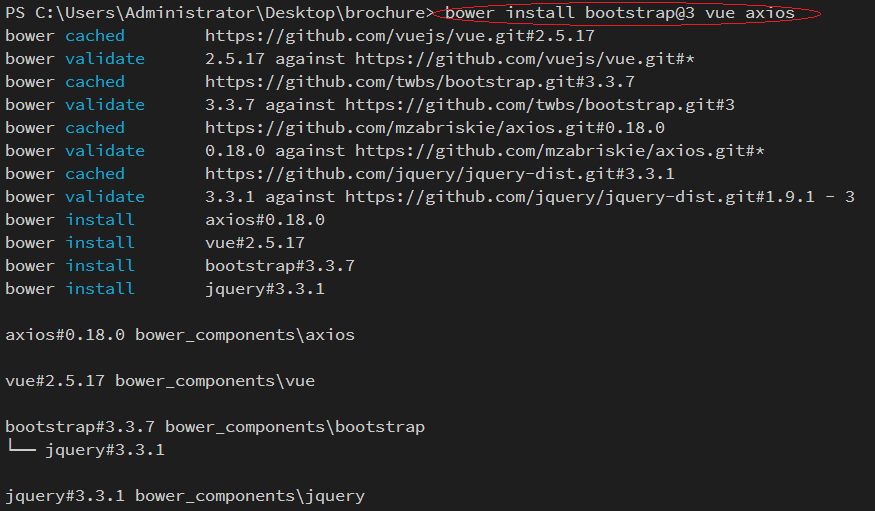
成功!
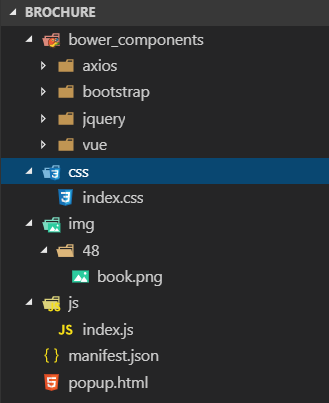
新建 css, js 目录,并在对应的目录下面新建 index.css 和 index.js文件
新建 img 目录,导入图标
新建 manifest.json 写入插件配置
  {

      "manifest_version": 2,

      "name": "发现小册",

      "version": "1.0.0",

      "description": "掘金已发布小册查看插件",

      "icons": {

          "48": "img/48/book.png"

      },

      "browser_action": {

          "default_icon": "img/48/book.png",

          "default_title": "掘金小册查看插件",

          "default_popup": "popup.html" (要与外部的入口的html文件名相同)

      },

      "permissions": [

          "contextMenus",  (在Chrome的右键菜单中增加自己的菜单项)

          "tabs",

          "notifications",

          "webRequest",

          "webRequestBlocking",

          "storage"

      ],

      "content_security_policy": "script-src 'self' 'unsafe-eval'; object-src 'self'",

      "content_scripts": [

          {

              "matches": [

                  "<all_urls>"

              ],

              "js": [

                  "js/index.js"

              ]

          }

      ]

  }
注意 : content_security_policy 简称CSP, 是Chrome扩展引入为了减少XSS的发生, 这里我们要设置 "content_security_policy": "script-src 'self' 'unsafe-eval'; object-src 'self'" ,
不然插件引入的vue没法识别,插件会报错。
新建 popup.html 的项目入口文件
项目基本构建完成
项目目录
代码
index.css 代码
body {

    width: 350px;

    height: 400px;

    overflow-y: scroll;

}

.row {

    border-bottom: .5px solid #e6e8e8;

    padding-bottom: 10px;

    padding-top: 10px;

}

.desc {

    line-height: 20px;

    height: 20px;

    font-size: 12px;

}

.title {

    font-size: 16px;

    font-weight: 600;

    color: #ed7b11;

    margin-top: 0px;

}

.info {

    margin-top: 18px;

}

.author {

    font-weight: blod;

}

.author-desc,

.message,

.buy-number {

    color: #ccc;

}

.price-text {

    color: #ed7b11;

}

span {

    padding: 2px;

}
popup.html 代码
<link rel="stylesheet" href="./bower_components/bootstrap/dist/css/bootstrap.css">

<link rel="stylesheet" href="css/index.css">

<div class="container" id="app"></div>

<script src="./bower_components/vue/dist/vue.js"></script>

<script src="./bower_components/axios/dist/axios.js"></script>

<script src="js/index.js"></script>
数据请求与数据绑定
index.js 添加数据请求
获取数据的地址为第三方的数据地址,第一页数据:https://xiaoce-timeline-api-ms.juejin.im/v1/getListByLastTime?uid=&client_id=&token=&src=web&alias=&pageNum=1
var vm = new Vue({

    el: '#app',

    data: {

        infoList: []

    },

    created() {

        const _this = this;

        const total = 3;

        const base_url = 'https://xiaoce-timeline-api-ms.juejin.im/v1/getListByLastTime?uid=&client_id=&token=&src=web&alias=&pageNum=';

        for (let number = 1; number < total; number++) {

            axios.get(base_url + number)

                .then(function (res) {

                    const data = res.data.d;

                    if (data != null && res.data.m === 'ok') {

                        _this.infoList.push(...data);

                    }

                })

                .catch(function (err) {

                    console.log(err);

                });

        }

    }

});
- 在popup.html的 .container的div下添加数据绑定
    <div class="row" v-for="item in infoList">

        <div class="box">

            <div class="col-xs-4">

                <img v-bind:src="item.img" alt="..." width=100 height=150>

            </div>

            <div class="col-xs-8">

                <h4 class="title"> {{item.title}}</h4>

                <p class="desc">{{item.desc}}</p>

                <br>

                <div class="info">

                    <span class="author">{{item.userData.username}}</span><span class="author-desc">{{item.userData.jobTitle}}</span>

                    <br>

                    <span class="price-text">¥{{item.price}}</span>

                    <span class="message">{{item.lastSectionCount}}小节</span>

                    <span class="buy-number">{{item.buyCount}} 人</span>

                </div>

            </div>

        </div>

    </div>
项目启动
项目完成后,打开chrome 浏览器 找到更多工具下面的扩展程序,选择记载已压缩的扩展程序,
然后选择项目brochure
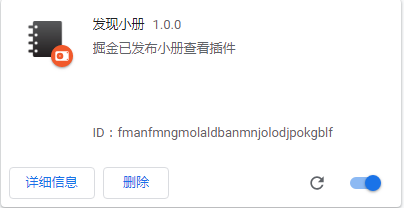
出现这个表示安装成功,点击导航行
运行效果
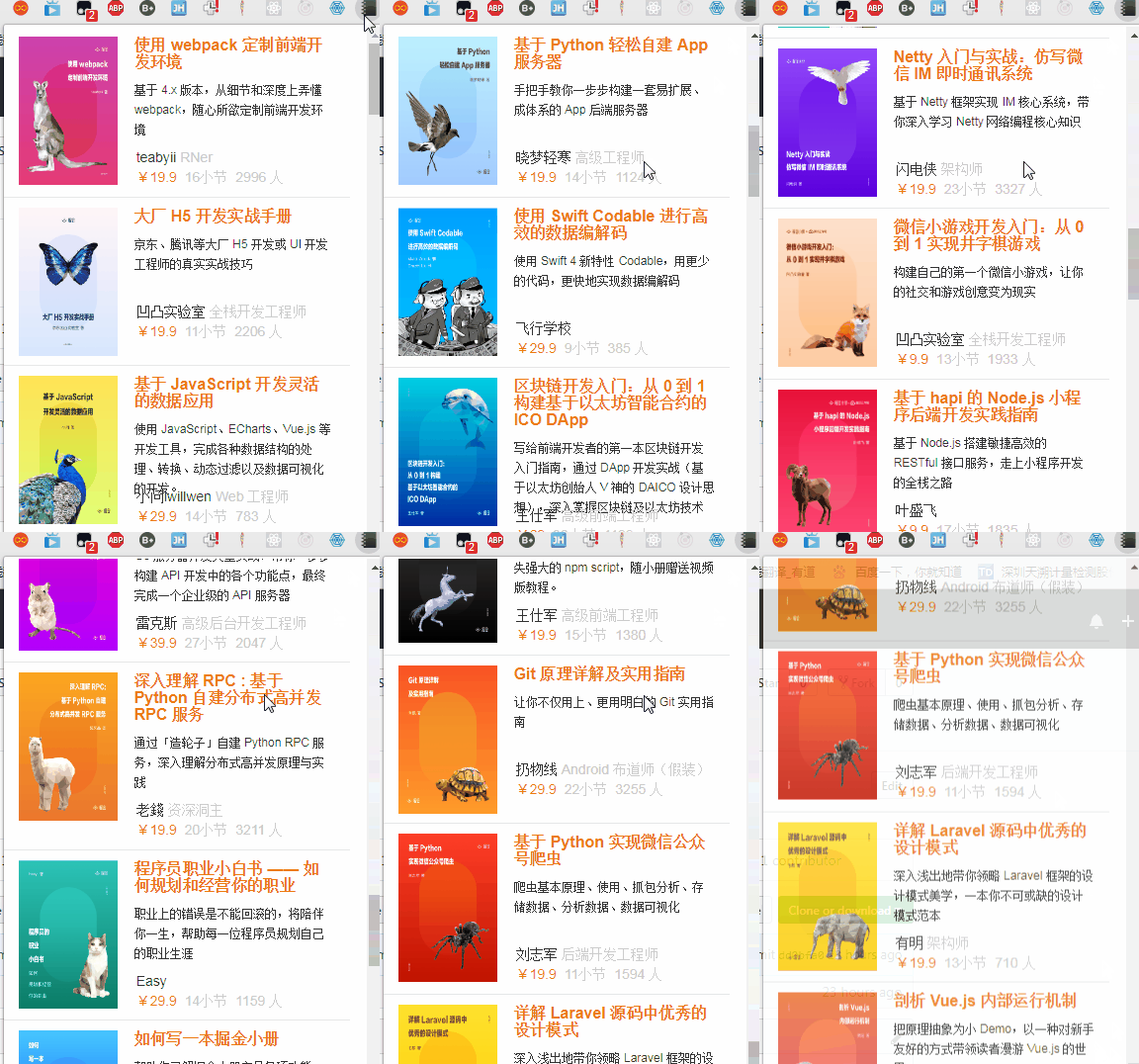
谢谢!基于 Vue BootStrap的迷你Chrome插件
注:本文著作权归作者,由demo大师代发,拒绝转载,转载需要作者授权
基于 Vue BootStrap的迷你Chrome插件的更多相关文章
- 基于Vue的省市区三级联动插件
官网地址:https://distpicker.uine.org/ 安装: npm install v-distpicker --save 局部注册: import VDistpicker from ...
- 谷歌浏览器中安装.crx扩展名的离线Chrome插件
一.本地拖放安装 1.下载扩展程序/脚本程序至本地计算机: 2.将其直接拖拽到浏览器的“扩展程序”(chrome://chrome/extensions/)页面. 二.解决“只能通过Chrome网上应 ...
- 离线Chrome插件安装文件(crx)的安装方法
离线Chrome插件安装文件(crx)的安装方法 一.正常安装方法 1.开发谷歌浏览器,设置->扩展程序 在打开的谷歌浏览器的扩展管理器中用户可以看到一些已经安装程序的Chrome插件,或者一个 ...
- Chrome 插件安装技巧
参考http://blog.csdn.net/shiyaru1314/article/details/49303317 最近在学习WEBAPI 由于没有界面可以调试,需要安装Chrome中的插件 P ...
- 基于jquery的bootstrap在线文本编辑器插件Summernote
Summernote是一个基于jquery的bootstrap超级简单WYSIWYG在线编辑器.Summernote非常的轻量级,大小只有30KB,支持Safari,Chrome,Firefox.Op ...
- 一款基于Bootstrap的js分页插件bootstrap-paginator使用实例
Bootstrap Paginator是一款基于Bootstrap的js分页插件,功能很丰富.它提供了一系列的参数用来支持用户的定制,提供了公共的方法可随时获得插件状态的改变,以及事件来监听用户的动作 ...
- 基于Metronic的Bootstrap开发框架经验总结(5)--Bootstrap文件上传插件File Input的使用
Bootstrap文件上传插件File Input是一个不错的文件上传控件,但是搜索使用到的案例不多,使用的时候,也是一步一个脚印一样摸着石头过河,这个控件在界面呈现上,叫我之前使用过的Uploadi ...
- 超级好用的前端开发测试Chrome插件-基于REST的Web服务客户端
基于REST的Web服务客户端是一款功能强大的谷歌浏览器插件,使用基于REST的Web服务客户端(模拟REST客户端)可以让用户使用谷歌浏览器模拟REST请求来测试REST风格. 基于REST的Web ...
- 基于bootstrap的上传插件fileinput实现ajax异步上传功能(支持多文件上传预览拖拽)
首先需要导入一些js和css文件 ? 1 2 3 4 5 6 <link href="__PUBLIC__/CSS/bootstrap.css" rel="exte ...
随机推荐
- Tomcat – java.lang.OutOfMemoryError: PermGen space Cause and Solution
Read more: http://javarevisited.blogspot.com/2012/01/tomcat-javalangoutofmemoryerror-permgen.html#ix ...
- JavaScript 触发click事件 兼容FireFox,IE 和 Chrome
解决了火狐下无法触发click事件的问题 <script language="javascript"> function test2(name) { if(docume ...
- 阿里巴巴分布式服务框架 Dubbo
1.Dubbo是阿里巴巴内部的SOA服务化治理方案的核心框架,每天为2000+ 个服务提供3,000,000,000+ 次访问量支持,并被广泛应用于阿里巴巴集团的各成员站点.Dubbo自2011年开源 ...
- linux内核编译指定工具连
make modules CROSS_COMPILE=arm-linux-
- JDBC 通过PreparedStatement 对数据库进行增删改查
1 插入数据 public boolean ChaRu3(User user){ boolean flag=true; Connection conn=null; PreparedStatement ...
- C++分布式实时应用框架——系统管理模块
一个分布式实时系统集群动辄上百台机器,集群的规模已经限定这将是一个”封闭“的系统.你不可能再一台台去操作上百台机器,传统的人工运维方式早已不能满足当下需要,所有对集群或者集群中某个节点的操作都必需通过 ...
- IOS Xib使用——为控制器添加Xib文件
Xib文件是一个轻量级的用来描述局部界面的文件,它与StoryBoard类似,都是使用Interface Bulider工具进行编辑.但是StoryBoard是重量级的,它是用来描述整个软件的多个界面 ...
- [置顶] Android异步加载数据库和多线程编程
Android是一种基于Linux的自由及开放源代码的操作系统,主要使用于移动设备,如智能手机和平板电脑,由Google公司和开放手机联盟领导及开发.尚未有统一中文名称,中国大陆地区较多人使用“安卓” ...
- 县级以上联动js实现无需数据库的行政区域下拉控件
代码共享url: http://code.google.com/p/region-select-js/ 数据已经更新到中国统计局网站中的2012年的那批数据(制作后未核对); 下拉使用div模拟实现. ...
- Linux服务器权限管理之sudo高级应用
Sudo是允许系统管理员让普通用户执行一些或者全部的root命令的一个工具,减少了root用户的登陆和管理时间,提高了安全性,Sudo不是对shell的一个代替,它是面向每个命令的. Linux系统的 ...