
19-[模块]-xml
1.xml协议
xml是实现不同语言或程序之间进行数据交换的协议,跟json差不多,但json使用起来更简单,不过,古时候,在json还没诞生的黑暗年代,大家只能选择用xml呀,至今很多传统公司如金融行业的很多系统的接口还主要是xml。
xml的格式如下,就是通过<>节点来区别数据结构的:
<?xml version="1.0"?>

<data>

    <country name="Liechtenstein">

        <rank updated="yes">2</rank>

        <year>2008</year>

        <gdppc>141100</gdppc>

        <neighbor name="Austria" direction="E"/>

        <neighbor name="Switzerland" direction="W"/>

    </country>

    <country name="Singapore">

        <rank updated="yes">5</rank>

        <year>2011</year>

        <gdppc>59900</gdppc>

        <neighbor name="Malaysia" direction="N"/>

    </country>

    <country name="Panama">

        <rank updated="yes">69</rank>

        <year>2011</year>

        <gdppc>13600</gdppc>

        <neighbor name="Costa Rica" direction="W"/>

        <neighbor name="Colombia" direction="E"/>

    </country>

</data>
2、遍历 xml
协议在各个语言里的都 是支持的,在python中可以用以下模块操作xml
import xml.etree.ElementTree as ET

tree = ET.parse("xmltest.xml")

root = tree.getroot()

print(root.tag)

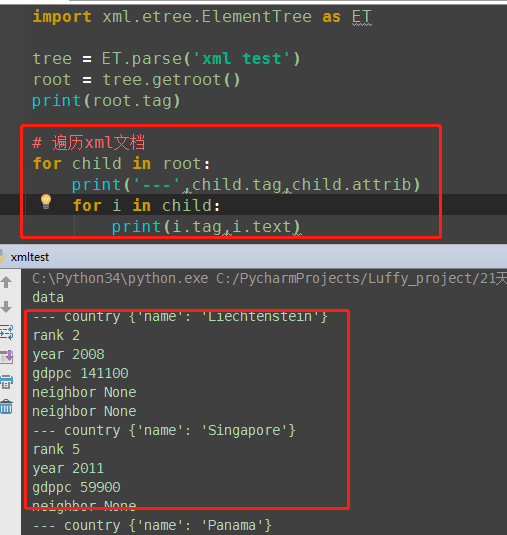
#遍历xml文档

for child in root:

    print(child.tag, child.attrib)

    for i in child:

        print(i.tag,i.text)

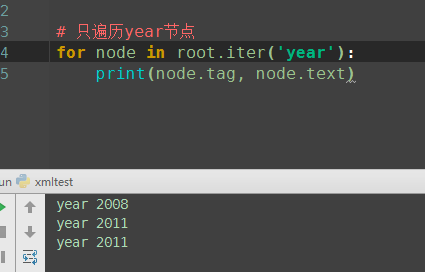
#只遍历year 节点

for node in root.iter('year'):

    print(node.tag,node.text)
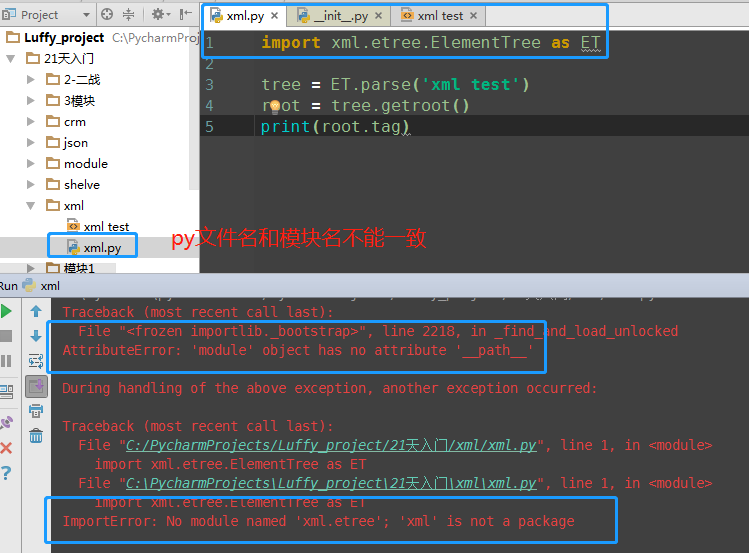
Traceback (most recent call last):

  File "<frozen importlib._bootstrap>", line 2218, in _find_and_load_unlocked

AttributeError: 'module' object has no attribute '__path__'

During handling of the above exception, another exception occurred:

Traceback (most recent call last):

  File "C:/PycharmProjects/Luffy_project/21天入门/xml/xml.py", line 1, in <module>

    import xml.etree.ElementTree as ET

  File "C:\PycharmProjects\Luffy_project\21天入门\xml\xml.py", line 1, in <module>

    import xml.etree.ElementTree as ET

ImportError: No module named 'xml.etree'; 'xml' is not a package
3.修改和删除xml文档内容
import xml.etree.ElementTree as ET

tree = ET.parse("xmltest.xml")

root = tree.getroot()

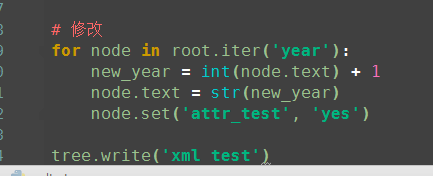
#修改

for node in root.iter('year'):

    new_year = int(node.text) + 1

    node.text = str(new_year)

    node.set("updated","yes")

tree.write("xmltest.xml")

#删除node

for country in root.findall('country'):

   rank = int(country.find('rank').text)

   if rank > 50:

     root.remove(country)

tree.write('output.xml')


4.自己创建xml文档
import xml.etree.ElementTree as ET

new_xml = ET.Element("namelist")

name = ET.SubElement(new_xml,"name",attrib={"enrolled":"yes"})

age = ET.SubElement(name,"age",attrib={"checked":"no"})

sex = ET.SubElement(name,"sex")

sex.text = ''

name2 = ET.SubElement(new_xml,"name",attrib={"enrolled":"no"})

age = ET.SubElement(name2,"age")

age.text = ''

et = ET.ElementTree(new_xml) #生成文档对象

et.write("test.xml", encoding="utf-8",xml_declaration=True)

ET.dump(new_xml) #打印生成的格式
19-[模块]-xml的更多相关文章
- python configparse模块&xml模块
configparse模块 用于生成和修改常见配置文档,当前模块的名称在 python 3.x 版本中变更为 configparser. [DEFAULT] serveraliveinterval = ...
- python 常用模块 time random os模块 sys模块 json & pickle shelve模块 xml模块 configparser hashlib subprocess logging re正则
python 常用模块 time random os模块 sys模块 json & pickle shelve模块 xml模块 configparser hashlib subprocess ...
- python 解析XML python模块xml.dom解析xml实例代码
分享下python中使用模块xml.dom解析xml文件的实例代码,学习下python解析xml文件的方法. 原文转自:http://www.jbxue.com/article/16587.html ...
- 小白的Python之路 day5 模块XML特点和用法
模块XML的特点和用法 一.简介 xml是实现不同语言或程序之间进行数据交换的协议,跟json差不多,但json使用起来更简单,不过,古时候,在json还没诞生的黑暗年代,大家只能选择用xml呀,至今 ...
- python-常用模块xml、shelve、configparser、hashlib
一.shelve模块 shelve模块也是用来序列化的. 使用方法: 1.open 2.读写 3.close import shelve # 序列化 sl = shelve.open('shlvete ...
- Python模块——xml
xml模块 xml是实现不同语言或程序之间进行数据交换的协议,跟json差不多,但json使用起来更简单, 不过,古时候,在json还没诞生的黑暗年代,大家只能选择用xml呀,至今很多传统公司如金融行 ...
- 19 模块之shelve xml haslib configparser
shelve 什么是shelve模块 也是一种序列化方式使用方法 1.opne 2.读写 3.close特点:使用方法比较简单 提供一个文件名字就可以开始读写 读写的方法和字典一致 你可以把它当成带有 ...
- s14 第5天 时间模块 随机模块 String模块 shutil模块(文件操作) 文件压缩(zipfile和tarfile)shelve模块 XML模块 ConfigParser配置文件操作模块 hashlib散列模块 Subprocess模块(调用shell) logging模块 正则表达式模块 r字符串和转译
时间模块 time datatime time.clock(2.7) time.process_time(3.3) 测量处理器运算时间,不包括sleep时间 time.altzone 返回与UTC时间 ...
- json,pickle,shelve模块,xml处理模块
常用模块学习—序列化模块详解 什么叫序列化? 序列化是指把内存里的数据类型转变成字符串,以使其能存储到硬盘或通过网络传输到远程,因为硬盘或网络传输时只能接受bytes. 为什么要序列化? 你打游戏过程 ...
- python笔记7 logging模块 hashlib模块 异常处理 datetime模块 shutil模块 xml模块(了解)
logging模块 日志就是记录一些信息,方便查询或者辅助开发 记录文件,显示屏幕 低配日志, 只能写入文件或者屏幕输出 屏幕输出 import logging logging.debug('调试模式 ...
随机推荐
- scrapy实战--爬取报刊名称及地址
目标:爬取全国报刊名称及地址 链接:http://news.xinhuanet.com/zgjx/2007-09/13/content_6714741.htm 目的:练习scrapy爬取数据 学习过s ...
- npm 删除node_modules
安装 npm install rimraf - g 使用 rimraf node_modules
- 进程间协作---wait,notify,notifyAll
转自牛客网的一篇评论,解释的十分详细 在 Java 中,可以通过配合调用 Object 对象的 wait() 方法和 notify()方法或 notifyAll() 方法来实现线程间的通信.在线程中调 ...
- JS 触发不同ifram控件,实现刷新,关闭标签(H+框架)
例: //前台页面事件处理模块var EventOperation = { Refresh: function (data_id) { var a = (window.top); var ele = ...
- [翻译] CoreImage-with-EAGLContext
CoreImage-with-EAGLContext https://github.com/anaglik/CoreImage-with-EAGLContext Simple example of d ...
- 使用NSOperation以及NSOperationQueue
使用NSOperation以及NSOperationQueue NSOperation vs. Grand Central Dispatch (GCD) 在Mac OS X v10.6和iOS4之前, ...
- 一份非常完整的 MySQL 规范
源自:https://www.cnblogs.com/huchong/p/10219318.html 一.数据库命令规范 所有数据库对象名称必须使用小写字母并用下划线分割. 所有数据库对象名称禁止使用 ...
- QT里使用Gsoap调用WebService
错误了很多天,今天终于搞定,并得到了服务器的结果.这里把错误的原因记录下来. 首先是这里,之前一直没有加载进来,所以一直报错 SOURCES += main.cpp\ gsoap/soapClient ...
- vue2.* 事件 定义方法 执行方法 获取数据 改变数据 执行方法传值 以及事件对象 05
<template> <div id="app"> <button v-on:click="run1()">执行事件的第一种 ...
- Robotframework测试相关库的简单整理
一. 官网地址 http://robotframework.org/#libraries 二.几类测试所用到的常用库初步整理 1. UI自动化测试 Selenium2Library.BuiltIn(自 ...