
linux系统编程之文件与IO(六):实现ls -l功能
本文利用以下系统调用实现ls -l命令的功能:
1,lstat:获得文件状态,
2,getpwuid:
#include <pwd.h>
struct passwd *getpwuid(uid_t uid);
描述:
The getpwuid() function returns a pointer to a structure containing the broken-out fields of the record in the password database that matches the user ID uid.
返回值:
The passwd structure is defined in <pwd.h> as follows:
struct passwd {
char *pw_name; /* username */
char *pw_passwd; /* user password */
uid_t pw_uid; /* user ID */
gid_t pw_gid; /* group ID */
char *pw_gecos; /* real name */
char *pw_dir; /* home directory */
char *pw_shell; /* shell program */
};
示例:
#include <unistd.h>

#include <stdlib.h>

#include <stdio.h>

#include <pwd.h>

#define ERR_EXIT(m) \

    do \

    { \

        perror(m); \

        exit(EXIT_FAILURE); \

    } while()

int main(void)

{

    uid_t uid;

    struct passwd *pw;

    uid = getuid();

    printf("current user id :%d\n",uid);

    if((pw = getpwuid(uid)) == NULL)

        ERR_EXIT("getpwuid error");

    printf("username:%s\n",pw->pw_name);

    printf("user passwd:%s\n",pw->pw_passwd);

    printf("user ID:%d\n",pw->pw_uid);

    printf("group ID:%d\n",pw->pw_gid);

    //printf("real name:%s\n",pw->pw_gecos);

    printf("home directory:%s\n",pw->pw_dir);

    printf("shell program:%s\n",pw->pw_shell);

    return ;

}
运行结果:
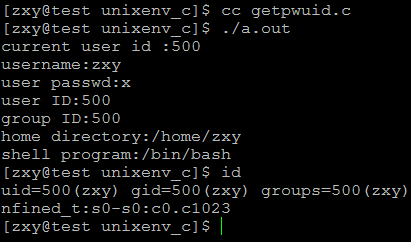
3,getgrgid:
#include <grp.h>
struct group *getgrnam(const char *name);//根据组名获得组信息
struct group *getgrgid(gid_t gid);//根据组ID获得组信息
描述:
The getgrnam() function returns a pointer to a structure containing the broken-out fields of the record in the group database (e.g., the local group file /etc/group, NIS, and LDAP) that matches the group name name.
The getgrgid() function returns a pointer to a structure containing the broken-out fields of the record in the group database that matches thegroup ID gid.
返回值:
The group structure is defined in <grp.h> as follows:
struct group {
char *gr_name; /* group name */
char *gr_passwd; /* group password */
gid_t gr_gid; /* group ID */
char **gr_mem; /* group members */
};
4,readlink:读取软链接文件的内容
#include <unistd.h>
ssize_t readlink(const char *path, char *buf, size_t bufsiz);
描述:
DESCRIPTION
readlink() places the contents of the symbolic link path in the buffer
buf, which has size bufsiz. readlink() does not append a null byte to
buf. It will truncate the contents (to a length of bufsiz characters),
in case the buffer is too small to hold all of the contents.
RETURN VALUE
On success, readlink() returns the number of bytes placed in buf. On
error, -1 is returned and errno is set to indicate the error.
示例:
#include <unistd.h>

#include <stdlib.h>

#include <stdio.h>

#define ERR_EXIT(m) \

    do \

    { \

        perror(m); \

        exit(EXIT_FAILURE); \

    } while()

int main(int argc,char **argv)

{

    if(argc != ){

        fprintf(stderr,"usage:%s linkfile", argv[]);

        exit(EXIT_FAILURE);

    }

    char buf[];

    if(readlink(argv[],buf,) ==-)

        ERR_EXIT("readlink error");

    printf("the content of %s are: %s\n",argv[],buf);

    return ;

}
运行结果:

现在利用相关的系统调用实现ls –l功能:
程序如下:
#include <stdio.h>

#include <unistd.h>

#include <stdlib.h>

#include <dirent.h>

#include <sys/types.h>

#include <sys/stat.h>

#include <string.h>

#include <time.h>

#include <pwd.h>

#include <grp.h>

#include <libgen.h>

#define ERR_EXIT(m) \

    do\

    {\

        perror(m);\

        exit(EXIT_FAILURE);\

    }while()\

void lsdir(char *dirname);

void lsfile(char *filename);

void lsfile(char *filename);

char getFileType(struct stat *fstat);

void getFilePerm(struct stat *st, char *perm);

int main(int argc,char **argv)

{

    if(argc != ){

        fprintf(stderr,"usage:%s [filepath]\n",argv[]);

        exit(EXIT_FAILURE);

    }

    struct stat fstat;

    if(lstat(argv[],&fstat) == -)

        ERR_EXIT("STAT ERROR");

    if(S_ISDIR(fstat.st_mode))

    {

        lsdir(argv[]);

    }

    else{

        lsfile(argv[]);

    }

    return ;

}

void lsdir(char *dirname)

{

    DIR *dir;

    char filename[] = {};

    dir =opendir(dirname);

    if(dir == NULL)

        ERR_EXIT("opendir error");

    struct dirent *dentry;

    while((dentry = readdir(dir)) != NULL)

    {

        char *fname;

        fname = dentry->d_name;

        if(strncmp(fname,".",) == )

            continue;

        sprintf(filename,"%s/%s",dirname,fname);

        lsfile(filename);

    }

    closedir(dir);

}

//-rw-r--r--.   1            zxy        zxy        2586        Jul 10 17:00    ls.c

//类型及权限  硬链接数        拥有者    所属组    文件大小    创建时间        文件名

void lsfile(char *filename)

{

    struct stat tmpstat;

    if(lstat(filename,&tmpstat) == -)

        ERR_EXIT("STAT ERROR");

    char buf[]= {};

    strcpy(buf,"----------");

    char type;

    type = getFileType(&tmpstat);

    char *bname = basename(filename);

    buf[] = type;

    if(type == 'l'){

        char content[];

        if(readlink(filename,content,) == -)

            ERR_EXIT("readlink error");

        sprintf(bname,"%s -> %s",bname,content);

    }

    getFilePerm(&tmpstat,buf);

    struct tm *ftime;

    ftime = localtime(&tmpstat.st_mtime);

    printf("%s %d %s %s %10ld %02d %02d %02d:%02d %s\n",

        buf,tmpstat.st_nlink,

        getpwuid(tmpstat.st_uid)->pw_name,

        getgrgid(tmpstat.st_gid)->gr_name,

        tmpstat.st_size,

        ftime->tm_mon+,

        ftime->tm_mday,

        ftime->tm_hour,

        ftime->tm_min,

        bname);

}

//获得文件类型

char getFileType(struct stat *st)

{

    char type = '-';

    switch (st->st_mode  & S_IFMT)

    {

        case S_IFSOCK:

        type = 's';

                break;

        case S_IFLNK:

        type = 'l';

                break;

        case S_IFREG:

        type = '-';

                break;

        case S_IFBLK:

        type = 'b';

                break;

        case S_IFDIR:

        type = 'd';

                break;

        case S_IFCHR:

        type = 'c';

                break;

        case S_IFIFO:

        type = 'p';

                break;

    }

    return type;

}

//获得文件访问权限

void getFilePerm(struct stat *st, char *perm)

{

    mode_t mode = st->st_mode;

    if (mode & S_IRUSR)

        perm[] = 'r';

    if (mode & S_IWUSR)

        perm[] = 'w';

    if (mode & S_IXUSR)

        perm[] = 'x';

    if (mode & S_IRGRP)

        perm[] = 'r';

    if (mode & S_IWGRP)

        perm[] = 'w';

    if (mode & S_IXGRP)

        perm[] = 'x';

    if (mode & S_IROTH)

        perm[] = 'r';

    if (mode & S_IWOTH)

        perm[] = 'w';

    if (mode & S_IXOTH)

        perm[] = 'x';

}
运行结果:
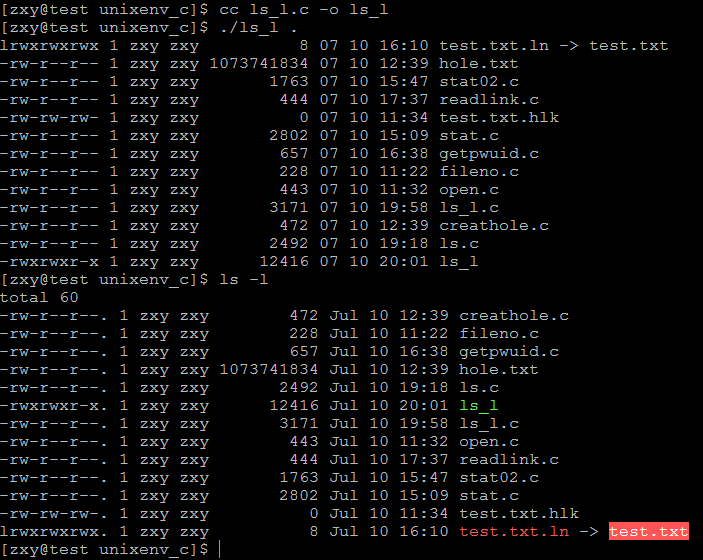
linux系统编程之文件与IO(六):实现ls -l功能的更多相关文章
- linux系统编程之文件与io(一)
经过了漫长的学习,C语言相关的的基础知识算是告一段落了,这也是尝试用写博客的形式来学习c语言,回过头来看,虽说可能写的内容有些比较简单,但是个人感觉是有史起来学习最踏实的一次,因为里面的每个实验都是自 ...
- linux系统编程之文件与io(五)
上一节中已经学习了文件描述符的复制,复制方法有三种,其中最后一种fcntl还并未使用到,关于这个函数,不光只有复制文件描述符的功能,还有其它一些用法,本节就对其进行一一剖析: fcntl常用操作: 这 ...
- linux系统编程之文件与IO(一):文件描述符、open,close
什么是IO? 输入/输出是主存和外部设备之间拷贝数据的过程 设备->内存(输入操作) 内存->设备(输出操作) 高级I/O ANSI C提供的标准I/O库称为高级I/O,通常也称为带缓冲的 ...
- linux系统编程之文件与io(四)
今天继续学习文件与io,主要是学习文件共享及文件.复制文件描述符,有点抽象,主要是概念上的理解,但是很重要,下面一一来分解: 文件共享: 回顾一下,在linux系统调用中,是通过文件描述符来访问文件的 ...
- linux系统编程之文件与io(二)
今天继续学习文件与io,话不多说,开始进入正题: 文件的read和write系统调用: 说明:函数中出现在size_t和ssize_t是针对系统定制的数据类型: 下面以一个实现文件简单拷贝的示 ...
- linux系统编程之文件与io(三)
上次我们利用文件的read和write来实现了简易的cp命令,其中将源文件拷贝到目标文件时,我们给目标文件的权限是写死的,而非根据源文件的权限生成的,如下: 今天就来解决这个问题,来学习获取文件权限相 ...
- linux系统编程之文件与IO(七):时间函数小结
从系统时钟获取时间方式 time函数介绍: 1.函数名称: localtime 2.函数名称: asctime 3.函数名称: ctime 4.函数名称: difftime 5.函数名称: gmtim ...
- linux系统编程之文件与IO(四):目录访问相关系统调用
1. 目录操作相关的系统调用 1.1 mkdir和rmdir系统调用 1.1.1 实例 1.2 chdir, getcwd系统调用 1.2.1 实例 1.3 o ...
- linux系统编程之文件与IO(三):利用lseek()创建空洞文件
一.lseek()系统调用 功能说明: 通过指定相对于开始位置.当前位置或末尾位置的字节数来重定位 curp,这取决于 lseek() 函数中指定的位置 函数原型: #include <sys/ ...
随机推荐
- LuoguP1126 机器人搬重物(BFS)
题目链接:https://www.luogu.org/problemnew/show/P1126 思路:很不错的搜索题,用BFS,虐了我1天多才A掉 QAQ,细节很多. 1.每个状态包含行.列.方向. ...
- 删除链表中的重复元素:不留&留一个&删除一个
不留: [抄题]: 给定一个排序链表,删除所有重复的元素只留下原链表中没有重复的元素. [思维问题]: 给出 1->2->3->3->4->4->5->nul ...
- 清空表中数据 id从1开始
删除表的记录以后,如何使新记录的编号仍然从1开始有两种方法: 方法1: truncate table 你的表名 --这样不但将数据删除,而且可以重新置位identity属性的字段. 方法2: dele ...
- Mac 终端便利工具: 管理工具-Homebrew 和提示工具oh my zsh
命令行提示工具 第一步: Homebrew - 安装与使用 https://blog.csdn.net/sir_coding/article/details/77509602 Homebrew安装问题 ...
- centos6.6中修改yum源
1.进入设置yum源的目录 > cd /etc/yum.repos.d 2.复制或重命名CentOS-Base.repo文件 > mv CentOS-Base.repo CentOS-Ba ...
- Spring框架的配置文件分开管理(了解)
1. 例如:在src的目录下又多创建了一个配置文件,现在是两个核心的配置文件,那么加载这两个配置文件的方式有两种! * 主配置文件中包含其他的配置文件: <import resource=&qu ...
- CodeSmith生成SQL Server视图的实体类脚本/对应的生成模板
C#生成sql视图的实体类 using System;using System.Text;using CodeSmith.Engine;using SchemaExplorer;using Syste ...
- web项目传classes目录项目正常,打包成jar不能运行。
笔者最近使用tomcat9,由于工作洁癖,盯上了tomcat启动日志里的"No TLD files were found in"字样,如下 15-Sep-2017 02:19:09 ...
- Django之ORM数据库
5.1 数据库的配置 1 django默认支持sqlite,mysql, oracle,postgresql数据库. <1> sqlite django默认使用sqlite的数据库 ...
- JDK和Eclipse的下载路径
JDK http://www.oracle.com/technetwork/java/javase/downloads/index.html Eclipse http://www.eclipse.or ...