
webservice(二)简单实例
1、建立WSDL文件
建立WSDL的工具很多,eclipse、zendstudio、vs都可以,我个人建议自己写,熟悉结构,另外自动工具对xml schame类型支持在类型中可能会报错。
下面是我自己写的模板:
- <?xml version ='1.0' encoding ='UTF-8' ?>
- <definitions name='自定义名称'
- targetNamespace='目标命名空间(WSDL所在地址)'
- <!--tns自定义目标空间,下面会用到-->
- xmlns:tns='目标命名空间(WSDL所在地址)'
- xmlns:soap='http://schemas.xmlsoap.org/wsdl/soap/'
- xmlns:xsd='http://www.w3.org/2001/XMLSchema'
- xmlns:soapenc='http://schemas.xmlsoap.org/soap/encoding/'
- xmlns:wsdl='http://schemas.xmlsoap.org/wsdl/'
- xmlns='http://schemas.xmlsoap.org/wsdl/'>
- <!--<types> 元素定义 web service 使用的数据类型,WSDL 使用 XML Schema 语法来定义数据类型,这里可以定义一些Schema不支持的类型-->
- <types>
- <xsd:schema xmlns:xsd="http://www.w3.org/2001/XMLSchema"
- targetNamespace="目标命名空间(WSDL所在地址)">
- </xsd:schema>
- </types>
- <!--
- <message> 元素可定义每个消息的部件,以及相关联的数据类型。
- 请求-响应是最普通的操作类型,不过 WSDL 定义了四种类型:
- One-way 此操作可接受消息,但不会返回响应。
- Request-response 此操作可接受一个请求并会返回一个响应。(常用)
- Solicit-response 此操作可发送一个请求,并会等待一个响应。
- Notification 此操作可发送一条消息,但不会等待响应。
- -->
- <message name='请求消息名称(方法名+Request)'>
- <part name="term" type="xsd:string"/>
- </message>
- <message name='响应消息名称(方法名+Response)'>
- <part name="value" type="xsd:string"/>
- </message>
- <!--
- <portType> 元素是最重要的 WSDL 元素。它可描述一个 web service、可被执行的操作,以及相关的消息。
- 它告诉你去哪个WebService的连接点,扮演了一个控制者。
- -->
- <portType name='执行的操作名称(binding的type与其对应)'>
- <operation name='执行操作的方法'>
- <input message='tns:*Request'/>
- <output message='tns:*response'/>
- </operation>
- </portType>
- <!--<binding> 元素为每个端口定义消息格式和协议细节-->
- <binding name='Binding的名称,与service的port名称对应' type='指向用于Binding的端口(tns(前缀):PortType名称)'>
- <!--style:属性可取值 "rpc" 或 "document",ransport:属性定义了要使用的 SOAP 协议。在这个例子中我们使用 HTTP-->
- <soap:binding style='rpc'
- transport='http://schemas.xmlsoap.org/soap/http'/>
- <!--operation 元素定义了每个端口提供的操作符,对于每个操作,相应的 SOAP 行为都需要被定义-->
- <operation name='GetCallDetailRecords'>
- <soap:operation soapAction='http://www.cwtservice.cn/newOperation/'/>
- <input>
- <soap:body use='encoded' namespace='urn:xmethods-delayed-quotes'
- encodingStyle='http://schemas.xmlsoap.org/soap/encoding/'/>
- </input>
- <output>
- <soap:body use='encoded' namespace='urn:xmethods-delayed-quotes'
- encodingStyle='http://schemas.xmlsoap.org/soap/encoding/'/>
- </output>
- </operation>
- </binding>
- <!--<service>包含一个或者多个port元素,每个port元素表示一个不同的Web服务-->
- <service name='服务名称'>
- <port name='Binding名称' binding='tns:Binding名称'>
- <soap:address location='http://目标命名空间(WSDL所在地址)/service.php'/>
- </port>
- </service>
- </definitions>
2、在service目录下建立myphone.wsdl
- <?xml version ='1.0' encoding ='UTF-8' ?>
- <definitions name='phonebook'
- targetNamespace='http://www.mysoapservice.cn/'
- xmlns:tns='http://www.mysoapservice.cn/'
- xmlns:soap='http://schemas.xmlsoap.org/wsdl/soap/'
- xmlns:xsd='http://www.w3.org/2001/XMLSchema'
- xmlns:soapenc='http://schemas.xmlsoap.org/soap/encoding/'
- xmlns:wsdl='http://schemas.xmlsoap.org/wsdl/'
- xmlns='http://schemas.xmlsoap.org/wsdl/'>
- <types>
- <xsd:schema xmlns:xsd="http://www.w3.org/2001/XMLSchema"
- targetNamespace="http://www.mysoapservice.cn/">
- </xsd:schema>
- </types>
- <message name='GetPhoneBookRequest'>
- <part name="name" type="xsd:string"/>
- </message>
- <message name='GetPhoneBookResponse'>
- <part name="phonebookInfo" type="xsd:string"/>
- </message>
- <portType name='PhoneBookToEveryOneProt'>
- <operation name='GetPhoneBook'>
- <input message='tns:GetPhoneBookRequest'/>
- <output message='tns:GetPhoneBookResponse'/>
- </operation>
- </portType>
- <binding name='PhoneBookSOAP' type='tns:PhoneBookToEveryOneProt'>
- <soap:binding style='rpc'
- transport='http://schemas.xmlsoap.org/soap/http'/>
- <operation name='GetPhoneBook'>
- <soap:operation soapAction='http://www.cwtservice.cn/newOperation/'/>
- <input>
- <soap:body use='encoded' namespace='urn:xmethods-delayed-quotes'
- encodingStyle='http://schemas.xmlsoap.org/soap/encoding/'/>
- </input>
- <output>
- <soap:body use='encoded' namespace='urn:xmethods-delayed-quotes'
- encodingStyle='http://schemas.xmlsoap.org/soap/encoding/'/>
- </output>
- </operation>
- </binding>
- <service name='PhoneBookService'>
- <port name='PhoneBookSOAP' binding='tns:PhoneBookSOAP'>
- <soap:address location='http://www.mysoapservice.cn/service.php'/>
- </port>
- </service>
- </definitions>
3、修改service.php
- <?php
- function GetPhoneBook($name){
- $pbook="Zhangsan,13888888888,friend,8888@163.com";
- return $pbook;
- }
- $server = new SoapServer("myphone.wsdl");
- $server->addFunction("GetPhoneBook");
- $server->handle ();
- ?>
4、修改client.php
- <?php
- header('Content-Type:text/html;charset=utf-8');
- $client = new SoapClient("http://www.mysoapservice.cn/service.php?WSDL" , array('trace'=>true));
- var_dump($client->__getTypes());
- try {
- $response = $client->GetPhoneBook('zhang');
- var_dump($response);
- }catch (SoapFault $sf){
- var_dump($sf);
- print ($client->__getLastRequest());
- print ($client->__getLastResponse());
- }
- ?>
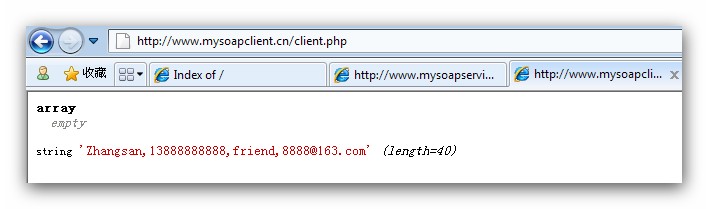
测试:
http://www.mysoapclient.cn/client.php
转载:http://blog.csdn.net/cwt0408/article/details/6952936
webservice(二)简单实例的更多相关文章
- Java WebService 开发简单实例
Web Service 是一种新的web应用程序分支,他们是自包含.自描述.模块化的应用,可以发布.定位.通过web调用.Web Service可以执行从简单的请求到复杂商务处理的任何功能.一旦部署以 ...
- 使用CXF发布WebService服务简单实例
一.说明: 前面介绍了使用axis2来发布Webservice服务,现在介绍一种更popular,更高效的Webservice服务发布技术:CXF Apache CXF = Celtix + XFir ...
- Java WebService(实战) 简单实例
一.准备工作(以下为本实例使用工具) 1.MyEclipse10.7.1 2.JDK 1.6.0_22 二.创建服务端 1.创建[Web Service Project],命名为[TheService ...
- JAVA项目中公布WebService服务——简单实例
1.在Java项目中公布一个WebService服务: 怎样公布? --JDK1.6中JAX-WS规范定义了怎样公布一个WebService服务. (1)用jdk1.6.0_21以后的版本号公布. ( ...
- Webservice入门简单实例
转载大神 项目目的: 程序A调用程序B中的方法C.. https://blog.csdn.net/lovebosom/article/details/51558139 ...
- 主题:Java WebService 简单实例
链接地址:主题:Java WebService 简单实例 http://www.iteye.com/topic/1135747 前言:朋友们开始以下教程前,请先看第五大点的注意事项,以避免不必要 ...
- (Hibernate进阶)Hibernate搭建开发环境+简单实例(二)
hibernate是非常典型的持久层框架,持久化的思想是非常值得我们学习和研究的.这篇博文,我们主要以实例的形式学习Hibernate,不深究Hibernate的思想和原理,否则,一味追求,苦学思想和 ...
- WebService连接winfrom简单实例
C# 创建.部署和调用WebService的简单示例 webservice 可以用于分布式应用程序之间的交互,和不同程序之间的交互. 具体详细用法可去查询资料.下面开始创建一个简单的webservic ...
- phpqrcode生成动态二维码简单实例
这是一个利用phpqrcode生成动态二维码简单实例,比微信官方提供的接口还要好用.二维码是动态的,不用生成图片,可自定义二维码大小,间隙,跳转地址等. 参数设置: include_once 'php ...
随机推荐
- c++ 以多维数组的形式访问动态内存
教学内容: 以多维数组的形式访问动态内存 六.作业 .]=(]) *sizeof(int)); 以 pNum[][]形式访问内存空间. //8*3 [8][3] ]; int i,j,n; n=; p ...
- 9.26 开课第二十三天 (JS表单验证)
<form action="lizi1.html" method="post"> 非空验证 <input type="text&qu ...
- 微信小程序:text元素中加入空格
在text标签中加入 decode = "{{true}}" ,然后字啊需要加入空格的地方使用 即可加入一个空格,可以连续用多个例如: <text decode = &q ...
- maven 打 fatjar
备忘. 1. <plugins> <plugin> <artifactId>maven-assembly-plugin</artifactId> < ...
- P1402 酒店之王
P1402 酒店之王 每个人要匹配一个A和一个B,所以这样连边: S向每个房间连边. 每个房间向喜欢这个房间的人连边. 每个人向喜欢的菜连边. 每道菜向T连边. 边权均为1. 注意人要限流. // I ...
- vs2012调试时,抛出异常的等待时间很慢,原来是QQ电脑管家搞的鬼。
vs2012调试时,抛出异常的等待时间以前都正常,不知什么时候起变得很慢,就是出错以后要等30秒以上才会提示,一直找不到原因. 今天看了一下任务管理器,发现有个QQpcrTP进程(好像是,因为卸载了) ...
- JUC——线程池
线程池本质的概念就是一堆线程一起完成一件事情. Executor package java.util.concurrent; public interface Executor { void exec ...
- Linux系统初探过程总结
Linux系统初探的过程大约用了一周的时间,这周基本将Linux系统安装,PostgreSQL安装,Nginx服务器安装,ASP.NET Core应用部署都走了一遍.由于以前没有怎么接触和使用过Lin ...
- .Net 如何访问主流的各大数据库
做过开发的都知道,.NET基本可以理解是和MSSQL,windows服务器属于一个好的搭档,正如PHP和MYSQL,LIUNX等也可以理解是一个完美搭配:但是在实际的开发中并不完全是这样的,如果你是学 ...
- java基础---JDK、JRE、JVM的区别和联系
当我们学习java语言时,首先需要安装到我们电脑上的就是jdk.jdk是java语言的开发环境,只有安装了jdk,我们才能使用java语言开发程序. JDK=JRE+开发工具包 JRE=JVM+核心类 ...