
如何在eclipse的配置文件里指定jdk路径
转载自:https://blog.csdn.net/gnail_oug/article/details/51925804;个人做了些小修改。
今天下载了eclipse4.6版本,打开时报Version 1.7.0_45 of the JVM is not suitable for this product. Version:1.8 or greater is required.,提示jdk版本要1.8以上,如下图:
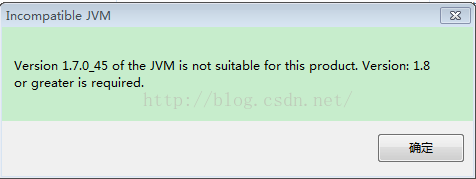
由于不想直接将环境变量配置的jdk1.7改为jdk1.8,所以单独在eclipse的配置文件里指定jdk来运行eclipse4.6,方法如下:
打开eclipse根目录下的eclipse.ini配置文件,eclipse4.6默认配置如下:
- -startup
- plugins/org.eclipse.equinox.launcher_1.3.200.v20160318-1642.jar
- --launcher.library
- plugins/org.eclipse.equinox.launcher.win32.win32.x86_64_1.1.400.v20160518-1444
- -product
- org.eclipse.epp.package.jee.product
- --launcher.defaultAction
- openFile
- -showsplash
- org.eclipse.platform
- --launcher.defaultAction
- openFile
- --launcher.appendVmargs
- -vmargs
- -Dosgi.requiredJavaVersion=1.8
- -XX:+UseG1GC
- -XX:+UseStringDeduplication
- -Dosgi.requiredJavaVersion=1.8
- -Xms256m
- -Xmx1024m
在 -vmargs 上一行--launcher.appendVmargs的上一行增加 -vm参数来指定jdk路径,如我的jdk路径在d:\java文件夹下 :
-vm
D:\java\jdk1.8.0_91\bin\javaw.exe
添加 -vm参数后的配置文件如下:
- -startup
- plugins/org.eclipse.equinox.launcher_1.3.200.v20160318-1642.jar
- --launcher.library
- plugins/org.eclipse.equinox.launcher.win32.win32.x86_64_1.1.400.v20160518-1444
- -product
- org.eclipse.epp.package.jee.product
- --launcher.defaultAction
- openFile
- -showsplash
- org.eclipse.platform
- --launcher.defaultAction
- openFile
- -vm
- D:\java\jdk1.8.0_91\bin\javaw.exe
- --launcher.appendVmargs
- -vmargs
- -Dosgi.requiredJavaVersion=1.8
- -XX:+UseG1GC
- -XX:+UseStringDeduplication
- -Dosgi.requiredJavaVersion=1.8
- -Xms256m
- -Xmx1024m
然后再次运行eclipse.exe便能正常启动了。
如何在eclipse的配置文件里指定jdk路径的更多相关文章
- (转)如何在eclipse的配置文件里指定jdk路径
本文转载自:http://songguoliang.iteye.com/blog/1752519 运行eclipse时报如下错误: 在eclipse的配置文件里指定jdk路径,只需在eclipse的配 ...
- 在eclipse的配置文件里指定jdk路径
在eclipse的配置文件里指定jdk路径,只需在eclipse的配置文件里增加-vm参数即可. 打开eclipse目录下的eclipse.ini配置文件,增加-vm配置,需要注意的是该参数要加在-v ...
- Tomcat指定JDK路径(Linux+Windows)
当系统有多套JDK,不方便在系统配统一的JAVA_HOME时,我们可能想给tomcat指定JDK路径. 1.Linux下Tomcat指定JDK路径 找到$CATALINE_HOME/bin/catal ...
- eclipse debug configurations arguments指定文件路径参数
1 eclipse debug configurations arguments指定文件路径参数 使用绝对路径,但是这个文件必须要放在该project的源码路径的外面才行,否则eclipse不认这个文 ...
- Tomcat指定JDK路径
一.应用实例 一般情况下一台服务器只跑一个业务,那么就直接配置一套环境,设置好Java环境变量即可.某些时候一台服务器上会安装多个业务,而且各个业务需要的JDK版本各不相同,或者为了使业务独立开来,需 ...
- [#Linux] CentOS 7 配置JDK后,eclipse无法启动,提示jdk路径错误。
解决方案:在eclipse的目录下创建一个jre文件夹,在jre文件夹里创建一个jdk的bin目录的链接 1.进入到eclipse目录下,右键在终端打开. 2.创建jre目录:mkdir j ...
- eclipse指定jdk路径
- Tomcat手动指定jdk路径
Windows系统: 修改bin下的setclasspath.bat,在开头处添加: rem set specific jdkset JAVA_HOME=%CATALINA_HOME%\jdk1.8. ...
- 怎样在Mac OS X上面指定Eclipse启动时用指定的某一版本号JDK?
编辑 $ECLIPSE_HOME/Eclipse.app/Contents/MacOS/eclipse.ini 文件.在 Finder 中右键或者Ctrl+点击 Eclipse 应用程序.然后点击&q ...
随机推荐
- 前端开发-2-HTML
1.开发环境 市面上有很多的HTML编辑器可以选择,常见的Hbuild.Sublime Text.Dreamweare都可以用来开发HTML. 当然PyCharm也支持HTML开发. 2.文件后缀名规 ...
- leader 选举机制
from: http://www.jasongj.com/2015/01/02/Kafka%E6%B7%B1%E5%BA%A6%E8%A7%A3%E6%9E%90/ 一种非常常用的选举leader的方 ...
- 快快快!27个提升效率的iOS开源库推荐(转)
CSDN移动将持续为您优选移动开发的精华内容,共同探讨移动开发的技术热点话题,涵盖移动应用.开发工具.移动游戏及引擎.智能硬件.物联网等方方面面.如果您想投稿.参与内容翻译工作,或寻求近匠报道,请发送 ...
- check_http检查http服务
选 项 说 明 -H, --hostname=ADDRESS 主机名或域名 -I, --IP-address=ADDRESS server的IP地址,用于在不能DNS的情况下 -p, --port=I ...
- 进入一个docker容器
Starting from Docker 1.3 you can use Docker exec to enter a Docker container : docker exec -it CONTA ...
- 迷你MVVM框架 avalonjs 学习教程20、路由系统
SPA的成功离开不这三个东西,分层架构,路由系统,储存系统.分层架构是我们组织复杂代码的关键,这里特指MVVM的avalon:路由系统是将多个页面压缩在一个页面的关键:储存系统特指本地储存,是安全保存 ...
- JS中的继承实现方式
第一种:通过prototype来实现 prototype.html <!DOCTYPE html><html lang="en"><head> ...
- html资源 链接
http://m.aicai.com/index.do?agentId=1&vt=5
- docker registry ui
https://hub.docker.com/r/parabuzzle/docker-registry-ui/
- 绘制pathway富集散点图
本文转载自http://www.omicshare.com/forum/forum.php?mod=viewthread&tid=146&extra=page%3D1%26filter ...