
SpringMVC绑定到实体数组、list、set、和map时要注意
实体的属性前一定要用.分割,如果是使用jquery的ajax提交的一个js数组对象,则请求数据会被格式化为
var sub = [{name:1,num:2},{name:1,num:2}]
$.post(url,{test,sub})

但是springmvc绑定实体时,是检测“.”符号,“.”之前的作为实体list在其bean中的名称,“.”之后的作为实体的属性而存在的,所以这里要用“.”来分割属性与list名
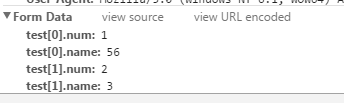
要想使用jquery自带的方法格式化为下面这种形式是不可能的(因为中间带有的.符号的特殊性),于是就只能这样提交了...自己构造一个这样的对象
var sub = {"test[0].num":1,"test[0].name":56,"test[1].num":2,"test[1].name":3}
$.post(url,sub)
这样是可以绑定的。
再说说后台的实体怎么写
1、实体这样写:
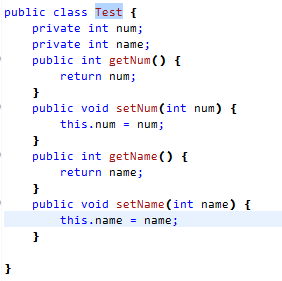
2、不可以在参数中直接写List<Test>,要在一个bean中把list作为成员,才可以使用list绑定实体。
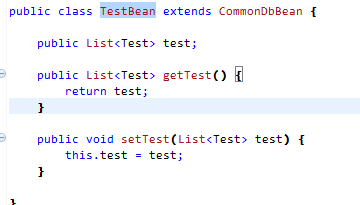
3、在请求参数中直接把TestBean作为参数即可
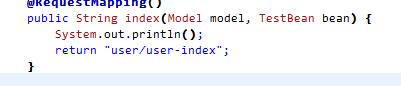
补充1:上面2:不可以在参数中直接写List<Test>,要在一个bean中把list作为成员,才可以使用list绑定实体。
(因为直接绑定到参数名的特殊性,springmvc会直接实例化参数对象类型,接口就会实例化失败
nested exception is org.springframework.beans.BeanInstantiationException:
Could not instantiate bean class [java.util.List]: Specified class is an interface)
根本原因是绑定到参数名与绑定到参数类型中的属性是不同的逻辑,所以要把list作为成员才行。
如果是实体的话,可以通过反射获取到非常多的信息,但是参数就没那么简单了,所以这里要对这两种区别对待,简单类型直接绑定到参数名,复杂类型要写在实体中。
补充2:springmvc绑定实体时,是检测“.”符号。这个检查的代码在:
org.springframework.beans.AbstractPropertyAccessor的方法子类实现:org.springframework.beans.BeanWrapperImpl.setPropertyValue(String propertyName, Object value)中--
public void setPropertyValue(String propertyName, Object value) throws BeansException {

        BeanWrapperImpl nestedBw;

        try {

            nestedBw = getBeanWrapperForPropertyPath(propertyName);

        }

        catch (NotReadablePropertyException ex) {

            throw new NotWritablePropertyException(getRootClass(), this.nestedPath + propertyName,

                    "Nested property in path '" + propertyName + "' does not exist", ex);

        }

        PropertyTokenHolder tokens = getPropertyNameTokens(getFinalPath(nestedBw, propertyName));

        nestedBw.setPropertyValue(tokens, new PropertyValue(propertyName, value));

    }
nestedBw = getBeanWrapperForPropertyPath(propertyName);这一句--
protected BeanWrapperImpl getBeanWrapperForPropertyPath(String propertyPath) {

        int pos = PropertyAccessorUtils.getFirstNestedPropertySeparatorIndex(propertyPath);

        // Handle nested properties recursively.

        if (pos > -1) {

            String nestedProperty = propertyPath.substring(0, pos);

            String nestedPath = propertyPath.substring(pos + 1);

            BeanWrapperImpl nestedBw = getNestedBeanWrapper(nestedProperty);

            return nestedBw.getBeanWrapperForPropertyPath(nestedPath);

        }

        else {

            return this;

        }

    }
的int pos = PropertyAccessorUtils.getFirstNestedPropertySeparatorIndex(propertyPath);获取第一个属性分隔符,属性分隔符就是“.”。其中代码是这样的
private static int getNestedPropertySeparatorIndex(String propertyPath, boolean last) {

        boolean inKey = false;

        int length = propertyPath.length();

        int i = (last ? length - 1 : 0);

        while (last ? i >= 0 : i < length) {

            switch (propertyPath.charAt(i)) {

                case PropertyAccessor.PROPERTY_KEY_PREFIX_CHAR:  //"["

                case PropertyAccessor.PROPERTY_KEY_SUFFIX_CHAR:  //"]"

                    inKey = !inKey;

                    break;

                case PropertyAccessor.NESTED_PROPERTY_SEPARATOR_CHAR:  //"."

                    if (!inKey) {

                        return i;

                    }

            }

            if (last) {

                i--;

            }

            else {

                i++;

            }

        }

        return -1;

    }
默认的last为false,即从开始搜索。
所以要使springmvc可以绑定最开始方括号那种属性到实体中,只需要对上面那一段做处理就行了,检测有两对[]的话,把最后一对换为.符号即可。具体有没有别的影响我不确定。
SpringMVC绑定到实体数组、list、set、和map时要注意的更多相关文章
- springMVC接受对象实体并且对象实体里面又有对象集合方式
springMVC接受对象实体并且对象实体里面又有对象集合方式: Ajax: function add(){ var orders = [ { orderNo : "H222255" ...
- JavaScript中的数组遍历forEach()与map()方法以及兼容写法
原理: 高级浏览器支持forEach方法 语法:forEach和map都支持2个参数:一个是回调函数(item,index,list)和上下文: forEach:用来遍历数组中的每一项:这个方法执行是 ...
- go语言的 数组、slice、map使用(转)
golang群 点击加入 go语言的 数组.slice.map使用, 由于网上有很好的说明, 不需要再写了,请看这几篇: Go语言中的 Array, Slice和 Map 深入学习golang五篇,以 ...
- 数组的方法 Array.map();Array.every()和Array.some();数组的indexof();检测是否是数组isArray(obj);
数组的方法 Array.map(); 栗子: var a=[1,2,,3]; var b=a.map( function(value){return value*value} ); alert(b); ...
- struts2 传递数组、List、Map
struts2 传递数组.List.Map jsp文件 数组: <s:textfield name="ages" value="a1">&l ...
- Vue表单绑定(单选按钮,选择框(单选时,多选时,用 v-for 渲染的动态选项)
<!DOCTYPE html><html> <head> <meta charset="utf-8"> ...
- js和jquery中的遍历对象和数组(forEach,map,each)
arr[].forEach(function(value,index,array){ //do something }) 参数:value数组中的当前项,index当前项的索引,array原始数组: ...
- springMVC对简单对象、Set、List、Map的数据绑定和常见问题.
算了,就不粘贴了,到原文去查看吧! springMVC对简单对象.Set.List.Map的数据绑定和常见问题.
- java中将数组、对象、Map、List转换成JSON数据
如果要将数组.对象.Map.List转换成JSON数据,那我们需要一些jar包: json-lib-2.4-jdk15.jar ezmorph-1.0.6.jar commons-logging.ja ...
随机推荐
- springboot不能加载*.properties
代码检查了无数遍!这是在intellij IDEA 下!!! 如图,这些配置文件直接放在sms-server下面,并没有放在sms-server/src/main/resources下面,所以不是cl ...
- python中使用Opencv进行人脸识别
上一节讲到人脸检测,现在讲一下人脸识别.具体是通过程序采集图像并进行训练,并且基于这些训练的图像对人脸进行动态识别. 人脸识别前所需要的人脸库可以通过两种方式获得:1.自己从视频获取图像 2.从人 ...
- ios 打tag
修改spec文件的version: git commit -am"version 0.1.1" git push origin master -u git tag 0.1.1 gi ...
- UVa 12100 Printer Queue(queue或者vector模拟队列)
The only printer in the computer science students' union is experiencing an extremely heavy workload ...
- 清空表中数据 id从1开始
删除表的记录以后,如何使新记录的编号仍然从1开始有两种方法: 方法1: truncate table 你的表名 --这样不但将数据删除,而且可以重新置位identity属性的字段. 方法2: dele ...
- datagridview 如何禁止行被选中
如题,如何规定特定的行,光标不能定位,也不能被选中,就好想Button中的Enable属性那样,变灰,而且点击也没有反应那种,这样的效果,如何实现. datagridview [解决办法]dataGr ...
- db2 创建用户及授权
1.创建系统用户dbuser/ehong隶属于db2users 2.C:\Program Files\IBM\SQLLIB\BIN>db2 connect to AKZXTEST数据库连接信息 ...
- PAT 1010 一元多项式求导 (25)(STL-map+思路)
1010 一元多项式求导 (25)(25 分)提问 设计函数求一元多项式的导数.(注:x^n^(n为整数)的一阶导数为n*x^n-1^.) 输入格式:以指数递降方式输入多项式非零项系数和指数(绝对值均 ...
- 3. Install Spring-Tool-Suite & TestNG
1.Install Spring-Tool-Suite 2.Install TestNG
- 使用JDBC连接MySql时出现:The server time zone value '�й���ʱ��' is unrecognized or represents more than one time zone. You must configure either the server or JDBC driver (via the serverTimezone configuration
在连接字符串后面加上?serverTimezone=UTC 其中UTC是统一标准世界时间. 完整的连接字符串示例:jdbc:mysql://localhost:3306/test?serverTime ...