
初始SpringBoot
导入依赖
<?xml version="1.0" encoding="UTF-8"?>

<project xmlns="http://maven.apache.org/POM/4.0.0" xmlns:xsi="http://www.w3.org/2001/XMLSchema-instance"

         xsi:schemaLocation="http://maven.apache.org/POM/4.0.0 https://maven.apache.org/xsd/maven-4.0.0.xsd">

    <modelVersion>4.0.</modelVersion>

    <parent>

        <groupId>org.springframework.boot</groupId>

        <artifactId>spring-boot-starter-parent</artifactId>

        <version>2.2..RELEASE</version>

        <relativePath/> <!-- lookup parent from repository -->

    </parent>

    <groupId>com.example</groupId>

    <artifactId>demo</artifactId>

    <version>0.0.-SNAPSHOT</version>

    <name>demo</name>

    <description>Demo project for Spring Boot</description>

    <properties>

        <java.version>1.8</java.version>

    </properties>

    <dependencies>

        <dependency>

            <groupId>org.springframework.boot</groupId>

            <artifactId>spring-boot-starter-web</artifactId>

        </dependency>

        <dependency>

            <groupId>org.springframework.boot</groupId>

            <artifactId>spring-boot-starter-tomcat</artifactId>

        </dependency>

        <!-- 引入springboot-mybatis的依赖 -->

        <dependency>

            <groupId>org.mybatis.spring.boot</groupId>

            <artifactId>mybatis-spring-boot-starter</artifactId>

            <version>1.1.</version>

        </dependency>

        <dependency>

            <groupId>org.springframework.boot</groupId>

            <artifactId>spring-boot-starter-test</artifactId>

            <scope>test</scope>

        </dependency>

        <dependency>

            <groupId>mysql</groupId>

            <artifactId>mysql-connector-java</artifactId>

            <version>5.1.</version>

        </dependency>

        <dependency>

            <groupId>org.springframework.boot</groupId>

            <artifactId>spring-boot-starter-web</artifactId>

        </dependency>

        <dependency>

            <groupId>org.springframework.boot</groupId>

            <artifactId>spring-boot-starter-test</artifactId>

            <scope>test</scope>

            <exclusions>

                <exclusion>

                    <groupId>org.junit.vintage</groupId>

                    <artifactId>junit-vintage-engine</artifactId>

                </exclusion>

            </exclusions>

        </dependency>

    </dependencies>

    <build>

        <plugins>

            <plugin>

                <groupId>org.springframework.boot</groupId>

                <artifactId>spring-boot-maven-plugin</artifactId>

            </plugin>

        </plugins>

    </build>

</project>
DemoApplication类

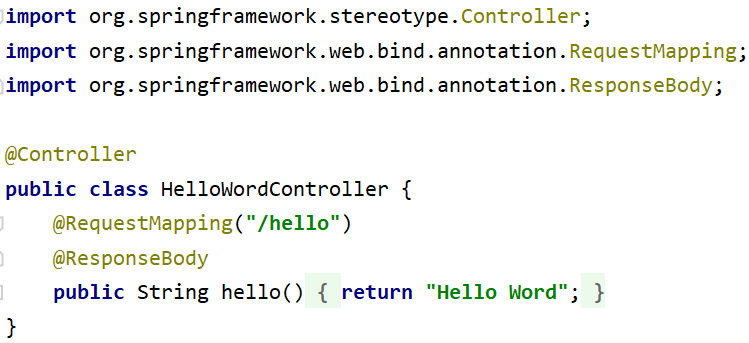
创建Controller类
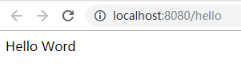
实现结果
初始SpringBoot的更多相关文章
- SpringBoot(1):初始SpringBoot
一. SpringBoot 简介 1. SpringBoot介绍 Spring Boot是由Pivotal团队提供的全新框架,其设计目的是用来简化Spring应用的初始搭建以及开发过程.该框架使用了特 ...
- 从SpringBoot源码分析 主程序配置类加载过程
1.@Import(AutoConfigurationPackages.Registrar.class) 初始SpringBoot 我们知道在SpringBoot 启动类上有一个@SpringBoot ...
- SpringBoot初始教程之Servlet、Filter、Listener配置(七)
1.介绍 通过之前的文章来看,SpringBoot涵盖了很多配置,但是往往一些配置是采用原生的Servlet进行的,但是在SpringBoot中不需要配置web.xml的 因为有可能打包之后是一个ja ...
- SpringBoot初始教程之Servlet、Filter、Listener配置详解
1.介绍 通过之前的文章来看,SpringBoot涵盖了很多配置,但是往往一些配置是采用原生的Servlet进行的,但是在SpringBoot中不需要配置web.xml的 因为有可能打包之后是一个ja ...
- SpringBoot初始教程之日志处理(二)
SpringBoot初始教程之日志处理(二) 1.介绍 SpringBoot默认是采用logback进行日志处理.Logback是由log4j创始人设计的又一个开源日志组件.Logback是由log4 ...
- SpringBoot初始教程之项目结构(一)
SpringBoot初始教程之项目结构 1 简介 spring Boot makes it easy to create stand-alone, production-grade Spring ba ...
- Spring-Boot初始篇
Spring Boot 项目旨在简化创建产品级的 Spring 应用和服务.你可通过它来选择不同的 Spring 平台.可创建独立的 Java 应用和 Web 应用,同时提供了命令行工具来允许 ‘sp ...
- SpringBoot初始教程之Redis集中式Session管理
1.介绍 有关Session的管理方式这里就不再进行讨论,目前无非就是三种单机Session(基于单机内存,无法部署多台机器).基于Cookie(安全性差).基于全局的统一Session管理(redi ...
- SpringBoot初始教程之Servlet、Filter、Listener配置
1.介绍通过之前的文章来看,SpringBoot涵盖了很多配置,但是往往一些配置是采用原生的Servlet进行的,但是在SpringBoot中不需要配置web.xml的 因为有可能打包之后是一个jar ...
随机推荐
- stm32F103片上串口USART1通信实验
硬件说明:如原理图所示, 103的PA10 PA11分别接CP2102usb转串口芯片的TXD RXD引脚.CP2102芯片是将串口和电脑USB接口进行了转接,方便应用灵活. 片上串口驱动代码如下. ...
- 通过names.index()方法找到第2个eva值 ,并将其改成EVA
names= ['alex','rain','peiqi','eva','mac','jack','eva','kangkang','jain']first_index=names.index('ev ...
- pymysql 模块简单使用
目录 pymysql 模块简单使用 安装 pymysql 模块 使用 pymysql 连接数据库 并插入数据 使用pymysql 插入数据 修改查询显示结果 pymysql 模块简单使用 安装 pym ...
- 登陆并访问k8s的apiserver
kubeadm安装的k8s集群默认需要用户登陆认证,无法直接使用命令curl访问.所以首先的第一步就是获取token. 先找到k8s集群中的dns组件coredns,之前的版本使用的是kube-dns ...
- 【软件设计师】CPU的功能和组成
CPU的功能 CPU的组成
- Python之TensorFlow的(案例)验证码识别-6
一.这里的案例相对比较简单,主要就是通过学习验证码的识别来认识深度学习中我们一般在工作中,需要处理的东西会存在哪些东西. 二.因为我没有数据集,没有关系,这里自己写了一个数据集,来做测试,为了方便我把 ...
- .Net MVC 输出HTML内容
1.后台代码中的带HTML标记的内容 ViewData["msg"]="<b>Title</b>"; 然则如许打印出来的就是 <b ...
- iOS - 小功能 跳转到淘宝或天猫的商品展示详情页
最近做iOS项目的时候遇到一个需求,点击广告页,跳转到淘宝或天猫的商品详情页. 具体需要是这样: 1)安装了淘宝:跳转到淘宝详情页. 2)没装淘宝,装了天猫:跳转到天猫详情页 3)淘宝.天猫都没装:跳 ...
- mysql的安装,启动,和基础配置 -----windows版本
下载: 第一步 : 打开网址(进入官网下载) : https://www.mysql.com , 点击downloads之后跳转到https://www.mysql.com/downloads 第二步 ...
- 快速入门 Python 数据分析实用指南
Python 现如今已成为数据分析和数据科学使用上的标准语言和标准平台之一.那么作为一个新手小白,该如何快速入门 Python 数据分析呢? 下面根据数据分析的一般工作流程,梳理了相关知识技能以及学习 ...