
利用Wireshark抓取并分析OpenFlow协议报文
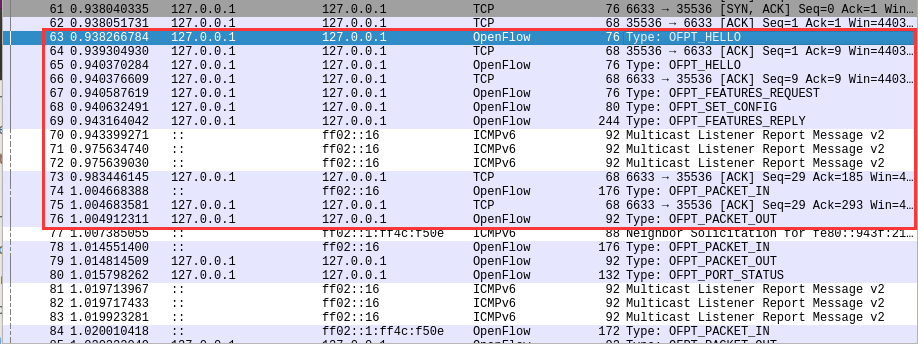
OpenFlow 交换机与控制器交互步骤
1. 利用Mininet仿真平台构建如下图所示的网络拓扑,配置主机h1和h2的IP地址(h1:10.0.0.1,h2:10.0.0.2),测试两台主机之间的网络连通性
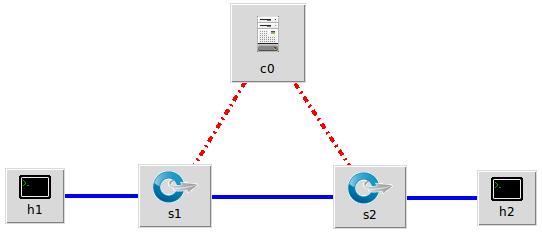
- miniedit.py设置
- start CLI
- 支持OpenFlow 1.0 1.1 1.2 1.3
- 其他使用默认设置(Controller选择默认的openflow reference)
2. 利用Wireshark工具,捕获拓扑中交换机与控制器之间的通信数据,对OpenFlow协议类型的各类报文进行分析,写出你的分析内容。
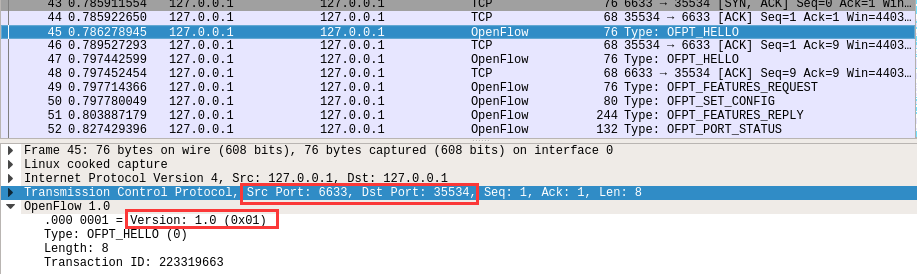
hello
控制器6633端口(我最高能支持OpenFlow 1.0) ---> 交换机35534端口
交换机35534端口(我最高能支持OpenFlow 1.3)---> 控制器6633端口
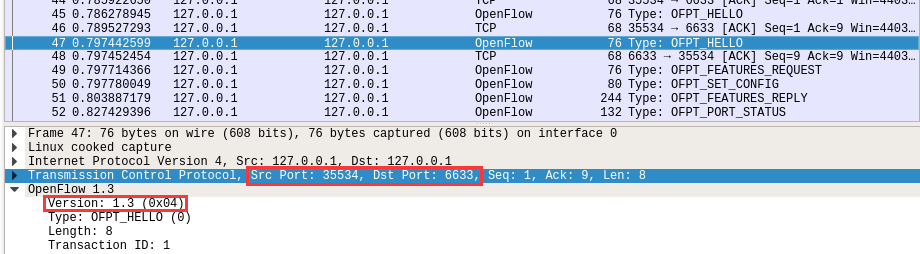
于是双方建立连接,并使用OpenFlow 1.0Features Request
控制器6633端口(我需要你的特征信息) ---> 交换机35534端口

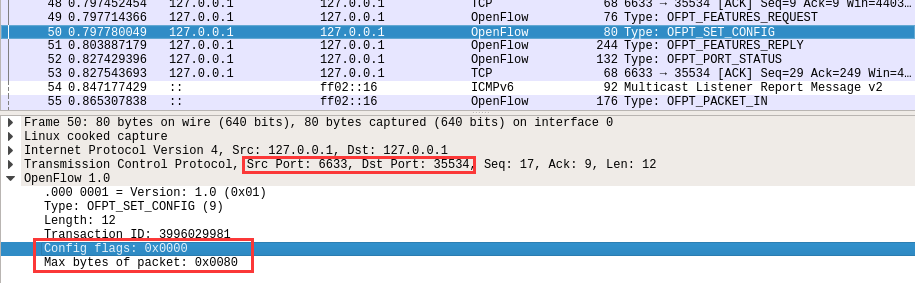
Set Config
控制器6633端口(请按照我给你的flag和max bytes of packet进行配置) ---> 交换机35534端口
Features Reply
交换机35534端口(这是我的特征信息,请查收)--- 控制器6633端口
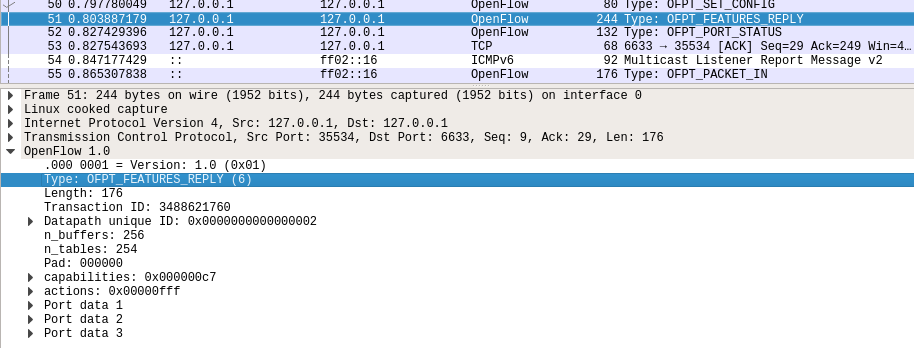
Features 消息包括 OpenFlow Header 和 Features Reply Message
对照Features Reply Message结构
struct ofp_switch_features{

    struct ofp_header header;

    uint64_t datapath_id; /*唯一标识 id 号*/

    uint32_t n_buffers; /*交缓冲区可以缓存的最大数据包个数*/

    uint8_t n_tables; /*流表数量*/

    uint8_t pad[3]; /*align to 64 bits*/

    uint32_t capabilities; /*支持的特殊功能,具体见 ofp_capabilities*/

    uint32_t actions; /*支持的动作,具体见 ofp_actions_type*/

    struct ofp_phy_port ports[0]; /*物理端口描述列表,具体见 ofp_phy_port*/

};
对应到抓取到的报文,逐项查看报文内容
OpenFlow 1.0

    .000 0001 = Version: 1.0 (0x01)

    Type: OFPT_FEATURES_REPLY (6)

    Length: 176

    Transaction ID: 3488621760

    Datapath unique ID: 0x0000000000000002

        MAC addr: 00:00:00_00:00:00 (00:00:00:00:00:00)

        Implementers part: 0x0002

    n_buffers: 256

    n_tables: 254

    Pad: 000000

    capabilities: 0x000000c7

        .... .... .... .... .... .... .... ...1 = Flow statistics: True

        .... .... .... .... .... .... .... ..1. = Table statistics: True

        .... .... .... .... .... .... .... .1.. = Port statistics: True

        .... .... .... .... .... .... .... 0... = Group statistics: False

        .... .... .... .... .... .... ..0. .... = Can reassemble IP fragments: False

        .... .... .... .... .... .... .1.. .... = Queue statistics: True

        .... .... .... .... .... ...0 .... .... = Switch will block looping ports: False

    actions: 0x00000fff

        .... .... .... .... .... .... .... ...1 = Output to switch port: True

        .... .... .... .... .... .... .... ..1. = Set the 802.1q VLAN id: True

        .... .... .... .... .... .... .... .1.. = Set the 802.1q priority: True

        .... .... .... .... .... .... .... 1... = Strip the 802.1q header: True

        .... .... .... .... .... .... ...1 .... = Ethernet source address: True

        .... .... .... .... .... .... ..1. .... = Ethernet destination address: True

        .... .... .... .... .... .... .1.. .... = IP source address: True

        .... .... .... .... .... .... 1... .... = IP destination address: True

        .... .... .... .... .... ...1 .... .... = IP ToS (DSCP field, 6 bits): True

        .... .... .... .... .... ..1. .... .... = TCP/UDP source port: True

        .... .... .... .... .... .1.. .... .... = TCP/UDP destination port: True

        .... .... .... .... .... 1... .... .... = Output to queue: True

    Port data 1

        Port number: 65534

        HW Address: e6:73:a1:3c:74:c0 (e6:73:a1:3c:74:c0)

        Port Name: s2

        Config flags: 0x00000001

            .... .... .... .... .... .... .... ...1 = Port is administratively down: True

            .... .... .... .... .... .... .... ..0. = Disable 802.1D spanning tree on port: False

            .... .... .... .... .... .... .... .0.. = Drop all packets except 802.1D spanning tree packets: False

            .... .... .... .... .... .... .... 0... = Drop received 802.1D STP packets: False

            .... .... .... .... .... .... ...0 .... = Do not include this port when flooding: False

            .... .... .... .... .... .... ..0. .... = Drop packets forwarded to port: False

            .... .... .... .... .... .... .0.. .... = Do not send packet-in msgs for port: False

        State flags: 0x00000001

            .... .... .... .... .... .... .... ...1 = No physical link present: True

        Current features: 0x00000000

            .... .... .... .... .... .... .... ...0 = 10 Mb half-duplex rate support: False

            .... .... .... .... .... .... .... ..0. = 10 Mb full-duplex rate support: False

            .... .... .... .... .... .... .... .0.. = 100 Mb half-duplex rate support: False

            .... .... .... .... .... .... .... 0... = 100 Mb full-duplex rate support: False

            .... .... .... .... .... .... ...0 .... = 1 Gb half-duplex rate support: False

            .... .... .... .... .... .... ..0. .... = 1 Gb full-duplex rate support: False

            .... .... .... .... .... .... .0.. .... = 10 Gb full-duplex rate support: False

            .... .... .... .... .... .... 0... .... = Copper medium: False

            .... .... .... .... .... ...0 .... .... = Fiber medium: False

            .... .... .... .... .... ..0. .... .... = Auto-negotiation: False

            .... .... .... .... .... .0.. .... .... = Pause: False

            .... .... .... .... .... 0... .... .... = Asymmetric pause: False

        Advertised features: 0x00000000

        Features supported: 0x00000000

        Features advertised by peer: 0x00000000

    Port data 2

        Port number: 1

        HW Address: 2a:ca:66:29:0e:ae (2a:ca:66:29:0e:ae)

        Port Name: s2-eth1

        Config flags: 0x00000000

            .... .... .... .... .... .... .... ...0 = Port is administratively down: False

            .... .... .... .... .... .... .... ..0. = Disable 802.1D spanning tree on port: False

            .... .... .... .... .... .... .... .0.. = Drop all packets except 802.1D spanning tree packets: False

            .... .... .... .... .... .... .... 0... = Drop received 802.1D STP packets: False

            .... .... .... .... .... .... ...0 .... = Do not include this port when flooding: False

            .... .... .... .... .... .... ..0. .... = Drop packets forwarded to port: False

            .... .... .... .... .... .... .0.. .... = Do not send packet-in msgs for port: False

        State flags: 0x00000000

            .... .... .... .... .... .... .... ...0 = No physical link present: False

        Current features: 0x000000c0

            .... .... .... .... .... .... .... ...0 = 10 Mb half-duplex rate support: False

            .... .... .... .... .... .... .... ..0. = 10 Mb full-duplex rate support: False

            .... .... .... .... .... .... .... .0.. = 100 Mb half-duplex rate support: False

            .... .... .... .... .... .... .... 0... = 100 Mb full-duplex rate support: False

            .... .... .... .... .... .... ...0 .... = 1 Gb half-duplex rate support: False

            .... .... .... .... .... .... ..0. .... = 1 Gb full-duplex rate support: False

            .... .... .... .... .... .... .1.. .... = 10 Gb full-duplex rate support: True

            .... .... .... .... .... .... 1... .... = Copper medium: True

            .... .... .... .... .... ...0 .... .... = Fiber medium: False

            .... .... .... .... .... ..0. .... .... = Auto-negotiation: False

            .... .... .... .... .... .0.. .... .... = Pause: False

            .... .... .... .... .... 0... .... .... = Asymmetric pause: False

        Advertised features: 0x00000000

        Features supported: 0x00000000

        Features advertised by peer: 0x00000000

    Port data 3

        Port number: 2

        HW Address: 66:01:64:ad:24:89 (66:01:64:ad:24:89)

        Port Name: s2-eth2

        Config flags: 0x00000000

            .... .... .... .... .... .... .... ...0 = Port is administratively down: False

            .... .... .... .... .... .... .... ..0. = Disable 802.1D spanning tree on port: False

            .... .... .... .... .... .... .... .0.. = Drop all packets except 802.1D spanning tree packets: False

            .... .... .... .... .... .... .... 0... = Drop received 802.1D STP packets: False

            .... .... .... .... .... .... ...0 .... = Do not include this port when flooding: False

            .... .... .... .... .... .... ..0. .... = Drop packets forwarded to port: False

            .... .... .... .... .... .... .0.. .... = Do not send packet-in msgs for port: False

        State flags: 0x00000000

            .... .... .... .... .... .... .... ...0 = No physical link present: False

        Current features: 0x000000c0

            .... .... .... .... .... .... .... ...0 = 10 Mb half-duplex rate support: False

            .... .... .... .... .... .... .... ..0. = 10 Mb full-duplex rate support: False

            .... .... .... .... .... .... .... .0.. = 100 Mb half-duplex rate support: False

            .... .... .... .... .... .... .... 0... = 100 Mb full-duplex rate support: False

            .... .... .... .... .... .... ...0 .... = 1 Gb half-duplex rate support: False

            .... .... .... .... .... .... ..0. .... = 1 Gb full-duplex rate support: False

            .... .... .... .... .... .... .1.. .... = 10 Gb full-duplex rate support: True

            .... .... .... .... .... .... 1... .... = Copper medium: True

            .... .... .... .... .... ...0 .... .... = Fiber medium: False

            .... .... .... .... .... ..0. .... .... = Auto-negotiation: False

            .... .... .... .... .... .0.. .... .... = Pause: False

            .... .... .... .... .... 0... .... .... = Asymmetric pause: False

        Advertised features: 0x00000000

        Features supported: 0x00000000

        Features advertised by peer: 0x00000000
- Packet_in
交换机35534端口(有数据包进来,请指示)--- 控制器6633端口
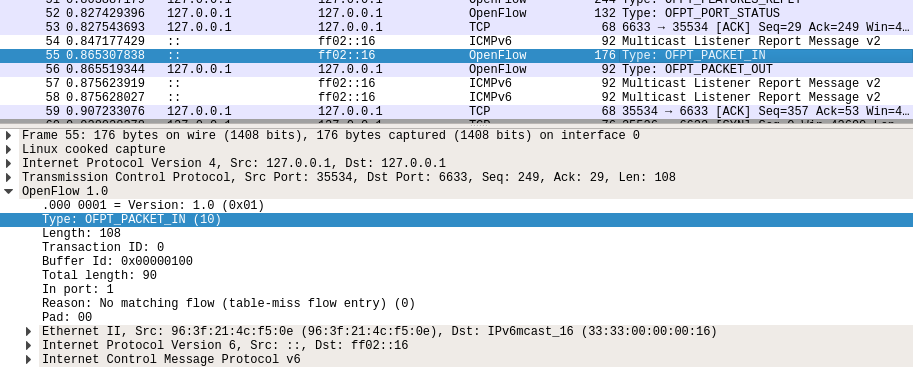
结合Packet_in的结构
struct ofp_packet_in {

    struct ofp_header header;

    uint32_t buffer_id; /*Packet-in消息所携带的数据包在交换机缓存区中的ID*/

    uint16_t total_len; /*data字段的长度*/

    uint16_t in_port; /*数据包进入交换机时的端口号*/

    uint8_t reason; /*发送Packet-in消息的原因,具体见 ofp_packet_in_reason*/

    uint8_t pad;

    uint8_t data[0]; /*携带的数据包*/

};
分析抓取的数据包,可以发现是因为交换机发现此时自己并没有匹配的流表(Reason: No matching flow (table-miss flow entry) (0)),所以要问控制器如何处理
OpenFlow 1.0

    .000 0001 = Version: 1.0 (0x01)

    Type: OFPT_PACKET_IN (10)

    Length: 108

    Transaction ID: 0

    Buffer Id: 0x00000100

    Total length: 90

    In port: 1

    Reason: No matching flow (table-miss flow entry) (0)

    Pad: 00

    Ethernet II, Src: 96:3f:21:4c:f5:0e (96:3f:21:4c:f5:0e), Dst: IPv6mcast_16 (33:33:00:00:00:16)

        Destination: IPv6mcast_16 (33:33:00:00:00:16)

            Address: IPv6mcast_16 (33:33:00:00:00:16)

            .... ..1. .... .... .... .... = LG bit: Locally administered address (this is NOT the factory default)

            .... ...1 .... .... .... .... = IG bit: Group address (multicast/broadcast)

        Source: 96:3f:21:4c:f5:0e (96:3f:21:4c:f5:0e)

            Address: 96:3f:21:4c:f5:0e (96:3f:21:4c:f5:0e)

            .... ..1. .... .... .... .... = LG bit: Locally administered address (this is NOT the factory default)

            .... ...0 .... .... .... .... = IG bit: Individual address (unicast)

        Type: IPv6 (0x86dd)

    Internet Protocol Version 6, Src: ::, Dst: ff02::16

        0110 .... = Version: 6

        .... 0000 0000 .... .... .... .... .... = Traffic Class: 0x00 (DSCP: CS0, ECN: Not-ECT)

            .... 0000 00.. .... .... .... .... .... = Differentiated Services Codepoint: Default (0)

            .... .... ..00 .... .... .... .... .... = Explicit Congestion Notification: Not ECN-Capable Transport (0)

        .... .... .... 0000 0000 0000 0000 0000 = Flow Label: 0x00000

        Payload Length: 36

        Next Header: IPv6 Hop-by-Hop Option (0)

        Hop Limit: 1

        Source: ::

        Destination: ff02::16

        IPv6 Hop-by-Hop Option

            Next Header: ICMPv6 (58)

            Length: 0

            [Length: 8 bytes]

            Router Alert

                Type: Router Alert (0x05)

                    00.. .... = Action: Skip and continue (0)

                    ..0. .... = May Change: No

                    ...0 0101 = Low-Order Bits: 0x05

                Length: 2

                Router Alert: MLD (0)

            PadN

                Type: PadN (0x01)

                    00.. .... = Action: Skip and continue (0)

                    ..0. .... = May Change: No

                    ...0 0001 = Low-Order Bits: 0x01

                Length: 0

                PadN: <none>

    Internet Control Message Protocol v6

        Type: Multicast Listener Report Message v2 (143)

        Code: 0

        Checksum: 0x7a2f [correct]

        [Checksum Status: Good]

        Reserved: 0000

        Number of Multicast Address Records: 1

        Multicast Address Record Changed to exclude: ff02::1:ff4c:f50e

            Record Type: Changed to exclude (4)

            Aux Data Len: 0

            Number of Sources: 0

            Multicast Address: ff02::1:ff4c:f50e
- Packet_out
控制器6633端口(请按照我给你的action进行处理) ---> 交换机35534端口

结合Packet_out的结构
struct ofp_packet_out {

    struct ofp_header header;

    uint32_t buffer_id; /*交换机缓存区id,如果为-1则指定的为packet-out消息携带的data字段*/

    uint16_t in_port; /*如果buffer_id为‐1,并且action列表中指定了Output=TABLE的动作,in_port将作为data段数据包的额外匹配信息进行流表查询*/

    uint16_t actions_len; /*action列表的长度,可以用来区分actions和data段*/

    struct ofp_action_header actions[0]; /*动作列表*/

    uint8_t data[0]; /*数据缓存区,可以存储一个以太网帧,可选*/

}
告诉输出到交换机的65531端口
OpenFlow 1.0

    .000 0001 = Version: 1.0 (0x01)

    Type: OFPT_PACKET_OUT (13)

    Length: 24

    Transaction ID: 0

    Buffer Id: 0x00000100

    In port: 1

    Actions length: 8

    Actions type: Output to switch port (0)

    Action length: 8

    Output port: 65531

    Max length: 0
接下来是另一台交换机(端口35536)与控制器(端口6633)的交互过程
h1 ping h2
- packet_in
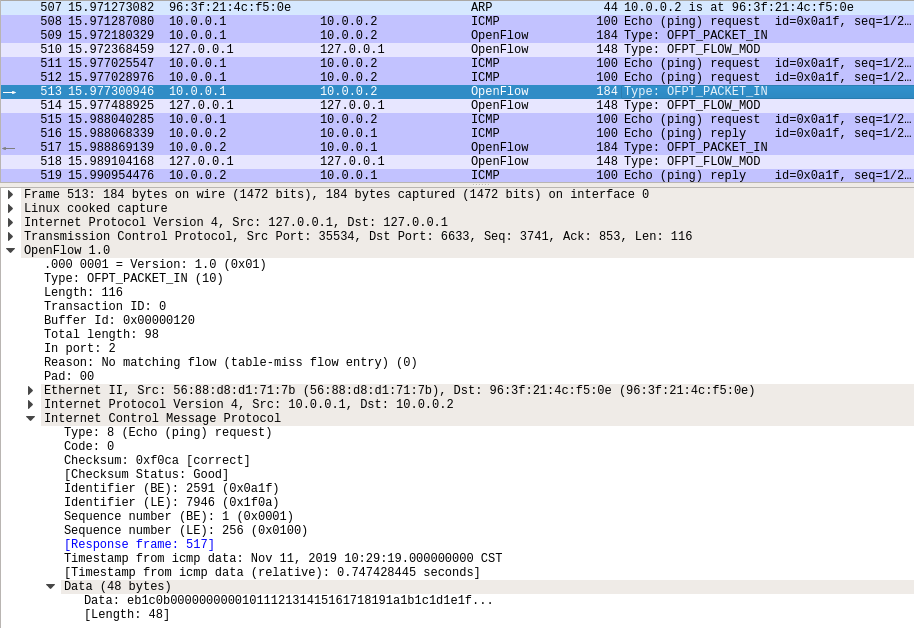
- flow_mod
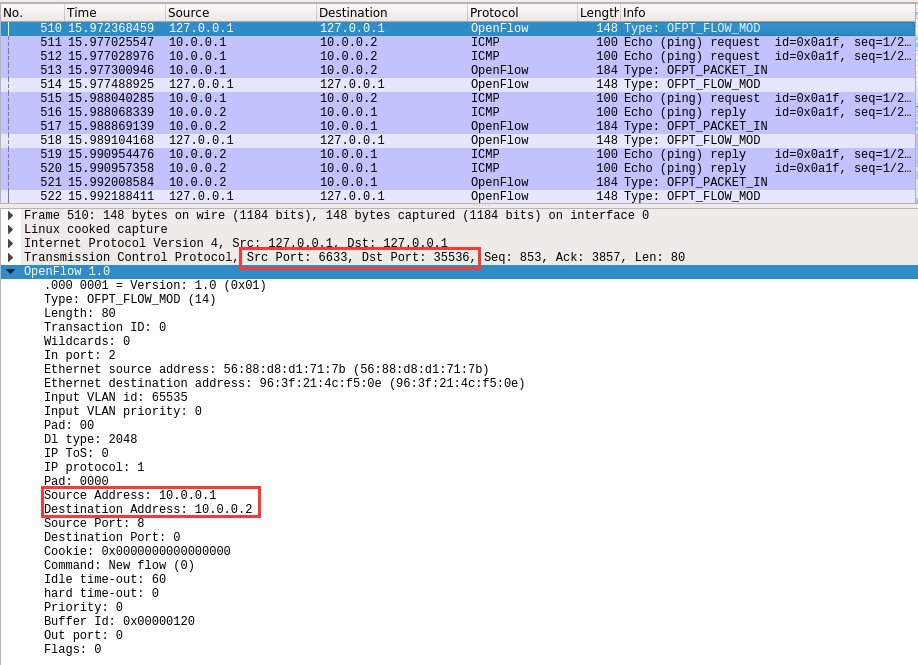
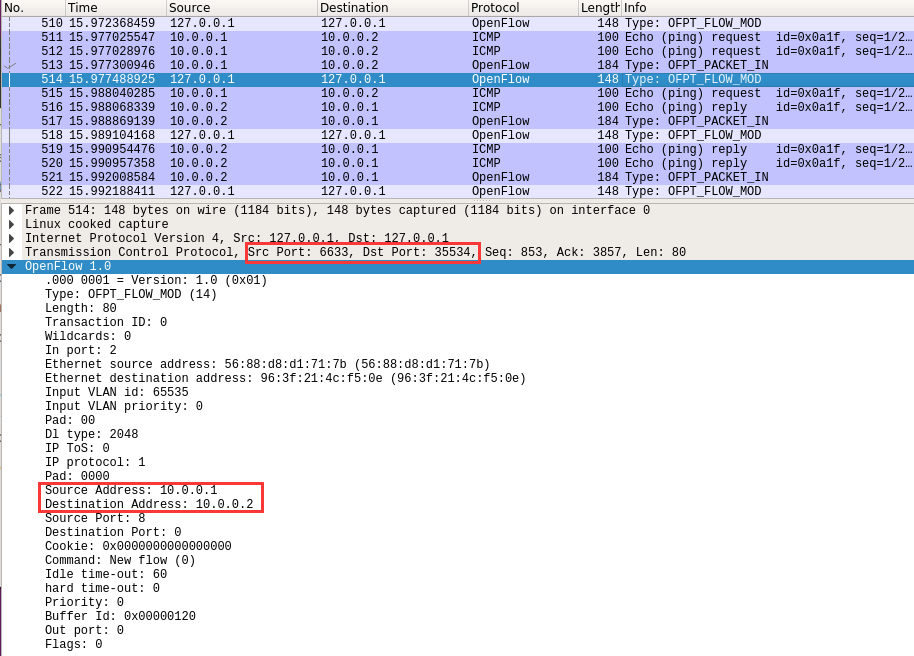
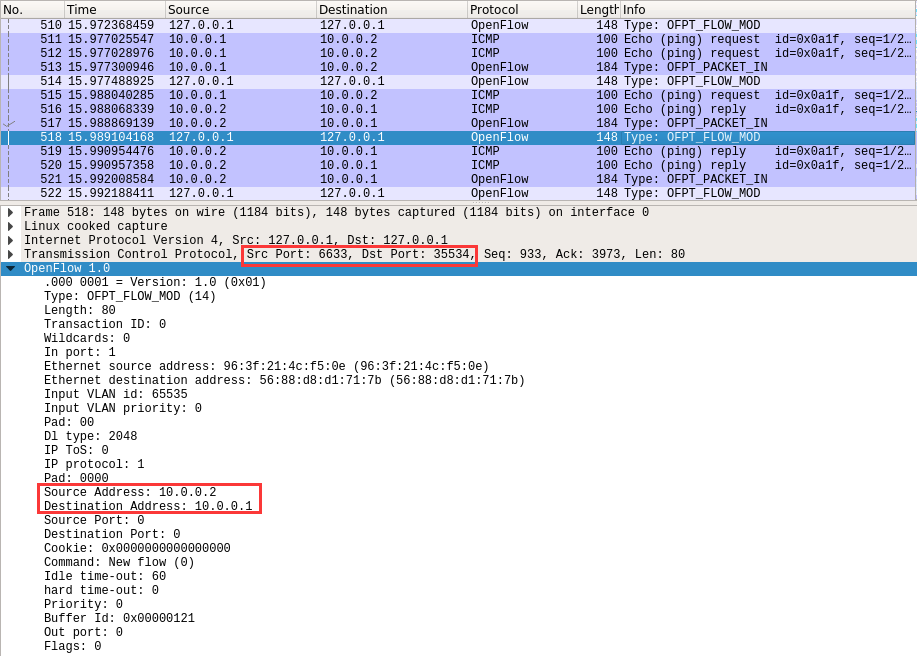
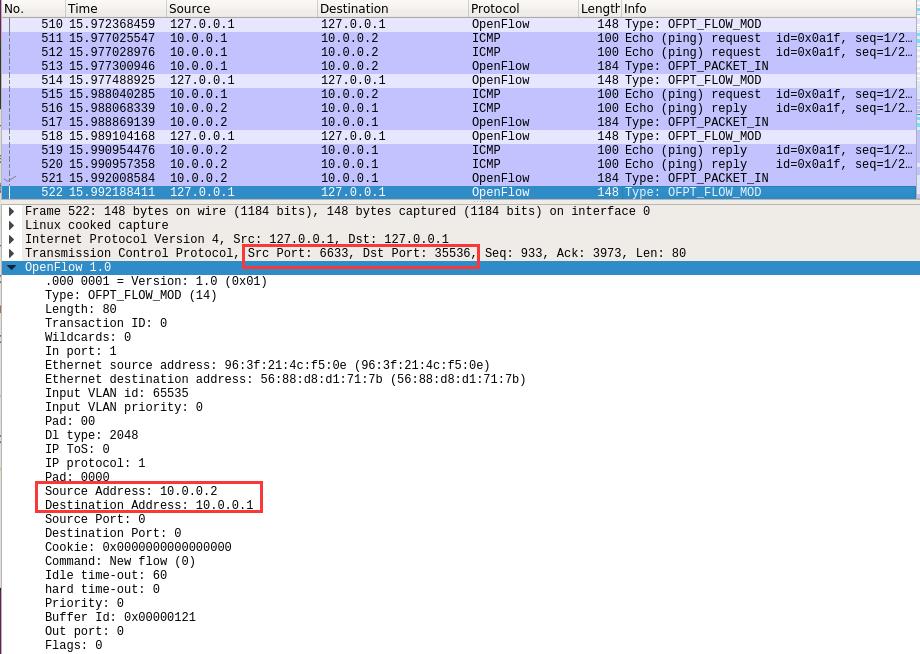
结合flow_mod结构
struct ofp_flow_mod {

    struct ofp_header header;

    struct ofp_match match; /*流表的匹配域*/

    uint64_t cookie; /*流表项标识符*/

    uint16_t command; /*可以是ADD,DELETE,DELETE-STRICT,MODIFY,MODIFY-STRICT*/

    uint16_t idle_timeout; /*空闲超时时间*/

    uint16_t hard_timeout; /*最大生存时间*/

    uint16_t priority; /*优先级,优先级高的流表项优先匹配*/

    uint32_t buffer_id; /*缓存区ID ,用于指定缓存区中的一个数据包按这个消息的action列表处理*/

    uint16_t out_port; /*如果这条消息是用于删除流表则需要提供额外的匹配参数*/

    uint16_t flags; /*标志位,可以用来指示流表删除后是否发送flow‐removed消息,添加流表时是否检查流表重复项,添加的流表项是否为应急流表项。*/

    struct ofp_action_header actions[0]; /*action列表*/

};
分析抓取的flow_mod数据包,控制器通过6633端口向交换机35334端口、交换机35336端口下发流表项,指导数据的转发处理
PS.把控制器从openflow reference改成ovs controller
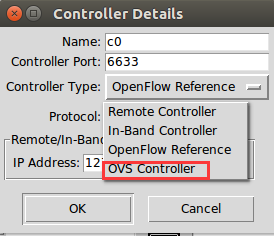
在hello报文中可以发现控制器支持的OpenFlow版本从1.0变成了1.3,因此,经过协商交换机和控制器之间将通过1.3版本的OpenFlow协议进行通信

- flow_mod

利用Wireshark抓取并分析OpenFlow协议报文的更多相关文章
- 利用wireshark抓取远程linux上的数据包
原文发表在我的博客主页,转载请注明出处. 前言 因为出差,前后准备总结了一周多,所以博客有所搁置.出差真是累人的活计,不过确实可以学习到很多东西,跟着老板学习做人,学习交流的技巧.入正题~ wires ...
- 利用wireshark抓取Telnet的用户名和密码
使用wireshark抓取Telnet 目标ip地址(telnet 192.168.88.1 ) 1,首先打开wireshark,然后选择网卡,点击开始. 2,为了在filter中输入telne ...
- 利用wireshark抓取TCP的整个过程分析。
原文地址:https://www.cnblogs.com/NickQ/p/9226579.html 最近,已经很久都没有更新博客了.看看时间,想想自己做了哪些事情,突然发现自己真的是太贪心,到头来却一 ...
- SNMP报文抓取与分析(二)
SNMP报文抓取与分析(二) SNMP报文抓取与分析(二) 1.SNMP报文表示简介 基本编码规则BER 标识域Tag表示 长度域length表示 2.SNMP报文详细分析(以一个get-respon ...
- Android利用tcpdump和wireshark抓取网络数据包
Android利用tcpdump和wireshark抓取网络数据包 主要介绍如何利用tcpdump抓取andorid手机上网络数据请求,利用Wireshark可以清晰的查看到网络请求的各个过程包括三次 ...
- 使用wireshark抓取TCP包分析1
使用wireshark抓取TCP包分析1 前言 介绍 目的 准备工作 传输 创建连接 握手 生成密钥 发送数据 断开连接 结论 前言 介绍 本篇文章是使用wireshrak对某个https请求的tcp ...
- Ubuntu下用wireshark抓取802.11封包并进行过滤分析
要用wireshark抓802.11的包 需要在linux下进行. 要在linux下抓802.11的包 需要在linux下安装无线网卡驱动. 所以 在正式抓取之前先把这两样东西搞起来. *没有特殊说明 ...
- 使用wireshark 抓取 http https tcp ip 协议进行学习
使用wireshark 抓取 http https tcp ip 协议进行学习 前言 本节使用wireshark工具抓包学习tcp ip http 协议 1. tcp 1.1 tcp三次握手在wire ...
- 深入理解USB流量数据包的抓取与分析
0x01 问题提出 在一次演练中,我们通过wireshark抓取了一个如下的数据包,我们如何对其进行分析? 0x02 问题分析 流量包是如何捕获的? 首先我们从上面的数据包分析可以知道,这是个USB的 ...
随机推荐
- Android Room 使用案例
本内容主要介绍 Android 中使用 Room 保存数据到本地数据库的方法. 以下是 Android Room 的官方介绍文档: Room Persistence Library(Room 库的简 ...
- 如何在SAP Cloud Platform ABAP编程环境里创建一个employee
用ABAP Development Tool登录SAP Cloud Platform ABAP编程环境后,对ABAP项目点击右键,选择属性,从而找到该环境的web访问的url: https://325 ...
- HDFS-SecondaryNameNode(SNN)角色介绍
它出现在Hadoop1.x版本中,又称辅助NameNode,在Hadoop2.x以后的版本中此角色消失.如果充当datanode节点的一台机器宕机或者损害,其数据不会丢失,因为备份数据还存在于其他的d ...
- gitignore文件不生效
git rm -r --cached . git add . git commit -m 'update .gitignore'
- 美化shell
Linux终端提示符颜色美化: (一)大致步骤:vim ~/.bashrc中设置PS1的值.保存后执行生效:source ~/.bashrc (二)PS1的值推荐:推荐1多色显示:用户白色:全路径(\ ...
- Python学习日记(八) 函数
函数的结构: 函数的返回值: 1.当函数执行时运到return关键字将不再往下执行 def func(): print("hello world!") print("he ...
- php最快测试环境建立
win下待验证,但linux下真快. 不要nginx,不要php-fpm,就一个字,快! 1, 安装php yum install php 输出如下: Dependencies Resolved == ...
- python 单元测试(unittest)
自动化测试在各大互联网公司全面铺开,那么针对于自动化测试好的设计思想有哪些呢?.....今天我们共同探讨下Unittest之数据驱动(DDT是 “Data-Driven Tests”的缩写). 对于接 ...
- 《少年先疯队》第八次团队作业:Alpha冲刺第三天
前言 第三天冲刺会议 时间:2019.6.16 地点:宿舍 3.1 今日完成任务情况以及遇到的问题. 3.1.1今日完成任务情况 姚玉婷:酒店的会员信息的管理,如会员的添加,删除 马 ...
- 结构型模式(四) 组合模式(Composite)
一.动机(Motivate) 在我们的操作系统中有文件夹的概念,文件夹可以包含文件夹,可以嵌套多层,最里面包含的是文件,这个概念和"俄罗斯套娃"很像.当然还有很多的例子,例如我们使 ...