
spring boot实现切割分片上传
<dependency>

      <groupId>commons-fileupload</groupId>

      <artifactId>commons-fileupload</artifactId>

      <version>1.3.3</version>

</dependency>
(2)UploadController
package com.example.demo.controller;

import com.example.demo.core.Result;

import org.apache.commons.fileupload.servlet.ServletFileUpload;

import org.apache.commons.io.FileUtils;

import org.springframework.stereotype.Controller;

import org.springframework.web.bind.annotation.CrossOrigin;

import org.springframework.web.bind.annotation.PostMapping;

import org.springframework.web.bind.annotation.RequestMapping;

import org.springframework.web.bind.annotation.ResponseBody;

import org.springframework.web.multipart.MultipartFile;

import javax.servlet.http.HttpServletRequest;

import javax.servlet.http.HttpServletResponse;

import java.io.File;

import java.io.FileOutputStream;

import java.io.IOException;

import java.text.SimpleDateFormat;

import java.util.Date;

@CrossOrigin

@Controller

@RequestMapping("/api/upload")

public class UploadController {

    @PostMapping("/part")

    @ResponseBody

    public Result bigFile(HttpServletRequest request, HttpServletResponse response, String guid, Integer chunk, MultipartFile file, Integer chunks) {

        try {

            String projectUrl = System.getProperty("user.dir").replaceAll("\\\\", "/");

            ;

            boolean isMultipart = ServletFileUpload.isMultipartContent(request);

            if (isMultipart) {

                if (chunk == null) chunk = 0;

                // 临时目录用来存放所有分片文件

                String tempFileDir = projectUrl + "/upload/" + guid;

                File parentFileDir = new File(tempFileDir);

                if (!parentFileDir.exists()) {

                    parentFileDir.mkdirs();

                }

                // 分片处理时,前台会多次调用上传接口,每次都会上传文件的一部分到后台

                File tempPartFile = new File(parentFileDir, guid + "_" + chunk + ".part");

                FileUtils.copyInputStreamToFile(file.getInputStream(), tempPartFile);

            }

        } catch (Exception e) {

            return Result.failMessage(400,e.getMessage());

        }

        return Result.successMessage(200,"上次成功");

    }

    @RequestMapping("merge")

    @ResponseBody

    public Result mergeFile(String guid, String fileName) {

        // 得到 destTempFile 就是最终的文件

        String projectUrl = System.getProperty("user.dir").replaceAll("\\\\", "/");

        try {

            String sname = fileName.substring(fileName.lastIndexOf("."));

            //时间格式化格式

            Date currentTime = new Date();

            SimpleDateFormat simpleDateFormat = new SimpleDateFormat("yyyyMMddHHmmssSSS");

            //获取当前时间并作为时间戳

            String timeStamp = simpleDateFormat.format(currentTime);

            //拼接新的文件名

            String newName = timeStamp + sname;

            simpleDateFormat = new SimpleDateFormat("yyyyMM");

            String path = projectUrl + "/upload/";

            String tmp = simpleDateFormat.format(currentTime);

            File parentFileDir = new File(path + guid);

            if (parentFileDir.isDirectory()) {

                File destTempFile = new File(path + tmp, newName);

                if (!destTempFile.exists()) {

                    //先得到文件的上级目录,并创建上级目录,在创建文件

                    destTempFile.getParentFile().mkdir();

                    try {

                        destTempFile.createNewFile();

                    } catch (IOException e) {

                        e.printStackTrace();

                    }

                }

                for (int i = 0; i < parentFileDir.listFiles().length; i++) {

                    File partFile = new File(parentFileDir, guid + "_" + i + ".part");

                    FileOutputStream destTempfos = new FileOutputStream(destTempFile, true);

                    //遍历"所有分片文件"到"最终文件"中

                    FileUtils.copyFile(partFile, destTempfos);

                    destTempfos.close();

                }

                // 删除临时目录中的分片文件

                FileUtils.deleteDirectory(parentFileDir);

                return Result.successMessage(200,"合并成功");

            }else{

                return Result.failMessage(400,"没找到目录");

            }

        } catch (Exception e) {

            return Result.failMessage(400,e.getMessage());

        }

    }

}
说明:
注解 @CrossOrigin 解决跨域问题
(3)Result
package com.example.demo.core;

import com.alibaba.fastjson.JSON;

/**

 * Created by Beibei on 19/02/22

 * API响应结果

 */

public class Result<T> {

    private int code;

    private String message;

    private T data;

    public Result setCode(Integer code) {

        this.code = code;

        return this;

    }

    public int getCode() {

        return code;

    }

    public String getMessage() {

        return message;

    }

    public Result setMessage(String message) {

        this.message = message;

        return this;

    }

    public T getData() {

        return data;

    }

    public Result setData(T data) {

        this.data = data;

        return this;

    }

    @Override

    public String toString() {

        return JSON.toJSONString(this);

    }

    public static <T>  Result<T> fail(Integer code,T data) {

        Result<T> ret = new Result<T>();

        ret.setCode(code);

        ret.setData(data);

        return ret;

    }

    public static <T>  Result<T> failMessage(Integer code,String msg) {

        Result<T> ret = new Result<T>();

        ret.setCode(code);

        ret.setMessage(msg);

        return ret;

    }

    public static <T>  Result<T> successMessage(Integer code,String msg) {

        Result<T> ret = new Result<T>();

        ret.setCode(code);

        ret.setMessage(msg);

        return ret;

    }

    public static <T> Result<T> success(Integer code,T data) {

        Result<T> ret = new Result<T>();

        ret.setCode(code);

        ret.setData(data);

        return ret;

    }

}
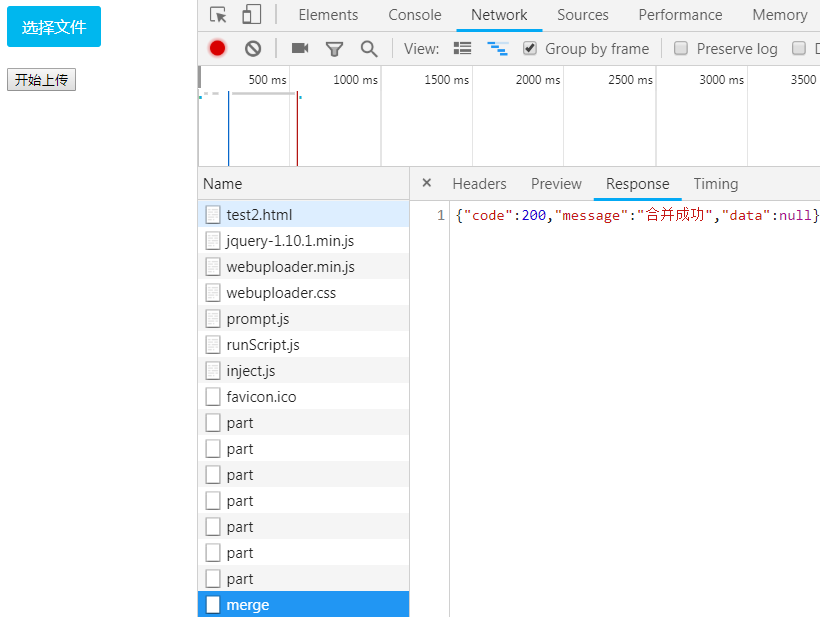
<!DOCTYPE html PUBLIC "-//W3C//DTD XHTML 1.0 Transitional//EN" "http://www.w3.org/TR/xhtml1/DTD/xhtml1-transitional.dtd">

<html xmlns="http://www.w3.org/1999/xhtml">

<head>

   <meta http-equiv="Content-Type" content="text/html; charset=utf-8" />

   <link href="css/webuploader.css" rel="stylesheet" type="text/css" />

   <script type="text/javascript" src="jquery-1.10.1.min.js"></script>

   <script type="text/javascript" src="dist/webuploader.min.js"></script>

</head>

<body>

   <div id="uploader">

      <div class="btns">

         <div id="picker">选择文件</div>

         <button id="startBtn" class="btn btn-default">开始上传</button>

      </div>

   </div>

</body>

<script type="text/javascript">

var GUID = WebUploader.Base.guid();//一个GUID

var uploader = WebUploader.create({

    // swf文件路径

    swf: 'dist/Uploader.swf',

    // 文件接收服务端。

    server: 'http://localhost:8080/api/upload/part',

    formData:{

       guid : GUID

    },

    pick: '#picker',

    chunked : true, // 分片处理

    chunkSize : 1 * 1024 * 1024, // 每片1M,

    chunkRetry : false,// 如果失败,则不重试

    threads : 1,// 上传并发数。允许同时最大上传进程数。

    resize: false

});

$("#startBtn").click(function () {

   uploader.upload();

});

//当文件上传成功时触发。

uploader.on( "uploadSuccess", function( file ) {

    $.post('http://localhost:8080/api/upload/merge', { guid: GUID, fileName: file.name}, function (data) {

       if(data.code == 200){

          alert('上传成功!');

       }

     });

});

</script>

</html>
<!DOCTYPE html PUBLIC "-//W3C//DTD XHTML 1.0 Transitional//EN" "http://www.w3.org/TR/xhtml1/DTD/xhtml1-transitional.dtd">

<html xmlns="http://www.w3.org/1999/xhtml">

    <head>

        <script src="jquery-1.10.1.min.js" type="text/javascript">

        </script>

        <meta content="text/html; charset=utf-8" http-equiv="Content-Type"/>

    </head>

    <body>

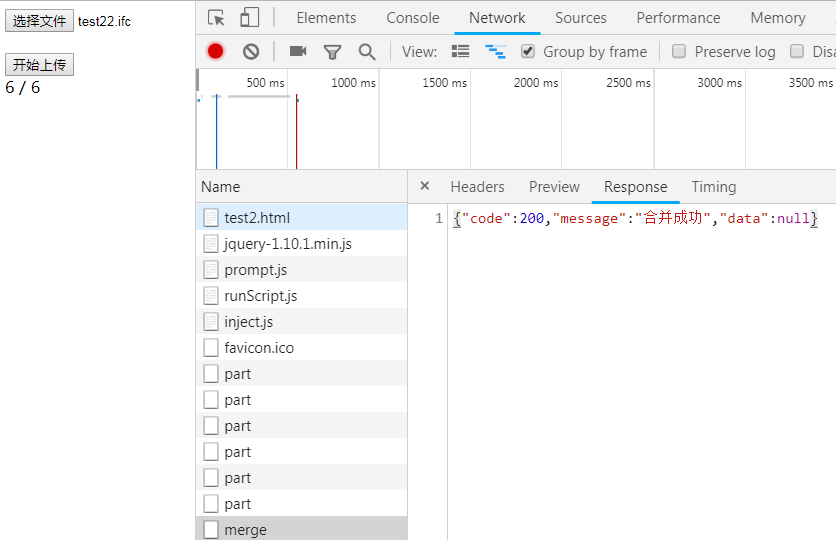
        <div id="uploader">

            <div class="btns">

                <input id="file" name="file" type="file"/>

                <br>

                    <br>

                        <button id="startBtn">

                            开始上传

                        </button>

                    </br>

                </br>

            </div>

            <div id="output">

            </div>

        </div>

    </body>

    <script type="text/javascript">

        var status = 0;

        var page = {

        init: function(){

            $("#startBtn").click($.proxy(this.upload, this));

        },

        upload: function(){

            status = 0;

            var GUID = this.guid();

            var file = $("#file")[0].files[0],  //文件对象

                name = file.name,        //文件名

                size = file.size;        //总大小

            var shardSize = 20 * 1024 * 1024,    //以1MB为一个分片

                shardCount = Math.ceil(size / shardSize);  //总片数

            for(var i = 0;i < shardCount;++i){

                //计算每一片的起始与结束位置

                var start = i * shardSize,

                end = Math.min(size, start + shardSize);

                var partFile = file.slice(start,end);

                this.partUpload(GUID,partFile,name,shardCount,i);

            }

        },

        partUpload:function(GUID,partFile,name,chunks,chunk){

            //构造一个表单,FormData是HTML5新增的

            var  now = this;

            var form = new FormData();

            form.append("guid", GUID);

            form.append("file", partFile);  //slice方法用于切出文件的一部分

            form.append("fileName", name);

            form.append("chunks", chunks);  //总片数

            form.append("chunk", chunk);        //当前是第几片

                //Ajax提交

                $.ajax({

                    url: "http://localhost:8080/api/upload/part",

                    type: "POST",

                    data: form,

                    async: true,        //异步

                    processData: false,  //很重要,告诉jquery不要对form进行处理

                    contentType: false,  //很重要,指定为false才能形成正确的Content-Type

                    success: function(data){

                        status++;

                        if(data.code == 200){

                            $("#output").html(status+ " / " + chunks);

                        }

                        if(status==chunks){

                            now.mergeFile(GUID,name);

                        }

                    }

                });

        },

        mergeFile:function(GUID,name){

            var formMerge = new FormData();

            formMerge.append("guid", GUID);

            formMerge.append("fileName", name);

            $.ajax({

                url: "http://localhost:8080/api/upload/merge",

                type: "POST",

                data: formMerge,

                processData: false,  //很重要,告诉jquery不要对form进行处理

                contentType: false,  //很重要,指定为false才能形成正确的Content-Type

                success: function(data){

                    if(data.code == 200){

                        alert('上传成功!');

                    }

                }

            });

        },

        guid:function(prefix){

                var counter = 0;

                var guid = (+new Date()).toString( 32 ),

                    i = 0;

                for ( ; i < 5; i++ ) {

                    guid += Math.floor( Math.random() * 65535 ).toString( 32 );

                }

                return (prefix || 'wu_') + guid + (counter++).toString( 32 );

        }

    };

    $(function(){

        page.init();

    });

    </script>

</html>
3.优化
springboot的默认配置为10MB,前端分片改为20M时,就会报错
org.apache.tomcat.util.http.fileupload.FileUploadBase$SizeLimitExceededException: the request was rejected because its size (10486839) exceeds the configured maximum (10485760)
解决方法:
在 src/main/resources 下的 application.properties里添加
spring.servlet.multipart.max-file-size=30MB

spring.servlet.multipart.max-request-size=35MB
说明:
设置的数值虽好比前端传过来的大,要不容易报错
spring boot实现切割分片上传的更多相关文章
- 基于前台vue,后台是spring boot的压缩图片上传
本人是刚毕业的新手,最近公司的一个项目,前后端分离,前端Vue,后端使用spring boot.其中有一个需求是需要做前端上传的图片需要压缩才能上传.为此在网上查找资料,并做了简单的实现. 那么一步来 ...
- Spring Boot入门——多文件上传大小超限问题解决
多文件上传中遇到上传文件大小的问题 org.apache.tomcat.util.http.fileupload.FileUploadBase$FileSizeLimitExceededExcepti ...
- Spring Boot 嵌入式 Tomcat 文件上传、url 映射虚拟路径
1.Java web 应用开发完成后如果是导入外置的 Tomcat 的 webapps 目录的话,那么上传的文件可以直接的放在应用的 web 目录下去就好了,浏览器可以很方便的进行访问. 2.Spri ...
- spring boot + vue实现图片上传及展示
转载:https://blog.csdn.net/weixin_40337982/article/details/84031778 其中一部分对我很有帮助 转载记录下 首先,html页面: <! ...
- spring boot:实现图片文件上传并生成缩略图(spring boot 2.3.1)
一,为什么要给图片生成缩略图? 1, 用户上传的原始图片如果太大,不能直接展示在网站页面上, 因为不但流费server的流量,而且用户打开时非常费时间, 所以要生成缩略图. 2,服务端管理图片要注意的 ...
- 解决使用Spring Boot、Multipartfile实现上传提示无法找到文件的问题
前言 SpringBoot使用MultiPartFile接收来自表单的file文件,然后进行服务器的上传是一个项目最基本的需求,我以前的项目都是基于SpringMVC框架搭建的,所以在使用Spring ...
- spring boot 长时间运行上传报临时目录找不到
The temporary upload location [/tmp/tomcat-docbase.3752410576653354473.8899/work/Tomcat/localhost/RO ...
- 009 spring boot中文件的上传与下载
一:任务 1.任务 文件的上传 文件的下载 二:文件的上传 1.新建一个对象 FileInfo.java package com.cao.dto; public class FileInfo { pr ...
- Spring Boot + thymeleaf 实现文件上传下载
参考博客:https://juejin.im/post/5a326dcaf265da431048685e 技术选型:spring boot 2.1.1+thymeleaf+maven 码云地址:htt ...
随机推荐
- js回调与异步加载的用法
以前还是菜鸟的时候(虽然现在依然很菜 -_-|| )对异步加载与回调函数的技术无比向往,但也一直没有使用过,这次因为页面逻辑太过复杂,一堆请求逻辑,如果还是用顺序请求,页面的速度... 领导又要挠头了 ...
- DOM是浏览器提供给开发者的语柄、套接字、文件接口
DOM是浏览器提供给开发者的语柄.套接字.文件接口
- hdu2068-RPG的错排-(dp递推式)
去年看错排公式,死都看不懂,基础扎实之后再来看就略懂了. 公式: dp[ n ] = ( n-1 ) * ( dp[n-1] + dp[n-2] ) 解析公式:比如有n个元素,各对应n个正确位置,dp ...
- SQLServer 数据库封装类
using System; using System.Collections.Generic; using System.Linq; using System.Text; using System.D ...
- ASP.NET Core Docker Nginx分权,多网站部署
https://www.cnblogs.com/esofar/p/10694319.html
- 破解EXCEL工作表保护密码
神技 破解EXCEL工作表保护密码 http://www.mr-wu.cn/crack-excel-workbook-protection/ 我们可以通过新建工作本,来创建一个新的工作本来创造新的宏而 ...
- 【LG3582】[POI2015]KIN
[LG3582][POI2015]KIN 题面 洛谷 题解 这题维护区间的信息有点像最大子段和,我们往最大子段和上面靠. 对于一个颜色,我们有一个直观的想法就是将它一次出现的权值设为正,二次出现就设为 ...
- OpenVSwitch
参考: https://opengers.github.io/openstack/openstack-base-use-openvswitch/ 这篇原理部分就不贴出来了,请自行参考上文,并根据自行实 ...
- cocos: 链接错误: _lz_adler32 in liblibquickmac.a
错误: Undefined symbols for architecture x86_64: "_adler32", referenced from: _lz_adler32 in ...
- [BUAA软工]Alpha阶段测试报告
测试报告 一.测试计划 1.1 功能测试 1.2 UI测试 1.3 测试中发现的bug https://github.com/bingduoduo1/backend/issues/21 https:/ ...