
SSM 前后端分离 这里controll层的返回值和之前那个不一样
1.先创建实体类:
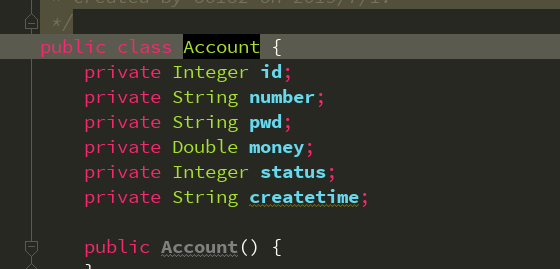
2.创建mapper层
package cn.kgc.mapper;

import cn.kgc.Account;
import org.apache.ibatis.annotations.Delete;
import org.apache.ibatis.annotations.Insert;
import org.apache.ibatis.annotations.Select;
import org.apache.ibatis.annotations.Update;

import java.util.List;

/**
 * Created by 86182 on 2019/7/1.
 */
public interface AccountMapper {
    //查询所有
    @Select("select * from account")
    List<Account> selectAccount();
    //查询单条
    @Select("select * from account where id=#{id}")
    Account selectByid(Integer id);
    //添加
    @Insert("insert into account(id,number,pwd,money,status,createtime) values(#{id},#{number},#{pwd},#{money},#{status},now())")
    Integer insertAccount(Account account);
    //修改
    @Update("update account set number =#{number},pwd=#{pwd},money=#{money},status=#{status} WHERE id =#{id}")
    Integer updateAccount(Account account);
    //删除
    @Delete("delete from account where id=#{id}")
    Integer deleteAccount(Integer id);
}
3.创建service层
3.1接口层:
package cn.kgc.service;

import cn.kgc.Account;

import java.util.List;

/**
 * Created by 86182 on 2019/7/1.
 */
public interface AccountService {
    //页面展示
    List<Account> showData();
    //查询单条
    Account findByData(Integer id);
    //添加
    Integer add(Account account);
    //修改
    Integer edit(Account account);
    //删除
    Integer del(Integer id);
}
3.2实现类
package cn.kgc.service;

import cn.kgc.mapper.AccountMapper;
import cn.kgc.Account;
import org.springframework.beans.factory.annotation.Autowired;
import org.springframework.stereotype.Service;
import org.springframework.transaction.annotation.Transactional;

import java.util.List;

/**
 * Created by 86182 on 2019/7/1.
 */
@Service
@Transactional
public class AccountServiceImpl implements AccountService {
    @Autowired
    private AccountMapper accountMapper;
    @Override
    public List<Account> showData() {
        return accountMapper.selectAccount();
    }

    @Override
    public Account findByData(Integer id) {
        return accountMapper.selectByid(id);
    }

    @Override
    public Integer add(Account account) {
        return accountMapper.insertAccount(account);
    }

    @Override
    public Integer edit(Account account) {
        return accountMapper.updateAccount(account);
    }

    @Override
    public Integer del(Integer id) {
        return accountMapper.deleteAccount(id);
    }
}
4.controller层
package cn.kgc.controller;

import cn.kgc.service.AccountService;
import cn.kgc.Account;
import org.springframework.beans.factory.annotation.Autowired;
import org.springframework.web.bind.annotation.RequestMapping;
import org.springframework.web.bind.annotation.RestController;

import java.util.List;

/**
 * Created by 86182 on 2019/7/1.
 */
@RestController
public class AccountController {
    @Autowired
    private AccountService accountService;

    //查询全部
    @RequestMapping("/init.do")
    public List<Account> showData(){
        return accountService.showData();
    }
    //添加
    @RequestMapping("/add.do")
    public int addData(Account account){
        return accountService.add(account);
    }
    //查询单条
    @RequestMapping("/info.do")
    public Account getInfo(Integer id){
        return accountService.findByData(id);
    }
    //修改
    @RequestMapping("/edit.do")
    public  int editData(Account account){
        return accountService.edit(account);
    }
    //删除
    @RequestMapping("/del.do")
    public int deleteData(Integer id){
        return accountService.del(id);
    }
}
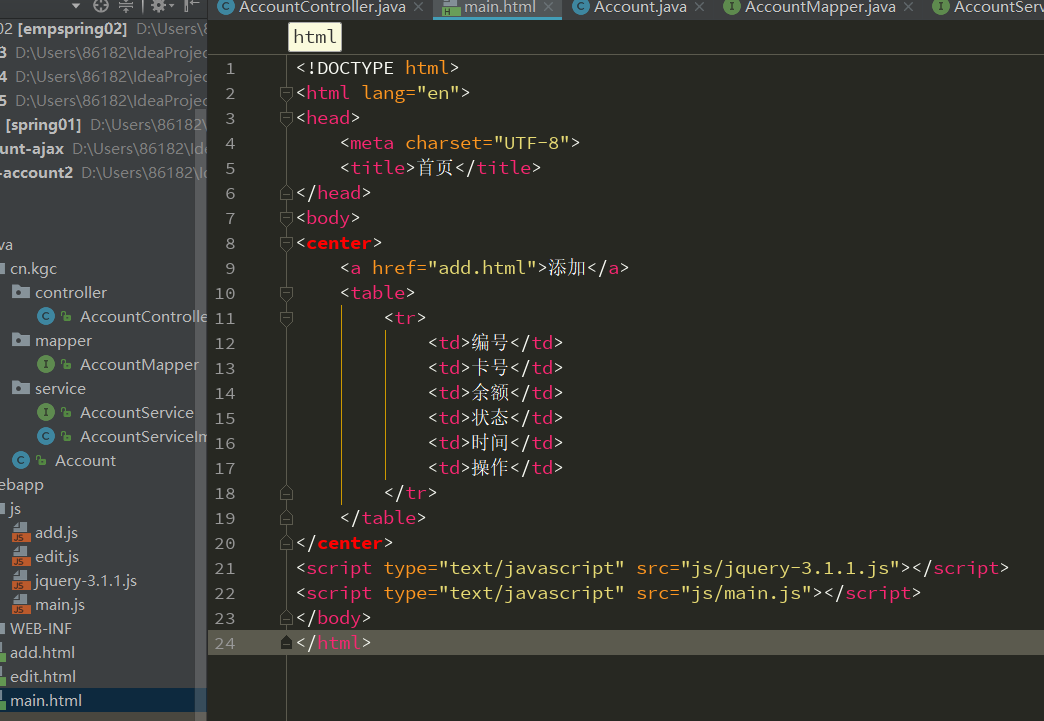
前台页面html
js页面
$(function () {
    initData();
})
function initData() {
    $.ajax({
      url:"init.do",
        type:"post",     //post的方式提交
        dataType:"json",   //数据类型是json格式
        data:{},
        async:true,
        success:function (obj) {
            // alert("success");
            console.log(obj);
            var str="";
            $.each(obj,function(i) {
                str+="<tr>";
                str+="    <td>"+obj[i].id+"</td>";
                str+="    <td>"+obj[i].number+"</td>";
                str+="    <td>"+obj[i].money+"</td>";
                str+="    <td>"+obj[i].status+"</td>";
                str+="    <td>"+obj[i].createtime+"</td>";
                str+="    <td>" +
                          "<a href='edit.html?id="+obj[i].id+"'>修改</a>" +
                          "|<a href='javascript:void(0);' onclick='delFun("+obj[i].id+")'>删除</a>" +
                          "</td>";
                str+="</tr>";
            });
            $("table").append(str);
        },
        error:function () {
            alert("error")
        }
    });
}
function delFun(id) {
    $.ajax({
        url:"del.do",
        type:"post",
        dataType:"json",
        data:{"id":id},
        async:true,
        success:function (obj) {
            location.href="main.html";
        },
        error:function () {
            alert("del error")
        }
    });
}
SSM 前后端分离 这里controll层的返回值和之前那个不一样的更多相关文章
- SSM前后端分离 ssm+html+js(ajax) 这种controll层的返回值是结合或者网址
提示: 1.单表查询多条数据用 list<实体类名字> mapper层 1.1单表查询单条数据用 对象 2.两表关联查多条 list<map<String,Object> ...
- SSM前后端分离/不分离对比Demo
之前某些原因,整理了一个小的Demo,用于演示.个人认为在SSM前后端不分离的基础上在前端处理上比较麻烦一点之后就是注解的使用.总结一些对比,仅是自己掌握的,不够严谨,不足之处请大佬批评指正. 路由控 ...
- SSM框架中的前后端分离
认识前后端分离 在传统的web应用开发中,大多数的程序员会将浏览器作为前后端的分界线.将浏览器中为用户进行页面展示的部分称之为前端,而将运行在服务器,为前端提供业务逻辑和数据准备的所有代码统称为后端. ...
- 从MVC到Ajax再到前后端分离的思考
前言 一位小妹去面试前端,前端leader问了"什么是ajax?",答:"接收后台的数据,然后然后自己填充和渲染样式":一位小哥去面试后台,技术经理问了&quo ...
- REST风格框架实战:从MVC到前后端分离(附完整Demo)
既然MVC模式这么好,难道它就没有不足的地方吗?我认为MVC至少有以下三点不足:(1)每次请求必须经过“控制器->模型->视图”这个流程,用户才能看到最终的展现的界面,这个过程似乎有些复杂 ...
- REST风格框架:从MVC到前后端分离***
摘要: 本人在前辈<从MVC到前后端分离(REST-个人也认为是目前比较流行和比较好的方式)>一文的基础上,实现了一个基于Spring的符合REST风格的完整Demo,具有MVC分层结构并 ...
- 【转】REST风格框架实战:从MVC到前后端分离(附完整Demo)
版权声明:欢迎转载,注明作者和出处就好!如果不喜欢或文章存在明显的谬误,请留言说明原因再踩哦,谢谢,我也可以知道原因,不断进步! https://blog.csdn.net/justloveyou_/ ...
- 浅谈WEB前后端分离
重审业务逻辑 用过MVC的童鞋都知道业务逻辑(Bussiness Logic),但是大多对这概念又是模棱两可,业务逻辑从来都是这样难以理解,谈论前后端分离之前这个概念非常有必要探讨一下! 在简单的CR ...
- 架构设计:前后端分离之Web前端架构设计
在前面的文章里我谈到了前后端分离的一些看法,这个看法是从宏观的角度来思考的,没有具体的落地实现,今天我将延续上篇文章的主题,从纯前端的架构设计角度谈谈前后端分离的一种具体实现方案,该方案和我原来设想有 ...
随机推荐
- shell之批量新增用户脚本(http-basic-auth)
user.txt(用户名记录文件) test001@.com test002@.com user.sh(shell脚本): for line in `cat user.txt` do echo $li ...
- 反射调用异常InvocationTargetException和代理类抛出异常
反射调用方法,如果方法抛出异常,会被包装成InvocationTargetException. 如果反射对象被代理了,在代理类中抛出异常,不会被包装成InvocationTargetException ...
- Mac OS X 10.14.3下如何给Python2.7.10安装MySQL-Python
最近准备再看一下python ,弄个自动化部署的工具,一来就遇到了坑 sudo pip install MySQL-Python --global-option=build_ext --global- ...
- 部署一个fc网站需要注意的地方
1. php环境 必须5.3 2. yum install nodejs 3. yum install v8-devel 3. 下载v8js php扩展, 版本是 v8js-0.1.3 tar -zx ...
- 用GEOquery从GEO数据库下载数据--转载
https://www.plob.org/article/9969.html Gene Expression Omnibus database (GEO)是由NCBI负责维护的一个数据库,设计初衷是为 ...
- RedHat 7关闭防火墙方法
1.在之前的版本中关闭防火墙等服务的命令是 service iptables stop /etc/init.d/iptables stop 2.RHEL7开始,使用systemctl工具来管理服务程序 ...
- 【转】Revit二次开发——读取cad中的文字信息
Revit读取cad的文字信息需要借助Teigha的开源dll,在程序中添加下图中红色框的dll文件的引用,其他的dll文件全部放在同一个文件夹中即可,运行的时候,会自动把这些dll文件全部复制到bi ...
- ubuntu下编译C++程序
1.CMake 定义:CMake是一个跨平台编译工具,可以用来自动输出makefile文件: 用法:(1)想要自动生成makefile,还需要编写对应的CMakeLists.txt文件: (2)在CM ...
- EasyNVR网页摄像机无插件H5、谷歌Chrome直播方案使用过程中问题的自我排查-设备不在线问题自我排查检测
由于EasyNVR的受众越来越多,时常会遇到很多类似的问题咨询,之前虽然有写过很多的博文进行技术的或者使用问题的解答,随着客户询问的增多,我发现,要想让客户了解问题和解决问题,往往引导和给一个思路比直 ...
- Spark sql -- Spark sql中的窗口函数和对应的api
一.窗口函数种类 ranking 排名类 analytic 分析类 aggregate 聚合类 Function Type SQL DataFrame API Description Ranking ...