
树莓派 - MQTT
安装mosquitto
下载源代码包
wget http://mosquitto.org/files/source/mosquitto-1.5.tar.gz
解压
tar zxfv mosquitto-1.5.tar.gz
进入目录
cd mosquitto-1.5
编译
make
安装
sudo make install
安装问题
handle_connect.c:33:25: fatal error: uuid/uuid.h: No such file or directory

 #  include <uuid/uuid.h>
解决:
pi@raspberrypi:~/mosquitto-1.5 $ sudo apt-get install uuid-dev找不到openssl/ssl.h
解决:sudo apt-get install libssl-dev
error while loading shared libraries: libmosquitto.so.1: cannot open shared object file: No such file or directory
解决:
sudo ln -s /usr/local/lib/libmosquitto.so.1 /usr/lib/libmosquitto.so.1

sudo ldconfig
在linux 虚拟机上也安装mosquitto, sudo apt install mosquitto
测试
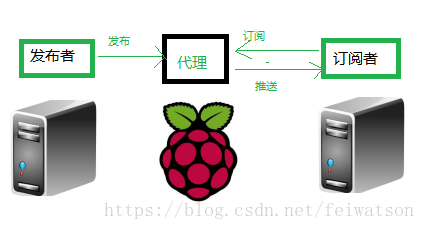
在raspberryPi上运行mosquitto -v
pi@raspberrypi:~ $ mosquitto -v

1533737054: mosquitto version 1.5 starting

1533737054: Using default config.

1533737054: Opening ipv4 listen socket on port 1883.

1533737054: Opening ipv6 listen socket on port 1883.

1533737096: New connection from 192.168.0.197 on port 1883.

1533737096: New client connected from 192.168.0.197 as mosqpub|9828-ubuntu (c1, k60).

1533737096: No will message specified.

1533737096: Sending CONNACK to mosqpub|9828-ubuntu (0, 0)

1533737096: Received PUBLISH from mosqpub|9828-ubuntu (d0, q0, r0, m0, 'gpio', ... (20 bytes))

1533737096: Received DISCONNECT from mosqpub|9828-ubuntu

1533737096: Client mosqpub|9828-ubuntu disconnected.

1533737126: New connection from 192.168.0.197 on port 1883.

1533737126: New client connected from 192.168.0.197 as mosqsub|9829-ubuntu (c1, k60).

1533737126: No will message specified.

1533737126: Sending CONNACK to mosqsub|9829-ubuntu (0, 0)

1533737126: Received SUBSCRIBE from mosqsub|9829-ubuntu

1533737126:     gpio (QoS 0)

1533737126: mosqsub|9829-ubuntu 0 gpio

1533737126: Sending SUBACK to mosqsub|9829-ubuntu

1533737170: New connection from 192.168.0.197 on port 1883.

1533737170: New client connected from 192.168.0.197 as mosqpub|9832-ubuntu (c1, k60).

1533737170: No will message specified.

1533737170: Sending CONNACK to mosqpub|9832-ubuntu (0, 0)

1533737170: Received PUBLISH from mosqpub|9832-ubuntu (d0, q0, r0, m0, 'gpio', ... (20 bytes))

1533737170: Sending PUBLISH to mosqsub|9829-ubuntu (d0, q0, r0, m0, 'gpio', ... (20 bytes))

1533737170: Received DISCONNECT from mosqpub|9832-ubuntu

1533737170: Client mosqpub|9832-ubuntu disconnected.

1533737186: Received PINGREQ from mosqsub|9829-ubuntu

1533737186: Sending PINGRESP to mosqsub|9829-ubuntu

1533737228: New connection from 192.168.0.197 on port 1883.

1533737228: New client connected from 192.168.0.197 as mosqpub|9835-ubuntu (c1, k60).

1533737228: No will message specified.

1533737228: Sending CONNACK to mosqpub|9835-ubuntu (0, 0)

1533737228: Received PUBLISH from mosqpub|9835-ubuntu (d0, q0, r0, m0, 'gpio', ... (20 bytes))

1533737228: Sending PUBLISH to mosqsub|9829-ubuntu (d0, q0, r0, m0, 'gpio', ... (20 bytes))

1533737228: Received DISCONNECT from mosqpub|9835-ubuntu

1533737228: Client mosqpub|9835-ubuntu disconnected.

1533737235: New connection from 192.168.0.197 on port 1883.

1533737235: New client connected from 192.168.0.197 as mosqpub|9836-ubuntu (c1, k60).

1533737235: No will message specified.

1533737235: Sending CONNACK to mosqpub|9836-ubuntu (0, 0)

1533737235: Received PUBLISH from mosqpub|9836-ubuntu (d0, q0, r0, m0, 'gpio', ... (20 bytes))

1533737235: Sending PUBLISH to mosqsub|9829-ubuntu (d0, q0, r0, m0, 'gpio', ... (20 bytes))

1533737235: Received DISCONNECT from mosqpub|9836-ubuntu

1533737235: Client mosqpub|9836-ubuntu disconnected.

1533737246: Received PINGREQ from mosqsub|9829-ubuntu

1533737246: Sending PINGRESP to mosqsub|9829-ubuntu
在PC机上分别开两个终端运行
mosquitto_sub -v -t gpio -h 192.168.0.135
mosquitto_pub -t gpio -h 192.168.0.135 -m "{\"pin\":17,\"value\":0}"
树莓派的IP地址为192.168.0.135.
发布者发布数据:
~$ mosquitto_pub -t gpio -h 192.168.0.197 -m "{\"pin\":17,\"value\":0}"

~$ mosquitto_pub -t gpio -h 192.168.0.135 -m "{\"pin\":17,\"value\":0}"

~$ mosquitto_pub -t gpio -h 192.168.0.135 -m "{\"pin\":17,\"value\":0}"
订阅者接收到数据:
~$ mosquitto_sub -v -t gpio -h 192.168.0.135

gpio {"pin":17,"value":0}

gpio {"pin":17,"value":0}

gpio {"pin":17,"value":0}
#
Reference
https://github.com/eclipse/mosquitto
https://blog.csdn.net/xukai871105/article/details/39255089
树莓派 - MQTT的更多相关文章
- 树莓派MQTT客户端搭建
树莓派安装和实现MQTT协议 下载Mosquitto 更新软件源:sudo apt-get update 下载g++编译器:sudo apt-get install g++ 安装:sudo apt- ...
- Galileo Gen2 之MQTT通讯
前言 原创文章,转载引用务必注明链接.如有疏漏,欢迎斧正. Galileo系统:完整版Yocto,内核版本3.8.7-yocto-standard:宿主机:Windows 7 64 bit 这期主要讲 ...
- DFRobot万物互联大赛第一轮
前言 原创文章,转载引用务必注明链接,水平有限,如有疏漏,欢迎指正. DF搞的这个比赛还挺有趣:micro:bit × OBLOQ DF创客社区玩转物联网挑战赛,一边在写文章一边在爱奇艺上看着印度电影 ...
- MQTT学习笔记——Yeelink MQTT维修 采用mqtt.js和paho-mqtt
0 前言 2014年8月yeelink推出基于MQTT协议的开关类型设备控制API.相比于基于HTTP RESTful的轮训方式,通过订阅相关主题消息,能够远程控制类应用实时性更好. 本文使用 ...
- 阿里云物联网平台体验(树莓派+Python篇)
阿里云物联网平台体验(树莓派+Python篇) 虽然对阿里云物联网平台比较熟悉了,从一开始就有幸参与了飞凤平台(Link Develop 一站式开发平台的前身)的一些偏硬件接入的工作.但是同时也见证了 ...
- (3)HomeAssistant 连接MQTT
整体说明 1 自己在阿里云上搭建MQTT服务器 2 自己笔记本电脑windos10搭建HASS,配置参数连接阿里云服务器 3 手机下载MQTT调试助手,当测试端 4手机当终端---阿里云MQTT--- ...
- 云中树莓派(5):利用 AWS IoT Greengrass 进行 IoT 边缘计算
云中树莓派(1):环境准备 云中树莓派(2):将传感器数据上传到AWS IoT 并利用Kibana进行展示 云中树莓派(3):通过 AWS IoT 控制树莓派上的Led 云中树莓派(4):利用声音传感 ...
- 云中树莓派(3):通过 AWS IoT 控制树莓派上的 Led
云中树莓派(1):环境准备 云中树莓派(2):将传感器数据上传到AWS IoT 并利用Kibana进行展示 云中树莓派(3):通过 AWS IoT 控制树莓派上的Led 云中树莓派(4):利用声音传感 ...
- 云中树莓派(2):将传感器数据上传到 AWS IoT 并利用Kibana进行展示
云中树莓派(1):环境准备 云中树莓派(2):将传感器数据上传到AWS IoT 并利用Kibana进行展示 1. 传感器安装及配置 1.1 DHT22 安装 DHT22 是一款温度与湿度传感器,它有3 ...
随机推荐
- CCF2016.4 - C题
思路:先把路径按反斜杠split成数组,然后用一个ArrayList去模拟.如果遇到空或者.则不处理:如果遇到..则删除ArrayList最后一个元素(注意如果只有1个元素则不删除):其他情况直接加到 ...
- 单表:1.查询全部 2.条件查询 JSP Servlet
- HBuilder mui 报错No 'Access-Control-Allow-Origin' header
Response to preflight request doesn't pass access control check: No 'Access-Control-Allow-Origin' he ...
- sql基础语法-联接查询
交叉联接 1.不带where条件的,将返回两个表的 行乘积 select c.*, e.* from Sales.Customers c cross join hr.Employees e 2.带wh ...
- Spark MLlib编程API入门系列之特征选择之卡方特征选择(ChiSqSelector)
不多说,直接上干货! 特征选择里,常见的有:VectorSlicer(向量选择) RFormula(R模型公式) ChiSqSelector(卡方特征选择). ChiSqSelector用于使用卡方检 ...
- Spark网络通信分析
之前分析过spark RPC的基本流程(spark RPC详解),其实无论是RPC还是Spark内部的数据(Block)传输,都依赖更底层的网络通信,本文将对spark的网络通信做一下剖析. 1,概要 ...
- Windows下Apache应用环境塔建安全设置(目录权限设置)
目的:为Apache,php配置受限制的用户权限.保护系统安全.需要的朋友可以参考下. 环境配置情况: apache安装目录:d:\www-s\apache php目录:d:\www-s\php5 m ...
- mybatis javaConfig实现
@Bean public SqlSessionFactory sqlSessionFactory(DataSource dataSource) throws Exception { SqlSessio ...
- IO(下)
7. 标准输入.输出流 7.1 标准输入流 源数据源是标准输入设备(键盘.鼠标.触摸屏)等输入设备.在java中用http://System.in 得到一个 InputStream 字节输入流. 需求 ...
- angular(一)路由的配置(1)
本篇文章是最近在公司里做项目的时候,尝试配置路由的过程.由于头尾,和路由主体,包括控制器组长都已配置好,我这里只是单纯的写一些配置单个副页面的过程.大家肯定会有看不懂的地方,后续会陆续更新完整的配置全 ...