
使用Spring-Session共享使用Session
前言:
session共享策略有很多,常见的有粘性复制,高并发下效率查。tomcat-redis-session-manager无疑是一个挺好的方案,缺点要配置tomcat,有点复杂。最优的方案莫过于使用Spring-Session无缝整合redis,只要项目修改即可。
测试项目结构:
项目结构很简单:
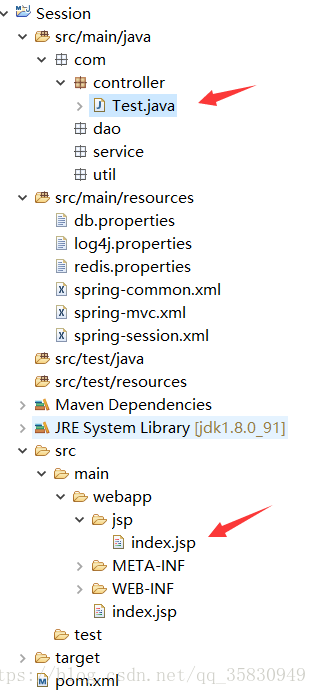
Test.java 就是一个页面跳转,传输一下sessionid
@Controller

public class Test {

    @RequestMapping("/test")

    public String test(HttpSession session, HttpServletRequest request) {

        request.setAttribute("id", session.getId());

        return "index";

    }

}
- 1
- 2
- 3
- 4
- 5
- 6
- 7
- 8
- 9
index.jsp 单纯的打印一下sessionid
<%@ page language="java" import="java.util.*" pageEncoding="UTF-8"%>

<%

    String path = request.getContextPath();

    String basePath = request.getScheme() + "://"

            + request.getServerName() + ":" + request.getServerPort()

            + path + "/";

%>

<%@ taglib prefix="c" uri="http://java.sun.com/jsp/jstl/core"%>

<%-- <%@ page isELIgnored ="false" %>   --%>

<!DOCTYPE HTML PUBLIC "-//W3C//DTD HTML 4.01 Transitional//EN">

<html>

<head>

<base href="<%=basePath%>">

<title>My JSP 'TestUpload.jsp' starting page</title>

<meta http-equiv="pragma" content="no-cache">

<meta http-equiv="cache-control" content="no-cache">

<meta http-equiv="expires" content="0">

<meta http-equiv="keywords" content="keyword1,keyword2,keyword3">

<meta http-equiv="description" content="This is my page">

</head>

<body>

我的session:${id}

    <br> sessionid=<%=session.getId()%>

</body>

</html>
当项目部署到nginx上的两个tomcat上时,每次访问地址,打印出来的sessionId都发生变化,这样在一些登录的操作中,用户明明在tomcatA上登录了,但是用户的其他操作负载到了TomcatB中,然而B不知道用户已经在A登录了,又让用户登录一次,这样用户体验极差。使用Spring-Session就是把用户的session缓存到redis中,让大家都从redis中获取用户session,这样就保证了session的共享。
使用Spring-Session
- pom.xml 增加依赖
<!-- 使用Spring Session来解决Session共享问题  -->

        <dependency>

            <groupId>org.springframework.session</groupId>

            <artifactId>spring-session-data-redis</artifactId>

            <version>1.3.0.RELEASE</version>

            <type>pom</type>

        </dependency>

        <dependency>

            <groupId>biz.paluch.redis</groupId>

            <artifactId>lettuce</artifactId>

            <version>3.5.0.Final</version>

        </dependency>
- web.xml增加配置
<!-- Spring session -->

    <filter>

        <filter-name>springSessionRepositoryFilter</filter-name>

        <filter-class>org.springframework.web.filter.DelegatingFilterProxy</filter-class>

    </filter>

    <filter-mapping>

        <filter-name>springSessionRepositoryFilter</filter-name>

        <url-pattern>/*</url-pattern>

        <dispatcher>REQUEST</dispatcher>

        <dispatcher>ERROR</dispatcher>

    </filter-mapping>
- 1
- 2
- 3
- 4
- 5
- 6
- 7
- 8
- 9
- 10
- 11
- Spring.xml增加配置
作用是导入redis配置redis.properties,导入新建的一个配置文件spring-session.xml
<context:property-placeholder location="classpath:db.properties,classpath*:redis.properties" ignore-unresolvable="true"/>

...

<import resource="classpath:spring-session.xml"/>
- 1
- 2
- 3
- 新增配置spring-session.xml
<?xml version="1.0" encoding="UTF-8"?>

<beans xmlns="http://www.springframework.org/schema/beans"

    xmlns:xsi="http://www.w3.org/2001/XMLSchema-instance" xmlns:util="http://www.springframework.org/schema/util"

    xsi:schemaLocation="http://www.springframework.org/schema/beans http://www.springframework.org/schema/beans/spring-beans.xsd   http://www.springframework.org/schema/util http://www.springframework.org/schema/util/spring-util.xsd">

    <!-- 创建名为springSessionRepositoryFilter 的Spring Bean,继承自Filter。 springSessionRepositoryFilter替换容器默认的HttpSession支持为Spring

        Session, 将Session实例存放在Redis中 -->

    <bean id="redisHttpSessionConfiguration"

        class="org.springframework.session.data.redis.config.annotation.web.http.RedisHttpSessionConfiguration" />

    <!-- 使用LettuceConnectionFactory -->

    <bean

        class="org.springframework.data.redis.connection.lettuce.LettuceConnectionFactory">

        <property name="hostName" value="${redis.ip}" />

        <property name="port" value="${redis.port}" />

        <property name="password" value="${redis.password}" />

    </bean>

    <!-- 也可以将使用LettuceConnectionFactory改成使用JedisConnectionFactory,两者保留其一就好 -->

    <!--<bean id="jedisConnectionFactory" class="org.springframework.data.redis.connection.jedis.JedisConnectionFactory"> -->

    <!--<property name="hostName" value="${redis.ip}"/> -->

    <!--<property name="port" value="${redis.port}"/> -->

    <!--<property name="password" value="${redis.password}"/> -->

    <!--</bean> -->

    <!-- 让Spring Session不再执行config命令 -->

    <!-- <util:constant

        static-field="org.springframework.session.data.redis.config.ConfigureRedisAction.NO_OP" /> -->

</beans>
- 增加redis.properties
redis.ip=193.112.76.194
redis.port=6379
redis.password=xxxxxx
redis.pool.maxTotal=10
redis.pool.minIdle=4
redis.pool.maxIdle=8
redis.pool.testOnBorrow=true
发布到服务器上。访问index页面。无论刷新多少次结果都一样。session没变
我的session:a4b2fe35-aaa5-40c2-a7de-b1d60180ca04
sessionid=a4b2fe35-aaa5-40c2-a7de-b1d60180ca04
使用redis客户端查看
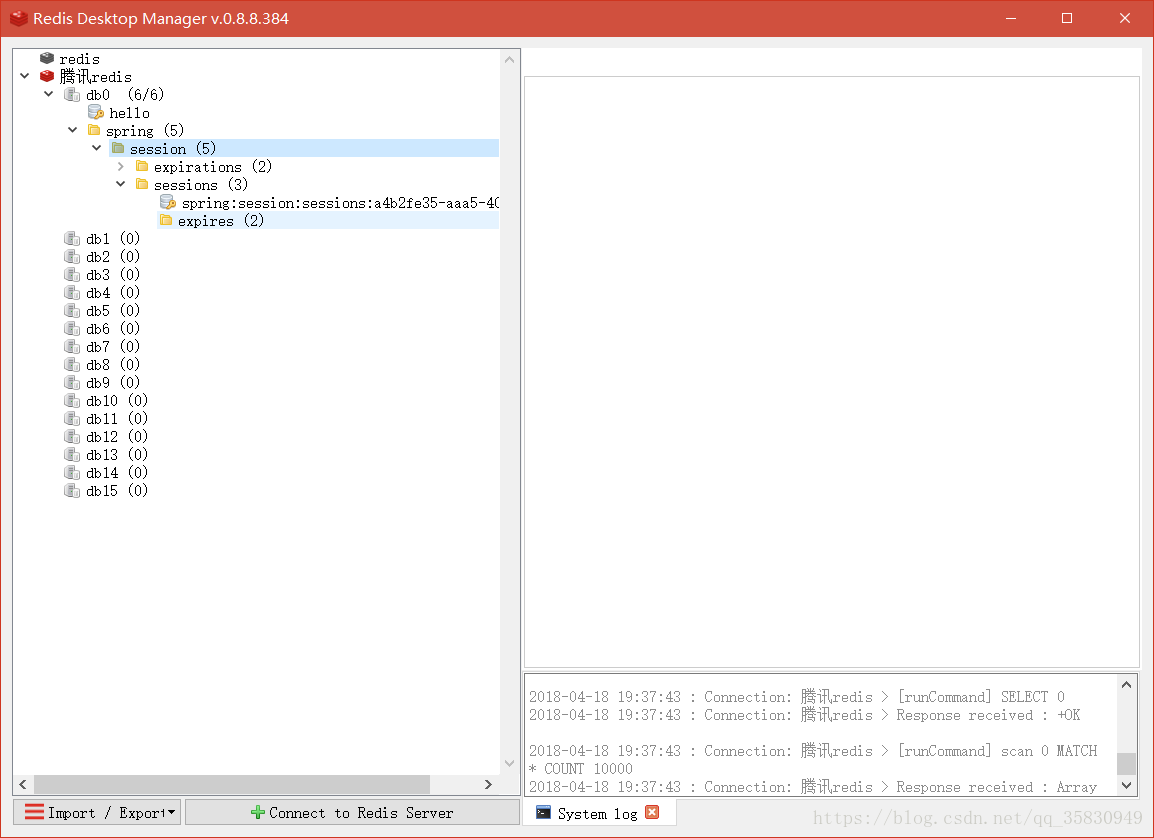
刚好有个seession一致。
原理:
DelegatingFilterProxy拦截器拦截, springSessionRepositoryFilter替换容器默认的HttpSession支持为SpringSession每个请求都会访问它。
使用Spring-Session共享使用Session的更多相关文章
- Tomcat 集群 + Redis Session 共享出现 Session 瞬间失效问题
写在前面的话 写这篇博客出于公司最近要迁移到新的云上面且对之前的资源,架构做一个升级. 本来是一个不大的项目,旧环境旧一个 TOMCAT 跑起来,不过出于高可用考虑,新环境决定使用 TOMCAT 集群 ...
- shiro源码篇 - shiro的session共享,你值得拥有
前言 开心一刻 老师对小明说:"乳就是小的意思,比如乳猪就是小猪,乳名就是小名,请你用乳字造个句" 小明:"我家很穷,只能住在40平米的乳房" 老师:" ...
- Shiro权限管理框架(二):Shiro结合Redis实现分布式环境下的Session共享
首发地址:https://www.guitu18.com/post/2019/07/28/44.html 本篇是Shiro系列第二篇,使用Shiro基于Redis实现分布式环境下的Session共享. ...
- 用redis实现TOMCAT集群下的session共享
上篇实现了 LINUX中NGINX反向代理下的TOMCAT集群(http://www.cnblogs.com/yuanjava/p/6850764.html) 这次我们在上篇的基础上实现session ...
- 关于session共享的解决方法
当网站业务规模和访问量的逐步增大,原本由单台服务器.单个域名组成的网站架构可能已经无法满足发展需要 此时会购买更多的服务器,并且以频道化的方式启用多个二级子域名,然后根据业务功能将网站分别部署在独立的 ...
- Session的使用与Session共享问题
Session的使用与Session共享问题 Session方法 getId():获取sessionId,这个id不一定是数字,比方说它用字符串来表示唯一标识,所以它返回值是String; boole ...
- 如何实现集群中的 session 共享存储?
Session 是运行在一台服务器上的,所有的访问都会到达我们的唯一服务器上,这 样我们可以根据客户端传来的 sessionID,来获取 session,或在对应 Session 不 存在的情况下(s ...
- 基于Spring Boot/Spring Session/Redis的分布式Session共享解决方案
分布式Web网站一般都会碰到集群session共享问题,之前也做过一些Spring3的项目,当时解决这个问题做过两种方案,一是利用nginx,session交给nginx控制,但是这个需要额外工作较多 ...
- [Spring] spring-session + JedisPool 实现 session 共享
1.至少导入四个jar包: jedis spring-session spring-data-redis commons-pool2 2.bean配置 <?xml version="1 ...
- 单点登录实现(spring session+redis完成session共享)
一.前言 项目中用到的SSO,使用开源框架cas做的.简单的了解了一下cas,并学习了一下 单点登录的原理,有兴趣的同学也可以学习一下,写个demo玩一玩. 二.工程结构 我模拟了 sso的客户端和s ...
随机推荐
- 转】MongoDB 自动分片 auto sharding
原博文出自于: http://blog.fens.me/category/%E6%95%B0%E6%8D%AE%E5%BA%93/page/4/ 感谢! MongoDB 自动分片 auto shard ...
- 重装系统后,重新搭建Selenium Server+Firefox环境
摘要:搭建Selenium自动化测试环境其实是非常简单的事情,在态度上我们不要把它当成难事:折腾起来是很愉快的,自然就成功了. 下面把这次安装的过程记录下来,一来是加深印象,二来可以给大家提供参考. ...
- JVM最多能创建多少个线程: unable to create new native thread
转载自:http://www.rigongyizu.com/jvm-max-threads/ 有应用报出这样的异常“java.lang.OutOfMemoryError: unable to crea ...
- 解决VS2010提示warning C4068: 未知的杂注
出现原因是#pragma声明问题,加上#pragma warning(disable:4068)即可 #pragma warning(disable:4068)#pragma execution_ch ...
- 利用ObjectMapper readValue()和泛型解决复杂json结构
import com.dj.fss.vo.MessageListVO; import com.fasterxml.jackson.annotation.JsonIgnoreProperties; im ...
- mysql-scott用户的表的创建
/* 功能:创建 scott 数据库中的 dept 表 */ create table dept( deptno int unsigned auto_increment primary key COM ...
- UML-画类图与交互图的顺序
并行.画完交互图,在画类图.交替进行.
- idea拉出Output窗口和还原窗口
拉出:按住标题可以拖出 效果: 还原:点击restore layout
- JS授权
(function(){ var origin_url = location.href; var oauth_url = 'https://vx.mcilife.com/weixin/api/oaut ...
- vue-cli项目中使用mockjs(基础使用和全局配置使用)
参考:vue+mockjs 模拟数据,实现前后端分离开发 (Github-Demo可查看全部代码),Mockjs ,Axios 很多时候前后端分离的项目在开发过程中前端所需数据和后端接口并不会同步开发 ...