
解决selenium.common.exception.WebDriverException:Message:'chromedriver' executable needs to be in Path
'chromedriver' executable needs to be in Path
声明:本人萌新,刚学python不久记录一下自己的坑,发出来若能帮助到一些人尽早解决问题那便是极好的,( ̄▽ ̄)"
在进行爬虫爬取淘宝商品信息时候,利用selenium来模拟浏览器进行爬取时遇到了这个问题:
selenium.common.exception.WebDriverException:Message:'chromedriver' executable needs to be in Path
详细如下图所示:

这一错误是因为没有配置好chromedriver,怎么配置呢?(我用的是chrome)
1.打开chrome 输入 “chrome://version/”来查看chrome版本 如图我的是63
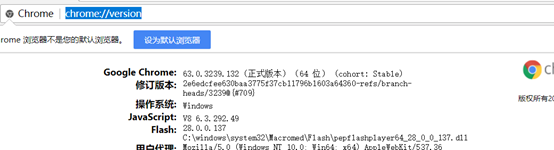
2.访问此网站 http://chromedriver.storage.googleapis.com/index.html 然后选择合适版本的driver
比如
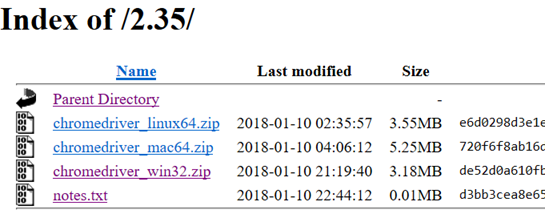
点击notes.txt就可查看其对应的版本号,如下:
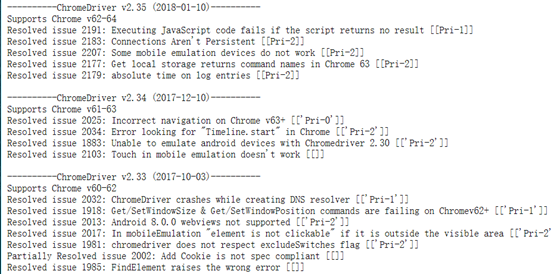
如果符合就可以下载了,下载到自己指定位置然后就可以进行配置了
3. 配置如下:

(具体路径根据自己下载保存的位置而定)
4.这时候运行基本就可以成功了!
不过很不幸,我第一次瞎下的driver版本不对,所以就GG了抛出了如下错误 ConnectionResetError:主机强迫关闭了一个现有连接

于是乎重新下了一个匹配的driver版本然后ok了
解决selenium.common.exception.WebDriverException:Message:'chromedriver' executable needs to be in Path的更多相关文章
- 解决selenium.common.exceptions.WebDriverException: Message: 'chromedriver' executable needs to be in PATH. Please see https://sites.google.com/a/chromium.org/chromedriver/home
解决方案: 1.查看浏览器当前版本:chrome://version/. 2.到https://sites.google.com/a/chromium.org/chromedriver/downloa ...
- 解决selenium.common.exceptions.WebDriverException: Message: 'chromedriver' executable needs to be in P
转载 解决selenium.common.exceptions.WebDriverException: Message: 'chromedriver' executable needs to be i ...
- selenium使用遇到的问题(selenium.common.exceptions.WebDriverException: Message: 'chromedriver' executable needs to be in PATH.)
1.安装pip3 install selenium 2.使用browser=webdriver.Chrome()时报错 :selenium.common.exceptions.WebDriverExc ...
- python+selenium,打开浏览器时报selenium.common.exceptions.WebDriverException: Message: 'chromedriver' executable needs to be in PATH
有一年多没写web自动化了,今天搭建环境的时候报了一个常见错误,但是处理过程有点闹心,报错就是常见的找不到驱动<selenium.common.exceptions.WebDriverExcep ...
- centos7 selenium.common.exceptions.WebDriverException: Message: 'chromedriver' executable needs to be in PATH
1.查看安装的chrome浏览器版本 2.查看版本对应的驱动 https://sites.google.com/a/chromium.org/chromedriver/downloads 下载后拷贝到 ...
- mac-webui-selenium下的webdriver selenium.common.exceptions.WebDriverException: Message: 'chromedriver' executable needs to be in PATH
from selenium import webdriver def test1(): url='http://www.baidu.com' driver=webdriver.Chrome(" ...
- selenium.common.exceptions.WebDriverException: Message: 'chromedriver' executable needs to be in PATH.
解决办法: 把chromedriver exe文件放到python scripts目录下
- python 安装selenium首次运行错误selenium.common.exceptions.WebDriverException: Message: 'chromedriver' executable needs to be in PATH
问题原因: 没有安装相关的支撑driver https://npm.taobao.org/mirrors/chromedriver/ 下载对应的driver 放置到python路径下
- Path通过Selenium模拟浏览器抓取,Windows 64解决selenium.common.exceptions.WebDriverException: Message: 'geckodriver' executable needs to be in PATH.方法
1.下载geckodriver.exe: 下载地址:https://github.com/mozilla/geckodriver/releases请根据系统版本选择下载:(如Windows 64位系统 ...
随机推荐
- threesixty.min.js 和jquery.threesixty.js使用总结----实现360度展示
最近公司做一个项目需要360度展示汽车的外观,就用到了threesixty.min.js,自己总结一下使用方法: treesixty.min.js 源码: /*! threesixty-slider ...
- mfc实现对话框全屏置顶显示
一.MFC让对话框窗口始终在最前 方法一:在对话框的属性中,把SystemModal设置为True. 二.全屏显示 在CDialog7::OnInitDialog()中加入: 先取得分辨率, int ...
- CodeForces - 504A && CodeForces - 624C && CodeForces - 2B
Points 1. 关键要看到以度数为1的点作为突破口. 2. 关键是发现两者不同只能是a-c,而剩余的点必须为b 3. 注意0的情况.
- zz MBR,EBR
http://hi.baidu.com/net5x/item/12d5243d86416bd76d15e993
- k8s-部署dashboard1.10.1-十七
一.获取镜像和填坑 我的k8s是1.13.1,这里dashboard用的1.10.1: 由于国内不能访问Google,而且大部分人可能也没有其他途径访问:只能在阿里云或者其他镜像网站上获取了: 镜像获 ...
- 斯坦福CS231n—深度学习与计算机视觉----学习笔记 课时5
课时5 数据驱动的图像分类方式:K最邻近与线性分类器(下) 在参数化方法中,我们要做的是构造一个函数,输入一张图片,对每一类输出一个数值.对任意一张图片,我们会计算出它到底属于哪一类.这些参数有时候也 ...
- 在 DotNetty 中实现同步请求
一.背景 DotNetty 本身是一个优秀的网络通讯框架,不过它是基于异步事件驱动来处理另一端的响应,需要在单独的 Handler 去处理相应的返回结果.而在我们的实际使用当中,尤其是 客户端程序 基 ...
- Gradle技术之四 - Gradle的Task详解
1 Gradle的Task详解 1 Task定义和配置 2 Task的执行 3 Task的依赖和执行顺序 4 Task类型 5 Task结合gradle的生命周期 6 Task实战 1.1 Task定 ...
- python 之 配置环境变量、通过pip 安装第三方库
配置环境变量 右击桌面上的“此电脑”—>“属性”—>“高级系统设置”—>右下角“环境变量”—>双击“系统变量”里的“Path”—>点击“新建”—>输入python的 ...
- LIS LCS LCIS (主要过一遍,重在做题)
只详细讲解LCS和LCIS,别的不讲-做题优先. 菜鸟能力有限写不了题解,可以留评论,我给你找博客. 先得理解最长上升子序列吧,那个HDOJ拦截导弹系列可以做一下,然后用o(n)log(n)的在做一遍 ...